Ciphertext is a secret-message version of readable text. It's the protected output created when plaintext is encrypted, and without the right key it should look like meaningless gibberish.
That matters more than is commonly understood. If you sent a private family message today, logged into your bank, used a password manager, or signed into a work tool, ciphertext was probably involved somewhere in the background. You usually never see it, but it's one of the main things standing between your information and anyone who intercepts it.
A lot of people hear the term and think of spy movies, advanced hacking, or something only security engineers care about. In real life, ciphertext is much more ordinary and much more useful. It's part of the invisible shield that protects a parent's conversation, a student's account login, or a small business team's shared files.
The confusion usually starts because scrambled-looking data can mean different things. Some data only looks messy. Some data is encrypted. Those are not the same thing, and knowing the difference helps you make better choices about the apps and services you trust.
What Exactly Is Ciphertext (and What It Is Not)
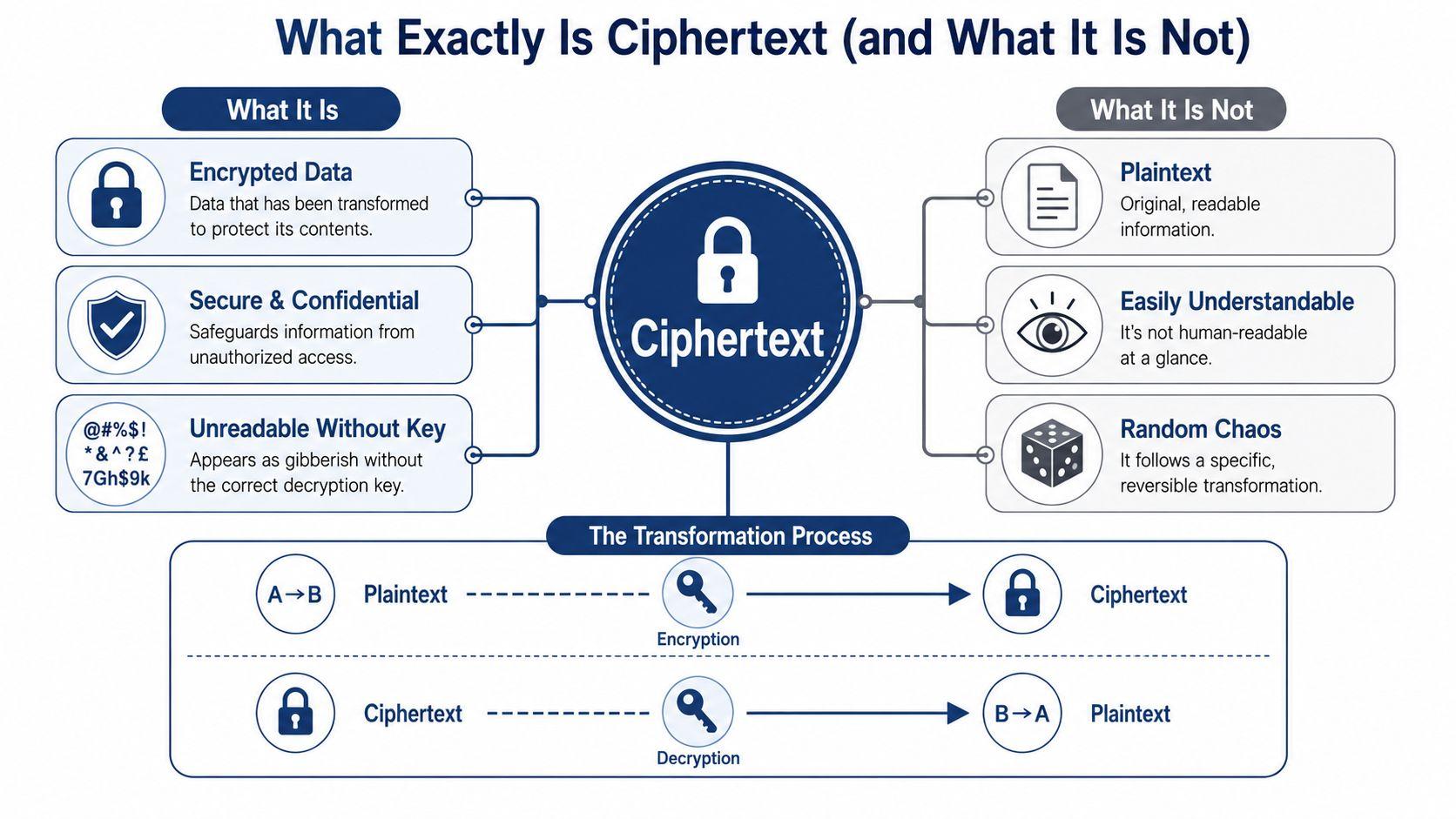
When people ask what is ciphertext, the simplest answer is this: it's the unreadable result you get after turning normal, readable information into protected data through encryption. CoinTracker describes it as the encrypted output of a cipher applied to readable plaintext, and notes that its security depends on being unintelligible without the correct decryption key, which is why it protects things like stored passwords and secure emails in modern systems (CoinTracker on ciphertext).
Start with a normal message such as, “The payroll file is attached.” That readable message is called plaintext. You run it through an encryption process, using a secret key, and the result becomes ciphertext. If the right person has the correct key, they can reverse the process through decryption and get the original message back.
A simple way to think about it is a locked box.
- Plaintext is the note you write and place inside the box.
- Encryption is the act of locking the box.
- The key is what allows the right person to open it.
- Ciphertext is the locked box in transit.
- Decryption is opening it and reading the note again.
Here's a quick visual that sums up the idea:
What makes ciphertext secure
Good ciphertext isn't just messy-looking text. It's data that has been transformed so that someone without the key can't understand it. Historically, this idea was formalized in Claude Shannon's work on secrecy systems, which shaped modern cryptography by showing that secure encrypted output should statistically resemble random data rather than readable language (historical overview of Shannon and secrecy systems).
That point helps explain a common beginner question. If ciphertext still showed clear language patterns, repeated phrases, or obvious structure, an attacker could learn things from those patterns. Strong encryption tries to remove those clues.
Practical rule: If data only looks scrambled but doesn't rely on a secret key, it probably isn't providing real confidentiality.
What ciphertext is not
Non-technical readers often find this particular concept confusing. Ciphertext is not the same as encoding. It also isn't the same as simple obfuscation.
Encoding changes data into a different format so systems can store or transmit it. For example, a program might encode text so it can safely travel through another system. But encoding is meant to be reversed easily, often with no secret at all.
Obfuscation hides meaning in a loose or cosmetic way. It may make something harder to read at a glance, but it doesn't give the same security guarantees as encryption.
SentinelOne makes this distinction clearly: encryption protects confidentiality through a secret key, while encoding and obfuscation do not offer the same protection, even if the result looks like gibberish (SentinelOne on ciphertext versus encoding and obfuscation).
A simple comparison helps:
| Type | Purpose | Secret key needed | Safe for private data by itself |
| Plaintext | Human-readable information | No | No |
| Encoding | Format conversion | No | No |
| Obfuscation | Make something less obvious | Not necessarily | No |
| Ciphertext | Protect confidentiality through encryption | Yes | Yes |
If you remember only one thing from this section, remember this: gibberish is not automatically security. Ciphertext is secure because of the encryption process and the key behind it.
The Two Main Ways Ciphertext Is Created
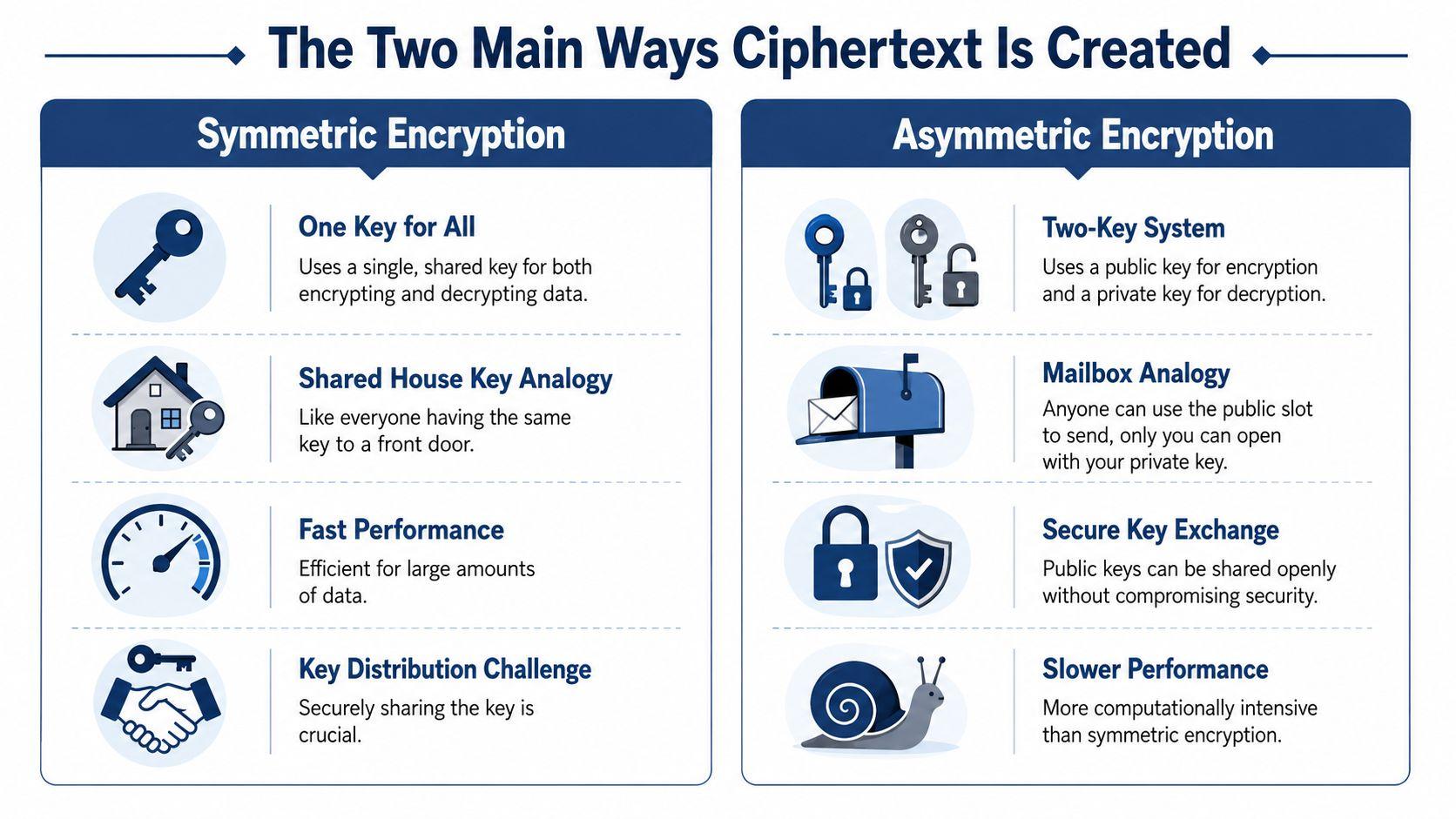
There are two broad ways systems create ciphertext: symmetric encryption and asymmetric encryption. Both produce protected data, but they solve different problems.
The easiest way to compare them is by thinking about keys.
Symmetric encryption
With symmetric encryption, the same key is used to lock and decrypt the message.
That makes it a bit like a shared office safe. If two people both have the same safe key, one can lock the documents inside and the other can open them. This approach is efficient, which is why it's widely used to protect files, device storage, and large amounts of data moving between systems.
The challenge is obvious. Both sides need that same secret key, and they need a secure way to share it in the first place.
Asymmetric encryption
Asymmetric encryption uses two related keys instead of one. One key is public, and one key is private.
The mailbox analogy works well here. Anyone can drop a letter into your mailbox slot if they know where it is, but only you can open the box and retrieve the mail. In encryption terms, someone can use your public key to encrypt data for you, but only your private key can decrypt it.
This is helpful when people or systems need to exchange information securely without already sharing a secret.
Why the same message may look different each time
One part of encryption surprises people: the same original message doesn't always turn into the same ciphertext.
That isn't a flaw. It's a safety feature.
NIST defines ciphertext as the “confidential form of the plaintext” produced by an authenticated-encryption function, and notes that the same plaintext can produce different ciphertexts when the scheme uses nonces, initialization vectors, or randomized padding. That design helps prevent pattern leakage and certain forms of analysis (NIST glossary entry for ciphertext).
If every repeated message always became the exact same encrypted output, attackers could start spotting patterns even without reading the content.
That idea matters in real network security too. If you're comparing ways companies protect traffic between offices, remote workers, and browsers, an IPSec VPN vs SSL VPN comparison can help you see where encryption methods fit into everyday business setups.
For readers who want more plain-English privacy and security explainers, the 1chat blog has a useful mix of practical topics around secure communication and digital habits.
Where You Encounter Ciphertext Every Day
Individuals already rely on ciphertext every day. They just don't call it that.
A parent sends a private message to a family member. A coworker uploads a contract. A student signs into a school account from a coffee shop Wi-Fi connection. In each case, the readable information is supposed to be transformed into protected data before it travels across networks or sits on a server.
Common daily examples
- Messaging apps: When an app uses encryption, the message moving across the network is ciphertext, not readable chat text.
- Online banking: The account details you enter shouldn't move across the internet as plain text. Encryption protects those details while they're in transit.
- Shopping websites: The padlock icon in your browser usually signals that the connection is protected, so payment or login information is being handled more safely.
- Password managers: These tools store sensitive account data in encrypted form so that stolen storage data isn't immediately useful.
- Team communication tools: Services built around secure messaging turn conversations into ciphertext before transmission or storage, depending on how the product is designed.
Where the ciphertext lives
People often picture encryption as something that only protects messages “on the way.” It also protects data while it's stored.
A few examples:
| Situation | Where ciphertext exists |
| Sending a message | While it travels across the network |
| Saving a password | In the password manager's storage |
| Storing files on a laptop | On the device's drive if disk encryption is enabled |
| Using a secure business tool | In transit, at rest, or both |
You usually don't need to see ciphertext for it to protect you. Its whole job is to stay invisible until something goes wrong, like interception or device theft.
This is why ciphertext isn't a niche concept. It's part of ordinary digital life for families and small teams. If your tools handle personal chats, customer records, login credentials, or financial details, they're either using encryption properly or leaving you exposed.
Protecting Your Digital Life with Ciphertext
Ciphertext matters most when something goes wrong. Someone joins the same public Wi-Fi network. A laptop gets lost. A phone is stolen. A cloud account is accessed by the wrong person. In those moments, encryption can turn a serious data exposure into a much smaller problem.
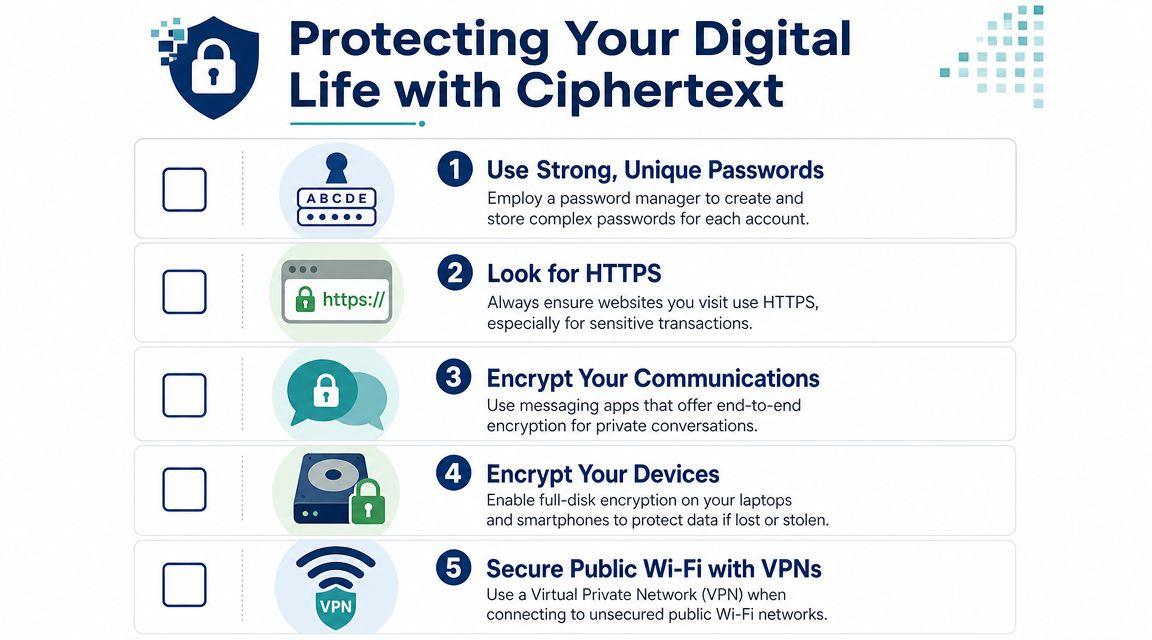
Here's a practical checklist worth keeping:
Habits that make ciphertext work for you
- Choose encrypted messaging tools: If you discuss family details, client information, or internal team issues, use apps that offer end-to-end encryption.
- Turn on full-disk encryption: Features like BitLocker and FileVault help protect files if a computer is lost or stolen.
- Use a password manager: It reduces password reuse and stores credentials in protected form.
- Check for HTTPS: Before entering payment, login, or personal details, make sure the site is using a secure connection.
- Be careful on public Wi-Fi: If you use open networks often, add a reputable VPN to protect traffic.
Focus on tools, not manual encryption
You don't need to create ciphertext by hand. Your job is to pick tools that do the right thing automatically.
For example, a service like 1chat is relevant here because it offers secure group chat and describes its chat as end-to-end encrypted, which means messages are encrypted before transmission. The important point isn't the brand. It's the pattern: choose products that clearly explain how they protect message content instead of assuming all “private” apps work the same way.
If you want a broader consumer-friendly checklist, this guide on how to protect your data online is a helpful companion to the basics covered here.
Strong security habits don't require you to understand cryptography math. They require you to choose tools that apply it correctly.
If privacy policies matter to your household or team, reviewing a provider's privacy information is a smart habit before you trust it with sensitive conversations or files.
Frequently Asked Questions About Ciphertext
Can ciphertext be broken
Sometimes, yes. But that doesn't mean encryption is useless.
Weak encryption, poor key management, outdated systems, or bad implementation choices can all create openings. On the other hand, strong modern encryption is designed so that the ciphertext itself doesn't reveal useful information about the original message to someone without the key.
A good way to think about it is a house door. A flimsy lock can be defeated. A solid lock, used correctly, raises the difficulty so much that the attacker usually looks for an easier target. In practice, people and businesses often get hurt not because the math failed, but because passwords were weak, devices were unprotected, or someone fell for phishing.
Is ciphertext the same as a hash
No. These are different tools.
Ciphertext comes from encryption, which is meant to be reversible if you have the right key. You encrypt data, and later you decrypt it.
A hash is usually one-way. You put data in and get a fixed output, but the system is not supposed to turn that output back into the original input. That's why hashing is commonly used for things like password verification or integrity checks, while encryption is used when data must be read again later.
Here's the simplest distinction:
- Encryption and ciphertext: Lock and open.
- Hashing: Create a fingerprint, not a recoverable message.
Do I need to manually create ciphertext
Almost never.
For everyday use, your role is to choose secure products and enable their protections. Your phone, browser, password manager, secure chat app, and operating system often handle the encryption process for you. Good security design hides the hard part in the background.
That's why product documentation matters. If you're unsure how a service handles private data, check whether it explains encryption clearly, whether it offers secure messaging or device protection, and whether it answers common user concerns in plain language. A public FAQ page for 1chat is one example of the kind of place you'd review when evaluating how a tool handles privacy and user questions.
Why does ciphertext matter if I never see it
Because it protects you in situations you may never notice.
If a network connection is intercepted, ciphertext helps keep the content unreadable. If storage is stolen, ciphertext can keep files and messages from being immediately exposed. You don't need to interact with it directly for it to do its job.
The plain-English answer to what is ciphertext is still the best one to remember: it's your readable information after encryption has turned it into protected data that outsiders can't use without the right key.
Ciphertext sounds technical, but the idea is simple. Readable data goes in, protected data comes out, and the right key turns it back again. Once you understand that, a lot of modern privacy tools start making much more sense.