Monday morning often looks the same. A parent is answering work messages while checking the school calendar. A small business owner is rewriting a customer email for the third time. A student has ten browser tabs open and still doesn't know how to start the paper due tomorrow.
That's the moment when an AI chat assistant starts to make sense.
Not as a robot that runs your life. Not as a magic answer machine. More like a fast, patient digital teammate that helps you sort ideas, draft first versions, summarize long material, and keep moving when your brain is overloaded. That shift matters because these tools aren't fringe anymore. They're becoming part of everyday work, school, and home routines.
Your New Super-Powered Digital Teammate
Julia runs a small online shop. By noon, she's already answered repeat customer questions, written a social post, checked inventory notes, and helped her son study for a history quiz. None of those jobs is huge on its own. Together, they eat the whole day.
That's where an AI chat assistant fits. It can turn a rough idea into a polished email, summarize a long document into a few useful bullets, or help you brainstorm a lesson plan, family trip checklist, or customer reply. Used well, it doesn't replace your judgment. It removes friction.

That's one reason these tools spread so quickly. Industry summaries estimate that 987 million people worldwide now use AI chatbots, and business adoption grew about 4.7x from 2020 to 2025, according to chatbot adoption statistics collected by Chatbot.com. That scale tells you something simple. Learning how to use an AI chat assistant is no longer optional for many families, students, and teams.
If you run a lean company and want examples closer to day-to-day operations, this guide to AI chatbots for small businesses is a useful companion read. It focuses on practical business workflows rather than abstract AI talk.
For people who want one place to compare and use different assistant styles, 1chat's AI assistant platform reflects a broader shift toward tools that package multiple models and everyday tasks into one simpler interface.
An AI chat assistant is most helpful when your problem isn't lack of intelligence. It's lack of time, clarity, or mental bandwidth.
Unpacking the AI Chat Assistant Concept
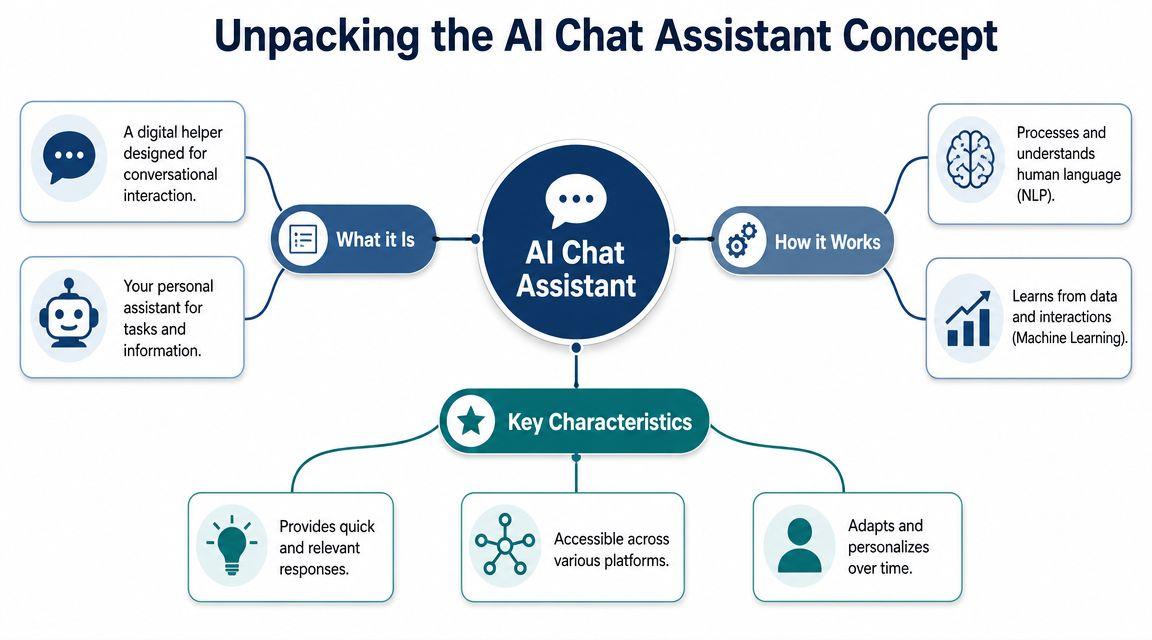
A lot of people still hear “chatbot” and think of the old website pop-up that only understood three phrases and kept sending them in circles. A modern AI chat assistant is different.
It's closer to a super-powered intern. You give it a task in plain language. It responds quickly, remembers the thread of the conversation for a while, and can help with writing, explaining, organizing, and research support. But like a new intern, it still needs clear instructions and a quick review of its work.
What it is in plain language
An AI chat assistant is software designed to interact through conversation. You type or speak naturally, and it tries to help without forcing you to learn rigid commands.
That matters because people don't typically think in software menus. They think in requests like:
- “Summarize this article for my teen.”
- “Write a polite reply to this customer complaint.”
- “Turn my notes into study questions.”
- “Help me plan dinners for the week.”
Older bots often depended on exact keywords. Newer assistants are more flexible. They can usually handle rewording, follow-up questions, and mixed tasks inside the same conversation.
What makes it feel smarter than old chatbots
The biggest difference is context. If you ask for a draft, then say “make it friendlier” or “shorten that for text message,” a good assistant usually understands what “that” refers to.
It also helps with broader knowledge work. You can ask it to compare options, simplify jargon, rewrite for a younger reader, or spot gaps in an outline. That's why people use it for school, family logistics, and business admin, not just customer service.
A good example is meeting support. Instead of manually pulling action items from a long call, many teams now use AI tools to capture and organize discussions. If that use case matters to you, WhisperAI's guide to meeting minutes AI shows how conversation-based tools can help turn raw discussion into something usable.
What it is not
It isn't a person. It doesn't “know” things the way a teacher, doctor, or accountant knows them. It generates helpful language based on patterns and instructions.
That distinction clears up a lot of confusion. You're not hiring a mind. You're using a conversational interface for tasks that benefit from speed, drafting, summarizing, and pattern recognition.
Treat the assistant like a capable helper, not an unquestionable authority.
How These Digital Brains Actually Work
The easiest mental model is this. An AI chat assistant reads your message, breaks it into smaller pieces, then predicts what should come next, one piece at a time.
Those pieces are often called tokens. A token might be part of a word, a whole word, punctuation, or a short chunk of text. The assistant doesn't write an answer all at once. It builds the response step by step, constantly predicting the next likely token based on your input and the conversation so far, as explained in Zapier's overview of how AI chatbots work.
Think of it like autocomplete with a massive memory
Phone autocomplete guesses your next word in a text message. An AI chat assistant does something similar, but on a far more advanced level. It has learned patterns from huge amounts of language, so it can produce paragraphs, lists, explanations, and revisions that feel natural.
That's why it can sound impressively fluent. It's very good at producing language that fits the situation.
It's also why it can sometimes sound confident while being wrong. Fluency and factual accuracy aren't the same thing.
Why your prompt matters so much
People often think the tool is random when the issue is the instruction. If you ask, “Tell me about photosynthesis,” you may get a broad explanation. If you ask, “Explain photosynthesis to a seventh grader in five bullet points and include one real-world example,” you'll usually get something much closer to what you needed.
Short version: the assistant works better when you specify:
- The task you want done
- The audience it's for
- The format you want back
- Any limits such as tone, length, or source boundaries
Here's the practical pattern:
Practical rule: Don't just ask for an answer. Ask for the kind of answer you need.
Why long chats sometimes go off track
This architecture also explains three common frustrations.
| Issue | What you notice | Why it happens |
| Latency | The reply feels slow | The system is generating a response token by token |
| Context length | It forgets earlier details | Long conversations can push older information out of active context |
| Prompt drift | The style or goal changes over time | Small misunderstandings compound across many turns |
That's why many experienced users start a fresh chat for a fresh job. One conversation for meal planning. Another for essay feedback. Another for customer service scripts. Clean separation usually gives cleaner outputs.
Core Features and Transformative Benefits
The phrase “AI chat assistant” can sound vague until you pin it to real tasks. Its value becomes clearer when you look at the kinds of work it can take off your plate.
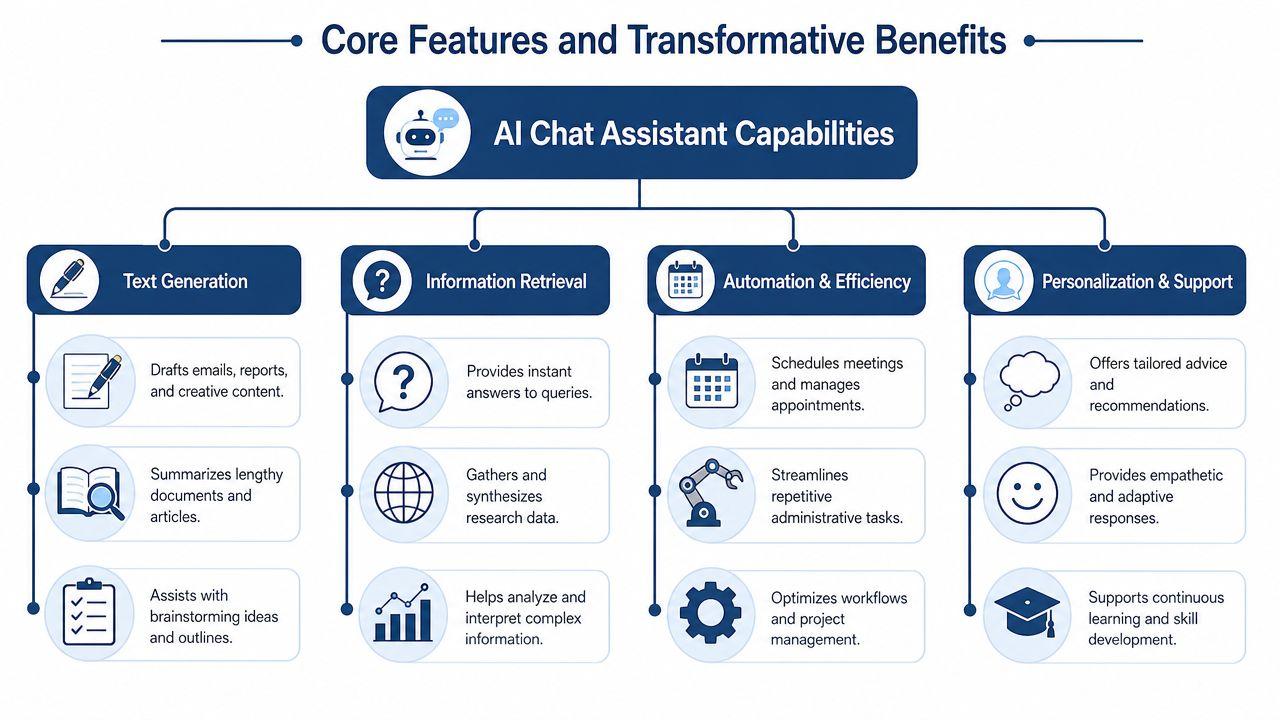
Writing and rewriting
Many people start by giving the assistant a rough message, a few bullet points, or a messy draft. It helps turn that into something readable.
For a parent, that might mean a clearer email to a teacher. For a shop owner, it might be a product description. For a student, it might mean turning scattered notes into a study guide.
The hidden benefit isn't just speed. It's momentum. A blank page slows people down more than an imperfect draft does.
Summarizing and simplifying
A good assistant can condense long text into short takeaways, then rewrite those takeaways for a different audience. That makes it useful for:
- Busy families who need the short version of a school memo
- Managers who want a plain-English summary of a long document
- Students trying to break down dense reading into review notes
This is one of the most practical everyday uses because it reduces cognitive load. You still read and decide. The assistant helps you get to the point faster.
Brainstorming and outlining
Sometimes you don't need the final answer. You need a starting structure.
An AI chat assistant can suggest blog topics, fundraiser ideas, science fair project angles, interview questions, lesson plans, or social content themes. It's also good at producing first-pass outlines.
That makes it useful when you're stuck between “I have an idea” and “I know how to execute it.”
Research support and information shaping
For non-technical users, “research help” often means organizing information, not replacing research itself. The assistant can compare approaches, suggest categories, turn notes into themes, and identify questions you still need to answer.
That's valuable because many real-world tasks aren't about finding more information. They're about making sense of the information you already have.
Task support and personalization
Modern assistants also help with repetitive planning work. They can generate checklists, prep templates, conversation scripts, meal plans, revision schedules, and customer reply drafts customized for your scenario.
A short example shows the difference:
- A generic planner says, “Create a weekly schedule.”
- An AI chat assistant can respond to, “Build a weekly schedule for two working parents, one middle school student, soccer practice on Tuesday, and a grocery trip under one hour.”
That conversational flexibility is what makes the tool feel personal instead of mechanical.
The strongest use case usually isn't “do everything for me.” It's “help me do the next useful step faster and with less friction.”
Practical Use Cases for Everyone
The same tool can feel completely different depending on who's using it. A small business needs speed and consistency. A family needs convenience and safety. A student needs help thinking more clearly without outsourcing the whole assignment.
For small businesses
A bakery owner gets the same customer questions every week. What are today's flavors? Do you make custom cakes? Are you open on holidays? A chat assistant can help draft response templates, organize FAQs, and summarize customer messages so the owner spends less time repeating the same work.
The economics explain why so many companies care. One widely cited estimate says a chatbot interaction costs about $0.50 compared with roughly $6.00 for a human agent interaction, and Gartner-based reporting projects $80 billion in contact-center labor cost reductions by the end of 2026, according to Dante AI's roundup of chatbot economics. You don't need a giant call center to understand the point. Repetitive communication gets expensive fast.
A local service business might use an assistant to:
- Draft replies: Turn rough notes into polished customer emails
- Summarize feedback: Group customer comments into common complaints or requests
- Create marketing copy: Produce first drafts for promotions, announcements, or product pages
- Support intake: Collect basic details before a human steps in
If you're exploring tools specifically for customer support workflows, building AI support agents is a useful example of how teams structure assistants around support conversations rather than general chat.
For families
Families often need coordination more than content. An AI chat assistant can help build a packing list for a weekend trip, suggest a grocery plan based on dietary restrictions, or turn a child's curiosity into a fun bedtime story about planets, dinosaurs, or ancient Egypt.
Parents also use these tools as translation and explanation helpers. You can paste in a school policy, ask for the plain-English version, then ask for the same summary in simpler language for a teenager.
A practical family rule helps here:
Never let the assistant make final decisions about health, discipline, money, or safety on its own. Use it to prepare, not to decide.
That keeps the tool in the right role. Helpful assistant. Not household authority.
For students
Students get the most value when they use an assistant as a coach rather than a shortcut. Instead of asking it to “write my essay,” they can ask better questions:
- “Help me turn this topic into a thesis.”
- “Quiz me on these biology notes.”
- “Find weak transitions in this draft.”
- “Explain this paragraph like I'm in ninth grade.”
That approach protects learning. It also usually produces better schoolwork because the student stays engaged in the reasoning.
A strong pattern is draft, review, revise:
| Stage | Student action | Assistant role |
| Start | Gather notes and assignment requirements | Build an outline or question list |
| Middle | Write a first draft | Suggest improvements in clarity and structure |
| Finish | Check citations, grammar, and logic | Flag confusing sections for review |
The same assistant can also help with presentation prep, flashcards, mock interview questions, or proofreading scholarship essays. Used carefully, it reduces friction without replacing the student's voice.
Navigating Privacy Security and Trust
The biggest mistake people make with AI chat assistants isn't usually technical. It's assuming every task carries the same risk.
Asking for dinner ideas is low stakes. Asking for guidance in a mental health crisis, legal dispute, or sensitive business matter is not. That difference should change how much trust you place in the tool and how closely a human reviews the output.
Where trust breaks down
A peer-reviewed case study found an AI chatbot for underserved populations reached 89% accuracy in crisis detection, but the same health equity literature warns that poorly designed systems can widen disparities if they aren't validated across diverse groups and community contexts, as discussed in this peer-reviewed review of AI and underserved populations.
That tells us two things at once. AI can be useful in serious settings. AI can also cause harm if people deploy it carelessly.
The right question isn't “Is AI safe?” It's “Safe for what, for whom, and under what supervision?”
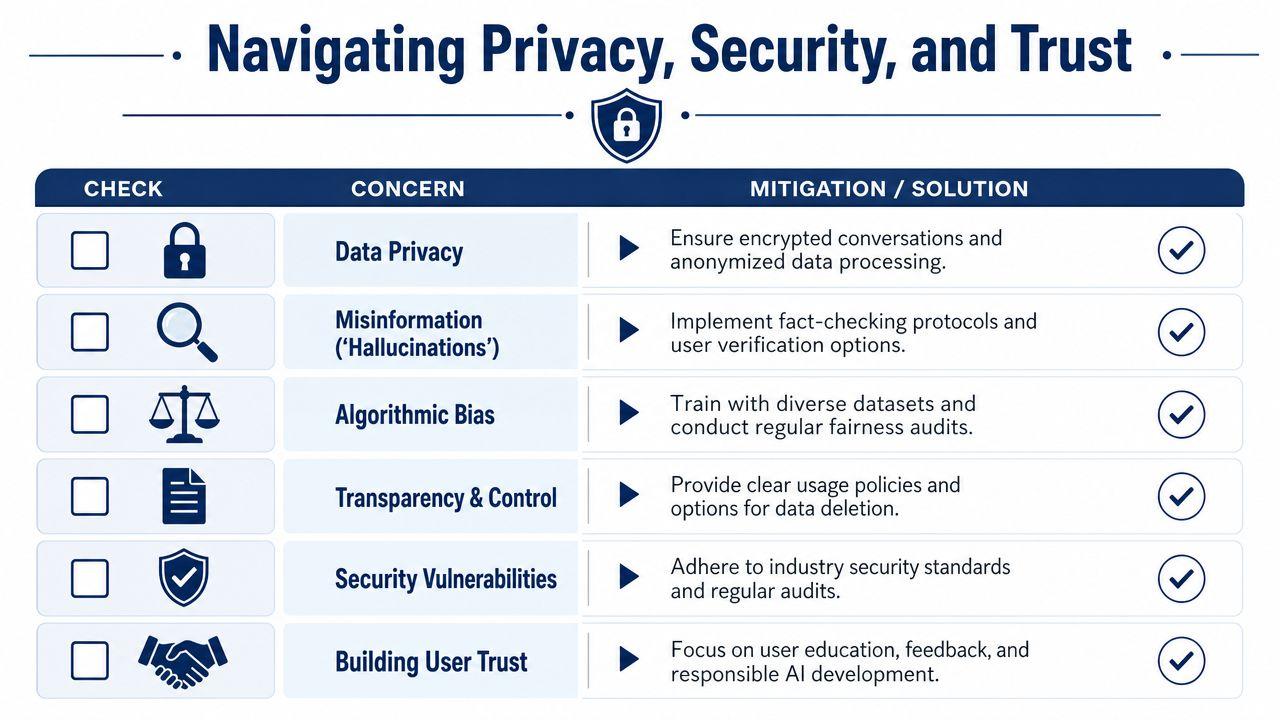
A simple privacy checklist
Before you use any AI chat assistant for family, school, or business tasks, check for these basics:
- Data handling: Can you understand what happens to your chats after you send them?
- Control: Can you delete conversations or manage stored history?
- Scope: Is the tool designed for general chat, or for the kind of work you need?
- Human fallback: Can a person review or take over when consequences are significant?
- Bias awareness: Does the provider acknowledge limits and edge cases?
If privacy is a major concern, read the policy yourself instead of relying on marketing summaries. A good starting habit is reviewing the provider's privacy policy details before sharing personal, family, school, or business information.
What not to paste into a chat
Even a useful assistant shouldn't become your dumping ground for sensitive material.
Avoid sharing:
- Private identifiers: personal account details, confidential records, or information about children that doesn't need to be there
- Unredacted business data: internal financial details, customer records, or contracts unless your organization has approved that use
- High-stakes evidence: anything that needs formal professional review before action
Trust should rise slowly. Start with low-risk tasks and increase usage only after you understand the tool's limits.
Choosing and Adopting Your First AI Assistant
Picking your first AI chat assistant gets easier when you stop asking, “Which one is smartest?” and start asking, “Which one fits my real life?”
That shift matters because the market is moving toward assistants built for specific workflows and channels. A 2025 World Economic Forum case described a WhatsApp-accessible farming chatbot that supports 27 languages and serves over 110,000 farmers across Ghana, Kenya, and other African markets, showing how useful assistants often win by fitting local habits rather than by sounding the most impressive in a benchmark, according to the World Economic Forum's case on AI in community workflows.
What to look for first
Choose based on fit, not hype.
- Privacy fit: Does it give you clear control over conversations and data?
- Workflow fit: Can you use it where you already work, such as web, mobile, school, or team chat?
- Audience fit: Is it appropriate for a family, student, solo business owner, or small team?
- Task fit: Does it help with your actual jobs, like summarizing PDFs, drafting replies, or organizing research?
- Budget fit: Can you keep using it without the cost becoming another problem?
Specialized tools often make more sense than broad general-purpose ones. For example, 1chat's FAQ outlines a setup centered on chatting with multiple LLMs in one place, along with use cases like PDF analysis and image generation. For someone comparing assistants for schoolwork, family use, or small-team tasks, that kind of focused feature mix may be more relevant than a general “do everything” pitch.
How to start without making a mess
Don't begin with your most sensitive or important task. Start small.
Try the assistant on:
- Low-risk writing such as email drafts or social captions
- Basic summaries of notes, articles, or meeting text
- Planning support like checklists, schedules, or brainstorming
- Revision help for tone, clarity, and organization
After that, set simple house or team rules. Decide what can be pasted into the tool, what needs human review, and when the assistant is only allowed to support, not decide.
Used that way, an AI chat assistant becomes less mysterious. It becomes a practical habit. One that saves time, lowers friction, and helps you think more clearly without giving up privacy, judgment, or control.
If you're evaluating an AI chat assistant for home, school, or work, start with one repeated question: does this tool help me think and act better without asking me to trust it too much? That's the balance worth keeping.