Most small business owners don't have an innovation problem. They have a bandwidth problem.
The day fills up with quote requests, customer emails, scheduling changes, invoice follow-ups, draft marketing copy, CRM cleanup, and the dozen small decisions nobody else can make. By late afternoon, the important work is still waiting. Growth gets pushed behind admin.
That's why AI for business efficiency matters now. Not as a flashy experiment, and not as a replacement for people, but as a practical way to remove low-value friction from the workday. The strongest signal is already in the market. In McKinsey's Global Survey 2025, 80% of respondents said their companies set efficiency as an objective for AI adoption, and businesses using generative AI can see about USD 3.7 in return for every USD 1 spent.
For an SMB, that changes the conversation. AI stops being “advanced tech” and starts looking like an operating decision. If it can cut waste, speed up routine work, and give your team more productive hours without adding headcount, it belongs in the same category as any other efficiency investment.
Putting Your Business on Autopilot with AI
A familiar pattern shows up in small companies. The owner starts the day planning to work on sales, service quality, or hiring. Instead, they spend the morning answering repeat questions, rewriting emails, checking appointment details, and hunting for information scattered across tools.
That's the gap AI can close.
Used well, AI acts less like a futuristic system and more like a reliable operations assistant. It drafts first versions, summarizes long threads, routes requests, extracts information from documents, and keeps routine work moving without constant supervision. In a sales setting, that might mean automating early outreach and qualification before a rep steps in. If you want a concrete example of that model, this guide to autonomous sales shows how teams are using AI to handle repetitive prospecting work.
What changes first
The first gains usually aren't dramatic transformations. They're quieter and more useful.
- Inbox pressure drops: Common questions get answered faster.
- Admin work shrinks: Notes, summaries, and follow-ups don't need to be written from scratch.
- Context improves: Staff spend less time looking for what happened last time.
- Response quality becomes more consistent: Customers stop getting wildly different answers depending on who replied.
Practical rule: Start where your team repeats the same action all week. That's where AI usually earns trust fastest.
Business owners often hesitate because they assume AI requires a major systems overhaul. It doesn't. The better path is narrower. Pick one recurring task cluster, plug AI into that workflow, and measure whether people get real time back.
The companies treating AI as a tool for efficiency, not novelty, are usually the ones seeing value first. That's why the benchmark matters. AI adoption has moved into the mainstream because leaders want less waste and more output from the same working hours.
What AI-Driven Efficiency Really Means
Traditional automation is like a calculator. It helps with a defined task and does it quickly. AI is closer to a capable assistant. It doesn't just process an input. It can interpret messy information, recognize patterns, and help decide what should happen next.
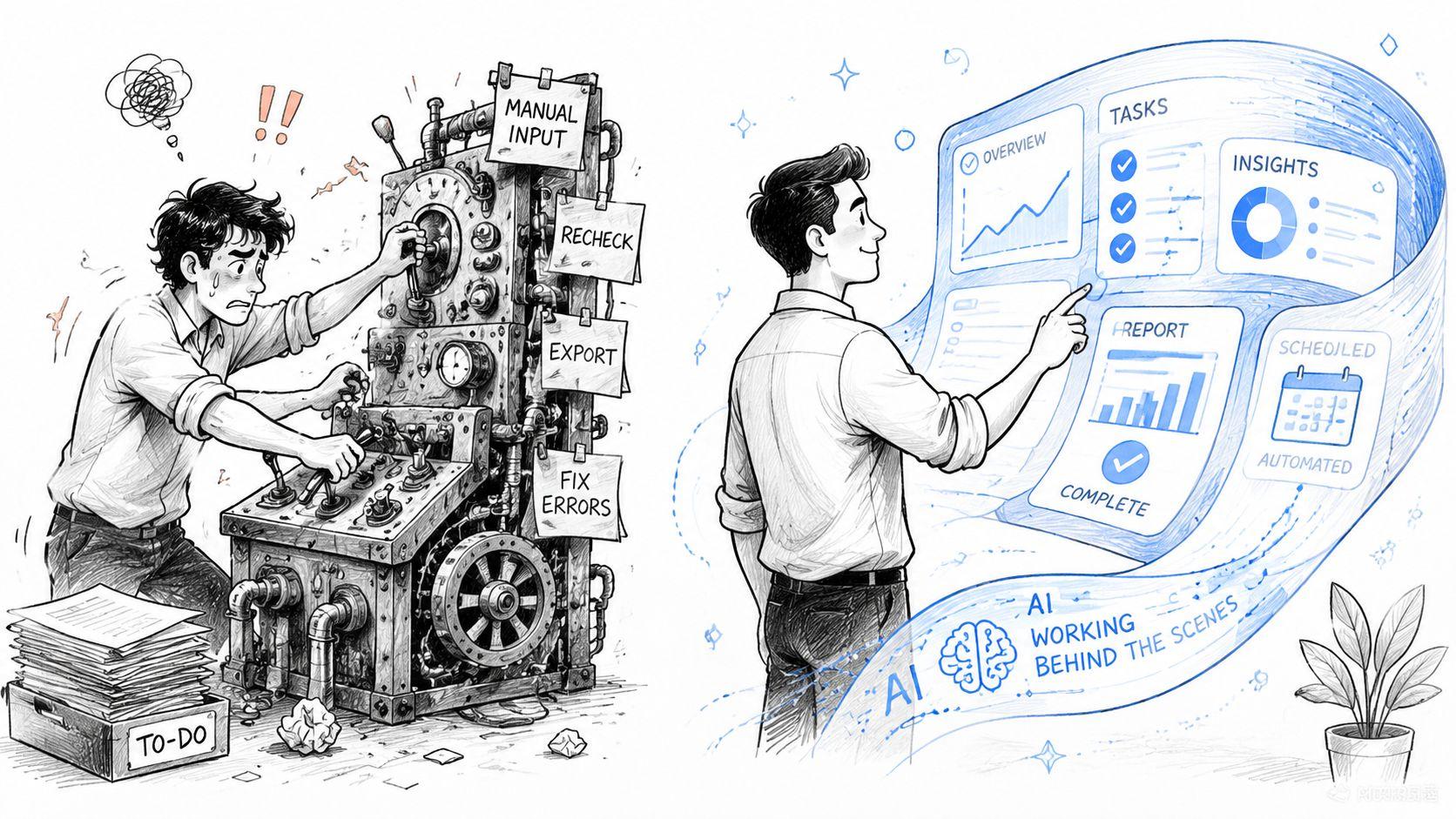
That distinction matters because many teams think efficiency means speed alone. It doesn't. Real AI-driven efficiency means your business handles routine work with less manual effort and makes better use of human judgment. The point isn't to answer emails faster if nobody has fixed the underlying process. The point is to reduce effort on low-value tasks so people can focus on revenue, service, and decisions that require context.
Faster is useful. Smarter is better.
A basic workflow tool can move a form from one step to another. AI can do more than pass the baton. It can classify the request, summarize the issue, flag urgency, draft the response, and suggest the next action.
That's why the best uses of AI for business efficiency usually share three traits:
- The work is repetitive enough to standardize
- The inputs are messy enough that old rules-based automation struggles
- A human still matters at the point of judgment or exception
A good example is customer support. Basic automation can send a ticket confirmation. AI can read the request, identify the likely issue, pull the account context, and prepare a response for review. The human agent steps in where empathy, judgment, or policy interpretation matters.
Efficiency should be measured in outcomes
If you're assessing where AI belongs, ask outcome questions, not feature questions.
| What to ask | Why it matters |
| Does this reduce repeated manual work? | That's where labor waste usually hides |
| Does it improve the quality of decisions or responses? | Speed without accuracy creates rework |
| Can the team adopt it without friction? | A good tool that nobody trusts won't stick |
| Does it protect sensitive business data? | Efficiency gains disappear if privacy risk rises |
If you need a quick way to think through the economics before buying anything, an AI expert ROI calculator can help frame the labor and process trade-offs.
Good AI implementation doesn't remove people from the business. It removes avoidable drag from the work.
That's the standard worth using. If a tool only adds novelty, it won't last. If it gives your team more time and better decisions, it's doing its job.
The Four Pillars of AI Business Efficiency
Most SMBs don't need a deep technical map. They need a working model of the capabilities that improve operations. I group them into four pillars because each one solves a different kind of business problem.
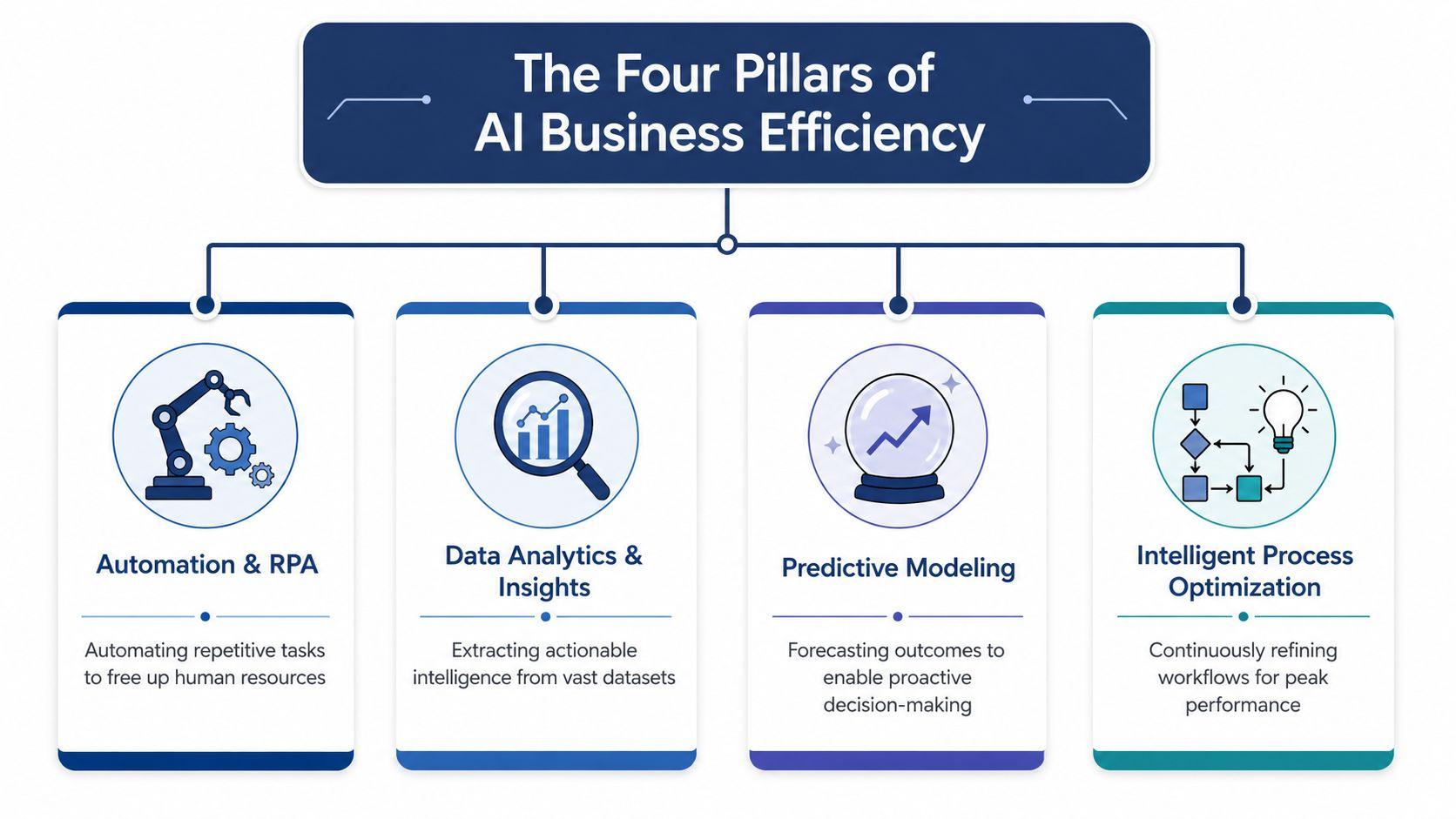
According to Master of Code's industry reporting summary, companies deploying AI agents can experience 55% higher operational efficiency and 35% cost reduction. The same source says workers using generative AI tools can improve performance by up to 40%, with frequent users saving four or more hours weekly. Those gains don't come from one feature. They come from stacking these capabilities into actual workflows.
Automation and RPA
This is the digital clerk.
Automation and robotic process automation handle repetitive, rules-based work such as moving data between systems, routing tasks, updating records, or triggering follow-ups. In a small business, this often shows up in form processing, order handling, lead routing, and internal admin.
Its main value is consistency. The process happens the same way every time, which lowers delays and reduces forgotten steps.
Data analytics and insights
This is the pattern finder.
AI-enhanced analytics helps teams spot trends, exceptions, and opportunities inside operational data. Instead of waiting for someone to build a report and interpret it later, AI can help surface what needs attention now. Sales teams use this to prioritize leads. Operations teams use it to spot backlog issues. Managers use it to understand where time is leaking out of the week.
A dashboard tells you what happened. AI-assisted analysis is better at helping you decide what to do next.
Natural language processing
This is the communicator.
Natural language processing lets systems work with the way people write and speak. That includes reading support tickets, summarizing meetings, extracting details from long messages, organizing knowledge, and handling common customer questions in conversational language.
NLP earns its keep when your business runs on email threads, chat messages, PDFs, notes, and customer conversations instead of clean structured fields.
For service-heavy SMBs, this pillar often creates the first obvious win because communication is where so much labor gets burned.
Generative AI
This is the creator.
Generative AI produces first drafts, summaries, proposals, responses, content outlines, and internal documentation. It's powerful because blank-page work slows teams down. A solid first draft can cut effort significantly, as long as someone reviews for accuracy and tone.
Its value isn't just writing. It accelerates thinking. Teams can generate options quickly, compare approaches, and spend their energy refining instead of starting from zero.
Put together, these four pillars create a practical system. Automation handles repeat work. Analytics highlights what matters. NLP manages language-heavy tasks. Generative AI speeds creation. That combination is where AI for business efficiency moves from theory into daily operations.
Practical AI Workflows for Small and Midsize Businesses
The fastest way to understand AI value is to look at work that keeps stealing time from staff.
Take a small service business with a steady stream of inquiries. Before AI, a team member reads each message, decides whether it's sales or support, checks prior context, writes a reply, and logs the interaction. After AI is added, the system can classify the request, summarize the customer history, prepare a response draft, and route edge cases to the right person. Staff still supervise the process, but they stop doing the same setup work over and over.
That's where efficiency gets real. AI-driven automation of repetitive tasks like data entry and report generation can reduce manual labor by 30 to 50%, with faster customer response times of up to 40% reduction and lower processing costs of 25 to 35% savings, as described in the earlier source summary.
Where SMBs usually get value first
Marketing teams often start with content operations. AI can turn campaign notes into draft email sequences, blog outlines, social post variants, and repurposed copy for different channels. That doesn't eliminate review. It removes the slowest part, which is creating version one.
Finance and operations teams usually benefit from document-heavy workflows. Invoice capture, field extraction, matching, categorization, and exception flagging are all good candidates because they combine repetition with predictable rules.
Customer service sits in the middle. A well-designed AI workflow can answer routine questions, draft replies, summarize long conversations, and pass unusual issues to a person with the right context attached.
Common SMB bottlenecks and AI solutions
| Business Challenge | AI Capability | Example Workflow |
| Too many repetitive customer questions | NLP and response drafting | Chat or email assistant handles common queries, then escalates exceptions with a conversation summary |
| Slow content production | Generative AI | Team turns a monthly campaign brief into draft posts, email copy, and FAQs for review |
| Messy lead follow-up | Analytics and automation | CRM records are scored, segmented, and routed so sales focuses on the strongest opportunities |
| Manual invoice handling | Document extraction and workflow automation | AI reads invoices, captures fields, checks for mismatches, and sends exceptions to finance |
| Long internal meetings with weak follow-through | Summarization and task extraction | Meeting notes become action items, owners, and follow-up drafts automatically |
If a workflow has repeated inputs, predictable outputs, and too many handoffs, it's a good AI candidate.
A practical way to collect ideas is to review examples from a broader small business AI workflow library. The useful pattern isn't “use AI everywhere.” It's “use AI where the process is slow, repetitive, and expensive to do manually.”
What works and what doesn't
What works:
- Narrow workflow targets: Pick one process with a clear owner
- Human review at key points: Keep approval where judgment matters
- Tool integration: Connect AI to the systems where work already happens
What doesn't:
- Asking AI to fix a broken process by itself
- Deploying multiple tools before staff learns one
- Using generic prompts with no workflow design behind them
The businesses that see lasting gains usually don't chase the broadest use case. They solve a specific operational headache and expand from there.
Your Step-by-Step AI Implementation Roadmap
Most failed AI projects don't fail because the model is weak. They fail because the business bought a tool before it defined the workflow.
That's why process redesign matters. As noted by Ulenia's discussion of AI and workflow redesign, the key constraint in AI efficiency is mapping workflows, identifying bottlenecks, and embedding AI into how work gets done. Generic “use AI to save time” advice usually falls apart without that groundwork.
Step 1 through Step 3
- Identify the bottleneck
Don't start with the most exciting tool. Start with the ugliest process. Look for repeated delays, rework, handoffs, and tasks nobody likes doing. - Launch a small pilot
Pick one workflow and one owner. A support inbox triage flow or invoice processing flow is easier to evaluate than a company-wide AI initiative. - Choose tools that fit the environment
Ease of use matters. Integration matters. Privacy matters. If a tool creates extra copying, extra checking, or extra risk, it's not efficient. For teams comparing options, this guide on how to integrate AI tools effectively is useful because it frames implementation around workflow fit rather than hype.
Step 4 and Step 5
- Train the team around augmentation
Staff need to know what the system should handle, when to intervene, and what “good output” looks like. Position AI as a helper for repetitive work, not as a silent replacement project. - Measure, refine, then scale
Review where people still get stuck. Tighten prompts, rules, approvals, and integrations. Then extend to adjacent workflows only after the first one is stable.
Operational advice: Don't automate confusion. Simplify the process first, then add AI.
One more factor gets overlooked in roadmap discussions. Cost control isn't only about subscription price. It's about whether the team can use the tool consistently. A platform with basic governance, collaboration, and manageable seat costs will often outperform a more advanced product that only one power user can operate. For teams comparing practical options, the 1chat pricing page is one example of how to assess AI access in a team-ready format rather than as a single-user experiment.
A good roadmap feels modest at the start. That's not a weakness. It's why the project survives first contact with real operations.
Navigating AI Ethics Privacy and Team Adoption
The hidden cost in AI projects isn't always software spend. It's what happens when teams use tools with weak controls, inconsistent data, and no clear rules.
Recent guidance for small businesses highlights that poor governance can erase expected gains. In FIU's discussion of AI and competitive advantage, the core warning is straightforward: many organizations adopt AI without seeing real productivity gains because they don't manage data quality and security risk well. AI is only as good as the data it uses and the rules that govern it.
Privacy is part of efficiency
A consumer AI app might be fine for harmless brainstorming. It's a poor fit for customer records, internal documents, pricing details, or team workflows if you can't control who accesses what and how data is handled.
That's why privacy-first implementation is a business decision, not a legal footnote. When teams trust the environment, they use the system. When they don't, they work around it, keep sensitive tasks offline, and your “efficiency” project turns into one more layer of operational friction.
Team adoption depends on clarity
People usually resist AI for two reasons. They think it will lower quality, or they think it threatens their role. Both concerns are manageable if leadership is direct.
Use plain operating rules:
- Define approved use cases: Say exactly which tasks AI should support
- Set review boundaries: Decide where human approval is required
- Protect sensitive data: Limit what can be uploaded, shared, or reused
- Train for judgment: Show staff how to check outputs, not just generate them
One practical option in this category is 1chat, which is positioned as a privacy-first AI platform for teams and small businesses, with unified access to multiple LLMs plus collaboration and customer communication functions. That kind of setup can be useful when a business wants AI access inside a more controlled environment rather than scattered across personal tools. Privacy expectations should still be reviewed directly in the provider's privacy documentation.
Teams adopt AI faster when the rules are simple, the data boundaries are clear, and nobody has to guess what's acceptable.
Ethical AI use in an SMB isn't abstract. It means protecting customer trust, setting internal guardrails, and making sure efficiency doesn't come at the cost of security or accountability.
Conclusion From an Efficient to an Intelligent Business
The practical case for AI is no longer complicated. If your team spends too much time on repetitive communication, document handling, routine analysis, and administrative follow-up, AI can reduce that drag and return time to the people who create value.
The businesses getting the most from AI for business efficiency aren't chasing every new tool. They're choosing specific workflows, redesigning them carefully, training staff well, and putting privacy controls in place from the start. That's what turns AI from a novelty into a dependable operating layer.
The shift that matters isn't from human work to machine work. It's from avoidable manual effort to better use of human judgment. Your staff should spend less energy copying, sorting, searching, and drafting the same things repeatedly. They should spend more energy advising customers, solving exceptions, building relationships, and making better decisions.
For small and midsize businesses, that's the primary opportunity. AI can help you run a tighter operation, but the bigger win is becoming a more intelligent business. One that responds faster, wastes less effort, protects sensitive information, and gives people room to do the work that moves the company forward.
If you're evaluating AI for your team, start with one recurring bottleneck, one workflow owner, and one clear privacy standard. That's usually enough to separate useful AI from expensive distraction.