Let's be honest, we've all stared down the barrel of a blank document, wondering where to even begin with a complex report. That familiar dread is quickly becoming a thing of the past. Using artificial intelligence for report writing isn't just a gimmick; it fundamentally reworks the entire process from the ground up.
This guide will walk you through exactly how AI can take you from raw data to a polished, insightful final draft. In short, AI acts as a tireless research assistant, handling the tedious work of summarizing data and creating initial drafts. This frees you up to do what you do best: think critically and add your unique human analysis.
The New Reality of Report Writing with AI
The days of manually digging through spreadsheets or spending hours just structuring the first few paragraphs are over. AI is more than just another tool in your belt—it’s a collaborator that does the heavy lifting, shifting your role from a pure writer to an editor and strategist. This change is massive, boosting both the speed and the quality of your final report.
Imagine generating a structured, data-backed outline in minutes instead of hours. That's the reality now. Your team's time can be reallocated to what truly matters: interpreting the "why" behind the data, building a compelling narrative, and adding the kind of expert perspective an algorithm simply can't replicate.
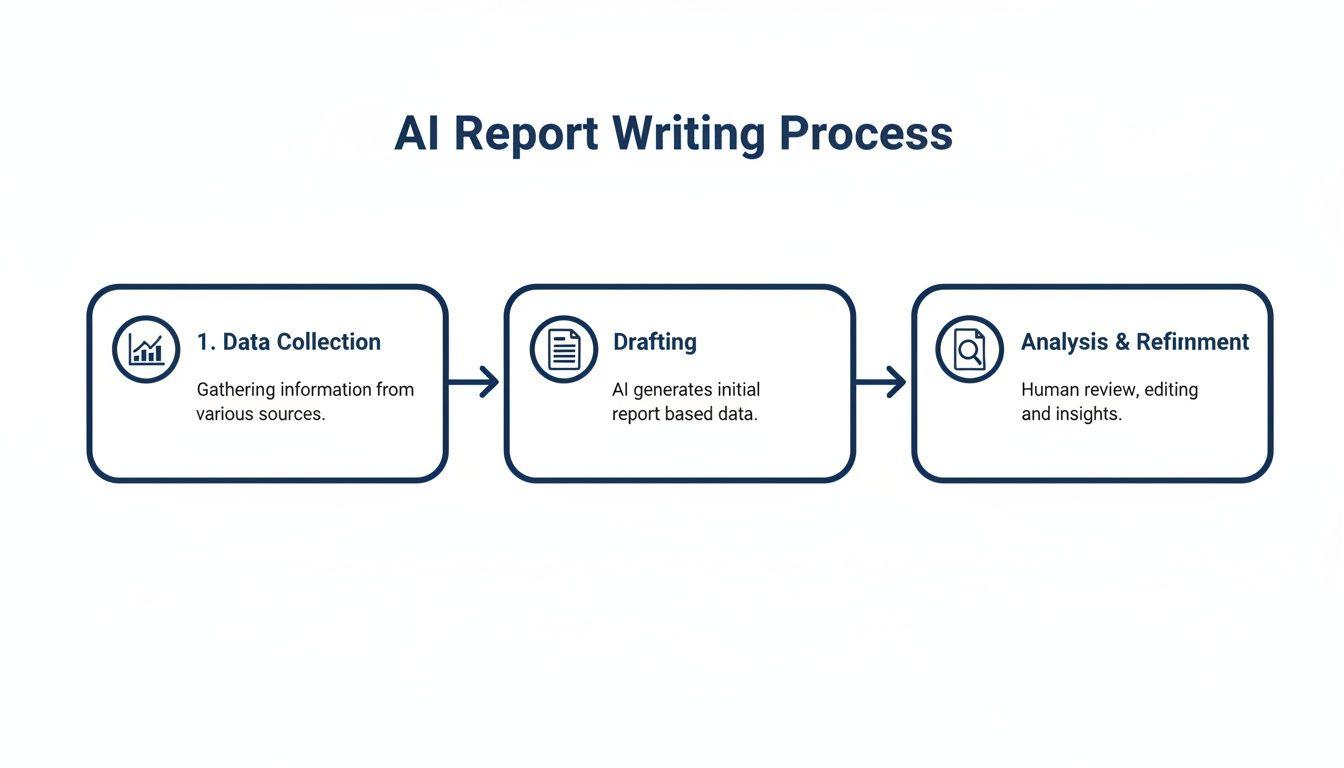
This workflow shows how AI slots into each phase, making the whole process smoother and more efficient. It’s not about handing over control; it's about smarter collaboration.
How AI Enhances Efficiency and Quality
The real magic happens when AI enhances your own abilities, not when it tries to replace them. The benefits are tangible at every step of the report creation lifecycle.
- Accelerated Data Synthesis: AI can chew through massive datasets in seconds, pulling out key findings and spotting correlations a person might easily overlook.
- Rapid First Drafts: It turns your raw notes and data points into a coherent first draft, effectively killing writer's block and giving you a strong foundation to work from.
- Consistent Tone and Style: Need to maintain a specific voice across a 50-page document or one written by three different people? AI is brilliant at ensuring a professional, uniform tone throughout.
To give you a clearer picture, this table breaks down how AI contributes at each stage of the report-writing journey.
Key AI Applications in the Report Writing Lifecycle
| Report Stage | AI Application | Primary Benefit |
| Data Collection & Sourcing | Web scraping, data extraction, and summarizing existing research | Drastically reduces manual research time and uncovers relevant information quickly. |
| Analysis & Synthesis | Trend identification, sentiment analysis, and data visualization prompts | Highlights key insights and patterns that might be buried in complex datasets. |
| Outlining & Structuring | Generating logical report structures and creating detailed outlines from prompts | Provides a clear, organized framework, overcoming the "blank page" problem. |
| Drafting Content | Writing initial sections, summarizing data points, and expanding on outline points | Creates a solid first draft in a fraction of the time, freeing up human writers for editing. |
| Editing & Refinement | Proofreading, grammar checks, tone adjustment, and ensuring style guide compliance | Improves clarity, consistency, and professionalism while catching errors. |
| Collaboration & Finalization | Summarizing feedback, generating executive summaries, and adapting content for different audiences | Streamlines the review process and makes it easier to repurpose the final report. |
As you can see, AI isn't just a single-step solution. It’s a versatile partner that provides value from the initial brainstorming all the way to the final executive summary.
The Growing Adoption of AI in Content Creation
This isn't just a theoretical shift; it’s happening right now. The integration of AI has exploded in professional settings. Among content marketers alone, 71.7% are already using AI for outlining reports, 68% for brainstorming ideas, and 57.4% for getting that first draft on the page.
This trend is driven by the relentless demand for data-rich reports across marketing, finance, and consulting. If you want to dive deeper, you can find more insights about AI writing statistics and see how pros in different fields are adapting.
The goal isn't to let AI write the report for you. It's to let AI handle the 80% of manual work so you can focus on the 20% that requires your unique expertise and analytical insight.
Using AI to Source and Analyze Your Data
A great report is built on solid data, but let's be honest—gathering and making sense of that information is usually the biggest grind. This is where AI completely changes the game. Think of it as a powerful research assistant that can chew through mountains of information and spot patterns you might otherwise miss.
Instead of spending days manually digging through academic journals, industry reports, or dense market research, you can send an AI to do the heavy lifting. We're not just talking about basic summaries, either. Modern AI can connect the dots between seemingly unrelated pieces of information to give you a cohesive starting point.
This lets you jump straight to the interesting part: analyzing the insights the AI surfaces, rather than getting stuck in the weeds of raw data. You end up with a faster workflow and a final report that’s built on a much deeper foundation of knowledge.
Automating Data Collection and Summarization
The first big hurdle in any report is tracking down credible information. AI turns this tedious, manual slog into a fast, targeted process. You can instruct AI tools to scan specific websites, databases, or even a folder of PDFs to pull out exactly what you need.
Imagine you’re putting together a quarterly competitor analysis. The old way involved visiting a dozen different websites, manually copying product updates, and pasting press releases. Now, you can have an AI with web-browsing skills do it all for you, freeing you up to think about what that information actually means for your strategy.
The real magic of AI in data sourcing isn't just speed—it's scope. An AI can process information from hundreds of sources at once, giving your research a level of thoroughness that would be nearly impossible to achieve manually in the same amount of time.
Automating this first step ensures your report is based on the most current and comprehensive data out there. This kind of foundational work is what separates good artificial intelligence report writing from great.
Uncovering Insights with AI-Powered Analysis
Once you’ve got your data, the real work begins: making sense of it all. This is where your AI shifts from a data gopher to an analytical partner. By feeding it your datasets—whether it's qualitative feedback from surveys or hard sales numbers—you can ask it to find trends, anomalies, and correlations that aren't immediately obvious.
Let's say you've collected thousands of customer reviews. A human analyst could spend weeks reading and categorizing them. An AI can run a sentiment analysis in minutes, classifying feedback as positive, negative, or neutral while also pinpointing recurring themes and specific customer pain points.
- Spotting Trends: Ask the AI to, "Identify the top 5 recurring themes in these customer support transcripts."
- Finding Anomalies: Prompt it with something like, "Analyze our sales data from the last quarter and flag any unusual spikes or dips that deviate from the norm."
- Connecting the Dots: Try a command like, "Based on this website traffic data and our social media metrics, is there a correlation between specific campaigns and new user sign-ups?"
This analytical muscle helps you build a narrative that’s backed by solid evidence. If you're focusing on market research, you can go even deeper with specialized AI tools for competitive analysis that are built to streamline this very process.
Practical Prompts for Data Handling
The quality of the AI's output depends entirely on the quality of your input. Vague questions get you vague answers. To get insights you can actually use, you need to be specific and give the AI plenty of context.
Here are a few real-world prompts I've found effective for sourcing and analysis:
- To Digest a Dense Document: "Act as a senior financial analyst. Read the attached annual report for Company X. Give me a bullet-point summary of the key financial highlights, any risks mentioned in the 'Forward-Looking Statements' section, and the CEO's main message from their letter to shareholders."
- For Web-Based Market Research: "Browse the top tech news sites for articles published in the last month about breakthroughs in renewable energy storage. Synthesize the findings into a 3-paragraph executive summary highlighting the main technological advancements and the key companies involved."
- To Analyze Unstructured Text: "I have a CSV with 500 open-ended survey responses about our new software feature. Analyze the text and categorize the feedback into three buckets: positive comments, bug reports, and feature requests. For each category, pull three direct quotes that best represent the sentiment."
Crafting precise prompts like these guides the AI to deliver structured, relevant information you can immediately put to work, creating a solid bedrock for the rest of your report.
Crafting Prompts That Actually Generate Great Reports
The quality of any report you get from an AI comes down to one thing: the prompt. I've learned to think of it less like a question and more like a detailed creative brief for a junior analyst. If you just ask for a "report on Q2 sales," you'll get a vague, uninspired draft that's more work to fix than to write from scratch.
The real secret to making artificial intelligence report writing work for you is mastering the art of the prompt. This means going way beyond basic instructions. A powerful prompt gives the AI a role to play, provides the necessary background, dictates the tone you're after, and outlines the exact structure you need. It’s the difference between getting a napkin sketch and receiving a full blueprint you can actually start building with.
The money pouring into this space is staggering. The global AI market is projected to hit $407 billion by 2025, and a huge chunk of that is going into the enterprise tools we use every day. Companies are spending billions on the tech that lets AI writers draft complex reports with an average processing time of just 89 milliseconds. If you want to see the scale of this shift, you can explore more about these enterprise AI statistics yourself.
The Anatomy of a Powerful Report Prompt
I've found that the most effective prompts almost always contain a few key ingredients. When you combine them, you dramatically reduce the chances of getting a generic or irrelevant first draft.
- Role-Playing: This is my favorite trick. Simply tell the AI to adopt a specific persona, like a "senior market analyst" or a "data scientist explaining a concept to a non-technical audience." It instantly frames the tone and expertise of the response.
- Context and Background: You have to give the AI the why behind the report. I always include key data points, who the report is for (the audience), and what we're trying to achieve with it.
- Format and Structure: Don't leave the layout to chance. Be explicit. Tell it you want specific headings, bullet points for key findings, or a summary table at the end.
- Tone of Voice: Clearly state if the report needs to be formal and analytical or more conversational and persuasive. This simple instruction keeps the final output from clashing with your brand or communication goals.
The best prompts don't just ask for information; they teach the AI how to think about the problem. When you tell it to 'Act as a senior market analyst,' you're not just setting a tone—you're activating a specific knowledge set and analytical framework within the model.
Prompt Templates for Common Report Sections
Let's make this more practical. Here are a few templates I’ve adapted and used for different parts of a typical business report. Feel free to copy and paste them, just be sure to swap in your own details.
For an Executive Summary
The executive summary has to be sharp and to the point. It’s often the only thing a busy exec will read, so it can't miss the mark.
Prompt Example:
"Act as a senior business strategist writing for a board of directors. Based on the attached quarterly performance data (Q3_Data.csv), write a 250-word executive summary. Your first sentence must be the single most important takeaway. Then, in three separate paragraphs, cover: 1) Key financial wins and what drove them, 2) Major challenges we faced and their impact on the bottom line, and 3) Your strategic recommendations for Q4. The tone must be formal, confident, and data-driven."
For Explaining Methodology
This is where you build credibility. You need to explain how you got your results in a way that's clear and trustworthy.
Prompt Example:
"You are a meticulous data scientist explaining your process to a non-technical audience. Write a 'Methodology' section for our market research report. Explain how we analyzed 15,000 customer survey responses. Use a numbered list to cover these steps: 1) The data cleaning process for removing incomplete entries, 2) The sentiment analysis model we applied to categorize feedback, and 3) The thematic analysis technique used to find recurring topics. Keep the language simple and skip the heavy technical jargon."
For Interpreting Complex Data
Here’s where an AI can be a huge help—finding the story hidden in the numbers. You provide the "what," and the AI helps you explain the "so what."
Prompt Example:
"I've attached a dataset showing a 15% drop in user engagement on our mobile app last October, which happened right after we launched the new UI. Act as a product analyst. Write a section called 'Interpreting the User Engagement Dip.' Use bullet points to list three potential reasons for this decline, supported by the data. Finish with a paragraph suggesting two A/B tests we could run to figure out which hypothesis is correct. The tone should be analytical but constructive."
These templates are a great starting point. But don't forget the smaller tasks. Sometimes you just need to expand on a bullet point or rephrase a clunky sentence. For that kind of work, an AI paragraph writer can refine your workflow and save you tons of time. Getting good at these micro-prompts is just as important as crafting the big ones for the overall report structure.
Editing and Verifying AI-Generated Content
Thinking of AI as an autopilot for report writing is a recipe for disaster. It leads to reports that are not just generic, but often flat-out wrong, and that’s a quick way to torpedo your credibility. The real magic happens when you treat the AI as a very capable, but very junior, partner. It gives you the raw clay; your expertise is what molds it into a trustworthy, polished final report.
This "human-in-the-loop" approach isn't optional—it's essential. Every single word the AI generates needs a thorough review before it goes anywhere. And I don't mean a quick once-over for typos. This is about applying your hard-won analytical judgment to every claim, number, and conclusion the machine spits out.
Your Role as the Human Expert
Your job fundamentally shifts from being the creator to being the curator and critic. You are the last line of defense, the person responsible for making sure the report isn't just well-written, but factually sound and perfectly aligned with your strategic goals. The AI does the grunt work of drafting, but you provide the crucial layer of human insight and verification.
So, what does that look like in practice? It boils down to a few key actions:
- Fact-Check Everything: Never, ever assume a statistic, date, or quote from an AI is correct. It might be, but you have to verify every single data point against a reliable, primary source.
- Inject Your Voice: An AI can mimic a tone, but it can’t truly capture your unique brand personality or industry perspective. This is where you edit the text to add nuance, use the language your audience expects, and infuse it with your authentic point of view.
- Shore Up the Narrative: Read the entire report from start to finish. Does the story make sense? Does one section flow naturally into the next? You’re looking for a coherent, compelling argument that’s easy for a human to follow.
A Practical Framework for Verification
To avoid getting lost in the weeds, it helps to have a system. A simple checklist can turn this critical review process from a daunting task into a manageable workflow, ensuring nothing important gets missed.
- Chase Down the Sources: For any data mentioned, go back to the original source. If the AI didn't provide its sources (a common issue), your first job is to find them yourself. If you can't, the claim has to go.
- Hunt for Inconsistencies: Check that key terms, data points, and conclusions are used consistently throughout the report. An AI might describe the same concept in three different ways across ten pages, which is a sure-fire way to confuse your reader.
- Read It Aloud: This is an old-school trick, but it works wonders. Reading the text out loud makes awkward phrasing and weak logical connections jump out at you in a way they just don't on the screen.
- Do the "Voice Check": Step back and ask yourself, "Does this actually sound like us?" Go through and rewrite sentences to match your organization's style guide and established way of communicating.
The biggest danger with AI content isn't a misplaced comma; it's the "hallucination"—an inaccuracy stated with absolute confidence. Your job is to be the ultimate backstop against that kind of misinformation.
Using AI as an Editing Assistant
Here’s a nice bit of irony for you: AI can actually be a fantastic tool for editing its own output. Once you have that first draft, you can turn right back to the AI to help you polish it.
Try prompts that play to its strengths in language processing:
- "Review this draft. Find any sentences that are too complex and suggest simpler ways to say the same thing."
- "Read this report and check for a consistent tone. Point out any sections that sound more formal or informal than the rest."
- "Take this paragraph and rewrite it to be more persuasive for an audience of C-level executives."
This lets you offload some of the more mechanical editing work, freeing you up to focus on the high-level strategy and verification. Even with the need for a careful human eye, the efficiency gains are undeniable. We're already seeing leading LLMs hit 95%+ accuracy in financial forecasting when fed proprietary data. That growing reliability is a big reason why 79% of leaders are expecting AI to transform their organizations within three years.
This isn't just theory, either. In the real world, 39% of companies using AI for reports are already seeing revenue lifts of 1-5%. You can read the full research about AI writing adoption to get a clearer picture of the tangible impact it's already having.
Integrating AI into Your Team's Workflow Safely
Just giving everyone on your team a login to an AI tool isn't a strategy. It's a recipe for inconsistent reports, duplicated work, and, frankly, some serious data privacy risks. If you want to do this right, you need a real game plan.
A well-designed workflow is what turns a cool new tool into a genuine team asset. It ensures everyone, from the analyst pulling the raw numbers to the editor doing the final polish, is on the same page. This structure is the key to making artificial intelligence report writing work at scale.

This isn't just a hypothetical, either. Companies are projected to spend a massive $37 billion on generative AI in 2025 alone. According to the State of Generative AI report from Menlo Ventures, the drive for efficiency is huge. In fact, 79% of leaders see AI bringing major changes within three years, and 56% are focused squarely on those efficiency gains.
Establishing Clear Roles and Responsibilities
First things first: you have to define who does what. Just like any other project, clear roles prevent chaos and make sure every stage of the report has an owner.
A simple, effective structure usually involves these three roles:
- The Prompt Engineer: This person lives and breathes prompts. They get really good at crafting the inputs that generate the best outputs, and they’re in charge of creating and managing a library of templates for the whole team.
- The Data Steward: This is your data gatekeeper. They're responsible for prepping and cleaning the data before it ever touches the AI. Their most important job is to scrub it of any sensitive info and ensure it's accurate.
- The Human Reviewer/Editor: No AI-generated report should go out without passing through this person. They are the final quality check, fact-checking every claim, editing the text to match your brand's voice, and giving the final sign-off.
By dividing the labor this way, your subject matter experts can focus on what they do best—analysis and strategy—instead of getting bogged down in generating raw text.
Building a Shared Prompt Library
If you want any kind of consistency, a shared prompt library is non-negotiable. It's a surprisingly simple way to make sure every report that goes out the door meets a certain standard for quality and tone.
A good prompt library is more than a time-saver; it’s your team's playbook. It becomes a living document where you store what works, so everyone gets smarter together.
You can start with a simple shared document or a dedicated spot in your company’s knowledge base. For every common report you create—a quarterly financial summary, a competitor analysis, a marketing campaign recap—save the best-performing prompt templates. This stops people from constantly reinventing the wheel and helps new hires get up to speed in a fraction of the time.
Prioritizing Data Privacy and Security
This is the most important part of the entire process. Let's be clear: when you use a third-party AI model, you are sending your data to someone else's server. One slip-up here can have massive consequences.
Your team needs an AI usage policy that is crystal clear and leaves no room for interpretation, especially when it comes to sensitive data.
Key Security Practices to Enforce:
- Anonymize Before You Analyze: Never, ever paste raw data with customer names, PII, or confidential financials into a public AI tool. Use anonymization techniques to swap out sensitive details for generic placeholders before the data leaves your system.
- Understand the Terms of Service: You need to know exactly what the AI provider does with your data. Some platforms use your inputs to train their models. If you're working with proprietary information, you absolutely must use a service that guarantees your data stays private and isn't used for training.
- Implement Access Controls: Not everyone needs access to everything. Use role-based permissions to control who can even input sensitive data into an AI tool. This minimizes your risk of a leak.
Sticking to these principles is essential. For a deeper dive into safeguarding information, our guide on how to protect privacy online has more strategies that are just as relevant here. By building security into your workflow from the very beginning, you can use AI confidently without putting your business at risk.
Common Questions About AI Report Writing
It's completely normal to have a few questions as you start weaving AI into your report writing. Let's be honest, this is a big shift. It brings up some very real concerns about accuracy, which tools to trust, and even job security. We'll tackle the big ones head-on so you can move forward with confidence.
Think of this less as just learning a new piece of software and more as fundamentally changing how you approach a core business task. Getting comfortable starts with getting answers.
Can I Trust the Accuracy of an AI-Generated Report?
This is the million-dollar question, isn't it? The short answer is a hard no—at least not without verification. AI models, especially the large language models we use for writing, are notorious for something called "hallucinations." They can state incorrect information with the confidence of a seasoned expert.
So, where does that leave you? You're the expert in the loop, the final line of defense for accuracy. Treat every single statistic, quote, or data point the AI gives you as an unverified claim. Your job is to trace it back to a primary source.
The rule I live by is simple: if you can't find the original, credible source for a piece of information, it has no place in your report. An AI's output is only as trustworthy as the human verification process you build around it.
This step isn't optional. It’s the only way to produce reliable reports using artificial intelligence report writing tools while protecting your professional credibility.
Which AI Tool Is Best for Report Writing?
With a new AI tool popping up every week, it's easy to get overwhelmed. The truth is, there’s no single "best" tool for everyone. The right choice really comes down to what you need it to do.
Before you start signing up for free trials, think about what will actually make a difference in your day-to-day work:
- Data Analysis: Do you need a tool that can plug directly into your data sources, like Google Analytics or a database, or are you just planning to paste in data you've already crunched?
- Privacy and Security: This is a big one. If you're working with sensitive company data, you need a tool with an enterprise-level privacy policy. Look for platforms like 1chat that are built for business use and guarantee your data won't be used to train their models.
- Team Collaboration: Are you flying solo or working with a team? If it's the latter, features like shared prompt libraries and team workspaces can be a game-changer for keeping everyone on the same page.
- User-Friendliness: The most powerful AI is worthless if your team hates using it. A clean, simple interface is key to getting everyone on board.
My advice? Pinpoint your top two or three priorities from that list. Then, find a few tools that fit the bill and put them through their paces with a real project.
Will AI Replace Analysts and Report Writers?
I hear this a lot, and I get why people are concerned. But what I'm seeing is not replacement, it's evolution. AI isn't making the analyst obsolete; it's changing the job description. It’s taking over the tedious, time-sucking tasks—like pulling data and writing a rough first draft—which frees you up to do the work that actually requires a human brain.
Here’s how I see the roles breaking down:
| Tasks AI is Automating | Tasks Humans are Focusing On |
| Summarizing huge documents | Strategic interpretation of the data |
| Generating first drafts | Weaving a compelling narrative |
| Basic grammar & style edits | Adding unique industry context |
| Finding initial data correlations | Making final, nuanced recommendations |
The future of artificial intelligence report writing is a partnership. Your value is no longer just about writing a clean sentence. It's about your ability to ask the right questions, to critically review what the AI produces, and to layer in the kind of strategic insight that only comes from experience. Your role is shifting from writer to a strategist and editor-in-chief.