Your desktop is full of PDFs with names like final_v2_REAL_final. Your email has attachments you meant to review last week. A customer sent back a signed contract, your supplier changed terms in a new document, and somewhere in that pile is the one sentence that actually matters. Or maybe you're a student staring at a folder of journal articles, trying to figure out what they agree on, what they contradict, and what belongs in your literature review.
The issue isn't a reading problem. It's a sorting problem.
That's where document analysis becomes useful. It's the skill of taking a messy set of documents and turning them into something you can act on. You stop asking, “How am I supposed to read all of this?” and start asking, “What question am I trying to answer from these materials?”
A small business owner might use document analysis to compare invoices, contracts, and customer emails before making a decision. A student might use it to trace patterns across research papers. A family might use it to organize insurance forms, school notices, and warranty documents into a system they can search. If you're also exploring practical automation, tools built for AI data extraction tools can help with the first pass of pulling details from files, while a broader AI workspace like 1chat can support document questions and summaries in one place.
The phrase what is document analysis can sound academic, but the idea is simple. It means reading documents in a structured way so you can extract meaning, spot patterns, and make better decisions.
From Information Overload to Actionable Insight
A student opens a folder with twenty journal articles and only needs three things from them: the main argument, the evidence, and where the authors disagree. A small business owner faces the same kind of problem with contracts, invoices, and customer emails. Different documents, same pressure. Too much material, not enough time, and a decision waiting at the end.
Document analysis helps turn that pile into a usable map.
In research, the method has a long history. People use it to study written records, forms, images, and other materials so they can spot patterns, compare versions, and interpret meaning in context. In everyday work, the same logic applies, but the goal is usually faster and more practical. You are trying to answer a question, reduce uncertainty, or find the detail that changes what you do next.
That is the gap many guides skip. Traditional document analysis is often slow, manual, and interpretive. Modern workflows add software that can sort, search, extract, and summarize before a human makes the final judgment. For a non-technical user, that shift matters. It means you do not have to choose between careful reading and speed. You can use both.
What changes when you analyze instead of just read
Reading follows the document from top to bottom. Analysis reads with a purpose, more like using a highlighter and a filing system at the same time.
Instead of asking only, “What does this say?”, you start asking questions such as:
- What repeats: Which themes, terms, or concerns appear across multiple documents?
- What changed: How does one version differ from another?
- What is missing: Which facts are vague, absent, or pushed into footnotes?
- Who shaped it: Who wrote this, for whom, and for what reason?
A useful comparison is cooking. Reading is tasting one ingredient. Document analysis is reading the recipe, checking the labels, and figuring out why the dish turned out the way it did.
Practical rule: If a document affects a decision, compare it with related documents, label what matters, and note the context around it.
Many beginners assume better analysis means slower reading. Often it means better filtering. A student may group articles by theme before reading closely. A business owner may use AI data extraction tools to pull dates, totals, names, or contract terms from a batch of files, then review the results for accuracy. A conversational workspace for document questions, such as AI document chat and summary tools, can help with the first pass when you need to understand a set of materials without manually opening every file one by one.
A plain-English definition
Document analysis is a structured process for reviewing documents so you can pull out useful information, organize it, and decide what it means.
The word "documents" covers more than reports and PDFs. It can include forms, emails, scanned records, screenshots, meeting notes, or article collections. The method also works at two levels.
One level is interpretive. You read closely, compare wording, and ask why something was included or omitted.
The other level is operational. You identify names, dates, clauses, topics, and patterns across many files so you can act faster.
| Document type | Everyday example | What you might look for |
| Text documents | contracts, reports, articles | obligations, claims, recurring topics |
| Communications | emails, memos, messages | decisions, tone, unresolved issues |
| Records | invoices, forms, policies | dates, names, requirements, gaps |
| Visual materials | posters, scans, screenshots | wording, symbols, intended audience |
People who search for "what is document analysis" are often asking a more practical question: how do I get from a messy folder to a clear answer? The answer is a blend of old and new methods. Human judgment gives the work context and nuance. AI gives you speed, searchability, and help with repetitive extraction. Used together, they turn information overload into something you can put to use.
The Two Faces of Document Analysis
Open a folder called “Documents” for a class project or a small business. One file needs close reading because the wording carries meaning. Another just needs the date, total, and names pulled out fast. Both tasks fall under document analysis, but they are not the same job.
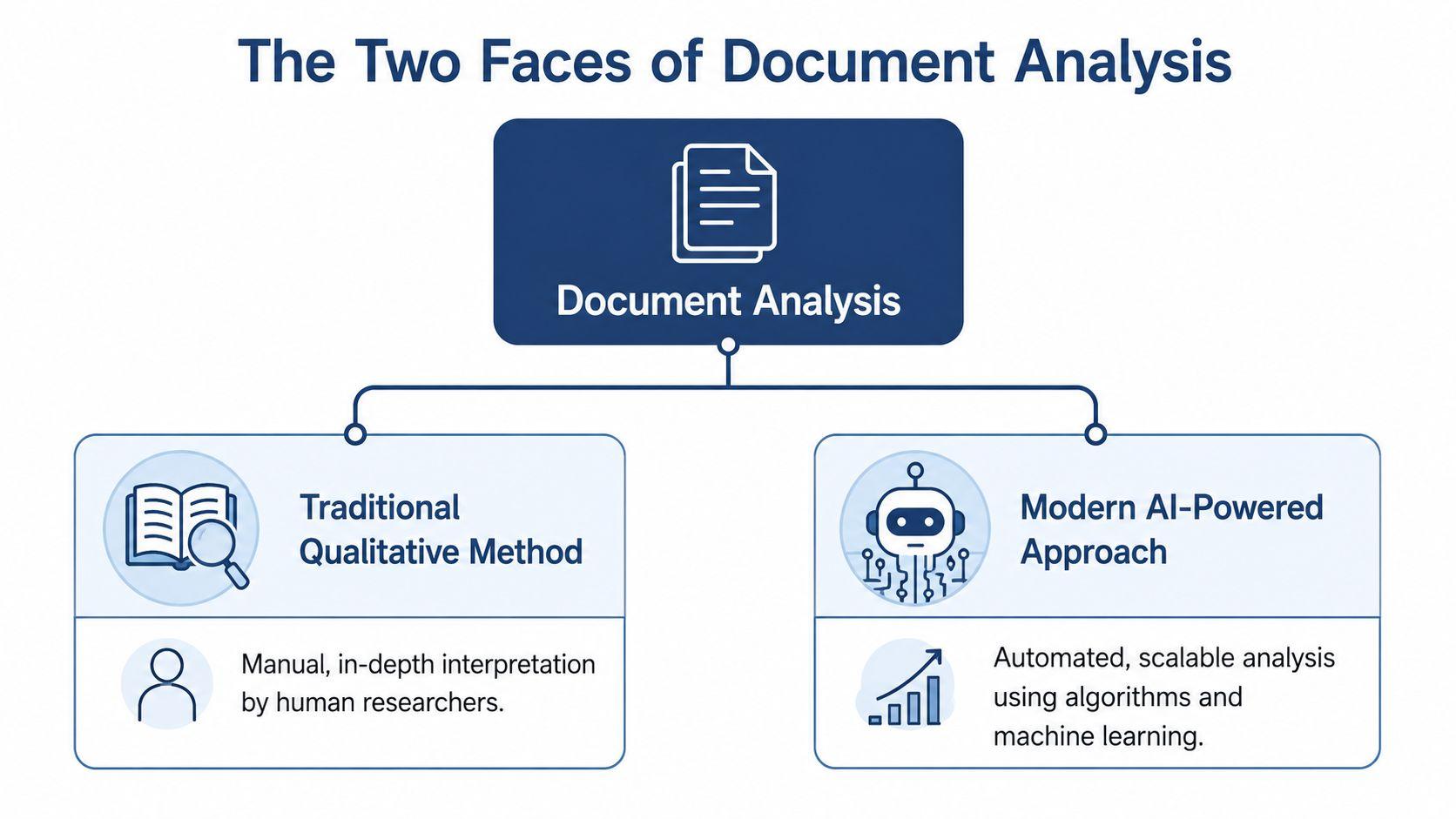
That split explains a common beginner problem. Students read about coding themes and interpretation, then see software demos about extracting invoice fields or summarizing PDFs. Small business owners hear the same term used for both. The result is confusion because the label stays the same while the task changes.
The traditional qualitative method
In its older academic sense, document analysis is a manual and interpretive method. You read documents closely to understand meaning, context, wording, and omission. Researchers in education, history, public policy, and social research use it when the point is not just to find facts, but to understand what the document is doing.
A useful comparison is margin-note reading taken to a disciplined level. You compare versions, mark repeated ideas, notice shifts in tone, and ask why one memo includes a phrase that another leaves out. Silence can matter as much as wording.
This approach fits situations like these:
- Meaning matters more than speed
- Nuance matters more than field extraction
- Context shapes interpretation, especially in policy, legal, or historical material
- The collection is small enough for close human review
If you want a practical overview of methods for qualitative data interpretation, this side of document analysis will feel familiar. The goal is understanding before action.
The modern AI-powered approach
The newer face of document analysis is operational. Teams use software to sort files, classify document types, extract names and dates, search across large collections, and generate short summaries. The question changes from “What does this wording suggest?” to “What information do I need from all these files, and how fast can I get it?”
Software helps by handling the repetitive parts first. It works like a research assistant who is fast at scanning, sorting, and labeling, but still needs a human to check judgment calls. That matters for non-technical users because you do not need to build an AI model to benefit from this approach. You often just need a tool that can read your files, pull out the obvious details, and make the set searchable.
For a student, that might mean grouping articles by topic before close reading. For a small business, it might mean pulling invoice numbers, customer names, or contract dates from a stack of PDFs. Many guides blur this practical shift. A good overview of document analysis articles and guides can help you see how these workflows fit everyday work, not just research labs or enterprise teams.
The useful distinction most guides blur
The clearest way to separate the two faces is to ask what comes first.
Traditional document analysis starts with interpretation. AI-powered document analysis often starts with extraction.
That difference changes the workflow, the tools, and the output.
| Question | Traditional approach | AI-powered approach |
| Main goal | interpret meaning | process information efficiently |
| Best for | research, policy, historical review | operations, productivity, document-heavy tasks |
| Main actor | human analyst | human plus software |
| Typical output | themes, coded findings, interpretation | structured data, summaries, searchable results |
For students and small businesses, the most useful approach is usually hybrid. Let software handle the repetitive pass across many files. Let people handle ambiguity, exceptions, and final interpretation. That is the bridge between the older qualitative tradition and the newer AI workflow, and it is the distinction many introductions leave out.
Unpacking the Analyst's Toolkit Core Techniques
A useful toolkit makes document analysis feel less mysterious. The terms sound technical, but each one does a fairly plain job. If traditional analysis teaches you how to read closely, AI tools help you sort, mark, and retrieve information at a scale that would tire a human reader.
OCR turns images into readable text
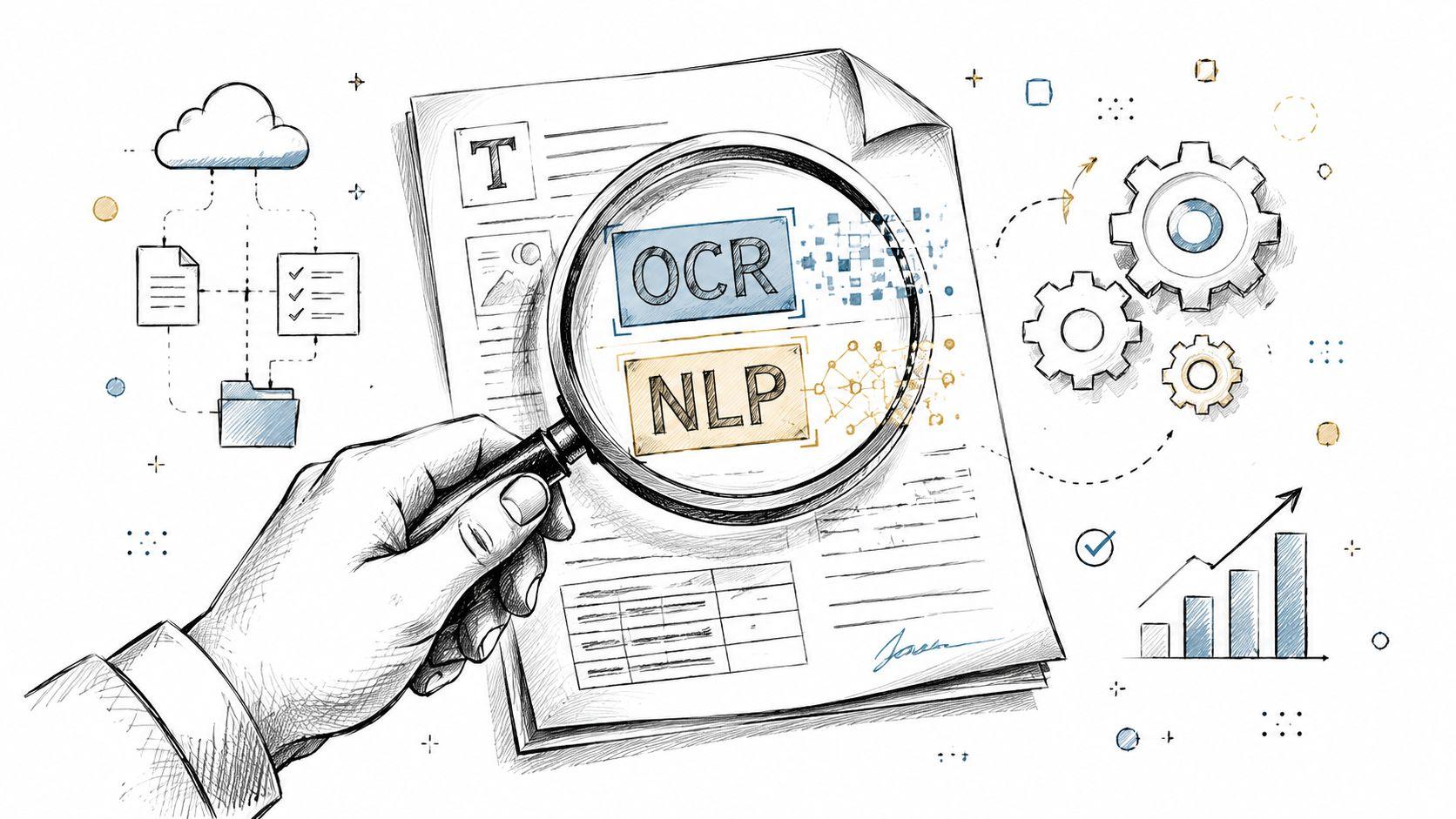
Optical Character Recognition, or OCR, handles the first barrier. A scanned PDF may look readable to you, but to software it often starts as a photograph of a page. OCR converts those visual shapes into text the system can search, copy, and process.
A receipt photo is a good example. You can spot the date, total, and store name in seconds. A computer needs OCR before it can do the same kind of basic reading.
OCR is especially helpful with:
- Scanned contracts
- Printed forms saved as PDFs
- Photos of notes or receipts
- Older paper records converted to digital files
Without OCR, later analysis is limited because the words are trapped inside an image.
NLP works on the meaning of language
Once text becomes machine-readable, Natural Language Processing, or NLP, takes over. NLP is the set of methods that helps software work with language instead of just storing it.
NLP works like a teaching assistant with narrow, specific jobs. It can sort documents into categories, shorten long passages, detect repeated topics, flag emotional tone, or pull out names, dates, and places. It does not "understand" a document the way a person does. It performs well-defined language tasks that reduce manual effort.
Here are a few common NLP tasks in plain language:
- Text classification: labels a document as an invoice, complaint, resume, contract, or another category
- Summarization: creates a shorter version of a long document
- Keyword and topic detection: spots recurring ideas or terms across many files
- Sentiment analysis: estimates whether wording is positive, negative, or neutral
- Entity extraction: identifies specific items such as people, organizations, dates, locations, or products
For non-technical users, that distinction matters. A student might use NLP to group articles by theme before close reading. A small business might use it to route incoming forms, summarize support messages, or find renewal dates in vendor agreements. The software handles the repetitive scan. The human still decides what the findings mean.
Entity extraction acts like a fast first pass with a highlighter
If NLP is the broader set of language methods, entity extraction is one of the most practical tools inside it.
It works like color-coding a page during review. A person might highlight all dates in blue, company names in green, and people in yellow. Entity extraction does a rough automated version of that job across hundreds or thousands of documents.
In lease agreements, it can pull tenant names, property addresses, start dates, and payment terms. In research papers, it may identify authors, institutions, methods, or cited organizations. That does not replace interpretation. It gives you a map of the material so your attention goes where it matters.
Qualitative coding still does the interpretive work
This is the point many beginner guides miss. Extraction and interpretation are not competitors. They solve different problems.
Qualitative coding means assigning labels to passages based on ideas, patterns, or meanings. A line in customer feedback might be coded as "late delivery." A paragraph in a policy memo might be coded as "equity," "risk," or "implementation challenge." Software can suggest clusters or repeated phrases, but a person decides whether those labels make sense in context.
That is why hybrid workflows are so useful. AI can gather likely dates, names, clauses, or recurring terms. Human readers judge tone, motive, ambiguity, and significance. Readers who want a practical companion to this interpretive side can review these methods for qualitative data interpretation.
A simple framework helps these tools work together
Document analysis becomes easier when you stop seeing it as one skill and start seeing it as a sequence of jobs. First, make the text readable. Next, identify useful patterns or fields. Then interpret those findings in context.
That sequence mirrors how many people already work. A student collects articles, marks recurring concepts, and then writes an argument. A small business gathers PDFs, pulls out dates and names, and then decides what needs action. The difference in modern workflows is speed. Tools can handle the first pass across messy files, while people focus on judgment.
If you want examples of how that bridge between classic analysis and AI-assisted workflows looks in practice, the document analysis guides and workflow examples are a useful reference point.
A Step-by-Step Document Analysis Workflow
Document analysis works best when you treat it as a repeatable workflow, not a heroic reading session. A strong process is systematic and iterative, turning unstructured text into coded evidence while combining content extraction with context analysis. ATLAS.ti describes the value as understanding not only what a document says, but why, when, and for whom it was created, including attention to source purpose and omissions (systematic document analysis workflow).
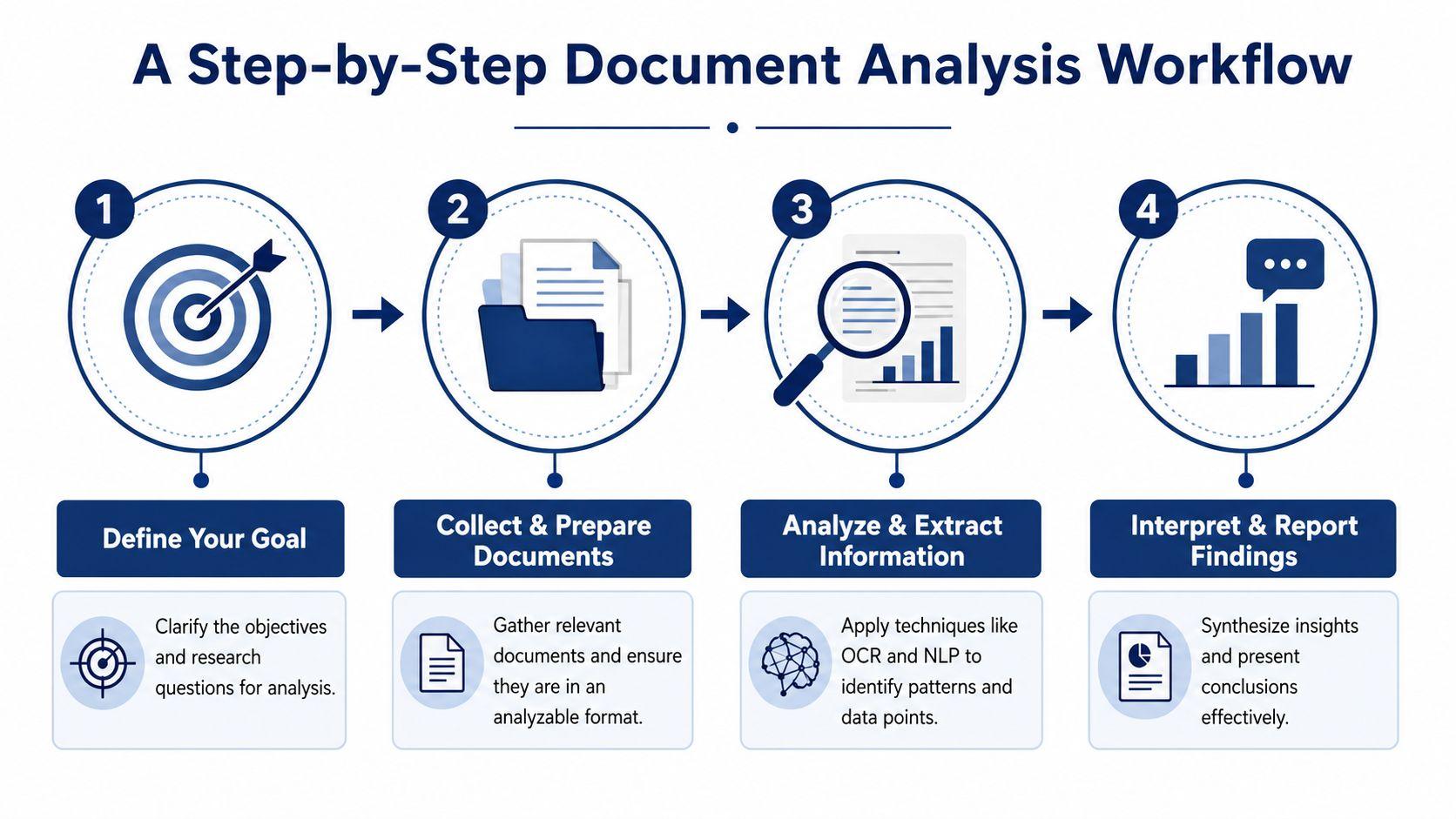
Step 1 Define the question
Start with one concrete question. Not “What's in these files?” but something sharper.
Examples:
- Which contract clauses changed between versions?
- What complaints appear most often in support emails?
- How do these research papers define the same concept differently?
A narrow question changes everything. It tells you what to ignore.
Step 2 Gather and prepare the documents
This step sounds boring, but it saves the project.
Put the files in one place. Rename them consistently. Convert scans with OCR if needed. Remove duplicates. If you're working with a mix of email exports, PDFs, screenshots, and notes, decide what counts as part of the dataset and what doesn't.
A student might separate journal articles from lecture notes. A business owner might separate signed contracts from drafts.
If your folder is chaotic, your findings will be chaotic.
Step 3 Extract and code what matters
Now you begin the actual analysis. What this looks like depends on your goal.
For a manual project, you might highlight passages and assign codes. For an AI-assisted one, you might ask software to identify entities, summarize repeated issues, or classify documents by type.
A practical way to work is to combine both:
- Run a first pass: Search, summarize, extract names, dates, and repeated terms.
- Review the output: Check what the machine got right and wrong.
- Code for meaning: Label themes, tensions, contradictions, and missing context.
Here's a quick comparison:
| Task | Human-led method | AI-assisted method |
| Find exact phrases | close reading | search and retrieval |
| Spot patterns across many files | coding and memoing | topic grouping and summarization |
| Pull names and dates | manual extraction | entity extraction |
| Judge ambiguity | strong | limited without human review |
Step 4 Interpret before you act
Analysis then becomes useful.
A list of extracted dates isn't insight. A bundle of highlighted quotes isn't insight either. Insight appears when you connect the findings to a decision.
That might mean:
- writing a short memo
- creating a comparison table
- summarizing key themes
- flagging documents for follow-up
- making a decision based on patterns you found
A common mistake to avoid
Many beginners stop at extraction. They gather facts but never interpret them.
Document analysis is not complete when you've pulled information out of files. It's complete when you can explain what those findings mean in context.
Document Analysis in the Real World Practical Use Cases
The easiest way to understand document analysis is to watch it solve ordinary problems.
A small business sorting customer feedback
A café owner has survey responses, online form submissions, and email comments from customers. Reading each message one by one feels endless. So she starts with a focused question: what problems come up most often, and which ones affect repeat customers?
She groups the comments by topic. Delivery confusion goes in one group. Pricing concerns in another. Praise about staff goes in a third. Then she compares those themes with dates and order channels.
What looked like a pile of comments becomes a decision tool. She can now tell the difference between isolated complaints and repeated friction.
A student building a literature review
A college student has a folder of research papers and one assignment prompt. At first, every article seems important. After a few hours, they all blur together.
Document analysis gives the student a way to separate useful material from noise. Instead of trying to remember everything, the student creates a note grid with columns like:
- main claim
- method
- key concept
- agreement with other papers
- open questions
Soon a pattern appears. Several papers use the same term differently. A few focus on outcomes but ignore implementation. One article becomes important not because it is “best,” but because it contradicts the others.
That's document analysis in action. The student isn't just collecting quotes. They're mapping a conversation.
A family organizing household records
Families do document analysis more often than they realize. Insurance policies, school forms, medical records, appliance warranties, tax documents, and service agreements all pile up quickly.
A simple project might involve digitizing the files, sorting them by category, and creating a searchable record. Then the family can ask practical questions:
- Which warranties are still active?
- Which policy document has the latest terms?
- Which forms need to be renewed?
The benefit isn't abstract. It reduces panic when something urgent happens.
Good document analysis often feels less like “research” and more like finally being able to find what matters when you need it.
A team reviewing internal policies
A small team updates its internal policy documents. Different versions exist in email attachments, shared folders, and copied text in chat messages. The challenge isn't writing new policy language. The challenge is figuring out which version is current and where terms no longer align.
Document analysis helps by comparing versions, labeling changes, and identifying contradictions. The team can then revise with confidence rather than guessing which document is authoritative.
These examples all use the same basic move. They turn documents from static files into evidence for a decision.
Getting Started with the Right Tools and Mindset
A good document analysis tool doesn't need to impress you with jargon. It needs to help you ask questions, work through files, and trust the results.
What to look for in a tool
For most non-technical users, the best tool has a short learning curve and handles common tasks well.
Look for these qualities:
- Easy upload and readable output: You shouldn't need technical setup to work with PDFs, notes, or scanned files.
- Search and question support: It helps when you can ask plain-language questions about a document set.
- Organization features: Tags, folders, and summaries matter more than flashy dashboards.
- Privacy protections: Sensitive files should stay protected.
- Reasonable cost: Students, families, and smaller teams usually need a practical option, not enterprise software.
The mindset matters as much as the software
Modern guidance on document analysis points to a challenge many software pages barely address: documents can be incomplete, biased, or partly AI-generated. Responsible analysis means asking who created the document, why it was created, what may have been omitted, and how your own assumptions shape interpretation, especially as mixed human-and-machine documents become more common (responsible document analysis guidance).
That matters whether you're reviewing a policy memo or a generated summary from an AI assistant.
Here's a simple reliability checklist:
| Question | Why it matters |
| Who created this document? | authorship affects perspective and credibility |
| Why was it created? | purpose shapes wording and omissions |
| What might be missing? | silence can be meaningful |
| Is it original, edited, or generated? | provenance affects trust |
| What assumptions am I bringing? | interpretation is never fully neutral |
The strongest analysts don't just extract information. They interrogate it.
A sensible starting point
If you're new to this, don't begin with your messiest archive. Start with a contained project:
- pick one folder
- choose one question
- review a small set of files
- summarize what you found in a page or less
That gives you a method you can reuse.
If you want a privacy-first place to ask questions about documents, compare responses, and work with AI in a family-friendly or small-team setting, explore 1chat pricing options. The right tool won't do your thinking for you, but it can remove enough friction that the thinking becomes possible.
Document analysis is easier to understand once you stop treating it as a niche research term. It's a practical way to turn scattered documents into usable knowledge. Sometimes that means close reading and coding. Sometimes it means OCR, NLP, and extraction. Most often, it means a thoughtful mix of both.
If you've been wondering what document analysis is, the shortest honest answer is this: it's how people move from piles of documents to clear decisions.