Strong AI image generation prompts look less like keyword piles and more like compact creative briefs. That shift matters because image prompting has moved rapidly from an experimental practice to everyday consumer behavior. OpenAI introduced DALL·E on January 5, 2021, describing a neural network that could create images from text captions across concepts expressible in natural language, and later prompt datasets grew to about 14 million generated images and roughly 1.8 million unique prompts in one gallery dataset, with another activity analysis reporting more than 1,819,808 unique prompts (OpenAI's DALL·E announcement).
Yet more words don't automatically produce better results. Adobe reported that the average Gen Z prompt was 17 words, compared with 20.1 words for Gen X, while academic prompt logs found that prompts around 6 to 12 tokens were especially popular and another study recorded an average of 12.54 tokens per prompt (Adobe's analysis of AI image prompts). The practical lesson is simple: describe the right visual decisions in a clear order.
The templates below move from scene construction to art direction, exclusions, composition, parameters, narrative, photography, iteration, inclusion, and rapid reuse. Each one adapts to marketing assets, school projects, family-friendly illustrations, product visuals, and small-team workflows. You can also browse image prompts for additional starting points, then use a privacy-first workspace such as 1chat to generate images and work with leading language models in one place without scattering your creative process across services.
1. Detailed Scene Description Prompt Template
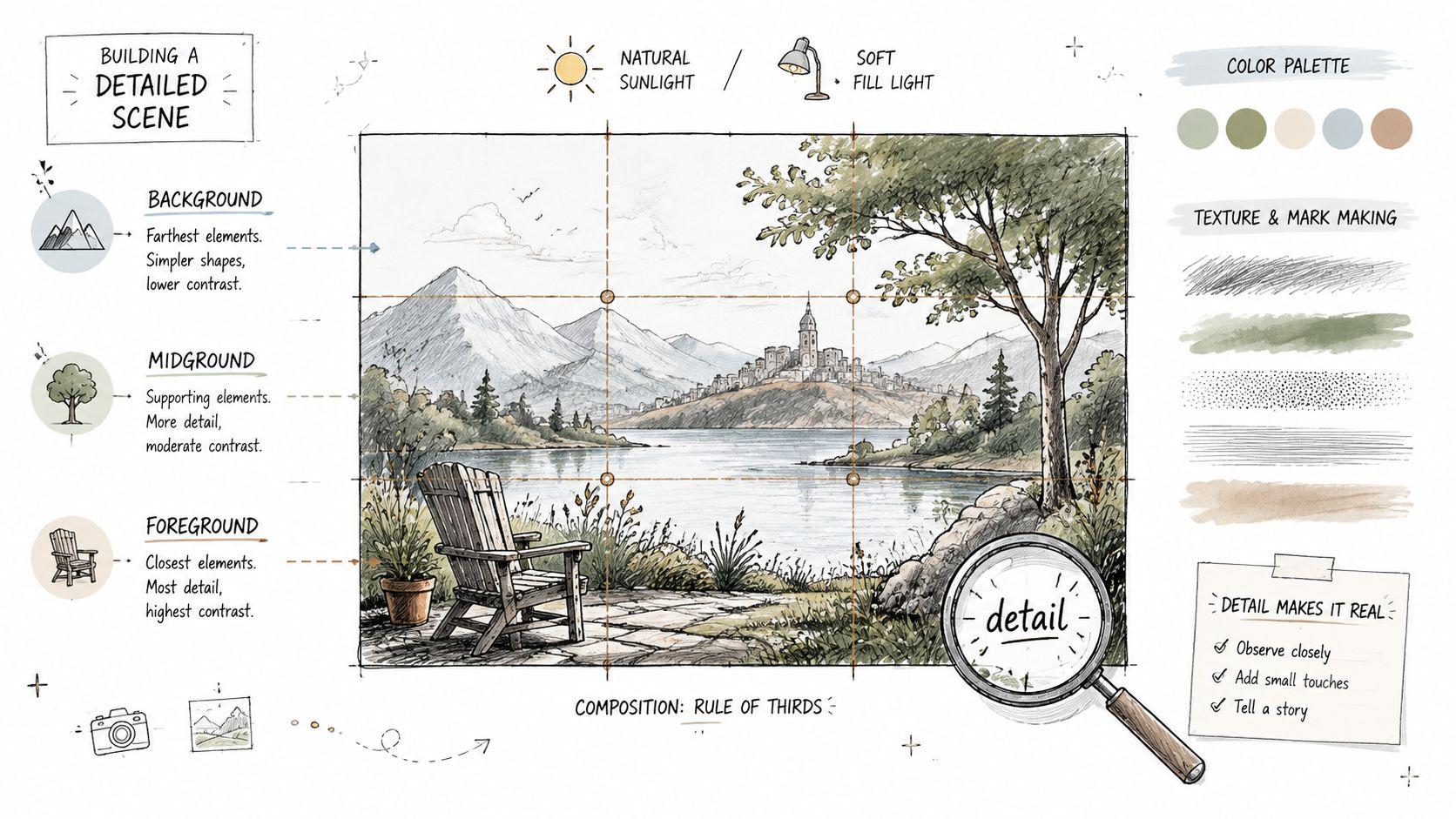
A reliable image starts with a reliable scene description. Instead of asking for “a beautiful product image,” identify the subject, setting, action, materials, lighting, viewpoint, composition, atmosphere, and intended visual medium. This gives the model separate visual anchors to interpret rather than forcing it to infer the entire brief from a vague adjective.
Use this structure:
Prompt: Create a [medium or image type] of [main subject] in [specific setting]. Show [action or arrangement], with [materials, colors, and important details]. Use [camera angle or viewpoint], [composition], [lighting], and [atmosphere]. The image should feel [mood], with [background treatment] and [level of detail]. Leave [specific area] clear for [text, logo, or later editing].
A marketing team could adapt it for a product mockup: “Create a clean editorial product photograph of a reusable stainless-steel bottle on a pale stone table beside folded linen, morning window light from the left, three-quarter view, centered composition, soft natural shadows, warm neutral palette, generous empty space on the right for headline text.” An educator might replace the product with “a labeled watercolor illustration of the water cycle,” while a small business owner could request a website hero image with the subject positioned away from the copy area.
Build the image in layers
Start with the subject and setting. Add lighting and composition next, then introduce surface detail or atmosphere. If the first result contains too many competing objects, remove adjectives before adding more instructions.
Comma-separated phrases often work well for models that interpret prompts as weighted visual tags, while conversational sentences can work better in systems designed for dialogue and image editing. A controlled study of 5,493 generations across 51 subjects and 51 styles found that subject and style keywords mattered more than connecting words, punctuation, or ordering terms (the ACM study on text-to-image prompt engineering). Treat that finding as a useful priority rule, not a demand to remove all natural language.
Test lighting variations such as soft window light, overcast daylight, hard midday sun, or controlled studio lighting. The same scene can serve a textbook illustration, a product page, or a family newsletter once you change the medium, framing, and emotional tone. For related workflow ideas, see this guide to AI video prompts for content creators.
2. Style Reference and Art Direction Prompt
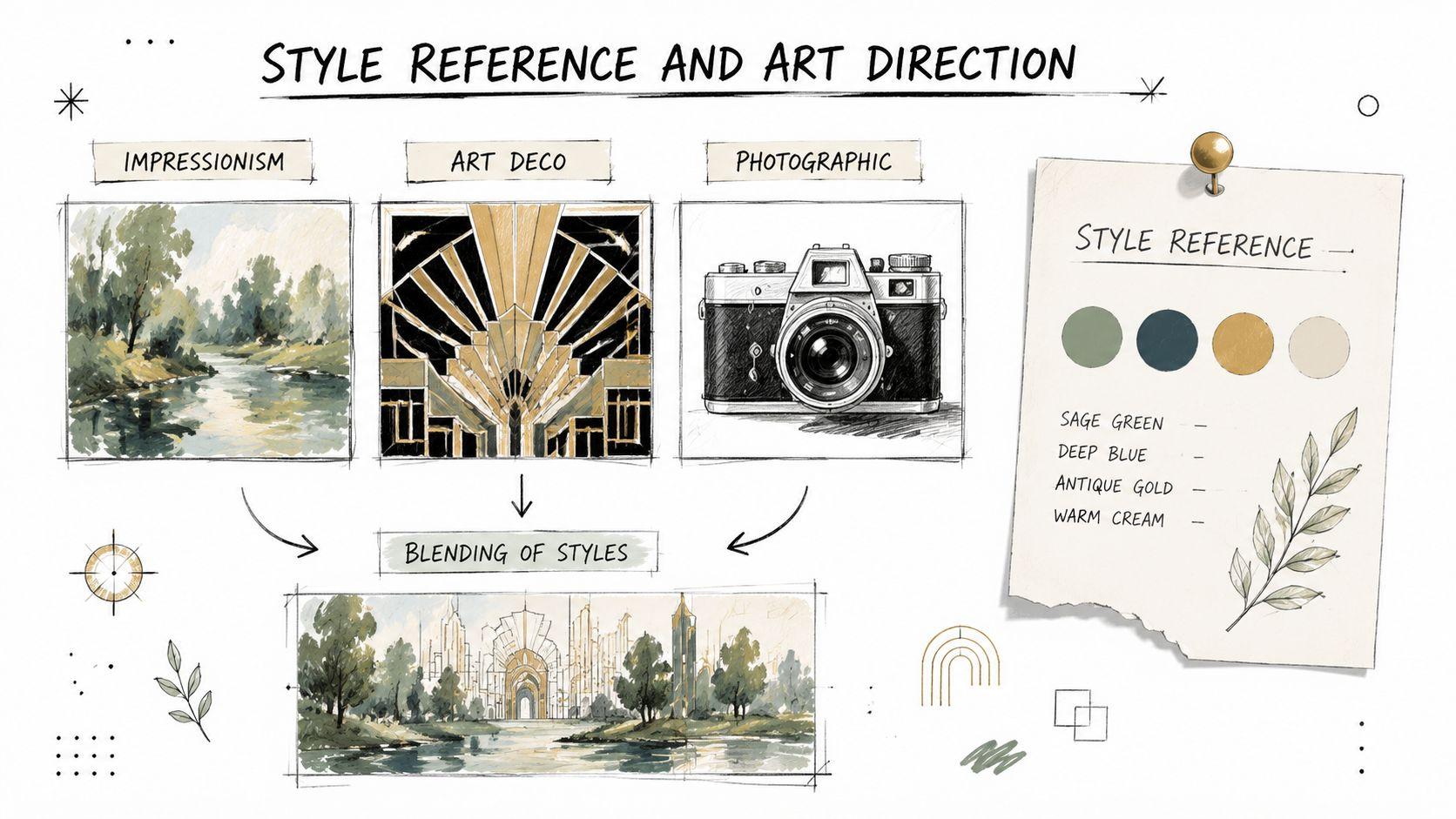
Style references help you replace an abstract request with a recognizable visual system. “Make it creative” gives the model little to work with. “Art Deco poster, geometric framing, metallic accents, restrained symmetry, screen-print texture” establishes direction through shape, palette, material, era, and finish.
A reusable template looks like this:
Prompt: Create a [subject or scene] in a visual direction combining [art movement or design influence] with [second influence]. Use [medium], [palette], [surface or texture], [lighting], and [composition]. Keep the result suitable for [audience or use case], with a consistent visual identity across related images. Avoid [style drift or unwanted visual quality].
Combining two compatible influences can produce a more distinctive result than naming a single style. For example, an e-commerce brand might request “minimalist product photography with Art Deco geometry, cream and deep green palette, polished stone surface, controlled studio reflections.” An educational publisher could use “Impressionist color handling with modern editorial illustration,” while a family content creator might choose “soft watercolor with Scandinavian picture-book design.”
Use references with boundaries
Style names work best when you explain what to borrow. Specify color behavior, line quality, composition, medium, and mood, rather than relying only on an artist or movement name. This reduces the chance that the model produces an exaggerated pastiche. If a living artist's name raises legal or ethical concerns for your project, describe observable traits instead, such as “loose visible brushwork, warm atmospheric color, flattened perspective, and paper grain.”
Keep brand rules stable across a series. Save the palette, preferred medium, background treatment, subject distance, and lighting language in one shared brief. Then vary only the scene or message. A consistent visual vocabulary is more valuable than chasing a new style for every image.
Practical rule: Style should answer how the image looks, not replace what the image needs to communicate.
For teams, a shared workspace can make these briefs easier to revise and reuse. 1chat's blog provides a relevant place to review prompting ideas alongside broader AI workflow discussions. Regardless of platform, compare outputs side by side and keep the version whose visual decisions support the audience and purpose, not merely the one with the loudest aesthetic.
3. Negative Prompt Specification Template
Positive instructions tell the model what to include. Negative prompts tell it what could undermine the result. They're useful when a recurring failure appears, such as unwanted text, watermarks, distorted anatomy, clutter, plastic-looking skin, or an illustration style that doesn't fit a professional document.
Try this structure:
Prompt: Generate [desired subject and scene] with [style, composition, lighting, and purpose]. Exclude [unwanted objects], [visual artifacts], [incorrect materials], [undesired style], [text or branding errors], and [safety or audience concerns]. Keep the final image clean, coherent, and appropriate for [specific use].
For a product image, exclusions might include “watermarks, extra packaging, duplicate products, illegible labels, harsh reflections, and cluttered backgrounds.” For an educational illustration, use “photorealistic gore, frightening expressions, unrelated symbols, decorative text, and distracting background objects.” For a character image, “blurry face, distorted hands, duplicated limbs, asymmetrical eyes, and warped clothing” can identify common failure modes.
Exclude selectively
A long list of negatives can conflict with the creative brief. If you ask for “rough film grain” and then exclude “noise and texture,” the model receives contradictory signals. Build a small library, but activate only the exclusions relevant to the current image.
Negative prompts also don't work identically across models. Some systems expose a dedicated negative-prompt field, while others treat exclusions as ordinary natural-language instructions. Test whether “no watermark” performs better than a comma-separated exclusion list. For text-heavy assets, it may be more dependable to request a clean area and add exact copy in a design tool afterward.
A negative prompt should remove predictable failure, not punish the model for being creative.
Professional users often need family-friendly and platform-safe outputs as well. State the audience and content boundary directly, then inspect the result yourself. No prompt can replace human review for accidental symbols, insensitive representation, unsafe context, or misleading product details.
4. Aspect Ratio and Composition Control Prompt
An image can be visually strong and still fail because the subject is cropped, the copy area is missing, or the composition doesn't suit the destination. Prompt for the format and placement before the model invents a layout.
Use:
Prompt: Create a [platform or asset type] in [aspect ratio or dimensions]. Place the main subject [centered, left third, right third, foreground, or full frame]. Use [symmetry, rule of thirds, leading lines, close-up, wide shot, or overhead view]. Keep [specific safe zone] uncluttered for text or branding. Maintain [background, margin, and focal-point requirements].
A social media manager might request a square product image with the bottle centered and a calm background. A website designer could ask for a wide hero composition with the subject on the left and open space on the right. An email team might specify a banner layout with a clear central focal point and restrained background detail. The use case matters because “wide image” alone doesn't tell the model how the asset will be read.
Prompt for usable space
Mention safe zones in plain language. “Leave the upper-left corner empty for a headline” is more actionable than “make it suitable for text.” If the image will sit behind copy, ask for low-contrast texture in that area rather than a blank white void. If the subject must remain visible on mobile, place it away from edges and request a balanced crop.
Aspect-ratio syntax varies. Some models accept preset labels, others accept numerical dimensions, and some rely primarily on a separate interface control. Use the platform's native setting when available, then reinforce it in the prompt. Pixel dimensions can describe intent, but they don't guarantee the final file will be delivered at those exact dimensions.
Create separate variations for a website header, square thumbnail, and vertical story rather than forcing one image to serve every placement. That preserves the focal point and prevents important details from disappearing during automatic cropping.
5. Parameter-Based Fine-Tuning Prompt
Parameters can make a prompt repeatable, but only when you understand what the selected model supports. A syntax copied from Midjourney, Stable Diffusion, or another generator may be ignored or interpreted as ordinary text elsewhere. Treat parameters as model-specific controls, not universal magic words.
A flexible template is:
Prompt: Generate [subject] in [style] for [use case]. Prioritize [detail level], [composition strength], [style intensity], and [color fidelity]. Use [supported aspect ratio, seed, guidance, quality, or reference controls]. Keep [brand or content constraints] stable across variations.
Stable Diffusion users may work with negative prompts, seeds, guidance settings, samplers, and image references. Midjourney users may rely on its own aspect-ratio, stylization, variation, and reference syntax. Other systems may hide these controls behind sliders or offer only conversational instructions. The correct workflow starts with the platform documentation and a baseline generation, then changes one control at a time.
Tune for the decision you need
More detail isn't always better. A dense parameter mix can produce clutter when the image needs a simple classroom diagram. A strong style setting can overpower a product's actual shape. A high-quality label may influence rendering language, but it doesn't repair a weak subject description or inaccurate brand color.
Keep a record of the full prompt, model, reference assets, parameter values, and selected output. Teams can then recreate a visual direction instead of relying on memory. 1chat's research resources can be useful when a team is organizing background material and deciding which workflow details belong in a shared prompt standard.
Change one control, save the result, and name the reason for the change.
For a brand system, use variables such as [PRODUCT], [PALETTE], [BACKGROUND], and [CAMERA VIEW]. This turns a long prompt into a controlled production template. Don't promise identical results across models, because randomization, model updates, reference handling, and parameter behavior can all change the output.
6. Contextual and Narrative-Based Prompt
A narrative prompt gives the model a reason for the image to exist. It describes a moment, relationship, or practical situation instead of presenting the subject as an isolated object. That often helps lifestyle marketing, children's illustrations, educational storytelling, and family content feel more intentional.
Use:
Prompt: Show [character or subject] in [setting] during [time or season]. They are [action], while [other subject] [related action]. The mood is [emotion], expressed through [body language, lighting, color, and environment]. The image should communicate [audience takeaway] and use [medium or visual style]. Keep the scene [age-appropriate, accessible, realistic, or brand-safe].
A publisher might request a child observing the stages of a seed growing in a classroom garden, with labeled visual clues added later during layout. A marketing team could show a customer preparing tea in a quiet morning kitchen, with the product naturally integrated rather than posed against an empty background. A family creator might depict a parent and child reading together in a warm living room, focusing on connection rather than exaggerated facial expressions.
Direct emotion through observable details
Avoid relying only on words such as “happy,” “inspiring,” or “authentic.” Explain how the mood should appear: relaxed posture, gentle side light, shared eye contact, open body language, or a calm color palette. Include relationships explicitly when multiple characters are present, because vague descriptions can cause the model to assign the wrong action to the wrong person.
Temporal details also shape the image. “Early winter evening” suggests a different palette and light from “bright summer morning.” Narrative prompts leave room for interpretation, so add a few key constraints, such as the subject's age range, clothing type, setting, or safe distance between characters.
Don't ask one image to communicate an entire plot. Choose one readable moment. For a sequence, keep character descriptions, wardrobe, environment, and visual style fixed, then change only the action or time.
7. Technical Photography and Camera Settings Prompt
Photographic language can steer a model toward believable optics, lighting, and depth. It works best when the camera details support the subject rather than decorate the prompt. A lens choice should explain the desired perspective, while an aperture reference should support the requested depth of field.
Try:
Prompt: Create a realistic photograph of [subject] in [location]. Use a [camera type] with a [lens] perspective, [aperture or depth-of-field description], [shutter or motion description if relevant], and [lighting setup]. Frame the subject as [close-up, medium shot, wide shot, or overhead view]. Show realistic [materials, skin texture, reflections, shadows, and surface detail]. Keep the image suitable for [commercial, editorial, educational, or family-friendly use].
An e-commerce business could request a tabletop product photograph with soft three-point lighting, controlled reflections, and enough background separation to keep the packaging readable. A real estate professional might specify a wide interior view with natural daylight, vertical lines kept straight, and realistic room proportions. A small business portfolio could use a medium portrait with gentle rim lighting and a neutral background.
Technical detail needs visual intent
Naming a camera or lens doesn't guarantee physically accurate optics. “85mm portrait perspective” is often more useful than stacking several unrelated camera bodies and exposure values. If you request shallow depth of field, identify which object must remain sharp. If you need the entire product readable, don't combine that instruction with an extreme close-up and heavy blur.
Lighting descriptions usually matter more than brand names. Specify direction, softness, contrast, and color temperature in accessible terms. Also be cautious with “hyperrealistic” and “8K.” Such labels can encourage excessive sharpness, waxy skin, or artificial texture without improving the composition.
For sensitive photographs, use reference images only when you have permission and avoid unnecessary personal information. Review identity, logos, packaging claims, and visible background details before publishing.
8. Prompt Chaining and Iterative Refinement Template
The search for one perfect prompt wastes time. Image generation is more dependable when you treat each output as a draft and refine it through controlled changes. Prompt chaining separates scene decisions, style decisions, composition decisions, and corrections, so you can identify which instruction changed the result.
Start with a compact baseline:
Step 1: Create [subject] in [setting], using [medium or realism level], [basic composition], and [lighting].
Step 2: Keep the subject, setting, palette, and camera view unchanged. Adjust only [one variable].
Step 3: Preserve the approved version. Correct [specific failure] without changing [protected elements].
Step 4: Adapt the final image for [new aspect ratio or use case] while preserving [identity, palette, and focal point].
A small business might first establish a product on a neutral surface, then test warmer lighting, then move the product into a lifestyle setting. An educator could create a clear diagram, refine the labels during post-production, and only afterward request a decorative illustration style. A brand team could approve a hero image before generating related social crops.
Protect approved elements
Use explicit language such as “keep the same bottle shape, label color, camera angle, and background tone.” Reference-image tools may preserve some features more effectively than text alone, but consistency still varies by model. If the platform offers image editing, mask the area that needs change rather than regenerating the whole scene.
Document every version. Record what changed, what improved, and what failed. This prevents a team from returning to an attractive but unusable draft or repeating an experiment without knowing its settings.
Refine the smallest meaningful variable first. Broad rewrites make diagnosis difficult.
Prompt chaining also supports model comparison. Run the same baseline across available generators, then adapt syntax to each model instead of assuming identical instructions will produce identical behavior.
9. Demographic and Inclusive Representation Prompt
Inclusive representation needs more than adding “diverse people” to a prompt. That phrase leaves age, appearance, ability, relationship, setting, and visual agency undefined. Describe who is present, how they participate, and how the image should avoid tokenistic or stereotypical treatment.
Use:
Prompt: Create an [image type] showing [specific people or group] participating in [activity] within [setting]. Represent varied [ages, skin tones, hair textures, body types, cultural backgrounds, and abilities] naturally and respectfully. Show [assistive devices or accessibility features] as ordinary parts of the environment. Use [clothing, lighting, composition, and mood] appropriate to the audience. Avoid stereotypes, exaggerated features, token placement, and making one person appear less engaged than others.
An educational publisher might request a classroom science activity with students who have varied skin tones, mobility aids, and learning needs, with all students visibly participating. A company could show a mixed-age team collaborating in a realistic office without making one person serve as a symbolic backdrop. A family-oriented creator might describe a multigenerational household while specifying genuine interaction rather than a posed lineup.
Specificity should support dignity
Name relevant details when they affect representation, but don't turn people into demographic inventories. Intersectional representation can be useful when the context calls for it, such as an older wheelchair user leading a group discussion or a child with hearing aids participating in a family activity. The image should communicate capability, belonging, and context.
Review outputs with people who understand the audience. Look for stereotype, cultural mismatch, inaccurate assistive devices, awkward anatomy, and unequal visual emphasis. If the image will teach or sell something, ensure that representation supports the message rather than distracting from it.
For children and family content, keep clothing, setting, interactions, and emotional tone age-appropriate. Avoid requesting identifiable real people unless you have permission and a clear reason to use their likeness. Synthetic representation can often meet the communication goal without exposing private family details.
10. Quick-Start Template Library and Prompt Shortcuts
A prompt library turns individual experiments into team capability. Store reusable structures with clear variables, approved examples, model notes, and known failure modes. The fastest template isn't the shortest one. It's the one another person can understand, customize, and evaluate without asking its original author what every phrase means.
A practical library entry might use:
Prompt: Create a [FORMAT] for [AUDIENCE] featuring [SUBJECT] in [SETTING]. Show [ACTION OR ARRANGEMENT]. Use [STYLE], [PALETTE], [LIGHTING], and [COMPOSITION]. Leave [SAFE ZONE] clear for [TEXT OR BRANDING]. Exclude [RELEVANT FAILURE MODES]. Adapt the result for [PLATFORM OR PURPOSE].
Create separate entries for product photos, website heroes, classroom illustrations, family scenes, social thumbnails, and campaign variations. Keep placeholders visually obvious. A social media manager should be able to replace [SUBJECT] and [PALETTE] without accidentally removing the composition rules.
Make the library operational
Give each template a descriptive name, version number, update date, supported model, and example output. Record whether the template depends on a reference image, a negative-prompt field, an aspect-ratio control, or post-generation typography. This helps teams distinguish a prompt problem from a platform limitation.
A school or family workflow should include audience-safety guidance and a reminder not to upload unnecessary personal information. A small business library should separate concept prompts from production prompts, because a moodboard can tolerate creative variation while a product image may need strict color and placement control.
1chat's FAQ can serve as one place to review product and workflow questions while teams develop their own internal standards. The important practice is ownership. Assign someone to retire templates that repeatedly fail, preserve strong versions, and keep model-specific notes current.
Comparison of 10 AI Image Prompt Templates
| Template | 🔄 Implementation Complexity | ⚡ Resource Requirements | ⭐ Expected Outcomes | Ideal Use Cases | 💡 Key Advantages |
| Detailed Scene Description Prompt Template | Medium–High: layered, multi-element descriptions | Moderate time to craft; minimal compute | High detail & consistent, professional images 📊 | Product mockups, educational illustrations, marketing visuals | Consistent branding and fewer regenerations |
| Style Reference and Art Direction Prompt | Medium: select & combine style references | Low–Moderate: research referenced styles | High stylistic consistency and cohesive aesthetics ⭐ | Brand identity, series art, cohesive campaigns | Fast achievement of a defined aesthetic; brand coherence |
| Negative Prompt Specification Template | High: requires knowledge of common failures | Low compute; higher expertise/time to refine | Cleaner, artifact-free outputs; fewer defects 📊 | Publication-ready images, product photos, professional assets | Removes unwanted artifacts and reduces iterations |
| Aspect Ratio and Composition Control Prompt | Medium: technical framing and safe-zone specs | Low–Moderate: dimension knowledge; testing | Design-ready images with accurate sizing ⭐ | Social media posts, website heroes, print layouts | Saves cropping/post-production; channel-ready assets |
| Parameter-Based Fine-Tuning Prompt | High: numeric tuning and platform-specific syntax | Moderate–High: platform knowledge and testing time | Very precise, reproducible, professional results ⭐ | High-fidelity brand assets, iterative refinement at scale | Granular control and strong reproducibility |
| Contextual and Narrative-Based Prompt | Medium: strong descriptive writing needed | Low–Moderate: time to craft scenarios | Emotionally engaging, human-centered imagery ⭐ | Storytelling, marketing, children's illustrations | Produces relatable visuals with stronger emotional impact |
| Technical Photography and Camera Settings Prompt | High: requires photography/technical skill | Moderate: knowledge of gear, exposure, lenses | Highly photorealistic results with DOF control ⭐ | E‑commerce product shots, real estate, portfolios | Professional photography look without equipment |
| Prompt Chaining and Iterative Refinement Template | High: multi-stage process and documentation 🔄 | High time, tokens/credits; organized workflow | Highly customized and optimized outputs 📊 | Brand development, complex unique visuals, R&D | Progressive improvement; builds reusable prompt libraries |
| Demographic and Inclusive Representation Prompt | Medium: thoughtful, specific demographic specs | Low–Moderate: research and review cycles | Inclusive, representative imagery that reduces bias ⭐ | Inclusive marketing, educational content, family-oriented media | Supports social responsibility; authentic representation |
| Quick-Start Template Library and Prompt Shortcuts | Low: pre-built, minimal setup 🔄 | Low: minimal skill required; fastest turnaround ⚡ | Consistent baseline quality; rapid output ⭐ | Non-technical teams, fast content production, scaling | Fastest time-to-image; easy team standardization |
Turn Prompt Examples Into a Repeatable Visual Workflow
The best prompt isn't the longest template. It's the clearest description of the decisions that matter for the image's job. Start with a scene or narrative foundation, then add art direction or photography cues that define the visual language. Set the intended use and composition before you ask for decorative detail. Apply only the exclusions that address a known risk, then refine the result one variable at a time.
A practical sequence looks like this:
- Define the communication goal: Decide whether the image must explain, sell, identify, reassure, entertain, or establish atmosphere.
- Name the subject and action: State what viewers should notice first and what the subject is doing.
- Set the environment: Add location, time, materials, background treatment, and relevant context.
- Choose the visual direction: Specify medium, art movement, photographic approach, palette, texture, or brand rules.
- Control the frame: State aspect ratio, focal point, viewpoint, crop, and safe space for copy.
- Add useful exclusions: Remove watermarks, unwanted text, extra objects, unsafe content, or visual artifacts that apply to the assignment.
- Generate a baseline: Don't overload the first attempt with every possible parameter.
- Refine deliberately: Change lighting, composition, styling, or detail separately so you can understand the effect.
- Review for purpose: Check accuracy, inclusion, readability, platform fit, brand alignment, and audience safety.
Model differences matter at every stage. One generator may interpret a conversational paragraph well, while another responds more consistently to concise keyword groups. Some systems support dedicated negative prompts, seeds, image weights, or style controls. Others expose fewer controls and expect you to describe the desired change in natural language. Parameters, reference images, character consistency, and text rendering don't transfer identically, so copy the creative intent, not necessarily the syntax.
The same caution applies to realism. Current visual preferences include both polished commercial photography and intentionally imperfect aesthetics such as natural skin texture, film grain, and lo-fi treatment. Choose based on the audience and use case. A family story illustration may benefit from warmth and visible texture, while a product listing may require restrained reflections and faithful packaging. Trend language can help establish direction, but it shouldn't replace a clear subject, composition, or constraint.
Privacy deserves a place in the workflow, especially for school, family, and small-business material. Minimize personal details in prompts and reference images. Avoid unnecessary names, addresses, faces, private documents, customer information, and identifiable locations. Obtain permission before using a real person's likeness, and inspect generated images for details that reveal more than intended.
A privacy-first workspace such as 1chat can fit projects where families, students, and small teams want image generation alongside work with language models. Use factual judgment about the information you share, review the service's current policies, and keep sensitive material out of prompts unless it's necessary and permitted.
Finally, save the full prompt, model, settings, reference assets, output, and revision notes for every successful result. Give templates clear variable names and maintain a shared library for approved brand colors, camera views, aspect ratios, exclusions, and audience rules. For more examples to support that practice, explore this guide to mastering AI image prompts.
Start today with one real asset, such as a website hero, classroom illustration, product mockup, or family-friendly story scene. Generate a baseline, change one meaningful variable, document what improved, and add the winning version to your team library. That small habit will produce more dependable results than collecting disconnected prompt tricks.
Choose one upcoming image project and turn its brief into the structured template above. Keep personal information out, record the model and settings, and review the final image before sharing or publishing. If your team or family needs a single workspace for AI conversations and image work, try 1chat with a privacy-first workflow and build your first reusable prompt library there.