Only 11.9% of businesses with 10–49 employees used AI in 2024, compared with 40% of firms with at least 250 employees, according to OECD research on small-business AI adoption. Those figures cover AI broadly, not just chat tools. If your office is starting now, you're not unusually late.
The useful question isn't how quickly you can catch up. It's whether your team finishes a task faster after checking and correcting the AI's work. Good AI implementation for small business starts with that measurement, then adds clear boundaries people can follow without an IT or legal department.
Pick the One Task Worth Automating First
The adoption gap makes a broad rollout tempting. Resist it. Choose repetitive work that's easy to check, uses limited sensitive information, and won't cause serious harm if a draft is wrong.
Start with your actual backlog, not a vendor's demonstration. The table below offers a starting assessment, not measured workload data. Replace the qualitative time estimates with your team's own time logs before choosing a pilot.
Task scoring for a first AI pilot
| Task | Weekly hours (estimate) | Cost of one error | Data sensitivity | Verdict |
| First-draft customer email replies | Moderate, verify with logs | Low if a person checks before sending | Low to medium after redaction | Start here |
| Product description rewrites | Moderate, depends on catalog workload | Low when checked against approved specifications | Low for public product information | Start here |
| Social post drafts | Modest, varies by publishing schedule | Low for routine, reviewed content | Low for public information | Good second pilot |
| Invoice data entry | Potentially substantial, verify with logs | High, wrong amounts can reach the ledger | High | Later, with a checkpoint |
| Contract review | Intermittent, depends on workload | Very high | High | Assist only, lawyer signs off |
| Hiring and pay decisions | Varies by hiring and review activity | Very high | Very high | Keep human-led |
“Low error cost” needs a boundary. A routine reply about opening hours is different from a refund commitment, product-safety statement, or promise about delivery. Narrow the task until the reviewer can check it against an approved reference.
Score work before choosing software
Ask the person doing each task to answer:
- Time consumed: How much active work does it require each week, including revisions and handoffs?
- Failure cost: What happens if an incorrect answer gets through? Include customer harm and cleanup work, not just money.
- Information involved: Does the task touch customer records, financial information, employee details, or confidential business plans?
Prefer substantial recurring workload with cheap, visible mistakes. Don't choose a task merely because it takes time. Contract interpretation might consume hours while still being a poor automation candidate.
For help building a candidate list, Cyndra's guide to streamline small business tasks with AI can serve as a companion resource. Apply your own risk assessment before adopting any suggested workflow.
Practical rule: Start with one task, one accountable owner, and one measurable outcome. A faster draft isn't the outcome. A finished, checked piece of work is.
Choosing a Privacy-First AI Tool for Your Team
A tool is privacy-first only when its written terms and working controls answer your questions. Don't treat a reassuring homepage as evidence that a particular subscription protects your business data.
Use this checklist before uploading a real customer document.
Privacy and team criteria for choosing an AI tool
| Criterion | What to check | Red flag |
| Training on your data | Whether inputs train models and whether you can opt out | Vague policy or no written answer |
| Data retention | How long chats and files remain stored, and whether you can delete them | No deletion option |
| Team controls | Shared workspace, user roles, and removal of departing employees | One shared login for everyone |
| Model choice | Access to several models for output comparison | Single-model lock-in when comparison is required |
| Document handling | PDF limits, processing location, and file retention | Unclear file storage |
| Seat pricing | Total cost at your headcount, minimum seats, and billing commitments | Price available only through a sales call |
| Exit | Export of chats and files | No export function |
Treat an unresolved red flag as a reason to stop the evaluation. Some criteria are operational preferences rather than privacy requirements, but they still matter if they're necessary for your workflow.
Get answers that apply to your plan
Ask each vendor in writing whether inputs train models, how long chats and uploads are retained, and how an administrator removes a departing employee's access. Confirm whether those answers also apply to any model providers or document-processing services involved.

1chat is one privacy-first, team-oriented option to evaluate. It brings multiple AI models into a single interface and supports PDF analysis and image generation. That combination can suit a team comparing responses, but it doesn't remove the need to verify contractual protections and available administrative controls.
Comparing models can expose disagreements; agreement doesn't prove an answer is correct. Keep approved business documents as the reference.
Plan prices and seat minimums aren't listed here. Check current vendor terms, then run a short trial on the selected task using redacted material. Record whether staff can complete the whole workflow, including checking, exporting, deleting, and handing work to a colleague, before purchasing broader access.
What AI Really Costs for a Small Team
Typical cost lines for a small-team AI rollout
| Cost line | Planning range | What drives it |
| Chat AI seats | Limited pilot access through broader team access | Per-seat charges, usage limits, and overlapping subscriptions |
| Pilot setup | Light setup through substantial process mapping | Baseline sheet, prompt template, and task log |
| Staff training | Brief orientation through repeated coached practice | Task complexity and staff familiarity |
| Review and editing | Light checking through extensive rewriting | Output quality, volume, and consequences of mistakes |
| Integration | Manual transfer through custom development | Connector availability and specialist support |
| Governance documents | Simple usage rules through specialist-reviewed procedures | Data sensitivity and business obligations |
| Monthly measurement | Routine log review through detailed investigation | Tracking quality and whether results remain stable |
These are budgeting categories, not vendor quotes or industry benchmarks. Put your own labor rates and observed effort beside them. Check current subscription pricing before approving access, including any usage charges or billing commitments.
Count the checking, not just the drafting
Reliability and accuracy concerned 45% of small-business respondents, while 25% had no formal procedure for reviewing AI-generated content, according to the Small Business & Entrepreneurship Council's technology-use survey. That's a strong reason to budget review work explicitly rather than assuming employees will absorb it.
Consider a hypothetical office where AI makes first drafts much faster, but the manager then checks every claim, restores missing context, and rewrites the tone. The drafting employee may feel more productive while the manager becomes the bottleneck. The business hasn't demonstrated a saving until both people's time is counted.
Track active working time, not merely elapsed time between request and response. Include preparing inputs, prompting, reading, checking, correcting, and transferring the result.
Don't subtract a subscription bill from “hours saved.” Convert time to a consistent cost basis first, and distinguish capacity freed from cash actually saved.
Separate initial setup, training, and governance work from recurring expenses. Refresher training, prompt maintenance, and error investigation belong in ongoing costs when they recur.
Use this calculation:
Net monthly value = value of baseline labor avoided − AI-assisted labor cost − subscriptions − recurring upkeep.
AI-assisted labor includes verification and correction. Count those costs once, not both inside task time and again as a separate deduction. Treat setup as an investment to recover, and don't assume freed capacity becomes additional revenue unless the business can use it.
Set Minimum Governance Before the Pilot Starts
Only 23% of surveyed U.S. small and midsize businesses had a documented AI policy; 28% relied on informal guidelines, and 24% were developing a policy, according to the Pax8 Pulse report. A small office doesn't need to imitate an enterprise compliance department. It needs clear instructions employees can apply while doing real work.
Write rules people can use
- Define what must never be entered. Include passwords, client identifiers, unreleased financials, employee health records, and children's personal information. Use redacted or synthetic examples during the pilot.
- Require accountable human review. Legal, financial, employment, medical, and child-safety content must go to an appropriately qualified reviewer before anyone acts on it.
- Keep a controlled record of sensitive work. Where use is permitted, record the redacted prompt, output, reviewer, and final decision. Don't create a second confidential-data problem by copying restricted material into an open spreadsheet.
- Name the person responsible. Staff need someone who can approve exceptions, answer questions, suspend access, and coordinate an incident response.
- Recheck vendor terms. Set a recurring review and repeat it whenever the tool, plan, model access, or data-processing arrangements change.
These rules should answer practical questions without requiring employees to interpret legal language. Include examples of an acceptable input and a prohibited input for the actual pilot task.
Review the published privacy policy, but don't assume a general policy answers every question about your account. Ask for clarification where the wording leaves uncertainty.
Stop condition: If an employee can't tell whether information is permitted, they should pause and ask the owner rather than upload it.
A short policy still needs an incident instruction. Tell staff whom to contact after an accidental upload, how to stop the workflow, and where to record what happened. Don't promise that deleting a chat necessarily resolves every downstream exposure.
The pilot's approval depends on these controls being usable, not merely written. Score the candidate tasks this week, assign the owner, and reserve the pilot window after baseline measurement is complete.
Getting Your Team to Use AI Consistently
42% of small-business owners reported no familiarity with AI, while 58% had some familiarity. Among owners already using AI, 57% said they had deliberately introduced it into operations, according to the NFIB survey on small-business technology use. Don't assume employees share the same starting point, and don't let adoption spread without an announced scope.
Make the rollout concrete
Consider a proposed rollout for routine customer-email drafts. The office manager owns the pilot, a customer-service colleague tests factual accuracy, and an administrator tests whether the workflow is easy to follow. These are suggested roles, not a reported case study.
At the opening session, the manager explains what changes: employees may use approved, redacted inputs to prepare drafts. Sending messages and making commitments remain human responsibilities.
The group works through a real, permitted task together. They compare the draft with the approved reference and identify what the reviewer must check.

Build the shared prompt library from that practice, not from a large collection of untested templates.
- Keep useful context: State the intended reader, approved facts, required format, and things the draft must not promise.
- Show an acceptable result: Include a sanitized example so employees can judge tone and completeness.
- Explain failure handling: Tell the model to flag missing information, and tell staff when to reject the response.
- Record changes: Keep the current template clearly marked so colleagues aren't testing different instructions unknowingly.
Make rejected outputs useful
During the team's regular check-in, review difficult examples without blaming the person who logged them. A rejection can reveal missing source information, an unsuitable task, or a prompt that asks for too much.
Address workload concerns directly. Explain how the business intends to use any freed capacity, which responsibilities remain unchanged, and what decisions haven't been made. Don't promise employment outcomes you can't guarantee.
Consistent use doesn't mean compulsory use on every task. Employees should know when the approved workflow applies and when ordinary manual work remains the better choice.
How to Run a Two-Week AI Pilot
Keep the live pilot separate from baseline collection. A rushed comparison against staff recollection won't tell you whether the workflow actually improved.
Set up the comparison
- Map the current process. Write down the input, person doing the work, approver, output destination, and failure consequences. This exposes handoffs that a faster draft alone won't fix.
- Measure before introducing AI. Establish a baseline for at least two weeks, recording active minutes per task, revisions, and errors in reviewed work. Use comparable task types so an easier workload doesn't look like a technical improvement.
- Define acceptance before testing. Set a quality threshold, a net-time-saving target, and clear stop conditions. Base them on the existing standard and the consequences of failure rather than borrowing an arbitrary acceptance percentage.
- Limit participation and standardize inputs. Have a small pilot group use the approved prompt and reference material. Keep enough consistency to identify whether problems come from the workflow, instructions, or missing information.
- Log every outcome. Mark outputs accepted, edited, or rejected, and record preparation, review, correction, and transfer time. Also note the reason for rejection so the owner can distinguish cosmetic edits from factual failures.
- Apply the governance rules. Route high-stakes material through the mandatory reviewers and stop prohibited data from entering the tool. A trial doesn't justify relaxing the controls.
- Make the decision at the end of the pilot. Compare quality, net task time, completed-task cost, and sensitive-data handling with the baseline. Inspect failures as well as averages before approving expansion.
The baseline and staged evaluation above are implementation recommendations. Census-linked research published through MIT's Initiative on the Digital Economy supports the broader principle: AI benefits require complementary process development, infrastructure, organizational changes, and worker training, rather than inserting technology into unchanged operations.
For an email task, that might mean replacing scattered reference documents with an approved answer sheet and routing only exceptions to the manager. Otherwise, the manager may still repeat the original work during review.
Use this checklist when considering what happens after a successful pilot.
Apply a real go-or-no-go test
Approve expansion only when quality holds, savings exceed tool and review costs, and sensitive-data handling is documented. Faster output with more factual mistakes isn't a pass. Neither is good output that requires more total labor.
If the pilot fails, narrow the task before changing everything else. Drafting a reply from an approved answer may work where interpreting an entire customer history doesn't. Change a defined part of the workflow, then test again.
Connecting AI to Your Existing Tools and Data
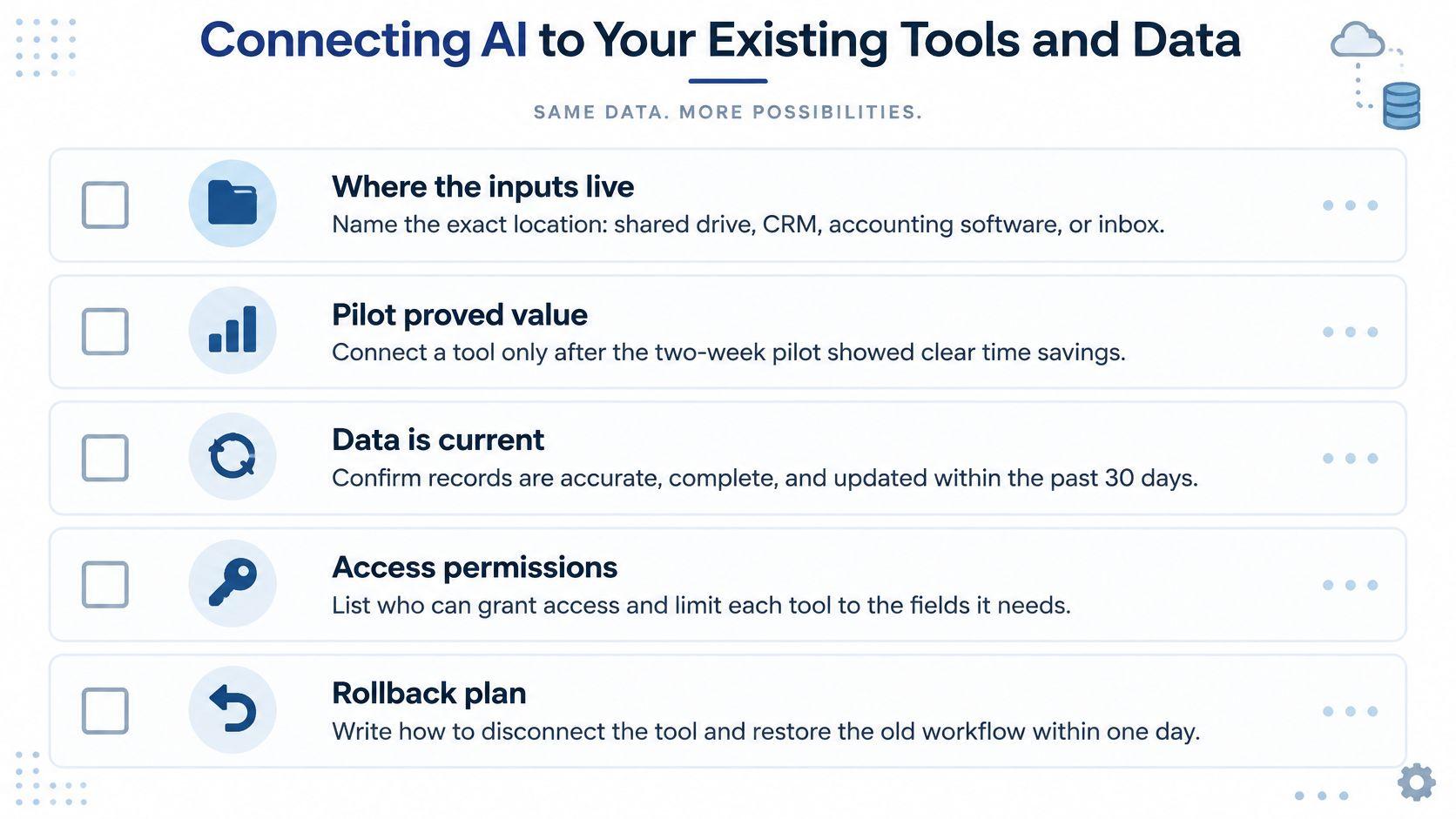
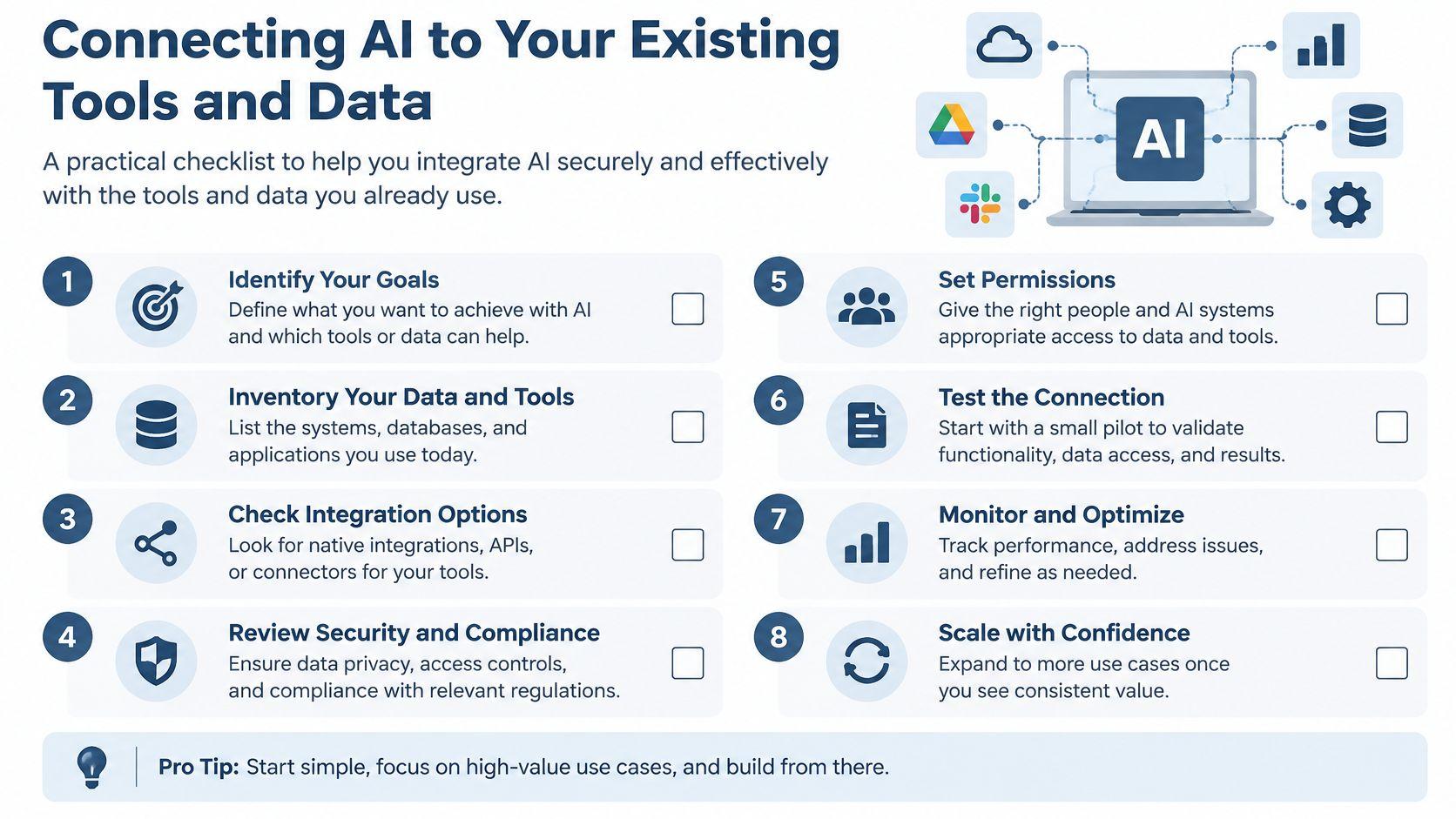
Integration belongs after demonstrated task-level value. Don't commission a connector merely to avoid discovering whether employees can use the output.
Start by identifying exactly what the connection would read, change, and send.
Check the workflow before granting access
- Input location: Name the shared-drive folder, CRM record, accounting screen, or inbox supplying the information.
- Sensitive fields: Identify information the task doesn't need and exclude it before transfer.
- Access owner: Record who can authorize access and who can revoke it.
- Consistent source material: Check file names, templates, required fields, and conflicting versions.
- Current information: Define how staff verify that the source is still valid for the task.
- Output destination: Specify where approved work goes and whether employees must retype it.
- Failure handling: Assign responsibility for rejected records, duplicate runs, and unavailable services.
- Rollback: Document how to disconnect the tool and resume the previous process.
A clean input isn't merely a readable document. It's the right version, with sufficient context and permission for the intended use.
Choose the least complicated connection
Manual transfer is a sensible starting point. Copying permitted material between systems avoids connector setup and makes hidden decisions visible, although it still consumes employee time. Keep the destination explicit so drafts don't accidentally become final records.
Connector-based automation suits repeated work with stable inputs and a clear exception path. When evaluating tools such as Zapier or Make, verify the exact applications, permissions, actions, and charges required for your workflow rather than assuming a connection supports everything you need.
Keep approval before an action that affects customers or the ledger. Reading a record, proposing an update, and committing that update are different permissions. Grant only what the task requires.
Don't automate transfer until the manual workflow has stayed reliable through ordinary work and realistic exceptions. Test duplicates, missing fields, outdated references, and rejected outputs, not just the successful path.
Choose a recurring task from this week's workload, name its owner, and begin the baseline log. Write the usage rules before introducing real work, then schedule the pilot and its decision meeting. Buy broader access or connect business systems only when the results show less total work, acceptable quality, and controlled data handling.