You finish a client call and realize nobody took proper notes. The recording bot did, but it also assigned a blunt comment to the wrong person, captured a private HR remark, and produced a polished summary that subtly changed the meaning of a commitment. The transcript exists, yet the meeting record is less trustworthy than the conversation itself.
That's the central problem with AI meeting transcription in 2026. The question isn't only whether software can turn speech into text. You also need to know who consented, what gets stored, which speaker receives each statement, how action items are interpreted, and which conversations should never be recorded. Accuracy, action extraction, and privacy are separate problems packaged under one product label.
The Meeting Where the AI Took Notes
The team had gathered around a small conference table after a difficult client call. The customer had challenged a delivery date, the project manager had offered a conditional response, and an employee had briefly mentioned a sensitive staffing issue before the call ended. Everyone was relieved when the AI notetaker produced a summary within minutes.
Then the review began.
The system attributed the delivery promise to the wrong speaker. It turned “we can probably do that if legal approves” into a firm commitment. Worse, the transcript contained the staffing comment, even though nobody had intended to preserve it in the client-call record. The tool had performed exactly what it was designed to do, capture and process the meeting, while the team had failed to decide whether the meeting should be captured at all.
The practical question: Can you trust the entire recording workflow, not just the sentence-level transcript?
AI meeting transcription has moved well beyond a niche productivity feature. One industry roundup estimates the market at $3.86 billion in 2025, with a projection of $29.45 billion by 2034, implying a 25.62% compound annual growth rate. The same roundup reports that about 70% of companies describe their AI adoption as moderate or full, with meeting transcription among the leading use cases. Those figures come from the meeting transcription adoption statistics roundup.
That growth makes generic tool roundups less useful for small businesses, families, and student groups. An enterprise buyer may have legal review, managed identity, retention controls, and an information-security team. A five-person business or a family may have one person clicking “record,” a shared cloud folder, and no reliable deletion routine.
This guide uses a different buying order:
- Privacy first: Decide who may record, what requires permission, and what stays off-limits.
- Accuracy second: Test the tool in the rooms, accents, microphones, and interruptions you have.
- Workflow third: Make sure summaries identify decisions and accountable owners rather than merely producing attractive notes.
- Tool choice last: Select software only after you know what data it may handle and where the output must go.
By the end, you should be able to evaluate a transcript as a business record, not just as a convenient text file.
How AI Meeting Transcription Actually Works
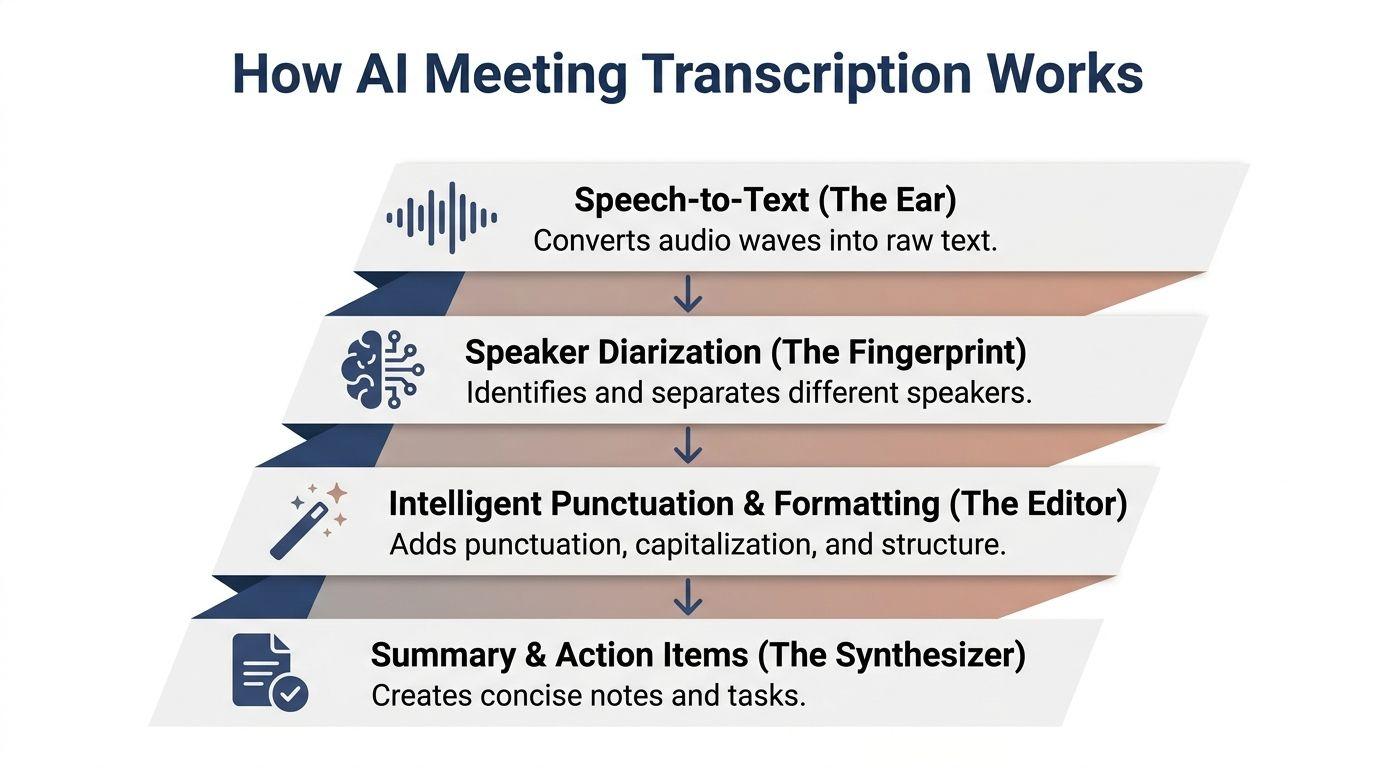
Most meeting assistants combine several layers. Understanding them helps you diagnose errors instead of treating every mistake as a mysterious “AI problem.”
The ear turns sound into words
Speech-to-text is the first layer. Think of it as an interpreter listening through a microphone and writing down its best guess. The system receives audio, detects speech patterns, and produces a stream of words. Whisper-class architectures are common reference points in this area, but the result still depends heavily on microphone placement, background noise, vocabulary, and overlapping voices.
A laptop microphone in a quiet room gives the system a cleaner signal than a distant microphone at the end of a conference table. The software can't recover every word that the audio never captured clearly.
The fingerprint separates speakers
Speaker diarization answers, “Who spoke when?” It labels segments as Speaker 1, Speaker 2, or similar placeholders. Picture several people writing on one shared whiteboard. Diarization tries to draw boundaries around each person's handwriting, even when people interrupt one another.
Speaker identification goes further by trying to replace those placeholders with actual names. That can help in recurring team meetings, but it creates an extra failure point. If the system recognizes the wrong voice, it can attach a correct sentence to the wrong person.
The editor adds structure
The next layer handles punctuation, capitalization, paragraphs, and formatting. It turns a continuous stream into something readable. This layer may also detect topics, decisions, questions, and changes in subject.
It's useful, but formatting can make an uncertain interpretation look authoritative. A neatly bulleted statement still needs review if the underlying audio was ambiguous.
The synthesizer creates meaning
Summarization and action extraction convert the transcript into decisions, follow-ups, risks, and tasks. This is less like copying notes and more like asking an assistant to infer what mattered. The prompt, model, meeting context, and transcript quality all affect the result.
For a broader technical overview, the AI meeting transcription guide 2026 offers useful background. You can also consider how a private workspace such as 1chat's research environment might fit into a review process where humans inspect generated text before sharing it.
Latency adds another tradeoff. A live assistant feels responsive only when transcript delivery is fast enough to follow the conversation. One 2026 benchmark reported about 270 milliseconds to first byte and about 698 milliseconds to the final transcript for a low-latency model, while Whisper-based systems took more than 1,000 milliseconds to final output. The live transcription latency benchmark shows why streaming design and model architecture affect the experience as much as raw recognition quality.
What Realistic Accuracy Looks Like in 2026
“Up to 99% accuracy” sounds decisive until you ask what the test measured. Speech recognition teams usually discuss word error rate, or WER, the proportion of words that the system gets wrong through substitutions, deletions, or insertions. A lower WER is better, but the number only means something alongside the recording conditions.
For clean studio speech, broader benchmarks often place WER around 2% to 5%. Typical meeting scenarios commonly land around 8% to 15% WER, according to independent transcription accuracy benchmarks. Standard business meetings or rooms with a small number of speakers may reach about 85% to 92% accuracy, while noisy, overlapping, accented, or field-recorded audio can fall to 60% or lower.
The gap comes from the environment, not only the model. Far-field microphones capture room reflections and side conversations. Crosstalk makes speaker boundaries uncertain. Accents, specialist terms, names, low voices, and people speaking while someone else is finishing a sentence all increase the difficulty.
A Microsoft study using seven asynchronous distant microphone streams reported 22.3% WER and 26.7% speaker-attributed WER. On non-overlapping speech, the system came within 3% of close-talking microphone performance, which is encouraging, but it also illustrates the condition that matters: the system performed much better when speakers weren't talking over one another. The figures are documented in the Microsoft meeting transcription benchmark summary.
Ask what the accuracy claim means
If a vendor claims 95% accuracy, ask for two things:
- The metric: Is the claim based on WER, sentence accuracy, or a human rating?
- The test condition: Was the audio clean, close-mic, single-speaker speech, or a real meeting with interruptions?
If the vendor can't provide both, treat the claim as a best-case signal rather than a forecast for your meetings.
The right threshold depends on the job. A transcript may be good enough for searching a discussion or drafting internal notes while still being unsafe for a verbatim quote. A legal, disciplinary, medical, or contractual record deserves a human-controlled process and may require a different approved solution altogether. Don't let a high average score substitute for fitness for purpose.
Why Action Items Are the Real Productivity Battle
A transcript can be accurate and still fail the meeting. The team doesn't need every sentence preserved as an archive. It needs a reliable answer to four practical questions: What must happen, who owns it, when is it due, and what condition could block it?
Consider this exchange:
“I'll check with finance, and if they approve the revised budget, Maya can update the proposal before we send it to the client.”
A weak summary might produce one vague item, “Update proposal.” A useful one should preserve the dependency, identify the finance check, distinguish the owners, and avoid inventing a deadline. That requires interpretation, not transcription.
Recent coverage reports transcription accuracy around 92.8% to 95.1% on clear audio, while action-item capture reaches only about 68% to 81%. Another summary attributes 68% of missed action items to ambiguous sentence structure rather than poor audio. These findings appear in the review of multi-agent action-item extraction.
Make commitments easier to detect
You can improve results before changing tools. People speak vaguely in meetings, and models inherit that vagueness.
- Name the owner: Say “Maya owns the proposal update,” rather than “someone should update the proposal.”
- Use an action anchor: Start with “Action item” when a commitment is made.
- State the condition: Say “after finance approves,” “once the client replies,” or “if legal signs off.”
- Separate decisions from ideas: Mark a suggestion as a suggestion until the group agrees.
- Give a deadline when one exists: If there's no date, the summary should say “deadline not specified,” not guess.
These habits help humans as much as models. They also make later review faster.
Treat the summary as a draft
Clean the transcript before asking for a final action list. Correct names, remove irrelevant private material, and mark uncertain passages. Then use a prompt that requires evidence:
“List only commitments explicitly made in this transcript. For each item, identify the named owner, stated deadline, dependencies, and supporting sentence. If any field is missing, write ‘not specified.’ Separate decisions, open questions, and risks.”
Finally, connect approved actions to a task or calendar system. An action item that remains inside a meeting assistant is an attractive form of procrastination. The workflow succeeds when a person reviews it, accepts or edits it, and sends it to the place where work is managed.
Privacy, Consent, and the Recordings That Should Not Exist
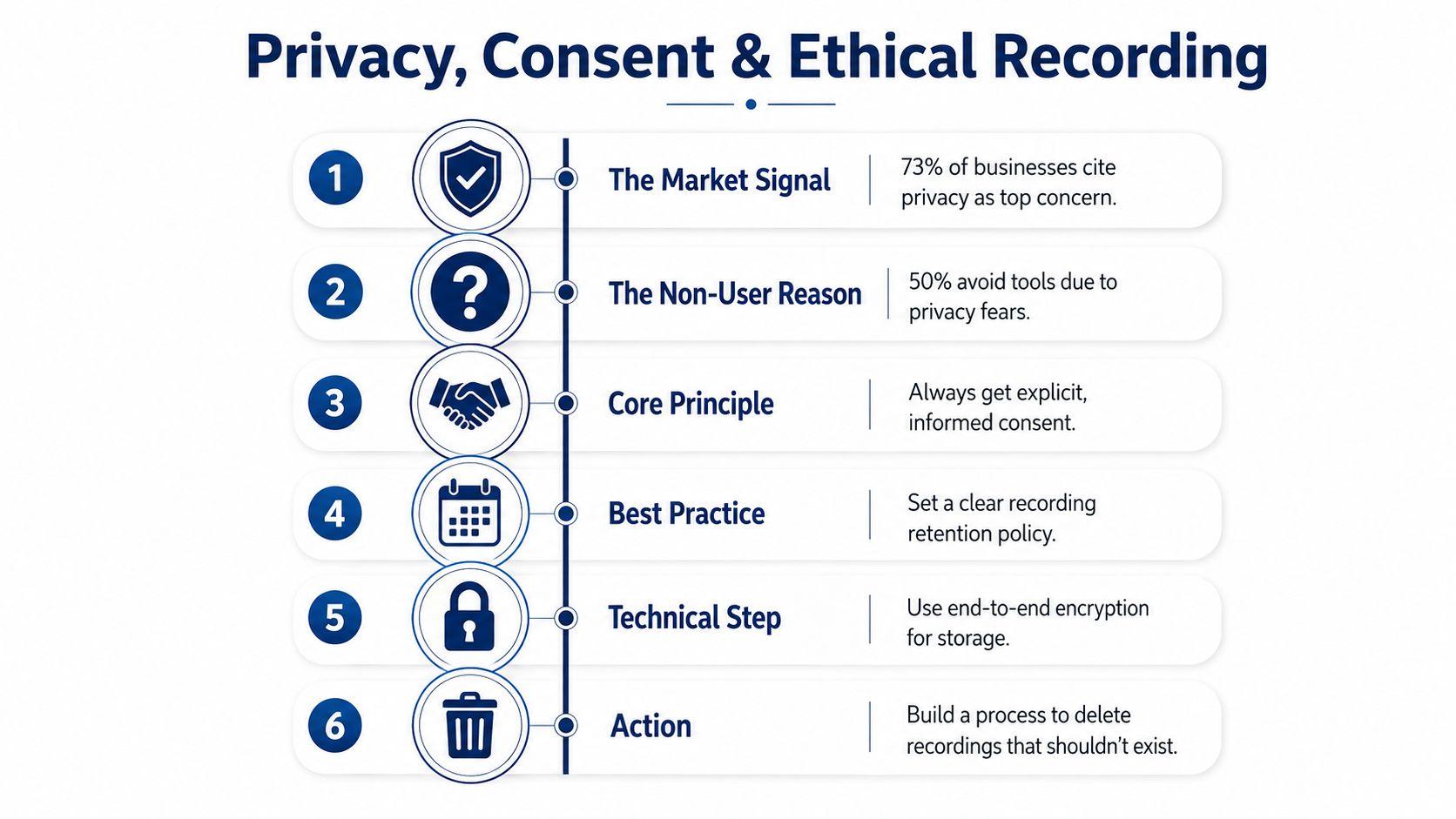
Privacy isn't a footnote to AI meeting transcription. It determines whether the workflow is appropriate in the first place. Recent market coverage reports that 73% of businesses cite privacy as their primary concern, while 50% of non-users say privacy is why they haven't adopted AI note-takers. Those figures are reported in coverage of AI transcription tools under scrutiny.
Consent is often weaker than teams assume. One 2026 U.S. report found AI notetakers present in one in three workers' meetings, while only 34.7% said they were always asked first. A visible bot icon isn't the same as informed permission, especially when guests, children, clients, or people unfamiliar with the platform are present.
Use a consent workflow people can understand
A workable process should be simple enough that nobody has to improvise it:
- Disclose at invitation time: Add a plain-language line explaining whether audio, video, transcript, or summary will be created.
- Announce it aloud: At the start, name the tool, its purpose, and where the output will be stored.
- Offer a real opt-out: Explain how someone can decline, leave the tool out, or request that a segment not be retained.
- Set a short retention window: Define deletion in days rather than allowing recordings to remain indefinitely.
- Redact sensitive sections: Remove HR details, medical information, financial data, client secrets, and material involving minors when the full record isn't necessary.
- Review vendor terms: Check whether the provider uses content for model training, who can access it, where it is processed, and how deletion works.
Storage distinction: “Encrypted” means the data is protected while stored or transferred. “Not stored” means there's no retained recording to discover, share, or delete later.
Create a do-not-record list
Small organizations and families need explicit boundaries. Meetings that should normally stay outside automatic recording include private HR conversations, health discussions, disciplinary matters, sensitive family conversations, counseling or pastoral discussions, negotiations involving confidential client information, and any session involving minors unless the responsible adults understand and approve the process.
GDPR-style expectations may apply depending on the people, locations, and data involved. A university privacy note on transcription tools warns that recorded or transcribed content can create compliance and liability concerns, particularly when it contains regulated information. It also highlights the difference between centrally managed tools with deletion controls and unapproved tools that leave users responsible for manual cleanup.
Use the privacy guidance for AI-assisted workspaces as a prompt for questions, not as a replacement for your own legal review. The safest transcript is sometimes the one you decide not to create.
Setting Up a Workflow That Actually Works
A useful setup doesn't require a long rollout. Start with one recurring meeting and make the privacy decision before selecting a model.
| Setup Stage | Small Business Default | Family or Student Default |
| Capture layer | A named host records only approved meetings | A responsible adult or group organizer decides whether recording is appropriate |
| Data destination | A restricted workspace with a documented deletion date | Local or tightly limited storage, with no casual sharing |
| Transcript review | One meeting owner checks names, decisions, and actions | A participant reviews for sensitive family or student details |
| Prompt design | Require owners, deadlines, dependencies, and evidence | Ask for plain-language notes and clearly marked uncertainties |
| Final output | Approved tasks go to the team's task or calendar tool | Only necessary reminders or study notes are retained |
First, decide who controls capture. Ask whether a bot joins the call, whether the platform records centrally, or whether a local tool processes audio without sending it elsewhere. Don't assume “local” means risk-free, but do ask where raw audio and transcripts travel.
Second, separate transcription from interpretation. The transcript should be treated as an editable source. The summary is a draft derived from it. A human should review both before distributing anything that contains personal, commercial, academic, or employment-sensitive information.
Use prompts that expose uncertainty
For a small business, try:
“Create four headings: decisions, action items, open questions, and risks. For each action, include the exact owner, deadline, dependency, and evidence from the transcript. Do not infer missing details.”
For a family or student group:
“Summarize only the information needed for the agreed plan. Exclude personal details unrelated to the plan. Mark unclear statements as uncertain, and do not create tasks that no person explicitly accepted.”
Then connect approved results to the system people already use. A task board, calendar, or team chat is more useful than a permanent archive nobody opens. Schedule a weekly review to delete recordings, remove unnecessary transcripts, and revise prompts when the summaries miss context.
Before subscribing, test the workflow with representative audio, review the provider's data-use and deletion terms, and compare the cost against the meetings you'll process. You can inspect current options through 1chat's pricing information, but the same evaluation questions apply to every vendor.
Putting It All Together This Week
Use three checks before enabling any AI notetaker:
- Consent: Put a clear recording statement in the invitation and repeat it at the start.
- Retention: Set a deletion window measured in days, then confirm that deletion really removes the relevant files.
- Boundaries: Maintain a written list of meetings and topics that must not be auto-recorded.
Use three more checks before trusting a generated summary:
- Named owners: Every action needs a person, not a department or vague group.
- Action anchors: Ask participants to label commitments during the meeting.
- Human approval: Review every action list before it reaches clients, staff, family members, or a shared workspace.
For the first month, choose one recurring meeting. Run it only after consent and retention controls are in place. Review the transcript, correct speaker labels, move approved actions into a real task list, and delete material that doesn't need to remain. At the end of the month, decide whether the tool earned a second meeting based on trust and follow-through, not on how polished its summary looks.
If you want a privacy-conscious place to review transcripts, compare summaries, and discuss the output before sharing it, try 1chat with one low-risk recurring meeting and apply the checklist above from the first invitation onward.