A 2025 randomized controlled trial found something that should change how families think about an AI tutor for students, students using an AI tutor achieved more than twice the learning gains of students in an active-learning classroom, while spending less time on task. The median AI session lasted 49 minutes versus a 60-minute classroom period, and 70% of AI-supported students finished in under an hour, which is a strong reminder that better learning doesn't always mean more screen time or more homework (study summary).
That result matters because it reframes the whole debate. The question isn't whether AI can answer questions, it's whether it can help a student learn more efficiently, with less frustration, and without turning into another distracting app. In my experience, the difference comes down to design, guidance, and trust.
What an AI Tutor Actually Does for Students
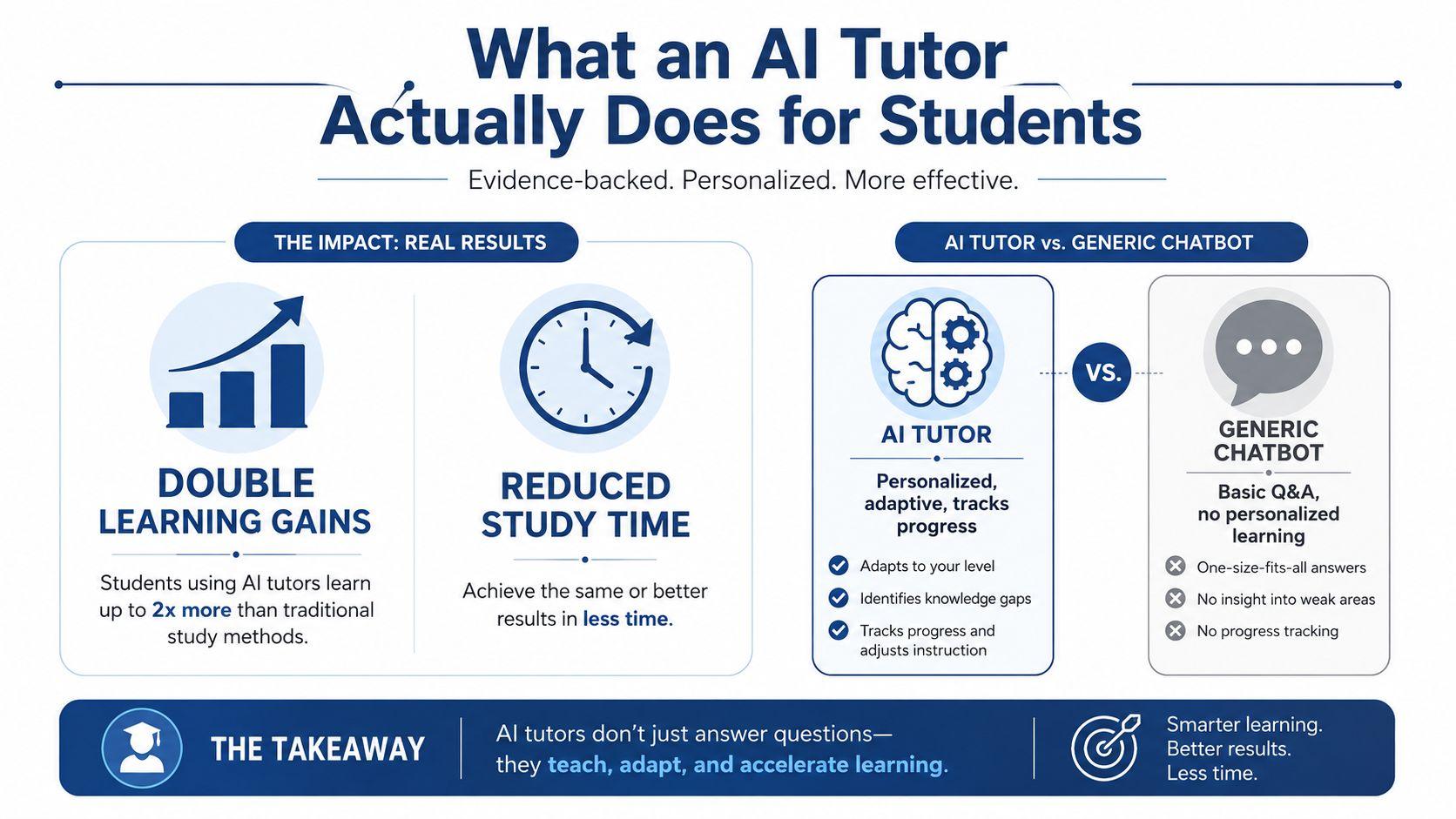
A clear sign that AI tutoring can do more than give quick answers is the learning pattern reported in the strongest trial: AI-supported students made more than twice the learning gains of students in an active-learning classroom, and they reached those gains in less time, with a median session of 49 minutes compared with a 60-minute class period (study summary). That matters because it points to both learning efficiency and learning outcomes at the same time, which is the ultimate test for any AI tutor for students.
A study partner, not a search box
A generic chatbot works like a smart search box. You ask a question, it replies, and the exchange can end there. A real tutor keeps track of what a student already knows, notices where the student hesitates, and changes the next explanation based on that history.
That difference changes the whole experience. The strongest tools shape practice instead of just producing text. If a student keeps missing the same algebra step, the tutor can slow down, revisit the prerequisite skill, and check understanding before moving on. It can also help a student compare a rough answer with a better one, which is often where learning starts to stick.
Practical rule: if the tool always gives the same style of answer, it is probably acting like a chatbot. If it changes its help based on the student's progress, it is behaving more like a tutor.
Some tools also help students review the path they took through a problem. That is why features like timestamped answers for students can matter, because they make it easier to see what was asked, what was answered, and where a misunderstanding started.
Why classroom learning still matters
The strongest use case is support, not replacement. AI tutoring works best when it sits alongside classroom teaching, homework, or office hours, because teachers still set the standards, choose the sequence of work, and catch misconceptions that no tool should be left to handle alone.
Access to an AI tutor does not guarantee engagement. A student can have the app open and still drift through a session without thinking much. Good tool design helps, but guided use matters too. Parents and teachers should watch for whether the tutor asks students to explain their reasoning, whether it gives feedback that fits the student's level, and whether it respects privacy instead of collecting more than it needs.
A useful way to judge the tool is simple. A good AI tutor helps students practice more intelligently, not just more often. It should feel like a patient coach that remembers weak spots, adjusts the pace, and nudges the student toward the next right step.
How Effective AI Tutors Are Built
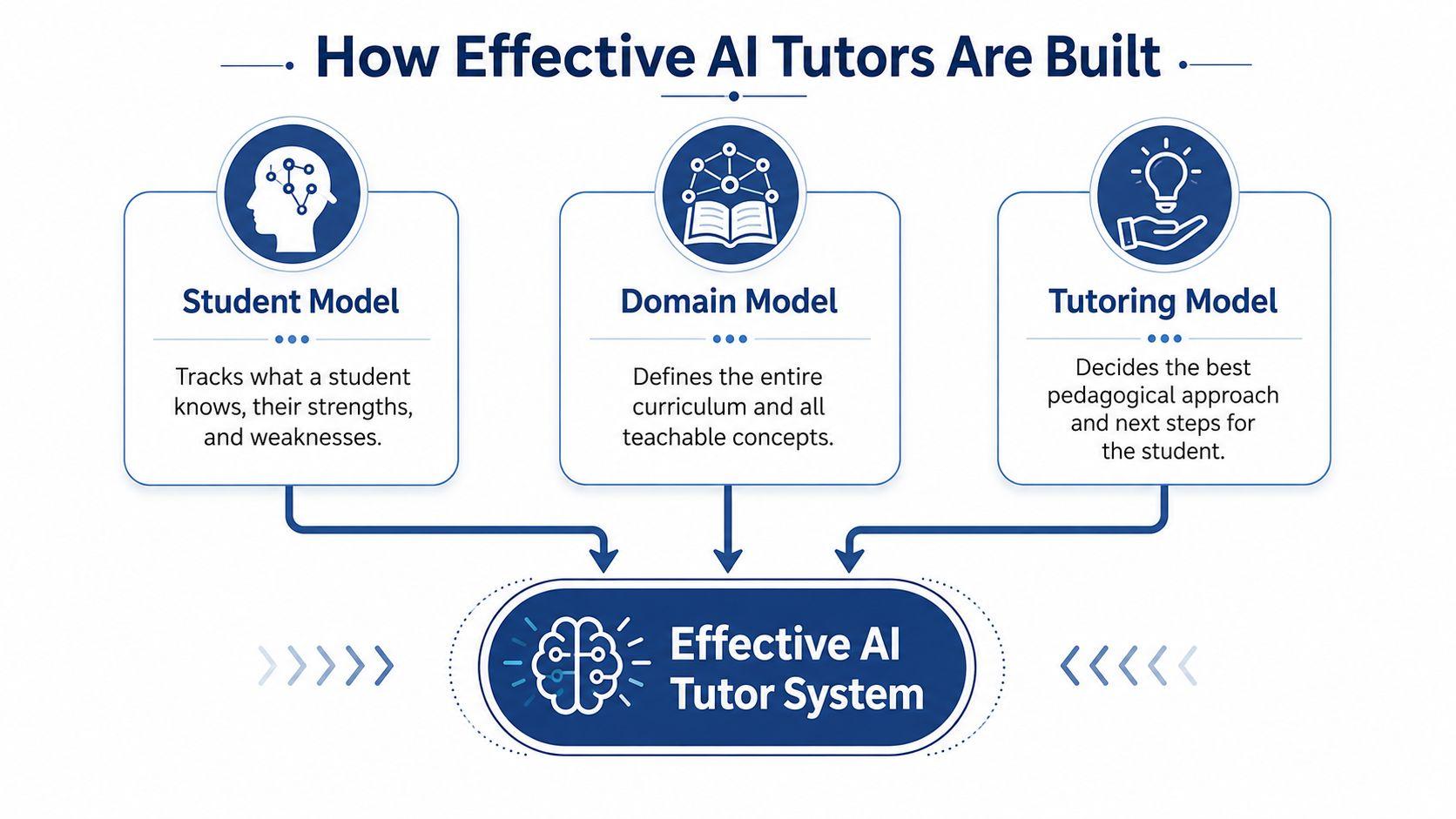
The strongest systems start with three moving parts, a student model, a domain model, and a tutoring model (intelligent tutoring systems overview). A simple way to picture them is as the learner's current profile, the subject map, and the decision layer that chooses the next step. The diagram below shows that structure clearly.
A tutor without those parts can still sound helpful. It may answer quickly, but it will not know when to review, when to challenge, or when to stop explaining and let the student work.
The three-part structure that makes tutoring adaptive
The student model tracks what a learner knows, where they slow down, and what they have already mastered. The domain model defines the curriculum, the concepts, and the order in which those ideas can be taught without confusion. The tutoring model chooses the next move, whether that is a hint, a question, a review, or a harder challenge (intelligent tutoring systems overview).
That structure separates a tutor from a random answer generator. It lets the system respond to the student instead of treating every prompt as if it were the first one. In practice, that gives learners a better chance of getting the right kind of help at the right moment.
The same idea shows up in systems built around a specific course. UC San Diego describes a bespoke tutor trained on course notes and podcasts that is designed to avoid giving direct answers, guide students with questions, and stay aligned with academic use requirements, privacy controls, and LMS integration. For families and schools, that distinction matters, because a tool tied to a class is usually easier to review than an open-ended chatbot.
If you want a concise example of how study support can be organized around memory and follow-through, forgetting less with Kohru is a useful companion read.
For readers comparing different approaches, 1chat research is a practical place to look at how tutoring systems are evaluated before they are used with students.
Why bounded tools usually teach better
Open-ended chatbots can be useful for brainstorming, but they are a poor fit for tutoring when they drift, over-explain, or answer too quickly. A course-bounded tutor has guardrails. It knows what content is allowed, what language fits the class, and when to ask the student to do the thinking.
That difference matters for engagement too. A student can have access to an AI tutor and still stay passive if the tool does too much of the work. Good design helps, but guided use matters as well, because parents and teachers need to see whether the tutor asks for reasoning, adjusts to the learner's level, and keeps data collection limited to what it needs.
A useful way to judge the tool is simple. A good AI tutor helps students practice more intelligently, not just more often. It should feel like a patient coach that remembers weak spots, adjusts the pace, and nudges the student toward the next right step.
AI Tutor Benefits by Age and Education Level
The right use case changes with age. Younger students usually need patience, repetition, and clearer boundaries, while older students benefit more from faster feedback, essay support, and deeper problem solving.
The same product can feel very different depending on who's using it. That's why parents shouldn't ask only, “Does it work?” They should ask, “Does it fit this student's stage?”
Elementary students need structure first
For elementary learners, an AI tutor should feel calm, repetitive, and simple. A child practicing phonics, basic math facts, or reading comprehension may benefit from short prompts like, “Can you explain that again using an example?” or “Ask me one question at a time.” The goal is not speed, it's confidence.
Parents should watch these sessions closely. Younger students are less likely to notice when a tool starts drifting away from the lesson, and they're more likely to treat every answer as final. The safest setup is one where an adult can review the conversation and keep the topic tightly bounded.
Middle and high school students need feedback loops
Older students usually want help with homework, essay revisions, test prep, and studying for harder classes. Here the best prompts are more specific, like, “Show me the steps but don't solve it for me,” or “Point out the weak thesis in this paragraph.” That style keeps the student active instead of passive.
A privacy-first tool can be a reasonable fit here, especially if it can analyze class materials, help with writing, and keep the conversation easy to review. 1chat is one option in this category, since it offers access to multiple models, PDF analysis, and writing assistance in one place, which makes it easier to use a single workspace for school tasks.
College students need precision and flexibility
College work adds another layer, because students may be reading dense papers, solving multi-step problems, or revising longer drafts. A tutor can help them break a reading into sections, identify main arguments, or test whether their reasoning holds up. It can also help them study more efficiently by turning a long document into a guided conversation.
The key is still the same across all ages. The tutor should support thinking, not replace it. If the student is only copying the output, the tool has stopped being a tutor and started being a shortcut.
Why Access Alone Doesn't Guarantee Learning
Giving students access to an AI tutor does not mean they will use it in a meaningful way. District reporting showed the gap clearly, with average weekly use just over two minutes in one district and just over five minutes in another, even though students had access to the tools (district reporting). Access is the first step. Learning depends on what happens after the student opens the tool.
That is the part many product pitches leave out. They assume adoption will follow once the software is available, but students usually need a clear reason to return, a simple first prompt, and a tutor that feels useful on the first try.
Why students don't come back
A student may open the tool once, get a vague answer, and never return. Another student may not know what to ask, or may think the tutor is only for emergencies. Younger learners also need more coaching to understand that the goal is learning, not just finishing a task.
The district-use summary also raises a broader concern, especially for elementary students. There is still limited evidence that generic GenAI chatbot tutors change learning outcomes in a meaningful way yet (district reporting). That does not make the category useless. It means the tool has to be designed with more care.
A tutor that gives broad, generic replies often feels like a search box with a friendlier tone. Students may try it once, then move on because it does not show them how to think, check their work, or take the next step.
Human guidance changes the outcome
The strongest evidence in the brief points in a different direction, toward AI used alongside human tutors. Stanford's reporting describes a study of roughly 1,000 students and about 900 tutors, where students whose tutors used AI assistance were 4 percentage points more likely to master the topic after a session, and lower-rated tutors saw gains of 9 percentage points (Stanford). On harder follow-up topics, students supported by LearnLM reached a 66% success rate, compared with 61% for human-only tutoring and 56% for static hints. That same pattern appears in other research on AI-supported tutoring, where guided use can help tutors give better explanations and more timely feedback without removing the human role.
That is an important clue. AI seems most useful when it helps a human tutor work better, especially for students who might otherwise get uneven support. The product has to fit real study habits, not sit off to the side waiting to be noticed.
Access gets the tool into the room. Design decides whether the student actually learns from it.
Best Practices for Safe and Effective AI Tutor Use
A student can have constant access to an AI tutor for students and still learn very little if the prompts are vague and the session has no structure. The difference often shows up in the first minute. A prompt that asks for a finished answer turns the tool into a shortcut, while a prompt that asks for hints, checks, or explanations turns it into a practice partner.
Safe use also depends on boundaries. Families should know what data the platform stores, whether it offers clear privacy controls, and whether it is built for schoolwork rather than casual chatting. A tool can be helpful and still be the wrong fit if it collects more information than a family is comfortable sharing.
What to ask the tutor to do
The first habit I would teach is simple: ask the tutor to teach, not to finish the assignment. Students do better when they start with a request for an explanation, a hint, or a check on their reasoning. That keeps the student active instead of passive.
Here are the prompts I'd recommend teaching students first:
- Ask for explanations: “Can you walk me through this step by step?”
- Request a hint first: “Give me a clue before you give the answer.”
- Check understanding: “Quiz me on this after you explain it.”
- Compare my work: “Tell me where my reasoning went off track.”
These prompts work because they keep the student involved in the thinking. They also make the session easier for parents or teachers to review, since the conversation shows whether the tool is supporting learning or just handing over answers.
What parents should check
Privacy deserves as much attention as the tutoring itself. UC San Diego's guidance for course-specific tutoring points to LMS integration and privacy controls, including FERPA and GDPR alignment, because student data should be handled carefully in academic settings (UC San Diego). If a product cannot explain its data policy in plain language, that is a reason to pause.
Parents should also look for family-friendly controls, visible conversation history, and a way to step in when the tool starts drifting away from the assignment. For younger students especially, the right setup lets a parent review what happened, lets the student keep practicing, and keeps the tutor focused on the school task.
Practical rule: if a platform cannot clearly say what it stores, who can see it, and how to delete it, do not use it for schoolwork.
That caution matters most for grades, essays, and anything tied to a school account. A safe AI tutor should support learning without asking families to give up oversight, because access alone does not guarantee engagement or understanding.
How to Choose the Right AI Tutor for Your Needs
The easiest mistake is choosing based on hype instead of fit. A real AI tutor for students should match the learner's age, the subject matter, and the family's comfort with data handling.
For some students, that means a focused classroom assistant. For others, it means a broader tool that can read PDFs, help draft writing, and support multiple subjects in one place.
A simple decision framework
Start with these questions:
- Is it course-bounded? If the tool can stay close to class materials, it's easier to trust.
- Does it ground answers in uploaded documents? That matters for homework, readings, and study guides.
- Does it protect privacy clearly? Parents should be able to understand the policy without digging.
- Can it support the student's age and independence level? Younger students need tighter guardrails.
- Does it help with learning, not just completion? The best tools ask questions back.
1chat fits this decision framework as one privacy-first option, since it's built as a family-friendly and team-oriented alternative with access to multiple models, PDF analysis for study materials, and writing assistance in one place. For families comparing platforms, its privacy policy is worth reading directly in the context of school use, especially if the student is under 18, through 1chat's privacy terms.
The point isn't to chase the most advanced model. It's to pick the tool that helps the student stay focused, stay safe, and learn. A simpler tutor with better boundaries often beats a flashier one that talks too much.
Making AI Tutoring Work for Your Learning Journey
The students who get the most from AI tutoring tend to use it with a plan. They pick one subject, set one goal, and ask for help that keeps them thinking. That's how a tool becomes a study habit instead of another tab.
A good starting process is straightforward. Choose a tutor that fits the student's age and privacy needs, set clear study goals, define what information shouldn't be shared, and check progress over time. If the tool starts replacing effort instead of supporting it, pull it back.
For families and college students who need practical study help, free PDF tools for college from PDFWix can be a useful companion when the work involves readings, handouts, or research files. If you want a broader overview of how products like this fit into studying, the guides at 1chat's blog can also help you compare use cases before you commit.
The technology is improving fast, but the bigger advantage goes to students who learn how to use it well now. A thoughtful AI tutor can save time, reduce confusion, and make practice feel less lonely, as long as the student stays in control.
If you're choosing an AI tutor today, start with one subject, one privacy review, and one week of guided use. Then keep what helps, drop what distracts, and build a routine that supports learning.