Your marketing team has three AI tabs open before breakfast. One person drafts copy in ChatGPT, another creates images in a separate tool, and a third uploads a PDF somewhere else to extract its key points. The work gets done, but prompts are lost, files sit in disconnected accounts, and nobody knows which version is approved.
A collaborative AI platform brings those activities into a shared digital workspace. People, AI models, documents, images, prompts, and approvals can work together instead of remaining scattered across individual tools. The important question isn't only whether AI can produce useful content. It's whether your team or family can use it together without losing control of sensitive information.
The category is moving quickly. The human-AI collaborative work systems market is projected to grow from USD 3.29 billion in 2025 to USD 4.59 billion in 2026, then reach USD 23.28 billion by 2031, representing a projected 38.37% compound annual growth rate from 2026 to 2031, according to Mordor Intelligence's market analysis. That growth reflects a change from isolated experiments to shared, operational workflows.
Getting Started with Collaborative AI
A small business can lose track of AI work long before anyone notices. A designer drafts visuals in one tool, an account manager analyzes a contract in another, and a colleague keeps the brand guidelines in an email thread. The work may look productive, yet confidential files, prompts, and approvals remain scattered across personal accounts.
A collaborative AI platform gives that work a shared home. The team can organize conversations, provide project context, assign tasks, and review outputs in one workspace. A copywriting agent might prepare a draft, a document-analysis tool can identify requirements in a brief, and a person can approve the result before it reaches a client.
The same idea applies outside a company. A family planning travel, managing household documents, or helping a student with research also needs clear ownership. Shared access should not mean that every person, or every AI tool, can see everything. Privacy settings, permissions, and simple rules about uploaded information determine whether the workspace remains useful and trustworthy.
Collaboration isn't multiple people using the same chatbot. It means the platform preserves the context that makes shared work possible. A project may hold its approved tone of voice, earlier drafts, reference documents, assigned roles, and decision record. New participants can understand the assignment without rebuilding its history from forwarded messages.
From experiments to daily operations
AI use is shifting from occasional testing toward regular work. An OpenAI survey of 9,000 workers across almost 100 enterprises found that weekly ChatGPT Enterprise messages increased roughly eightfold over the past year, while the average worker sent 30% more messages, as reported in the State of AI Usage Report 2026. The report also describes business customer growth of more than 140% year over year in Australia, Brazil, the Netherlands, and France.
For small and medium enterprises, growth in adoption should prompt a governance conversation, not a race to collect tools. The practical questions are straightforward: Where do shared files live? Who may access client or family records? Which person approves an AI-generated result? How can someone remove information that no longer belongs in the workspace?
If your current setup depends on repeated copy-and-paste work, separate subscriptions for related tasks, or informal upload rules, a shared workspace may reduce confusion. You can examine a team-oriented workspace through shared AI workspace features, then compare its controls with the privacy and governance requirements discussed below.
What Makes a Platform Collaborative
A standalone chatbot is like a useful tool on a desk. You ask for help, get an answer, and decide what to do next. A collaborative AI platform works more like a shared studio, where different people use the same workspace, follow the same process, and review the final result before it goes out the door.
That shared environment needs more than a message box. Look for these building blocks:
- Shared prompts and instructions: Teams can save a useful prompt, explain its purpose, and let authorized colleagues reuse it. A one-off experiment becomes a repeatable team asset.
- Project memory: Conversations, files, decisions, and outputs stay connected to a project. A new participant can understand the assignment without piecing together old messages from half a dozen threads.
- Role-based access: Owners, editors, reviewers, and viewers do not all need the same permissions. Access controls should limit who can upload, change instructions, approve outputs, or view sensitive files, which matters for both SMB records and family information.
- Version history: The platform should show what changed and which output became the approved version. Without versioning, teams can confuse an early AI draft with a reviewed document.
- Audit trails: Logs answer practical questions. Who accessed a file? Which prompt produced the draft? Did a person approve the content before publication?
- Workflow coordination: The system should move work between people and AI tools instead of forcing users to manage every handoff manually. That is how a shared workspace stays organized instead of turning into a pile of disconnected tasks.
The difference between access and collaboration
Giving ten people access to one AI account does not create a team system. They can still overwrite one another's work, expose files to the wrong person, or depend on private habits that no one else can see.
A genuine platform makes responsibilities visible. The human team sets the purpose, supplies the right context, reviews important outputs, and decides when automation may proceed. AI models handle specialized tasks within those boundaries.
Practical rule: If a platform cannot show who can access a project, how its instructions are managed, and where approvals are recorded, it is not ready for sensitive collaborative work.
Core Capabilities That Drive Teamwork
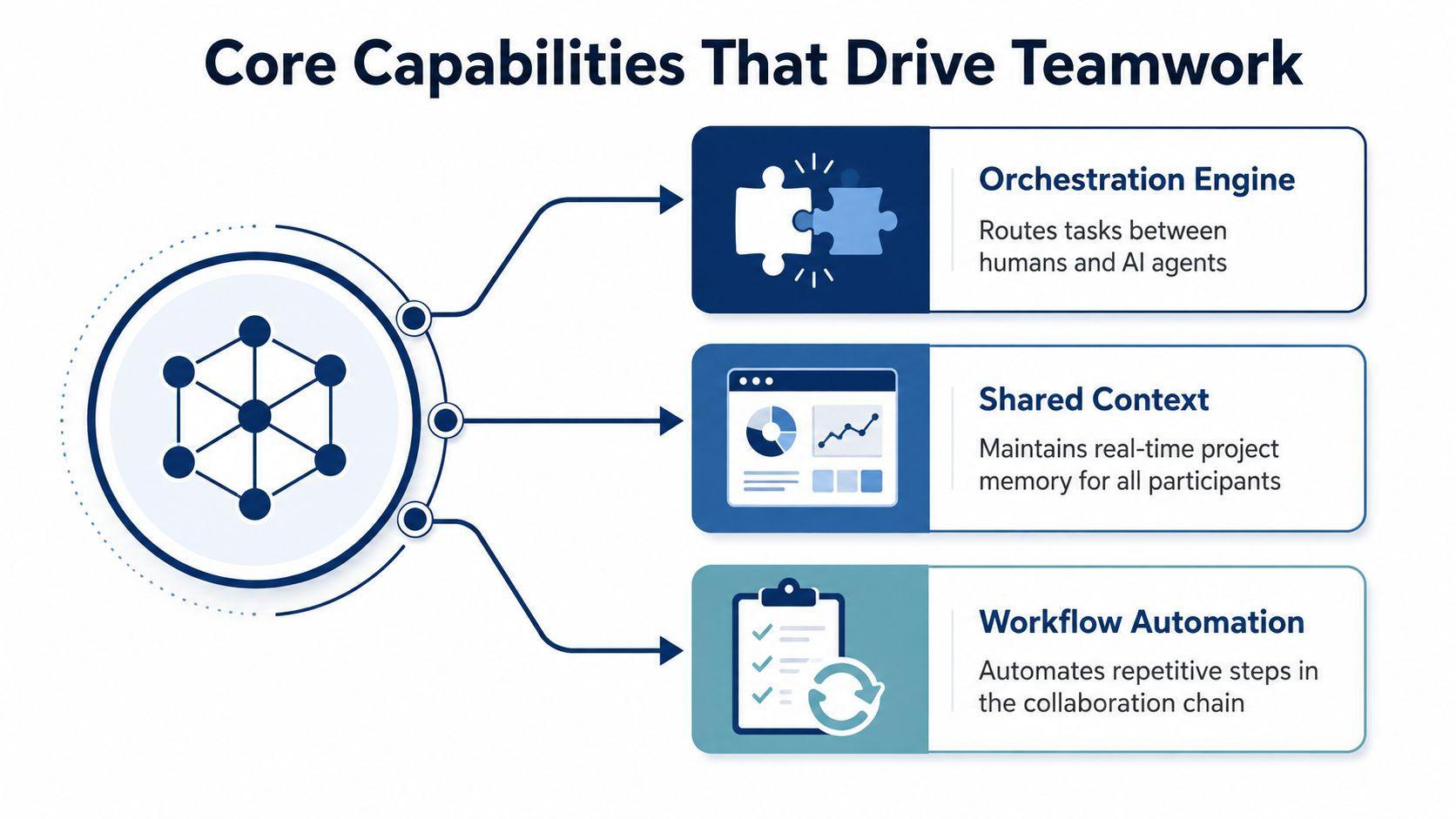
The technical foundation usually begins with multi-agent orchestration. In this design, specialized AI agents handle different parts of a task. One agent might classify a request, another might search or analyze a document, and a third might draft a response. An orchestration layer decides which agent acts next and passes the relevant information forward.
Technical research identifies control flow, state passing, and failure recovery as major concerns in these systems. Frameworks such as LangGraph, CrewAI, and Microsoft Agent Framework represent this workflow-oriented pattern, as described in the survey of collaborative multi-agent LLM systems. For readers who want a more focused explanation, this overview of coordination patterns for AI agents provides useful background on how agents divide and hand off work.
Orchestration needs memory and recovery
Consider a customer asking a small business about a return. The system may need to identify the product, check a policy document, draft a response, and flag an exception. If the document-analysis step fails, the platform shouldn't invent an answer. It should preserve the state of the request, report the failure, and route the case to a person or another approved process.
That is why model quality alone isn't enough. A powerful model can still produce a poor business result if the workflow loses context between steps. Buyers should ask how the platform records intermediate outputs, handles unavailable agents, prevents duplicate actions, and signals uncertainty.
Human review is a system feature
Human oversight works as a quality-control layer, not merely as a final apology after an error. A validation loop can require approval before a message is sent, an escalation path can route uncertain requests to a qualified person, and feedback can help refine future system behavior. These patterns are especially important for decisions involving health, education, finance, employment, or private family information.
The research on human-in-the-loop governance emphasizes the complementary roles of AI and people. AI supplies scale and consistency, while humans contribute contextual judgment, ethical review, and domain expertise.
A practical platform should therefore connect three layers:
- Task execution, where agents perform defined actions.
- Workflow integration, where files, conversations, and business systems provide context.
- Human governance, where people approve, correct, escalate, and audit important work.
Real-World Applications for Every User
A collaborative AI platform becomes easier to understand when you follow the work of different users.
A small business
A local events company receives venue brochures, supplier agreements, and customer questions every week. Before adopting a shared workspace, the owner asks one employee to summarize PDFs, another to draft promotional copy, and a third to create social images. The team spends time moving content between tools and checking whether everyone used the current event details.
With a unified project, the team can keep the event brief, approved messages, analyzed documents, and creative drafts together. A person can assign document review first, request a copy draft using the approved facts, and send the visual concept for human review. The most valuable capability isn't unlimited model access. It's shared project context with clear ownership.
A remote professional team
A distributed sales team prepares proposals for different industries. Each representative has developed personal prompts, so the language and claims vary from one proposal to the next. A shared prompt library can provide approved starting points, while role-based permissions can prevent casual edits to the core instructions.
The manager might allow representatives to create drafts, give a compliance reviewer approval rights, and restrict access to internal pricing files. The platform becomes a controlled workspace rather than a collection of personal assistants. The key benefit is consistency without removing human judgment.
A family
Parents may want their children to use AI for explanations, brainstorming, or language practice. They may also worry about inappropriate content, oversharing, and whether a child can upload a school document or family photograph without understanding the consequences.
A family-oriented setup should make account ownership, content filtering, and file sharing understandable. Parents can establish household rules, children can work in separate spaces, and adults can review how the tool is being used when appropriate. The important feature is supervised access, not a cheaper way to obtain an AI conversation.
A student
A student researching a history assignment may need to understand a PDF, compare notes, outline an essay, and proofread a draft. Those tasks can happen in one project, but the student still needs to verify sources and make the final argument independently.
A collaborative workspace can help separate stages. The student asks an analysis tool to identify themes, uses a writing model to organize ideas, and requests language feedback at the end. The platform supports learning when it shows the reasoning process and preserves the student's ownership of the work. It becomes harmful when it encourages submission of unchecked output.
The right platform reduces handoff confusion, but it doesn't remove the user's responsibility to review what AI produces.
Keeping Data Safe and Compliant
A collaborative AI workspace can feel a lot like a shared office with glass walls. Everyone can see what is happening, but that does not mean everyone should see every file, prompt, or draft. For SMBs and families, the risk starts when access is too broad and the boundaries are unclear.
Privacy-first design starts with a different question. Collaboration is expected. The test is whether the system makes it selective, visible, and accountable.
Controls to inspect before uploading sensitive material
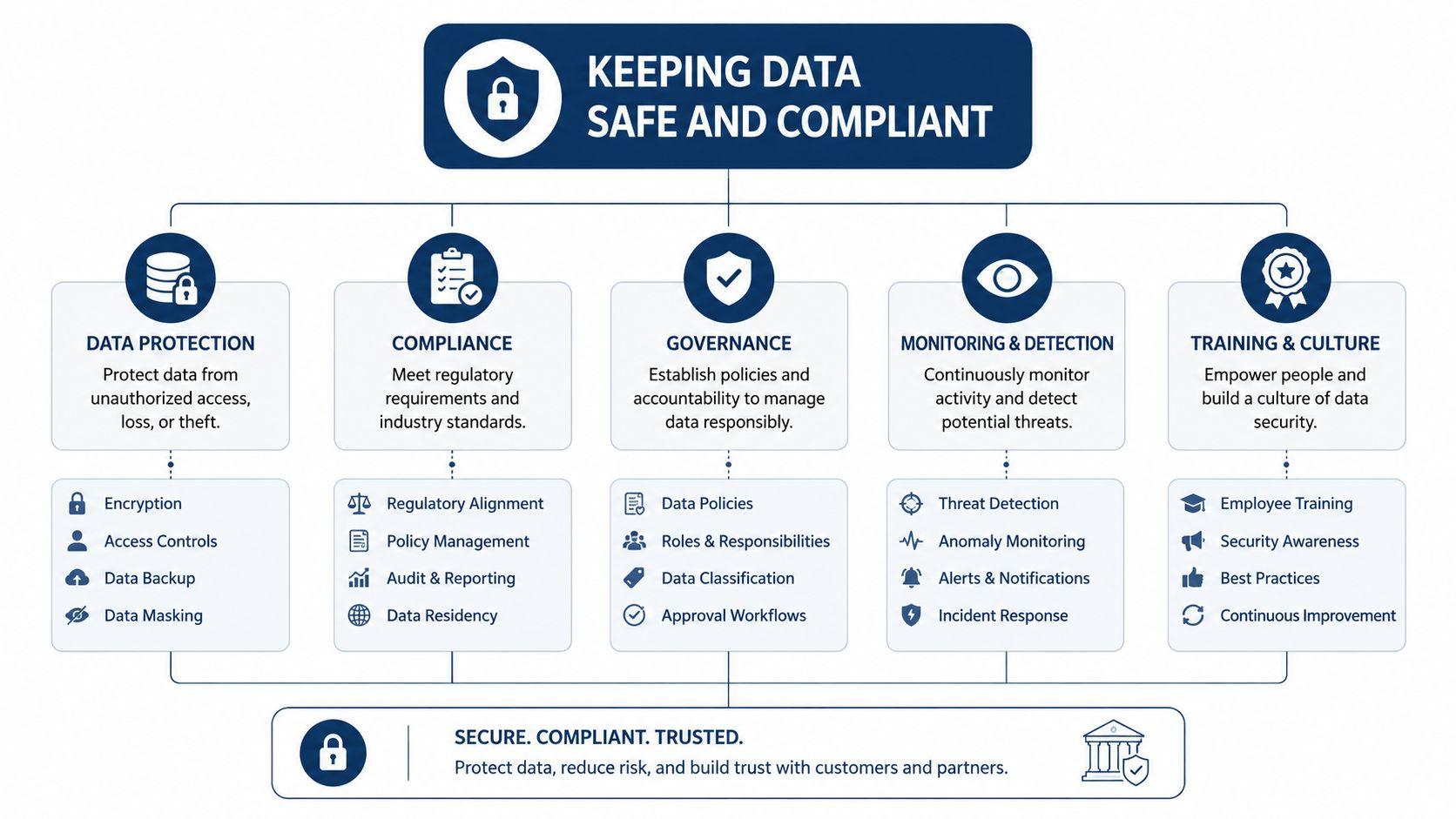
- Access boundaries: Check whether permissions apply at the workspace, project, conversation, and file levels. A person who can edit a marketing brief may not need access to payroll or private student records.
- Data handling: Read how the provider stores, processes, and retains prompts, uploaded documents, generated images, and conversation history.
- Deployment choices: Regulated organizations may need cloud, hybrid, or on-premise options, along with suitable data residency arrangements.
- Auditability: Look for records of access, edits, approvals, exports, and automated actions. An audit log turns a vague concern into something an administrator can investigate.
- Human checkpoints: Important actions should pause for approval when the system is uncertain or when an output affects another person.
Human-in-the-loop governance adds validation loops, escalation paths, and feedback mechanisms. These controls help align outputs with business objectives, ethical expectations, regulatory requirements, and auditability needs, as explained in this guide to AI governance and compliance.
A good way to judge the setup is to ask who can open the cabinet, who can add a document, and who can review the trail later. That is the difference between a workspace and a shared filing cabinet. A family may need simple sharing rules, a small business may need to keep one client file out of unrelated projects, and a school user may need clearer handling of student data.
Privacy policy language matters, but it cannot do the work by itself. The platform still needs practical controls, clear ownership, and settings ordinary users can understand. In a shared digital workspace, that is how AI stays useful without putting personal or business information at unnecessary risk.
Governance check: Ask what happens when an AI agent is wrong, uncertain, unavailable, or asked to access information outside its role.
How to Evaluate and Choose a Platform
Start with your workflow, not the vendor's feature list. Write down the tasks your users perform, the documents they handle, the people who need access, and the actions that require approval. Then test each platform against the same scenario, such as analyzing a brief, drafting a response, sharing the result, and reviewing the activity record.
| Criterion | Why It Matters | What to Look For |
| Capability breadth | A platform should support the tasks you already need. | Model variety, document analysis, image generation, search, and workflow support where relevant |
| Collaboration features | Shared work requires more than shared logins. | Projects, prompt libraries, comments, permissions, version history, and audit trails |
| Privacy and governance | Sensitive data needs boundaries before it enters the system. | Data handling terms, residency options, access controls, approval gates, and escalation |
| Ease of use | A complicated tool can create unofficial workarounds. | Clear navigation, simple onboarding, understandable settings, and useful help materials |
| Total cost of ownership | The subscription is only part of the cost. | User limits, model usage rules, storage, integrations, administration, and export terms |
Test the workflow, not the demo
Ask the provider to show how a new team member joins a project. Can an administrator limit access to a particular folder? Can the owner revoke access without deleting the entire workspace? Can the system identify which model generated an answer and whether a person approved it?
For families and schools, test the experience from both sides. Parents and administrators need controls they can understand, while students need a workspace that doesn't make ordinary study tasks unnecessarily difficult. For SMBs, test whether a new employee can follow the team's process without learning a private collection of shortcuts.
Compare convenience with oversight
An all-in-one product may reduce tool switching, but only if it doesn't create a new layer of confusion. Multi-model routing and agentic workflows can help match tasks to suitable capabilities, yet they also require evaluation, failover planning, and human escalation. The strongest choice may be the platform that makes the workflow easiest to supervise, not the one that advertises the longest feature list.
Review pricing and plan details through the provider's pricing information, then compare the total operating cost with your current collection of separate tools. Include training time, administration, duplicated storage, and the cost of correcting an unchecked AI output.
Why Privacy-First Matters for Your Team
A collaborative AI platform becomes valuable when it combines capability with stewardship. A shared workspace can help people analyze PDFs, draft content, generate images, and organize conversations, but those functions shouldn't encourage users to upload everything without considering who can access it or how the data is handled.
The privacy question is especially important for SMBs and families. A small company may have limited administrative capacity, while parents and students may not recognize the implications of sharing personal information. Both groups need clear permissions, understandable settings, and a way to keep separate projects from blending together.
Collaboration and control belong together
A platform such as 1chat provides a single environment for access to multiple large language models, PDF analysis, AI image generation, project-based conversation organization, and team-oriented shared conversations. Those capabilities can support a small business, family, or student, but users should still evaluate the product's specific permissions, retention practices, and administrative controls before placing sensitive material inside it.
The same principle applies to any provider. Read the platform's privacy terms, and compare them with an independently written privacy page from Walling to see which questions a clear policy should address. Then review the provider's own privacy documentation before inviting other users or uploading confidential files.
Convenience without control creates a liability. Shared AI becomes sustainable when every participant understands what can be shared, who can see it, and when a human must approve the result.
Start by choosing one real workflow, such as a campaign project, a family learning space, or a student research folder. Define the permitted files, assign access roles, require review for important outputs, and test the audit trail before expanding. If you're ready to replace scattered AI experiments with a more organized shared workspace, evaluate 1chat against this guide and begin with a low-risk project that your team or family can supervise closely.
Start your evaluation today by listing one recurring task, the people involved, the documents it uses, and the approval points it needs. Create a controlled pilot, invite only the necessary participants, and review every privacy and governance setting before moving sensitive work into a collaborative AI platform.