You're probably making a decision like this right now. A cheaper software plan looks good on the checkout page. A discount laptop seems “good enough” for school. A budget appliance costs less today, but the reviews hint at repairs, noise, or short lifespan.
That's where many get trapped. They compare price tags, not outcomes.
Cost effective solutions aren't the cheapest options. They're the choices that give you the strongest return over time, with fewer surprises, less waste, and better results for the money spent. For a small business, that might mean paying more upfront for automation that cuts manual work. For a family, it might mean skipping a “free” app that pays for itself by collecting your data. For a student, it could mean choosing one reliable tool that handles research, writing support, and document analysis instead of juggling several weak substitutes.
Beyond the Price Tag What Cost Effective Really Means
Cheap and cost effective aren't the same thing.
A cheap option has one obvious advantage. It asks for less money today. That can matter when cash is tight. But low price often hides trade-offs like lower durability, more setup time, weaker support, or higher monthly add-ons.
An expensive option isn't automatically smart either. Higher price can reflect better quality, but it can also reflect branding, unnecessary features, or a package built for larger organizations than yours.
The smarter third choice
A cost effective option sits in the middle of those extremes. It delivers the outcome you need at a sensible total cost. That means you judge a purchase by more than the starting price.
Ask four questions:
- Will it solve the actual problem
- What will it cost to run and maintain
- How long will it stay useful
- What risks come with choosing it
If a cheaper tool creates rework, missed deadlines, privacy issues, or replacement costs, it wasn't cheaper. It was just lower at the point of sale.
Practical rule: If you have to spend extra time fixing, replacing, or working around something, that time belongs in the cost.
This matters across everyday decisions. A small business owner choosing payroll software, a parent comparing family subscriptions, and a student buying study tools all face the same basic challenge. The right question isn't “What costs less today?” It's “Which option gives me the most usable value over the next year or two?”
Value has three parts
Most smart spending decisions come down to a simple balance:
- Price: What you pay now and later
- Performance: Whether it does the job well
- Longevity: How long it remains useful before replacement or upgrade
When those three line up, you've found a cost effective solution. When one is badly out of balance, problems show up later.
Understanding the Math Behind Smart Spending
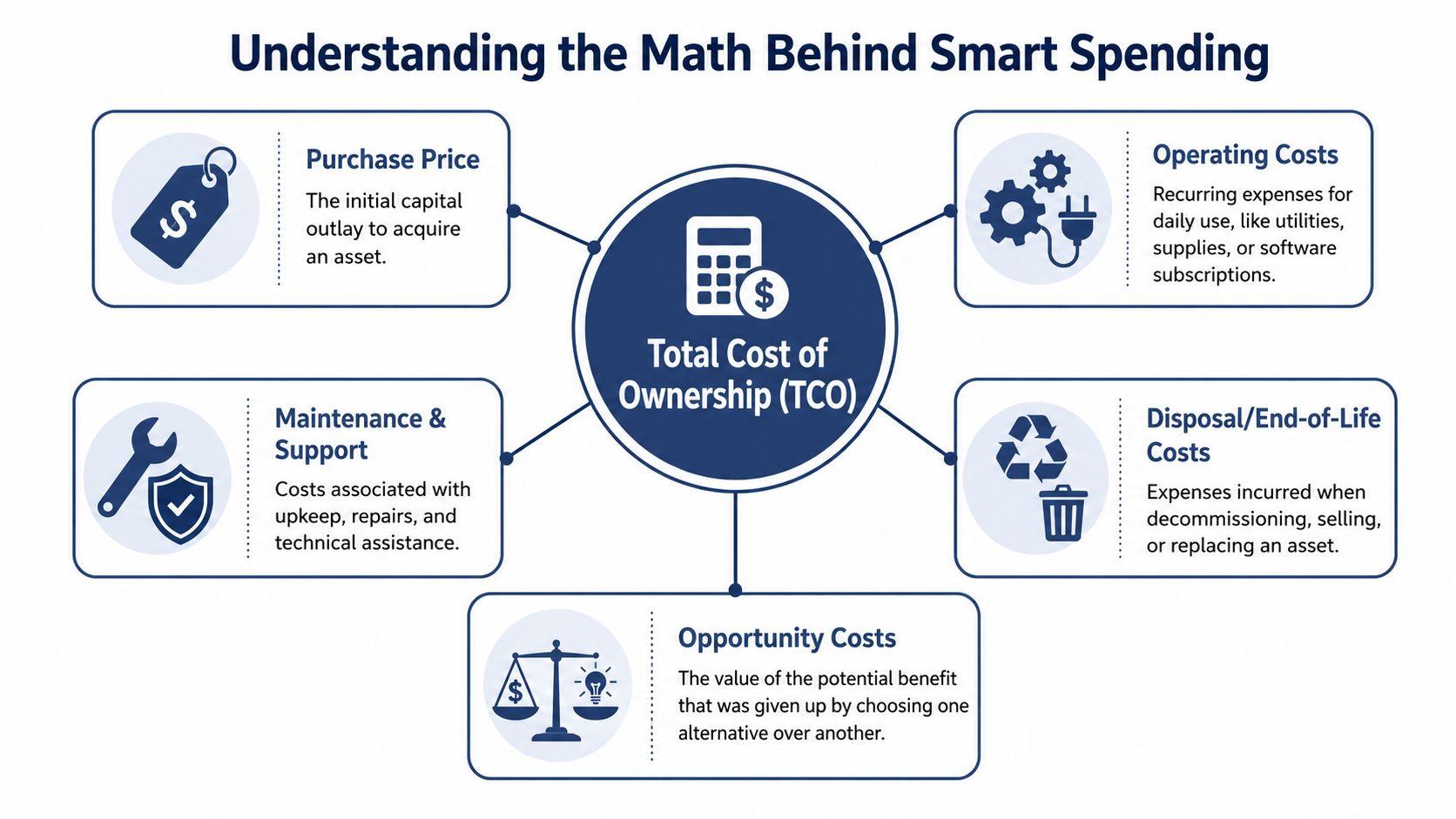
A useful way to evaluate any purchase is Total Cost of Ownership, often shortened to TCO. It sounds technical, but the idea is simple. The cost of something includes everything you'll spend to buy it, use it, maintain it, and eventually replace it.
Think like a car buyer
Consider two cars. One has a lower sticker price. The other costs more upfront but uses less fuel, needs fewer repairs, and holds value better. If you only compare purchase price, the first car wins. If you compare ownership over several years, the result may flip.
That same math applies to software, home appliances, laptops, tutoring subscriptions, and AI tools.
TCO usually includes these parts:
- Purchase price: The upfront amount
- Operating costs: Utilities, subscriptions, supplies, fuel, or usage fees
- Maintenance and support: Repairs, upgrades, training, or customer support plans
- End-of-life costs: Disposal, replacement, migration, or resale impact
- Opportunity cost: What you give up by choosing a weaker option
Opportunity cost is the one people skip most often. If your team spends hours wrestling with bad software, or your child loses time because a device is slow and unreliable, that lost output is part of the cost.
A simple way to calculate value
You don't need a finance team to do this. Use a basic worksheet:
| Cost category | What to check |
| Upfront cost | Price, setup, delivery, onboarding |
| Monthly cost | Subscription, utilities, accessories |
| Annual cost | Repairs, renewals, support, training |
| Risk cost | Errors, downtime, privacy concerns, replacement risk |
| Residual value | Resale value or useful life left |
Then compare the options side by side. If you want a practical place to build out research notes and compare tools, a centralized workflow like 1chat research resources can help keep product details, vendor claims, and document summaries in one place.
The best buying decision often looks slightly more expensive at checkout and much less expensive six months later.
Why this approach matters beyond shopping
This isn't just a household budgeting trick. It's the same logic organizations use when the stakes are much higher. A study found that 61% of global health aid projects included at least one intervention considered cost-effective, and the core question was “What will do the most good for the lowest cost?” according to the Center for Global Development's discussion of cost-effective global health aid.
That principle applies cleanly to everyday spending. Smart buyers don't ask only what something costs. They ask what outcome each dollar buys.
A Framework for Evaluating Your Options
Most bad purchasing decisions happen before money changes hands. They happen when people compare options that aren't comparable.
A student compares a free writing tool with a paid one without accounting for limits, ads, or privacy trade-offs. A business compares a low-cost software plan built for five users against a platform intended for a distributed team. A family compares appliance prices without considering energy use, warranty quality, or repair access.
Benchmark the right way
Professional cost benchmarking works because it normalizes the comparison. According to Nomitech's overview of cost benchmarking, effective methodologies require normalizing data for project scale and location so internal costs can be compared accurately against external peers. That matters because a tool that looks cheap for a solo user may become inefficient for a ten-person team.
Apply the same discipline in everyday decisions:
- Match the use case: Compare student plans to student plans, team tools to team tools.
- Match the scale: A family of five has different value drivers than a single user.
- Match the context: A local service, shipping cost, tax treatment, or support availability can change the winner.
Hidden costs to surface before you buy
A practical review should include the costs vendors rarely emphasize.
- Training time: If a tool takes hours to learn, you're paying with time.
- Integration friction: Importing files, moving data, or syncing accounts can add labor.
- Support quality: Cheap plans often push you toward self-service when urgent help is what you need.
- Subscription creep: One low monthly fee becomes several add-ons over time.
- Governance and oversight: This is especially important with software and AI.
For household spending, this can be as simple as reviewing every recurring charge. For personal budgeting discipline, resources like Peaceful Mindful Pocket's budgeting solutions are useful because they force every dollar to have a purpose before small leaks become routine expenses.
Compare complete systems, not isolated prices. A lower sticker price on the wrong setup isn't savings.
A five-part decision screen
Before you commit, run each option through this short filter:
- Fit: Does it solve the main problem without forcing workarounds?
- Scale: Will it still work if your needs grow?
- Support: What happens when something breaks or changes?
- Risk: Are there privacy, compliance, or reliability concerns?
- Exit cost: How hard is it to cancel, replace, or migrate later?
This framework is useful because it slows down impulsive buying. It also prevents a common mistake: choosing a low-cost tool that's only affordable if nothing goes wrong.
Smart Business Spending That Boosts Your Bottom Line
Small businesses rarely have a spending problem in the abstract. They have a prioritization problem. Money goes to the wrong layer of the business, or teams keep paying for manual work because the “cheaper” path feels safer.
That's why cost effective solutions in business usually come from three moves: automate repetitive tasks, right-size infrastructure, and stop buying tools that create hidden admin burdens.

Automation pays when errors are expensive
Back-office work often looks affordable because salaries are already on the books. But manual processes carry error costs, delay costs, and focus costs. A PwC study found that companies adopting automated HR and payroll tools reduced compliance errors by 45% and processed tasks 30% faster on average, as reported by RemotePass in its summary of global workforce management tools.
That finding matters well beyond HR. If automation cuts mistakes and frees staff for higher-value work, the return shows up in cleaner operations, not just lower headcount.
Use that logic in areas like:
- Payroll and invoicing: Reduce rekeying and manual approvals
- Document handling: Summarize contracts, extract terms, and answer questions from PDFs
- Customer support triage: Route simple inquiries faster so staff can handle exceptions
- Content workflows: Draft outlines, rewrite copy, and organize research without paying for a full content team
Infrastructure should match actual use
A lot of small firms overpay for cloud resources because nobody revisits the original setup. Server sizes drift upward. Old instances stay running. Storage grows without rules.
If your business runs on AWS, a focused review like this guide to AWS EC2 cost optimization is useful because right-sizing is one of the clearest examples of value-based spending. You don't win by buying the most capacity. You win by buying enough capacity for current demand and monitoring it.
Where AI fits without becoming another cost center
AI can be cost effective when it reduces repetitive work and consolidates separate tasks into one workflow. It becomes wasteful when teams pile on disconnected tools, pay for features nobody uses, or ignore privacy and governance.
One practical option is 1chat pricing. It's a privacy-first platform that lets users chat with multiple LLMs in one place, analyze PDF documents, generate AI images, and use writing assistance without stitching together several separate subscriptions. For small businesses and teams, that kind of consolidation can matter more than flashy features because fewer tools usually means fewer training and oversight burdens.
What works and what doesn't
A pattern I see often is this:
| Works | Doesn't work |
| Buying one tool that replaces several weak ones | Buying multiple cheap tools with overlapping features |
| Automating high-friction repetitive work | Automating a broken process without fixing it first |
| Reviewing usage quarterly | Letting renewals continue unchecked |
| Paying for reliable support in critical systems | Saving a little upfront on systems that touch payroll, billing, or customer data |
The strongest business spending decisions are usually boring. They reduce friction, trim avoidable complexity, and give your staff back time.
Everyday Cost Effective Choices for Home and School
At home, bad spending rarely looks dramatic. It sneaks in through “small” decisions that repeat every month. An extra subscription here. A bargain appliance that needs replacement sooner. A free app that turns your attention and data into its primary product.
Students run into the same pattern. The low-cost path can become expensive if it wastes study time, produces poor work, or forces constant switching between tools.
For families, convenience can get overpriced fast
A household doesn't need to cut every comfort to spend wisely. It needs to separate convenience that delivers value from convenience that drains the budget.
Consider a few common choices:
- Streaming and app subscriptions: One family often pays for overlapping services because each charge feels small in isolation.
- Appliances: A lower purchase price can lose its appeal if the machine is inefficient, noisy, or unreliable.
- Groceries: Bulk buying helps only when food gets used before it expires.
- Children's tech tools: Free educational apps may come with ads, weak privacy controls, or constant upsells.
The lesson is simple. Look at repeat cost and side effects, not just the first transaction.
For students, time is part of the budget
A student choosing a laptop, calculator, writing assistant, or research tool should treat time as a real expense. A cheaper device that crashes, lags, or can't handle assignments costs more than the receipt suggests. The same is true for low-quality study apps that require extra checking because the outputs are shallow or awkward.
“Free” deserves more scrutiny than many people give it. Info-Tech Research Group notes that enterprises often overlook 30-40% of the total cost of AI in post-deployment phases like data governance and model retraining, and the same source points out that this hidden-cost principle applies to consumer choices too, where a free app's true price may be your privacy, according to Info-Tech's analysis of AI cost frameworks.
Free can still be expensive if you pay with distraction, weak outputs, or personal data.
A better test for home and school purchases
Before buying or subscribing, ask:
- Will this replace something else I already pay for
- Will I still use it three months from now
- Does it reduce hassle or add another account to manage
- Am I paying with money, attention, privacy, or all three
That last question matters more than people think. In home and school settings, the best cost effective solutions are often the ones that simplify life, not just the ones that cut a visible bill.
Making the Right Choice A Simple Matrix
When a decision feels fuzzy, a side-by-side matrix helps. The point isn't to force every choice into a formula. It's to make trade-offs visible.
Decision Matrix Cheap vs. Cost-Effective
| Scenario | Cheap Option | Cost-Effective Option | The Smart Decision |
| Business software | Lowest monthly plan with limited support and add-ons | Moderately priced plan that includes needed features, onboarding, and reporting | Choose the option that covers real workflows without requiring extra tools |
| Home appliance | Lowest purchase price, short warranty, higher operating burden | Reliable model with stronger efficiency, support, and lifespan | Choose the one that lowers hassle and replacement risk |
| Student laptop | Budget device with weak performance and shorter useful life | Mid-range device that handles coursework reliably for several years | Choose stability if it avoids interruptions and early replacement |
| Family subscriptions | Several low-cost services bought one by one | Fewer services that the household actually uses consistently | Cut overlap and keep what delivers regular value |
| AI or productivity tool | Free or low-cost tool with limits, ads, or privacy trade-offs | Paid option that consolidates tasks and reduces switching | Choose the one that saves time and avoids hidden costs |
How to use the matrix
Start with the scenario. Then ignore marketing language and fill in the missing costs yourself.
If the “cheap” option wins only because you haven't counted support, time, reliability, or replacement, it isn't the smart decision. Cost effectiveness becomes clearer once you compare full use, not just first purchase.
Putting Cost Effective Principles into Action
The core idea is straightforward. True savings come from value over time, not from grabbing the lowest number on a sales page.
That doesn't mean spending more by default. It means spending with clearer standards. A product, subscription, or service becomes cost effective when it solves the right problem, stays useful, and doesn't create a long trail of maintenance, risk, or workaround costs.
A practical checklist you can keep
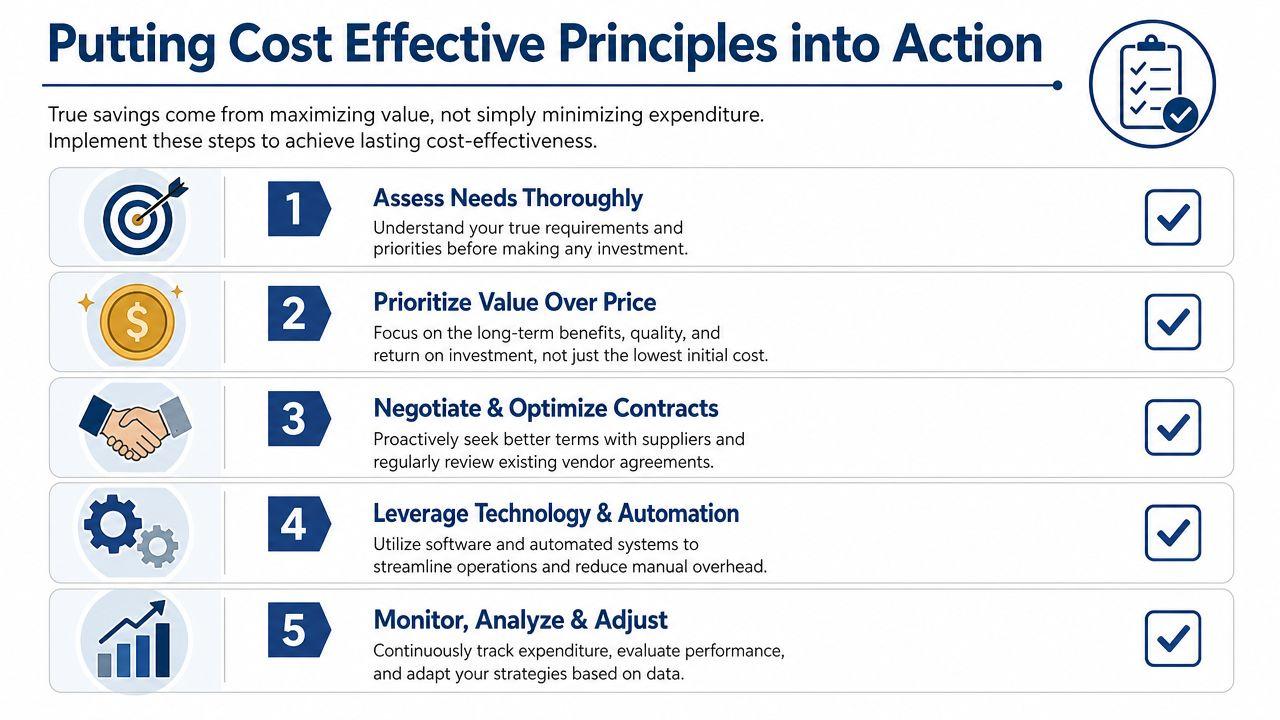
Use this checklist before your next purchase:
- Define the job first: Be specific about what success looks like. A family needs reliable use. A student needs output quality and usability. A business needs measurable workflow improvement.
- List the full ownership costs: Include setup, training, monthly fees, maintenance, replacement risk, and any likely add-ons.
- Check the hidden operational burden: Ask who will maintain it, monitor it, or fix mistakes. If nobody owns that work, the cost will surface later.
- Compare value, not brand positioning: Expensive doesn't guarantee better. Cheap doesn't guarantee savings.
- Review after purchase: Recheck subscriptions, tools, and recurring services on a schedule so weak decisions don't stay on autopilot.
Performance and savings can exist together
A lot of buyers still assume they must choose between lower cost and better performance. That trade-off is real sometimes, but not always. In data platform benchmarking, advanced SaaS architectures delivered 14% to 70% lower costs while also achieving 1.7x to 2.3x lower latency, according to GigaOm's benchmark report on real-time data platforms. That's a strong reminder that a better-designed solution can improve performance and spending at the same time.
For more practical examples of evaluating tools, workflows, and AI use cases with a value-first mindset, the 1chat blog is a useful follow-up resource.
Buy for the full lifecycle. That's where the real savings are.
The best cost effective solutions usually feel calm after the purchase. They don't demand constant patching, surprise fees, or extra work to justify themselves. They keep delivering value.