Your head is full, but nothing feels settled. A work task keeps interrupting a grocery reminder. A good idea for a project shows up while you're replying to a message. You remember an email you forgot to send, then lose the thread of what you were about to say. By the end of the day, you've been thinking constantly, yet it doesn't feel like you've moved much forward.
That feeling doesn't mean you're disorganized. It usually means your mind is trying to hold too many open loops at once.
Learning how to organize thoughts isn't about becoming a different kind of person. It's about building a system your brain can trust. When thoughts have a place to go, they stop circling so loudly. When priorities become visible, decisions get easier. When ideas are structured, communication gets clearer.
A simple way to think about the process is this: capture, clarify, and communicate. First, get thoughts out of your head. Next, sort them so the important ones stand out. Then shape them into something useful, whether that's a plan, a conversation, a paper, or a presentation.
Why Your Mind Feels So Cluttered and What to Do About It
Mental clutter usually isn't one big problem. It's a pile of small unfinished things competing for attention at the same time. A deadline, a family errand, a half-formed idea, a conversation you need to have, a tab you meant to revisit. Your brain keeps all of them active because it doesn't trust that they'll be remembered elsewhere.
That's why trying to "just focus" often doesn't work. Focus is hard when your mind is still acting like a storage unit.
Many people also expect clear thinking to arrive before they start organizing. In practice, clarity usually comes after you give your thoughts some structure. If you've ever spoken more clearly after writing messy notes first, you've already felt this.
The real problem isn't having many thoughts
The problem is mixing different kinds of thoughts together.
A task shouldn't sit in the same mental space as a worry. A future idea shouldn't compete with something that must be done today. A draft for a team meeting shouldn't share a pile with a reminder to buy toothpaste. Once everything blends together, all of it feels equally urgent.
Clear thinking starts when you stop asking your brain to remember, rank, and refine everything at once.
This matters even more when you need to speak well under pressure. If part of your challenge is turning scattered ideas into confident speech, resources on mastering high-stakes communication can help you connect internal clarity with real-time delivery. If you're sorting notes, research snippets, or personal planning materials, a practical workspace like 1chat research support can also make the capture stage easier to manage.
A calmer approach
Use this sequence:
- Capture first: Write or record everything without trying to improve it.
- Clarify next: Decide what each item is, and whether it matters now, later, or not at all.
- Communicate last: Turn the useful parts into action, writing, or conversation.
People often get stuck because they try to do all three steps at once. They edit while capturing. They prioritize while brainstorming. They prepare to explain an idea before they've even named it.
That creates more friction than progress.
First Get Everything Out of Your Head
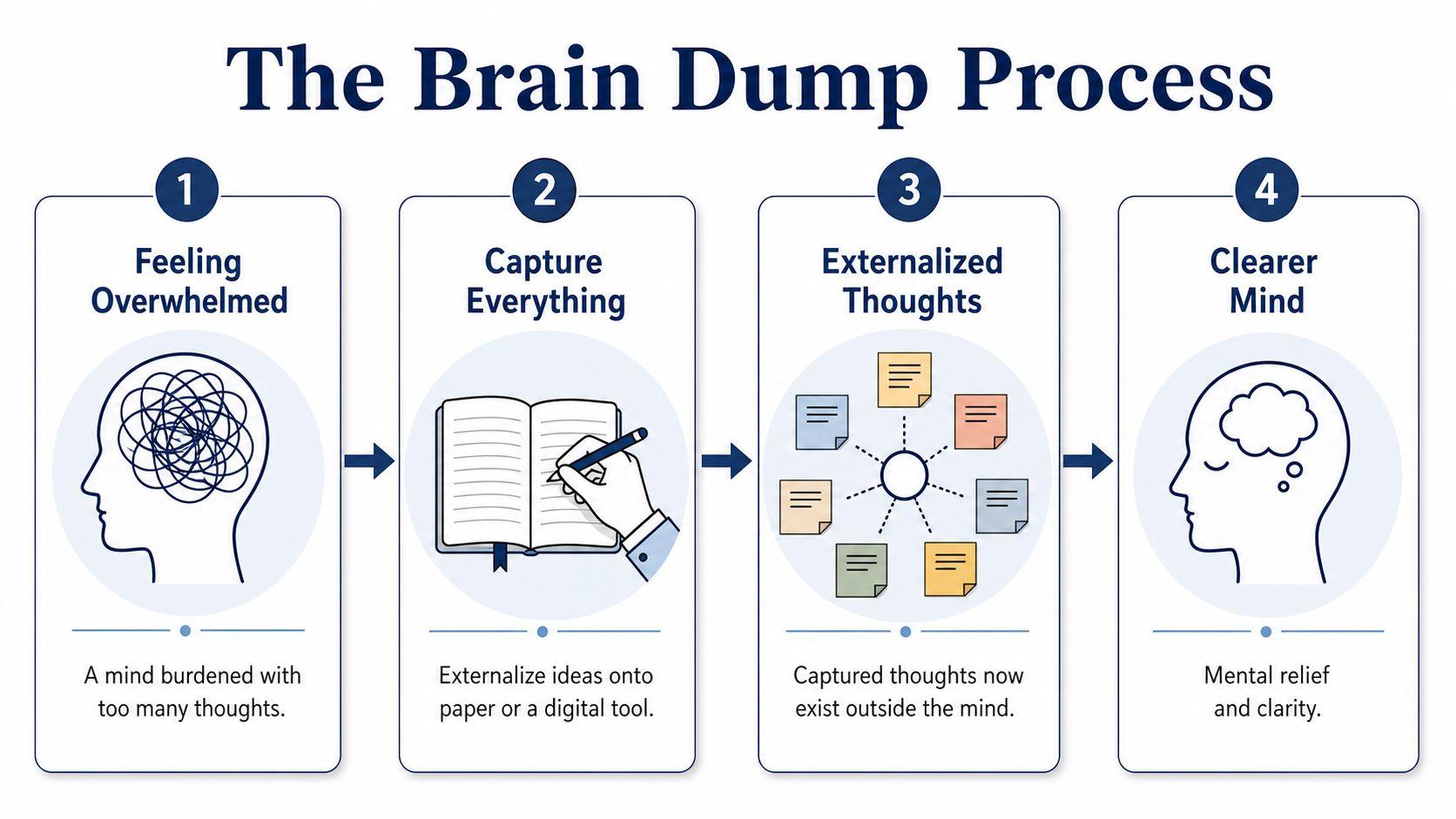
Before you can organize anything, you need to stop storing it mentally. That first move is simple and often messy. Put your thoughts somewhere outside your head.
According to Erin Condren's guidance on organizing your thoughts, transferring thoughts from head to paper without immediate organization reduces cognitive load by 40%, which helps people express complex ideas more clearly afterward. That's why a brain dump feels relieving before it feels useful. You're reducing pressure first.
Give yourself permission to be messy
A common mistake is to sabotage this step by trying to be organized too early. Individuals start writing, then stop to sort, rename, rewrite, or judge. That turns capture into a performance.
Don't do that yet.
Your first draft of your mind can look like this:
- call dentist
- angry about meeting
- essay idea on school uniforms
- check budget
- email Sam
- trip in October?
- why did that comment bother me
- buy printer ink
- presentation opening line
That list is useful precisely because it isn't polished.
Practical rule: Capture without editing. Organize after the page is full.
Three good ways to do a brain dump
Different brains empty out differently. Choose the one that feels easiest, not the one that looks smartest.
- Timed free-write
Set a short timer and write continuously in a notebook, Google Docs, Apple Notes, or Notion. Don't stop to fix wording. If you get stuck, write "what else?" and keep going. - Rapid list format
Write one thought per line. This works well if your mind jumps quickly between errands, ideas, and concerns. - Voice-to-text capture
If you think more clearly while talking, use your phone's voice notes or dictation. Speak in fragments if needed. You can sort it later.
What belongs in the dump
Include more than tasks. If you only write down chores, you miss half the clutter.
Capture:
- Open loops: things you need to remember, decide, or finish
- Emotional residue: worries, frustrations, repeated thoughts
- Ideas: project concepts, writing angles, business possibilities
- Questions: things you need to research, ask, or clarify
A useful brain dump often includes awkward, vague, unfinished material. That's normal. You're not writing a final answer. You're emptying the container.
When people get confused
A common question is whether to separate personal and work thoughts right away. Don't. Mixing them in the first pass is fine. The goal is total capture. Separation comes later.
Another sticking point is whether digital or paper is better. At this stage, speed matters most. Use the method that lets you keep up with your own mind.
Find the Signal in the Noise with Prioritization
A full page of thoughts can feel better than a crowded mind, but it can also feel intimidating. That's where prioritization helps. You're no longer asking, "What am I thinking about?" You're asking, "What deserves attention now?"
The Eisenhower Matrix is one of the simplest tools for this job. According to Mossery's explanation of the Eisenhower Matrix, it sorts thoughts into four quadrants, Do, Decide, Delegate, and Eliminate, and helps people focus on one task at a time. That source also states that this approach increases productivity by 50% because the brain processes single tasks 40% more efficiently than multitasking.
The four buckets that calm a busy list
You don't need a fancy template. Draw four boxes on paper or make four headings in a note.
- Do
These items are urgent and important. Example for a student: submit the assignment due tonight. - Decide
These matter, but not this minute. Example for a parent: book the pediatric appointment for next week. - Delegate
These need to happen, but don't require you personally. Example for a small business owner: ask a team member to collect client feedback. - Eliminate
These are distractions, outdated ideas, or low-value extras. Example: a task you wrote down from guilt, not actual need.
A quick example from real life
Take this rough list:
- finish slides
- buy birthday gift
- redesign website someday
- answer client invoice question
- compare five new productivity apps
- fix typo in brochure
- schedule car service
Once sorted, it becomes easier to breathe:
| Quadrant | Example item | Why it goes there |
| Do | answer client invoice question | Time-sensitive and important |
| Do | finish slides | Needed soon and tied to a real outcome |
| Decide | schedule car service | Important, but can be planned |
| Decide | buy birthday gift | Has a deadline, but not immediate |
| Delegate | fix typo in brochure | Someone else may be able to handle it |
| Eliminate | compare five new productivity apps | Feels productive, but may distract from current priorities |
| Decide | redesign website someday | A future project, not a current demand |
How to choose faster
If you stare at a list and everything feels important, ask three short questions:
- What has a real deadline
- What has consequences if ignored
- What only feels urgent because it's noisy
If two items seem equal, do the one that removes more mental pressure for the rest of the day.
If you want more practical ways to narrow a long task list, Pebb's prioritization insights add useful decision criteria without making the process complicated.
Create Structure with Visual and Linear Methods
Once you've captured and prioritized your thoughts, you need a shape that fits the task in front of you. Often, many people force themselves into the wrong method. They use outlines when they need to see relationships. They use mind maps when they need a sequence.
The better question is not "What's the best system?" It's "What kind of structure does this thought need?"
Two strong options for different brains
Some thinking is linear. It moves step by step. A report, essay, client proposal, or meeting agenda usually benefits from an outline.
Other thinking is visual. It branches, loops, and connects. Brainstorming a new business idea, planning a family event, or exploring themes for a presentation often works better as a map, whiteboard, or cluster of notes.
Here's a side-by-side view.
| Method | Best For | Pros | Cons |
| Linear outlining | Essays, reports, presentations, project plans | Creates sequence, supports logical flow, easy to turn into final writing | Can feel restrictive when ideas are still forming |
| Visual mind mapping | Brainstorming, big-picture planning, creative problem-solving | Shows connections quickly, helps non-linear thinkers, flexible | Can become messy if you need a final order |
| Sticky-note grouping | Teams, family planning, ADHD-friendly sorting | Easy to move ideas around, tactile, collaborative | Needs follow-up to become an actionable plan |
| Simple category list | Daily planning, errands, admin tasks | Fast, low effort, easy to maintain | Doesn't always show relationships between ideas |
How to pick the right one
Use linear outlining when the final result must be read or spoken in order. A school essay, for example, might look like this:
- Main argument
- Supporting point one
- Supporting point two
- Counterpoint
- Conclusion
Use visual mapping when you need discovery before order. Put the main topic in the center of a page, then add branches such as "questions," "risks," "resources," and "next steps."
If you're working with a lot of notes, prompts, or drafts, a writing workspace like 1chat blog resources can help you move from rough ideas to cleaner structure without losing the early thinking.
A daily system that keeps clutter from piling up
A practical routine from Next Step 4 ADHD's Log and Categorize method starts by externalizing all mental content, then asking one question for each item: "Is this necessary for today?" The source describes this as a high-yield cognitive maintenance routine.
That question is useful because it stops every thought from demanding immediate action.
Try it like this:
- Put every thought into one capture list.
- Read each item once.
- Ask, Is this necessary for today?
- If yes, move it to today's list.
- If no, give it a home such as calendar, ideas file, project note, or question list.
A good system doesn't keep everything in front of you. It keeps the right thing in front of you.
If you freeze when choosing a method
Start with the least permanent format.
Use scrap paper. Open a blank note. Grab sticky notes. Speak into your phone. The first structure doesn't need to be elegant. It only needs to reveal the next step. Once the thought becomes visible, you can always rebuild it in a cleaner form.
Adapt Your System for Different Contexts
Thought organization works best when it fits the situation. A student planning an essay doesn't need the same setup as a parent organizing a busy week or a team lead preparing a feature discussion. The system should bend to the work, not the other way around.

Three mini-scenarios
A student might begin with a rough page of ideas for an essay. Then they highlight the thesis, group supporting examples, and turn those groups into a basic outline. If the topic still feels fuzzy, a mind map can help them discover what they think before they start drafting.
A parent or household planner may need categories rather than a long list. One page for appointments. One for shopping. One for school items. One for weekend tasks. This reduces the stress of treating every reminder like it belongs in the same pile.
A team lead often needs a shared visual system. During brainstorming, sticky notes on a wall or a digital whiteboard help separate ideas from decisions. Once the group agrees on priorities, those notes can be turned into a short action list with owners and deadlines.
Neurodivergent approaches deserve better than generic advice
Mainstream productivity advice often assumes people think in a neat sequence. That's not true for everyone. According to DIG Coaching's ADHD organization discussion, 30% of adults report attention-related challenges affecting thought organization, yet only 12% of top-ranking articles offer ADHD-specific strategies such as visual rearrangement with Post-It notes or poster boards.
That gap matters. If your thoughts are fast, layered, or associative, traditional lists may feel like a trap rather than a tool.
Try these adaptations:
- Use large visual space: Poster boards, whiteboards, or a kitchen table with sticky notes let you spread ideas out physically.
- Sort by color: One color for tasks, another for ideas, another for worries or follow-up items.
- Build in movement: Some people think more clearly while standing, pacing, or moving notes by hand.
- Keep categories few and obvious: Too many folders can become another form of clutter.
If you're looking for practical routines built around real-life attention challenges, sustainable ADHD organization systems offer helpful ways to make systems easier to maintain.
The best organization method is the one you'll still use on a tired Tuesday.
Personalize, then simplify
You don't need one master system for every part of life. You may use a paper notebook for reflection, Google Calendar for commitments, sticky notes for brainstorming, and a shared doc for team planning. That's fine.
What matters is that each thought has a home, and you know where to look for it later.
Turn Organized Thoughts into Clear Communication
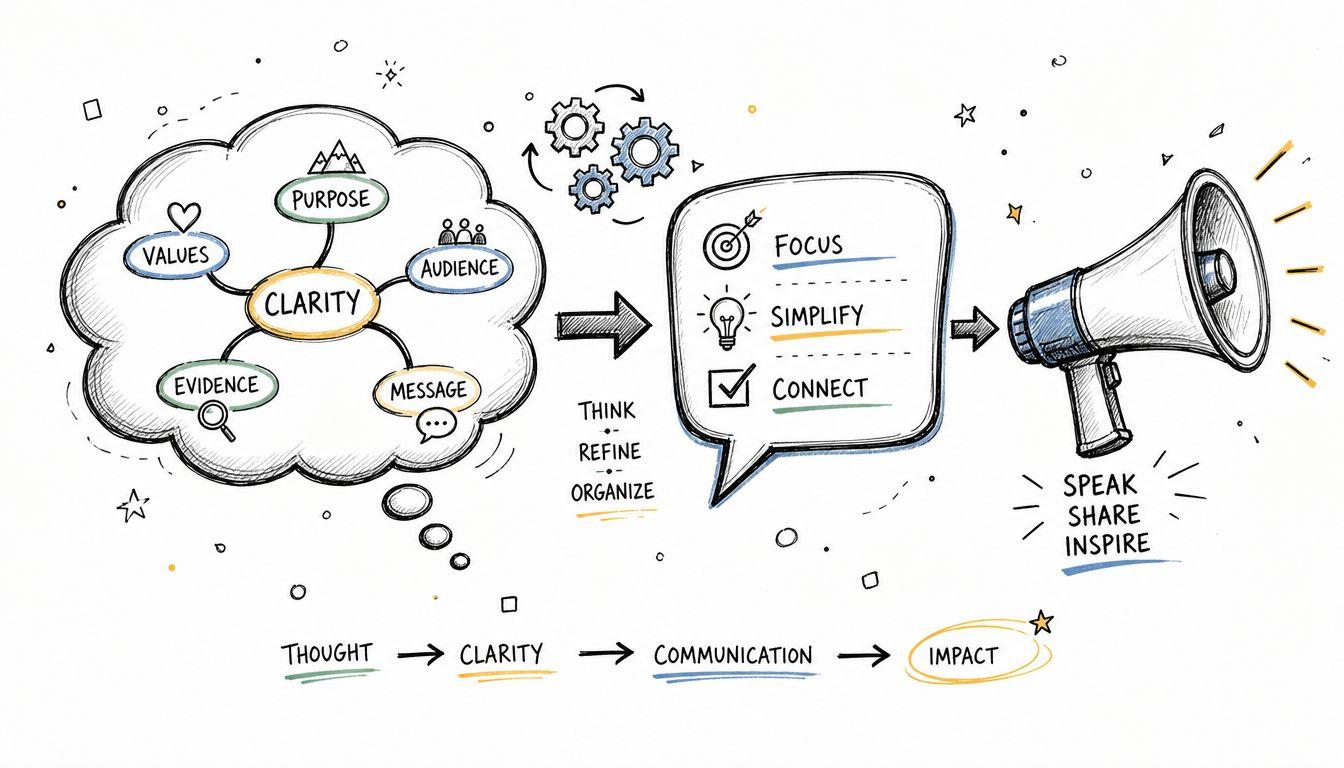
Having organized thoughts is powerful. Being able to explain them clearly is what makes them useful to other people.
Many capable people continue to struggle. They have ideas, notes, and even a decent plan, but when it's time to speak in a meeting, answer a tough question, or write a concise email, everything jams up. According to a discussion referencing the 2025 LinkedIn Workforce Report on articulating thoughts under pressure, 78% of professionals struggle to articulate ideas clearly under pressure, and only 9% of articles on thought organization include interactive refinement techniques such as recording Q&A sessions.
Turn notes into a message
A useful communication structure is simple:
- State the point
- Explain why it matters
- Support it with key details
- End with the decision, ask, or takeaway
Suppose your brain dump and sorting process produced these notes for a team update:
- customers keep asking for easier onboarding
- support tickets mention setup confusion
- sales team wants simpler demo flow
- two ideas for fixing first-run experience
That becomes:
- Point: We should simplify onboarding.
- Why it matters: Customers are getting stuck early.
- Support: Support and sales are hearing the same friction.
- Takeaway: Let's review two changes for the first-run experience.
Pressure-test the idea before you present it
Many people stop too early. They organize their notes, then assume they're ready to communicate. A better move is to test the idea in motion.
Try one of these:
- Record yourself explaining it aloud: Listen for places where you ramble or skip logic.
- Use interview-self questions: What am I really saying? What's the evidence? What might someone challenge?
- Ask a skeptical friend or teammate: Let them poke holes in weak spots before the main conversation.
If you can't explain the point in a few plain sentences, the thought probably needs one more round of sorting.
Match the format to the situation
For an email, lead with the ask.
For a presentation, start with the main message, then build support.
For a difficult conversation, write down the core point and the one outcome you want.
Clear communication doesn't require perfect words. It requires a thought structure strong enough to hold your message when pressure rises.
Frequently Asked Questions About Organizing Thoughts
How do I organize my thoughts when I'm anxious or emotional
Start smaller than usual. Don't try to build a full system in that moment. Write short fragments such as "what happened," "what I feel," and "what needs action today."
If your thoughts feel tangled, separate them into two buckets:
- What needs soothing
- What needs solving
That distinction matters. Not every intense thought is a task.
Should I use paper or digital tools
Use the format you'll return to consistently. Paper is often better for slowing down, sketching ideas, and reducing distractions. Digital tools are better for search, storage, and moving notes between devices.
A mixed setup works well for many people. Capture on paper. Store final tasks in a digital calendar or task app. Keep project notes in one searchable place. If you're comparing tools or workflows, 1chat FAQs and help topics can be useful for practical questions about organizing information across tasks.
What if I only have five minutes a day
Use a micro-routine:
- Minute one: empty your head
- Minute two: circle the most important item
- Minute three: move non-urgent items elsewhere
- Minute four: write the next physical action
- Minute five: remove one distraction
Five minutes won't solve everything, but it can stop mental buildup.
What should I do if my system keeps falling apart
Make it smaller. Systems usually fail because they ask too much maintenance. Too many categories, too many apps, too many rules.
Strip it down to three places:
- Capture
- Today
- Later
Then rebuild only if more complexity is necessary.
How do I organize thoughts for speaking, not writing
Talk through the idea before you polish it. Speak into your phone, answer your own questions out loud, and listen back. Spoken clarity often comes from rehearsal, not from trying harder in the moment.
If you tend to freeze, prepare three anchors: your main point, one supporting example, and your closing takeaway. That's often enough to keep your mind from scattering.
Thought organization doesn't start with perfect discipline. It starts with relief. Get the thoughts out. Sort what matters. Give each idea a form that matches the job. Then practice saying it clearly.
If you want help turning rough notes, research, drafts, and questions into something more usable, 1chat gives families, students, and small teams one place to work with multiple leading AI models, organize information, analyze documents, and move from scattered thinking to clearer output.