You're helping a client, child, student, or coworker, and an AI chat box seems like the fastest way to get unstuck. You paste in a contract to summarize, forward a school email, upload a customer spreadsheet, or ask a health question without stopping to consider what happens after you click send. The response may be useful, but the information you supplied has entered a system with its own rules for processing, storage, access, and deletion.
Data privacy protection means keeping personal and business information under the control of the people who are entitled to use it. That control matters at home, in school, and at work. By 2026, 172 countries were enforcing data protection laws, compared with about 100 in 2015, according to a 2026 overview of global data privacy statistics. Privacy is no longer a niche concern reserved for legal departments. It's part of using digital services responsibly.
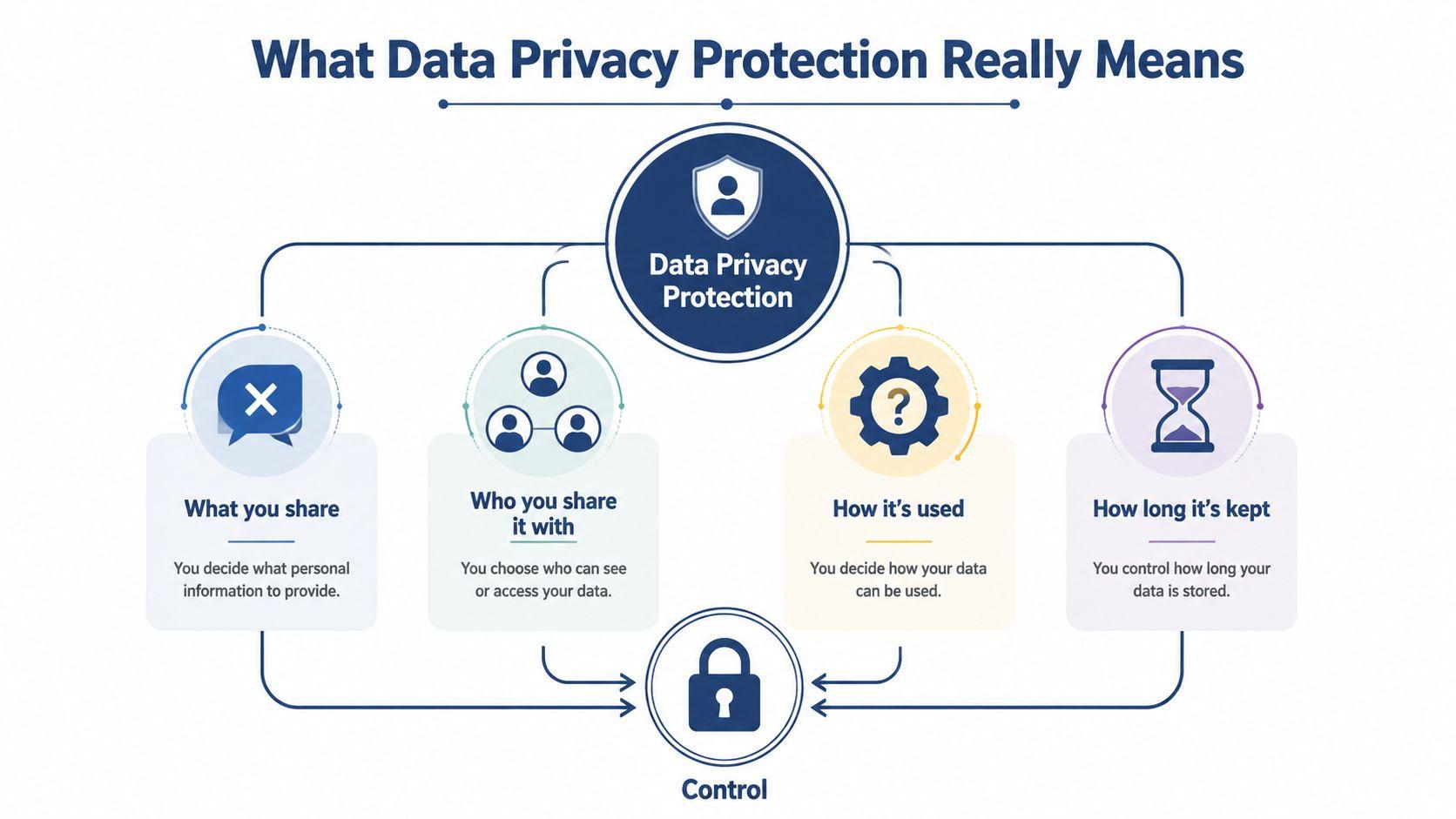
What Data Privacy Protection Really Means
Suppose a freelancer pastes a client contract into a chatbot and asks for a plain-language summary. The freelancer may have avoided malicious software, used a strong password, and received a helpful answer. Still, important questions remain: Who can access the text? How long will the service keep it? Can the provider reuse it? Can the freelancer remove it later?
Data privacy protection is the set of choices that controls what information gets shared, who receives it, how it's used, and how long it remains available. By Design Law Firm's guide to data privacy and compliance offers useful legal context, but the practical question is simpler: are you giving a system more information or permission than it needs?
Security and privacy overlap, but they aren't identical. Security protects systems and data from unauthorized access, such as phishing, theft, or malware. Privacy governs what legitimate people and systems are allowed to do with information after they can access it. A company can have excellent security and still misuse data by retaining it indefinitely or using it for an unrelated purpose.
Start with the kind of data
Three categories appear in most everyday situations:
- Personal data: Information that identifies or can reasonably relate to a person, such as a name, email address, home address, account number, or school record.
- Sensitive personal data: Information that could cause greater harm or embarrassment if exposed, including health details, financial information, identity documents, or private family circumstances.
- Non-personal data: Information that doesn't identify a person in its current form, such as a general writing prompt or a public product description. Context can still matter, because combining harmless-looking details may make someone identifiable.
Follow the AI data lifecycle
An AI tool typically handles your information through several stages:
- Input: You enter text, upload a file, or send an image.
- Processing: The service analyzes the material to produce a response.
- Storage: The conversation, account information, logs, or uploaded files may be retained.
- Training or reuse: Depending on the provider's terms and settings, inputs may or may not contribute to future model development or other service functions.
- Deletion: The provider may offer controls for removing conversations, files, memories, or the account itself.
Before sending anything, ask one question for each stage: What exactly am I sharing? Who processes it? Where might it be stored? Will it be reused? How can I delete it? You can review the specific controls for 1chat in its privacy policy.
The Most Common Threats You Actually Face
Small users rarely encounter privacy problems because they designed an attack platform. More often, the problem looks ordinary: a rushed message, a convincing email, a shared account, or a chatbot prompt that contains one detail too many. The most dangerous action can look exactly like normal productivity.
| Threat | How It Shows Up in Chat Tools | Frequency for Small Users |
| Phishing and social engineering | A fake support message asks you to paste a login code or upload an account document | High |
| Accidental oversharing | A parent forwards a school email, a student pastes an essay draft, or a startup uploads a customer CSV | High |
| Model training or input reuse | A user assumes a private conversation stays private without checking the provider's settings or terms | Medium to high |
| Cross-border data transfer | Customer or employee information moves through a cloud service operating in another jurisdiction | Medium |
Phishing and social engineering work because attackers use trust, urgency, and helpful-looking instructions. A message may claim to be from a teacher, bank, colleague, or AI support team and ask you to provide information “for verification.” If a chatbot-connected agent can take actions, the risk can extend beyond disclosure to unauthorized changes. AI agent security risk examples from Agntz can help teams recognize these patterns.
Oversharing is especially common because it feels productive. A parent might ask a chatbot to summarize an email containing a child's name, school, schedule, and teacher contact details. A student might paste an entire assignment brief with identifying information. A startup might upload a CSV when a few anonymized rows would have been enough.
Practical rule: If the tool can answer your question after you remove names, addresses, IDs, and account numbers, remove them first.
Training and reuse create a different kind of uncertainty. The user isn't necessarily attacked, but may not know whether an input is retained, reviewed, used for service improvement, or available through account features. Cross-border collection adds another layer. A UN-linked discussion of the global privacy gap describes how international personal-data collection can move faster than legal frameworks and leave people with limited remedies when information is collected from abroad.
You can check how cookies and related technologies are handled through 1chat's cookie policy. The broader lesson is practical: treat every chat input as a data-transfer decision, not merely a writing shortcut.
GDPR and CCPA in Plain English
Privacy laws become easier to understand when you translate them into tasks. GDPR generally asks organizations handling relevant personal data to identify a lawful basis, respect individual rights, protect information, and respond properly when something goes wrong. It can apply when a small team handles the data of an EU resident, even if the team itself is located elsewhere.
The GDPR also gives people rights to access and delete their personal data. A serious personal-data breach may require notification to the relevant supervisory authority within 72 hours, as described in the regulation's breach-notification framework. A small business using AI should therefore know what data it sends, which vendors receive it, how to answer a data request, and who handles an incident.
CCPA focuses on California residents and gives people rights to know what personal information a business collects, request deletion, and opt out of the sale of personal information. The law provides for a $7,500 civil penalty per intentional violation, so teams should treat privacy requests and disclosures as operational responsibilities, not paperwork.
| Requirement | GDPR (EU) | CCPA (California) |
| Trigger | Handling personal data in situations covered by the GDPR, including certain activity involving people in the EU | Conduct covered by California privacy rules involving California residents |
| Core rights | Access, deletion, restriction in relevant circumstances, and other rights | Know, delete, and opt out of sale, among other rights |
| Incident response | Some personal-data breaches require supervisory-authority notification within 72 hours | Requires attention to applicable disclosure and security obligations, with consequences for violations |
| Financial exposure | Regulators can impose significant enforcement penalties | Intentional violations can carry a $7,500 civil penalty per violation |
| Day-one action | Record the purpose and lawful basis for each AI workflow, minimize inputs, and prepare a request process | Map collected data, explain uses, provide applicable rights controls, and review sale or sharing practices |
Both regimes push toward data minimization. That means collecting and sending only what the task requires. A writing assistant usually needs the paragraph you want edited, not the customer's full profile, payment history, or medical background. Teams that communicate with customers by email can use this plain-language GDPR resource for email marketers to connect legal duties with daily sending practices.
Other jurisdictions follow the same broad pattern. Brazil's LGPD and Canada's PIPEDA also emphasize responsible collection, clear purposes, individual rights, and safeguards. The precise rules differ, so a business should obtain local legal advice when its operations or customers cross borders.
Best Practices for Small Businesses Using AI
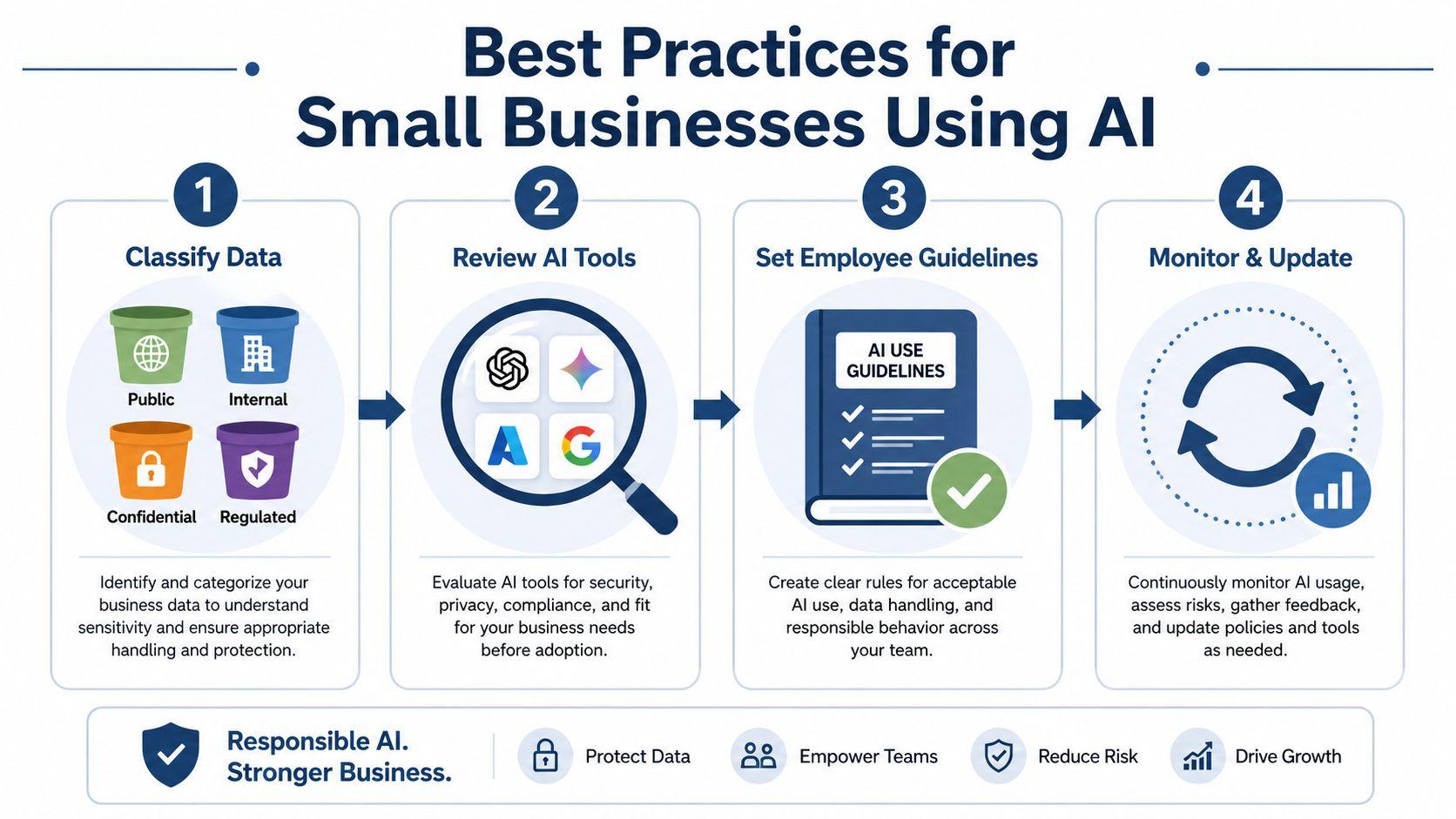
A small business doesn't need a large privacy department to create useful guardrails. It needs a repeatable routine that answers three questions before data reaches an AI tool: what is this, who approved the tool, and what happens after submission?
Classify before anyone pastes
Create four practical buckets:
- Public: Published webpages, public product descriptions, and general marketing copy.
- Internal: Team procedures, planning notes, and non-public material that doesn't identify customers.
- Confidential: Contracts, pricing, negotiations, employee information, and unpublished business plans.
- Regulated: Customer PII, payment information, health records, identity documents, and other data subject to specific obligations.
Put the classification next to the chat workflow, not in a forgotten policy folder. An employee who sees “public only” beside a prompt box is more likely to pause than someone who has to remember a long legal definition.
Review the provider
Before approving an AI tool, ask where information is stored, whether inputs are used for training or service improvement, which administrators can access conversations, and how deletion requests work. Also ask whether the service offers encryption, audit records, role-based permissions, temporary conversations, and regional residency choices.
NIST recommends combining access control with encryption at rest, in transit, and in use. Its guidance also describes identity-, role-, attribute-, and resource-based access policies, which gives a small team a useful vocabulary for deciding who can see which files. For fine-grained encrypted access, NIST discusses attribute-based encryption and the operational challenges that can arise when traditional keys must change as permissions change. See the NIST guidance on attribute-based encryption for the technical background.
Write one page, then rehearse it
Your acceptable-use guide can fit on one page. Name approved tools, prohibited content, the sanitization rule, the person to contact when someone is unsure, and the process for reporting an accidental disclosure.
Train with realistic prompts. Replace a customer's name with “Customer A,” an email with “[email protected],” and an account number with “[ACCOUNT ID].” The goal isn't to make AI unusable. It's to preserve the context needed for a useful answer while removing identifiers the tool doesn't need.
NIST's PII protection guidance supports this layered approach, including identifying PII, de-identifying information when full identity isn't necessary, limiting portable-device access, and encrypting PII before transmission.
Review the rules monthly
Spend a short monthly review checking new tools, browser extensions, shared prompts, employee changes, and recent incidents. Ask whether the approved-tool list still matches actual usage. That brief review catches policy drift before an employee creates a new workflow around an unapproved chatbot.
Practical Steps for Families, Students, and Teams
Privacy habits work better when they match the moment people use AI. A family, student, and small team may use the same kind of chat tool, but each group faces different pressure to share information quickly.
Families with children
Start with the device, not the policy document. Turn off chat history where the service allows it, use a shared household account only when everyone understands who can see conversations, and review app permissions regularly. Establish a simple household rule: schoolwork containing identifying details, medical questions tied to a real person, and home addresses never enter a public chatbot.
A child can still ask for help with a fictional example, a general explanation, or a de-identified homework question. Parents should explain that “the chatbot helped” doesn't mean the chatbot needs the entire email, report card, or family story.
Red flag: forwarding a complete school message to get a summary when the same summary can be requested after removing names, contact details, and schedule information.
Students writing essays
Use AI for brainstorming, outlining, grammar feedback, and questions about a topic. Keep the actual draft, grading rubric, student ID, teacher comments, and research notes in a private document or approved school system unless the institution has authorized another workflow.
Students should also follow their school's academic-integrity rules and disclose AI use truthfully when required. A privacy-safe workflow protects both personal information and authorship. Ask the tool to critique a paragraph with placeholders rather than pasting a full paper that includes identifying details or instructor annotations.
Red flag: uploading an entire course folder, including classmates' work, feedback, and identifying information, just to improve one paragraph.
Small teams sharing AI access
Shared accounts need clear ownership. Use approved browser profiles, avoid leaving conversations open between shifts, log out on shared devices, and don't place credentials or customer records into a common chat history. Teams should agree on standard prompt templates that use placeholders and explain which data categories are banned.
A business account with administrative controls may be more appropriate than an informal personal account, but the team still needs a rule for files, prompts, and deletion. Review shared conversations for accidental exposure and remove material that no longer serves a business purpose.
Red flag: assuming that everyone who can open the account should be able to read every previous conversation.
Print this combined checklist:
- Pause: Identify the information before opening the chat.
- Strip identifiers: Remove names, addresses, IDs, emails, and account numbers when they aren't needed.
- Check the tool: Confirm retention, training, access, and deletion settings.
- Use the right account: Keep household, school, and business workflows separate.
- Review the response: Make sure the output doesn't repeat sensitive information.
- Delete when appropriate: Remove conversations and files that no longer need to exist.
- Ask when uncertain: Escalate instead of guessing.
How a Privacy-First AI Chat Tool Helps
Good privacy design removes decisions users shouldn't have to make repeatedly. A privacy-first assistant should connect its controls to the risks already discussed: accidental oversharing, uncertain reuse, unauthorized account access, and cross-border handling.
Zero-retention conversations address the concern that a sensitive prompt remains available after the task ends. No training on user inputs addresses uncertainty about whether a customer message, essay draft, or internal prompt contributes to later model development. Encrypted storage reduces the chance that readable content is exposed if stored systems or devices are accessed improperly.
Regional data residency options can help organizations evaluate where information is processed and stored, especially when customers or employees live under different legal regimes. Visible controls inside the chat window matter too. A user should be able to see whether a conversation is temporary, delete individual chats, remove saved memories, or delete an account without searching through obscure settings.
Product claims should always be checked against the provider's current policy. Based on the supplied product information, 1chat describes controls for deleting specific or all conversations, deleting saved memories, and deleting an account. Its policy also states that deleted personal data is removed from its systems within 30 days, unless legal or safety reasons require retention, and that Temporary Chats are automatically deleted within 30 days.
| Privacy Control | Typical Consumer AI Tool | 1chat |
| Conversation retention | Depends on the provider and selected settings | Provides deletion controls and Temporary Chats described as automatically deleted within 30 days |
| Training use | May depend on account settings and provider terms | Described for this comparison as not training on user inputs |
| Account deletion | Usually available, but process and timing vary | Provides account-deletion controls, with policy conditions for removal |
| User visibility | Controls may be distributed across settings and policy pages | Privacy controls are intended to be visible within the chat experience |
For teams evaluating options, 1chat represents one privacy-first alternative to consider alongside other vetted tools. The point isn't to trust a label blindly. It's to choose a service whose defaults, controls, and documentation make the safe workflow easier to follow.
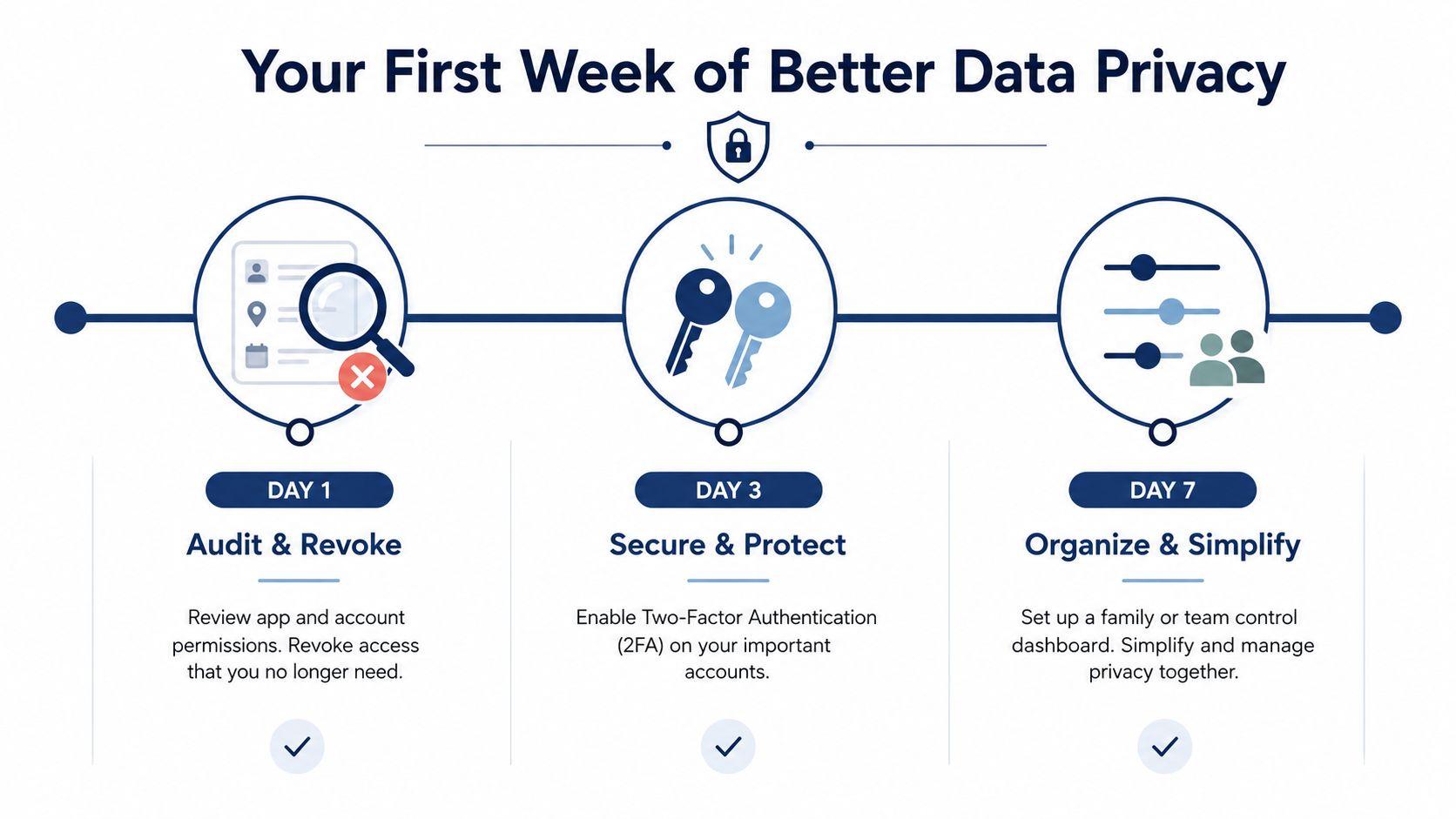
Your First Week of Better Data Privacy
You don't need to rebuild every digital habit at once. Start by finding the places where sensitive information already sits, then secure the accounts and workflows people use.
Day 1, audit and revoke
Set aside 15 minutes for a personal or team data audit. Search inboxes, cloud drives, and AI chat histories for names, addresses, identity details, account numbers, contracts, health information, and customer files. The deliverable is a short list of exposed or unnecessary material. Delete what you're allowed to delete, revoke unused app permissions, and record the tools that need review.
This step creates visibility. You can't protect a workflow that nobody has identified.
Days 2 and 3, secure the accounts
Install a password manager, turn on multifactor authentication wherever it's available, and review privacy settings in every AI tool already in use. Check chat history, training or improvement settings, shared access, connected applications, uploaded files, and account-recovery options.
The deliverable is a settings record showing which controls are enabled and who owns each account. If a provider's retention or training practices are unclear, stop sending sensitive information until someone verifies the policy.
Days 4 and 5, make the rule usable
Draft the one-page household or team agreement using the earlier categories. Name approved tools, banned data types, the placeholder method, the escalation contact, and the deletion routine. Then move at least one sensitive workflow to a privacy-first option such as 1chat, after checking the current product documentation and your organization's requirements.
The visible result should be a policy people can follow without asking a lawyer to interpret every prompt. Keep the printable checklist near the shared device or team workspace, and revisit it during the monthly review.
Start today by auditing one inbox, one cloud folder, and one AI chat history. Remove unnecessary identifiers, enable multifactor authentication, and write your first approved-use rule before the next person in your household or team pastes sensitive information into a chatbot.