Think about sending a postcard. Anyone who handles it—the mail carrier, the person at the sorting facility, even a nosy neighbor—can read what you wrote. Sending a regular, unencrypted file online is pretty much the same thing.
Encrypted document sharing is the solution. It’s like putting that sensitive information inside a locked metal box before you mail it. Only the person with the right key can open it and see what’s inside. This isn't just a niche tool for tech experts anymore; it's an absolute must for protecting everything from business contracts to personal medical records.
Why Secure Document Sharing Is So Important
The way we share information directly impacts our security. Every single day, teams work together on confidential projects and families send each other personal documents, often using tools that leave them wide open to risk.
An unsecured file transfer is an open invitation for trouble. Whether it's a hacker sniffing around on a public Wi-Fi network or a large-scale data breach targeting the service you use, the threats are real. This isn't just some abstract "what if" scenario—it leads to real-world financial losses, damaged reputations, and serious legal trouble.
The Real-World Risks of Unsecured Files
What happens when you don't encrypt your documents before sharing? Let's look at a few common situations:
- Business Contracts: Imagine a draft of a merger agreement or a new client proposal gets leaked. It could completely tank the deal and give your competitors a massive advantage.
- Client Data: Sharing unencrypted financial reports or health records is a huge breach of trust. It can also land you with crippling fines under regulations like GDPR or HIPAA.
- Personal Records: Sending copies of passports, social security numbers, or bank statements without protection makes you an easy target for identity thieves.
These examples all point to the same uncomfortable truth: most standard file-sharing tools trade security for convenience. Secure sharing methods are designed to fix that, giving you both.
Building Trust Through Digital Privacy
Using encrypted sharing isn't just about dodging bullets. It's a powerful way to build trust. When your clients, business partners, or even family members know you’re taking steps to protect their information, it shows you value their privacy.
In the business world, this has become a major selling point. The market is shifting dramatically as more people demand secure ways to communicate and share data.
The numbers don't lie. The global market for end-to-end encrypted communication was valued at USD 6.12 billion in 2024 and is expected to skyrocket to USD 19.97 billion by 2032.
This isn't just a trend; it's a fundamental shift in how we think about data. As more of us wake up to the risks, having a solid plan for encrypted document sharing is no longer optional—it's essential. You can find more details on this growth in recent secure file transfer market reports.
Understanding How Encryption Actually Works
To really get why encrypted document sharing is so important, it helps to peek behind the curtain at how the technology actually keeps your information safe. Don't worry, we won't get bogged down in complex math or dense jargon. The core ideas are pretty simple when you think about them in terms of real-world security.
Each encryption method acts like a different layer of defense, designed to shield your data at its most vulnerable points.
The Basics: In Transit vs. At Rest
Think of encryption in transit as an armored truck. When you send a file from your computer to someone else, this method protects it while it's zipping across the internet. Just like an armored truck secures cash on its way to the bank, this keeps anyone from snooping on your data as it travels through public networks, like the Wi-Fi at your local coffee shop.
But what happens once the armored truck reaches its destination, like a cloud storage server? The file needs to stay safe there, too. That's where encryption at rest comes in. If in-transit is the armored truck, at-rest is the bank vault. It scrambles the files stored on the server, making them unreadable to anyone who might break into the data center or gain unauthorized access to the hard drives.
The Gold Standard: End-to-End Encryption
The armored truck and bank vault are great for protecting data at specific stages, but what if you could wrap your document in a single, unbreakable shield for the entire journey? That's the magic of end-to-end encryption (E2EE).
Imagine you place your document inside a special lockbox, and only you have the key to lock it. You hand that box off for delivery. When it arrives, your recipient has the only other key in the world that can open it.
The most important part? The delivery service itself—the platform you're using—can’t peek inside. They can handle the box, but they have no way of opening it. This is what makes E2EE the gold standard for secure file sharing. Only the sender and the intended recipient can ever see what’s inside.
This concept is central to protecting all kinds of sensitive information, from business deals to personal family photos.
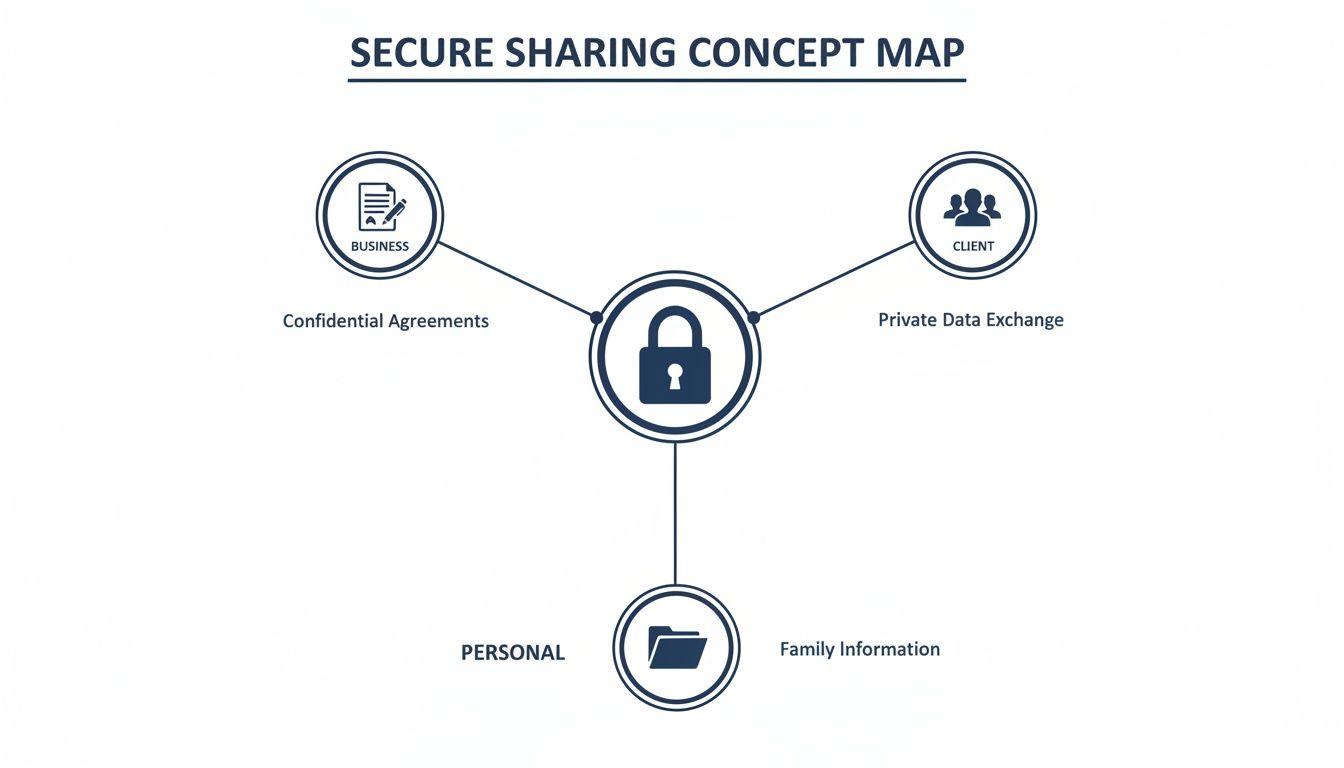
As the visual shows, a solid encryption strategy is the foundation for keeping business contracts, client data, and family records genuinely private.
Taking Privacy to the Next Level with Zero-Knowledge
Let's push that lockbox analogy a little further. What if the person delivering your lockbox doesn't even know what a key is, let alone have a master key? That’s the core idea behind zero-knowledge encryption.
In a zero-knowledge system, the service provider manages your encrypted files (the lockbox) but has absolutely no access to the keys or passwords that can decrypt them. Your key is created from your password, and that password is never sent to or stored on their servers.
This means the provider is mathematically blocked from ever accessing your files. Even if faced with a court order, they can’t hand over data they simply can't read. You don't have to trust them not to look; the system is built so they can't.
Key Takeaway: The difference between standard cloud storage and a zero-knowledge service comes down to who holds the keys. With most services, the provider has a copy. With zero-knowledge, only you do.
Encryption Methods At A Glance
Choosing the right approach all comes down to what you're trying to protect and who you're trying to protect it from. This table breaks down the key differences at a high level.
| Encryption Type | What It Protects | Analogy | Who Can Access Data |
| Encryption in Transit | Data as it moves across a network. | Armored Truck | Sender, Recipient, Service Provider |
| Encryption at Rest | Data stored on a server or drive. | Bank Vault | Sender, Recipient, Service Provider |
| End-to-End Encryption | Data for its entire journey. | Sealed Lockbox | Sender & Recipient Only |
| Zero-Knowledge | Data stored by a third party. | Lockbox with a Secret Key | Only You (the User) |
With zero-knowledge systems, your password becomes your primary line of defense. Even the world's best encryption can be undone by a weak password. That's why creating a strong, unique credential is so critical. To really level up your security, it's worth learning about the significant differences between a passphrase vs password and why one is almost always the better choice.
Understanding these concepts gives you the power to make much smarter choices about the tools you trust with your most important documents.
Choosing Your Method for Sharing Documents Securely
Now that you've got the basics of encryption down, it's time to move from theory to action. Picking the right way to share encrypted documents really boils down to your specific situation—what you're sending, who it's for, and the classic trade-off between convenience and security.
Let's walk through the most reliable methods, looking at where they shine, where they fall short, and when you should use them.
Dedicated Secure File Sharing Platforms
The most direct route is to use a platform built specifically for secure file sharing for businesses. Think of these as all-in-one solutions that take the complexity out of the equation. They manage the encryption, user access, and the entire transfer process for you, so you don't have to sweat the details.
These services typically use end-to-end encryption and come packed with business-focused features like audit trails (who touched what file and when), the ability to revoke access, and detailed user permissions. If your team is juggling sensitive client contracts or confidential project files, this is almost always the best path forward. You get top-tier security without sacrificing ease of use.
Zero-Knowledge Cloud Storage
As we covered earlier, zero-knowledge cloud services offer an incredible layer of privacy. Unlike standard cloud storage where the provider technically could access your data, zero-knowledge architecture ensures you—and only you—hold the keys.
This is a fantastic approach for creating a secure digital vault for a family's most critical documents, like passports, wills, birth certificates, and financial records. While you can certainly share files from these platforms, their real strength lies in providing a private, long-term storage solution. The user experience feels just like a regular cloud drive, but with a powerful privacy guarantee working silently in the background.
Key Insight: The main difference is intent. Secure file sharing platforms are designed for the act of sending files securely, while zero-knowledge storage is built for the act of storing files with ultimate privacy.
The Manual Method: Password-Protected Archives
For the occasional secure transfer, you can't go wrong with the classic password-protected archive (like a .zip or .7z file). It’s a time-tested and surprisingly effective method. Nearly every computer has built-in tools to create these archives, which essentially wrap your document in an encrypted container that needs a password to unlock.
But this method's security lives or dies by one simple rule: never send the password through the same channel as the file.
Think about it. Emailing an encrypted file and then immediately emailing the password is like sending a locked safe by courier and taping the key to the top of the box. If a thief grabs the package, they get everything they need.
Here’s a much safer workflow:
- Email the encrypted archive to your contact.
- Send the password through a completely different, secure channel. This could be an end-to-end encrypted messaging app like Signal or even just a quick phone call.
By splitting the file and the key across two separate channels, you make an attacker's job exponentially harder. A breach of your email doesn't automatically expose the document, making this a very robust technique when you do it right.
High-Security Email with PGP or S/MIME
For people who live in their email inbox and need to encrypt the actual message content—not just the attachments—PGP (Pretty Good Privacy) and S/MIME (Secure/Multipurpose Internet Mail Extensions) are the gold standards.
These technologies use a system of public and private keys to both encrypt and digitally sign your emails, proving they came from you and haven't been tampered with.
- PGP: Generally requires some third-party software and a bit more technical know-how to get started, but it's a powerful and highly respected standard.
- S/MIME: Is often built right into major corporate email clients like Outlook and Apple Mail, which is why it's so common in professional settings.
Getting PGP or S/MIME running is definitely more involved than the other methods here, so it’s not ideal for casual users or families. However, for journalists, lawyers, and anyone handling extremely sensitive communications over email, it remains an essential tool. The learning curve is a bit steep, but the security it provides for your actual conversations is second to none.
Defending Against Common Digital Threats
Using encryption isn't just about ticking a technical box; it’s a direct response to very real, very common digital dangers. Once you understand what you're up against, the value of encrypted document sharing becomes crystal clear. It stops being an abstract concept and starts feeling like an indispensable shield.
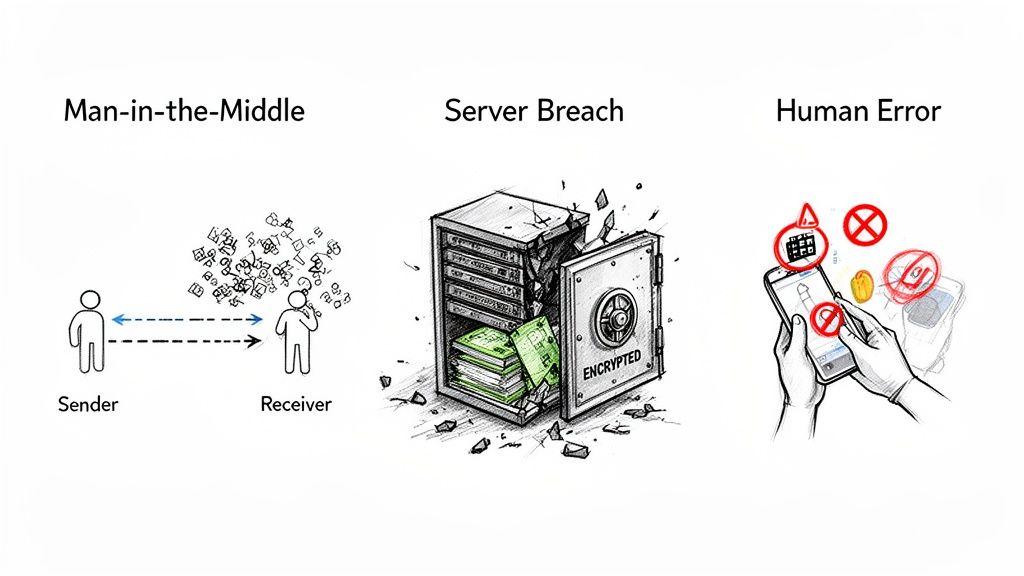
Every time you send a file, you're opening a door to risks you might not even see. Think about opportunistic hackers lurking on public networks or even massive data breaches at the services you trust. The dangers are always there, but the right kind of encryption can be the perfect defense for each scenario.
The Public Wi-Fi Problem
Picture this: you're at a coffee shop, using their free Wi-Fi to send a confidential contract to a client. Without encryption, you’re wide open to a "Man-in-the-Middle" (MitM) attack. This is where a hacker on the same network slips silently between you and the internet, intercepting everything you send and receive.
To them, your unencrypted file is like an open book. They can read it, copy it, or even change the details before it ever reaches your client.
This is exactly where encryption in transit shines. It scrambles your document's data for the entire journey. So, even if a snoop manages to grab the file, all they get is a block of jumbled, meaningless code. The contract is completely unreadable and useless to them.
When Your Provider Gets Breached
You probably trust the service you use to share files, but what happens if their security fails? Data breaches are shockingly common, and even the biggest companies are targets. If a hacker manages to break into a provider's servers, they could gain access to everything stored there.
This is the exact threat that encryption at rest is designed to stop. By encrypting files while they’re sitting on a server, the data stays protected even if the server itself is compromised. The bad guys might steal the files, but they won't be able to read a thing without the encryption keys.
For the absolute highest level of security, zero-knowledge encryption is the gold standard. Since the service provider never has access to your encryption keys, they simply cannot decrypt your files—not for a hacker, not even for a government subpoena.
This approach builds a firewall between your data's security and the provider's, giving you true control over your privacy. It’s a vital layer of defense in a world where server-side breaches are an unfortunate fact of life and a key part of learning how to protect your privacy online.
The Human Element of Risk
Let's be honest: the biggest security risk often isn't a piece of technology—it's us. In the name of convenience, people often turn to their personal, insecure apps to share work documents. They're not trying to cause harm, but they're creating huge security gaps without even realizing it.
This casual approach can completely undermine a company's security policies. And it happens more than you think. A stunning 56% of employees in the U.S. admit to regularly using personal file-sharing tools like Google Drive, WhatsApp, or Dropbox for work, often against company rules. You can dig into more of these trends in recent file transfer statistics reports.
The solution isn't just a stricter policy; it's adopting tools that are both secure and easy to use. When a company provides a user-friendly, end-to-end encrypted platform, it solves the problem at its root. That way, even if someone makes a mistake, the data itself remains shielded from prying eyes, turning a potential disaster into a non-issue.
Building A Secure Sharing Workflow From Scratch
Knowing about encryption is one thing, but putting it into practice is where it really counts. You need a plan—a workflow that turns good security intentions into consistent, reliable habits. Building this out isn't nearly as complicated as it sounds; it's really just about making deliberate choices about how you and your team (or your family) handle sensitive information.
The goal is to create a system that’s both rock-solid secure and simple enough that people will actually use it. One missed step can unravel all your hard work, so the best workflows are straightforward and cover the entire life of a document—from the moment it's created to the day it's securely deleted.
A Secure Workflow For Small Businesses
For any small business, a formal process for sharing encrypted documents is non-negotiable. It’s how you protect client data, safeguard your intellectual property, and build a reputation for being professional and trustworthy. The trick is to remove any and all ambiguity so that every single team member knows precisely what to do and when.
A successful business workflow is built on two pillars: policy and process. It's not enough to just buy a fancy new tool; you have to define exactly how your team is expected to use it. This discipline creates a strong, repeatable security posture that grows with your team and, crucially, prevents the all-too-common problem of employees using their own insecure personal tools just for convenience.
Here are the foundational steps to build your team's workflow:
- Standardize Your Tools: First things first, officially select and approve a single platform for all sensitive file sharing. This move alone eliminates massive amounts of confusion and stops employees from using a dangerous patchwork of personal accounts.
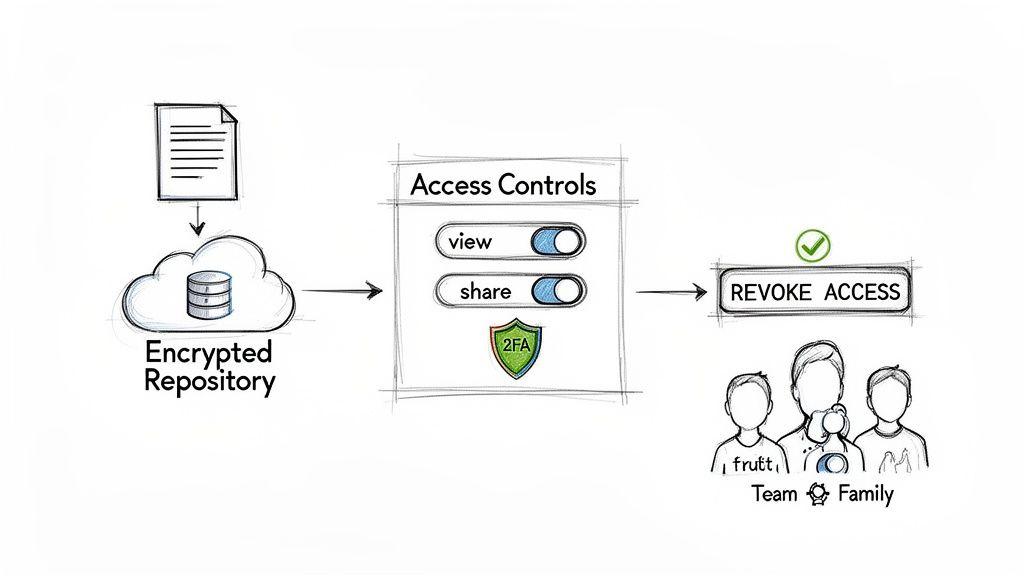
- Define Access Tiers: Not everyone needs the keys to the kingdom. Establish clear permission levels based on roles—think "Viewer," "Commenter," and "Editor." This is the principle of "least privilege" in action, and it ensures people only have the access they absolutely need to do their jobs.
- Mandate Strong Authentication: The world's best encryption is useless if it's locked behind a password like
P@ssword123. Require every team member to enable Two-Factor Authentication (2FA) on their account. It adds a critical second layer of defense against stolen or weak credentials. - Create an Offboarding Protocol: What happens when someone leaves the company? Your workflow must include a clear, immediate checklist for revoking their access to all shared documents and company systems. This is a surprisingly common security hole that’s easy to plug.
By establishing these clear rules, you elevate secure document sharing from a hopeful suggestion into a core business operation. That consistency is your best defense against both external attackers and simple human error.
To make this even more practical, here’s a checklist you can adapt for your own team.
| Step | Action Item | Key Consideration |
| 1. Tool Selection | Officially select and deploy one secure sharing platform. | Does it offer end-to-end encryption? Does it support the access controls you need? |
| 2. Policy Creation | Draft a simple "Secure Sharing Policy" document. | Clearly state what is considered sensitive data and when the official tool must be used. |
| 3. Access Control | Define roles (e.g., Admin, Editor, Viewer) and assign default permissions. | Default to the lowest permission level needed for a given role. Grant more access only as required. |
| 4. Authentication | Enforce mandatory 2FA for all user accounts during onboarding. | Use an authenticator app over SMS for better security. |
| 5. Training | Hold a brief training session to demonstrate the correct workflow. | Show, don't just tell. Walk through a real example of sharing and revoking access. |
| 6. Offboarding | Integrate access revocation into your employee departure checklist. | This should be one of the very first steps taken when an employee's departure is confirmed. |
| 7. Auditing | Schedule a quarterly review of user access and shared file permissions. | Check for old, unnecessary shares and accounts with overly broad permissions. |
This checklist transforms abstract security goals into a concrete, repeatable process that anyone on your team can follow.
A Simple Workflow For Families
When it comes to family, the priorities shift a bit. Security is still the top concern, of course, but the focus is more on simplicity, long-term reliability, and ensuring access during an emergency. The aim here is to create a central, secure digital vault for the documents that truly matter.
Think of it as the digital equivalent of a fireproof safe. This is where you'll keep everything from passports and birth certificates to the will and insurance policies. Your workflow should be so simple that even a less tech-savvy family member can get what they need, when they need it.
Creating Your Family’s Digital Vault
Building a family workflow is less about strict corporate policies and more about creating a shared system built on trust and preparation.
- Choose a Zero-Knowledge Service: For the ultimate privacy, pick a zero-knowledge cloud storage provider like Proton Drive or Tresorit. This design guarantees that only your family can ever access the encrypted files—the company itself holds no keys.
- Organize and Digitize: Go through your paper files and systematically scan and upload the critical documents. Create obvious folders like “Legal,” “Financial,” “Medical,” and “Identification” so everything is easy to find in a stressful situation.
- Establish a Sharing Protocol: Decide who needs access and figure out how you'll securely share the master password. The best method is often the simplest: write it down and store it in a physically secure location, like a home safe or a sealed envelope given to a trusted executor or family lawyer.
- Regularly Review and Update: Set a calendar reminder to review the vault's contents once a year. This is your chance to update insurance policies, add new documents (like a new baby's birth certificate), and make sure your access plan still makes sense.
This straightforward process ensures your family's most important information is protected by powerful encryption and, just as importantly, is accessible when it counts.
Beyond Encryption: Advanced Security and Staying Compliant
For a lot of businesses, strong encryption isn't just a nice-to-have security perk—it's a legal and regulatory must. If you fail to protect sensitive data, you could be looking at massive fines under regulations like GDPR and HIPAA. This reality makes encrypted document sharing a non-negotiable part of any serious compliance strategy.
In fact, by 2025, encryption has pretty much become the baseline for sharing documents the right way. A full 62% of organizations now have formal policies for it. The industry standard has settled on 256-bit AES encryption, and for good reason. End-to-end encryption, in particular, has become the gold standard for turning your files into gibberish that only the intended recipient can ever read. You can get a deeper dive into the specifics of what makes file sharing compliant on mymxdata.com.
But here’s the thing: real security isn’t just about the encryption itself. The best platforms add advanced controls on top, giving you layers of specific, fine-tuned protection over your shared documents.
What Comes After Basic Encryption?
Think of these extra features like the security guards, cameras, and access logs that protect a bank vault. The vault (your encryption) is critical, but these other systems give you visibility and control over who’s coming and going.
Here are the key features you should be looking for:
- Audit Trails: This is your digital paper trail. It gives you a detailed log of every single thing that happens to a file—who viewed it, who downloaded it, and exactly when. It's absolutely essential for accountability and figuring out what happened if something goes wrong.
- Remote Access Revocation: This one is a game-changer. It’s basically an "unshare" button. Did a project wrap up? Did an employee leave the company? You can instantly cut off their access with a click, no matter how many times they've downloaded the file.
- Document Watermarking: To stop people from leaking sensitive info, you can slap a dynamic watermark on your documents. This can overlay the viewer's name, email, or IP address, making it painfully obvious who was responsible if the file ends up where it shouldn't.
- Screenshot Protection: Some tools can even prevent users from taking a screenshot while viewing a sensitive document. It's a simple but surprisingly effective way to stop data from walking out the door.
These advanced controls are what turn encrypted sharing from a passive defense into an active security system. You're no longer just locking data up; you're actively managing and monitoring its entire lifecycle. This proactive approach is what proves to clients and regulators that you’re taking security seriously—and it’s the real difference between basic encryption and a truly robust security plan.
Common Questions Answered
Even with the best plan in place, it's natural to have a few lingering questions. Let's tackle some of the most common ones that pop up when teams and families start sharing documents securely.
Is Password-Protecting a Document the Same as Encrypting It?
Not really, and it's a critical distinction to make. Think of a simple password lock on a document as a basic doorknob lock. It keeps honest people out, but it’s not designed to stop a determined intruder.
True encryption, on the other hand, is like locking the document in a high-tech bank vault. It uses powerful algorithms like AES-256 to mathematically scramble the file's contents into gibberish. Without the unique key, the file is completely unreadable. Some built-in password features can be flimsy and easily bypassed, so for anything sensitive, make sure you're using a tool that offers genuine, strong encryption.
Can I Trust Cloud Services like Google Drive with My Sensitive Files?
It depends on your definition of "trust." Big-name cloud providers do a great job of encrypting your files on their servers ("at rest") and while they're being transferred ("in transit"). But here’s the catch: they usually hold the encryption keys. This means the company could, in theory, access your data or be forced to hand it over in response to a court order.
If you need absolute privacy where no one but you can see your files, you have two solid choices: encrypt the files on your own computer before you upload them, or switch to a zero-knowledge cloud provider. Zero-knowledge services are built so that only you have the keys, meaning even the provider can't peek at your data.
What's the Safest Way to Share the Password for an Encrypted File?
Whatever you do, don't send the password in the same email as the file itself! That’s the digital equivalent of mailing a key taped to the outside of the locked box it opens. If the email is intercepted, the attacker gets everything they need in one go.
The trick is to use a completely different method—what we call an "out-of-band" channel.
- For example: Email the encrypted document.
- Then, share the password over a secure messaging app like Signal, during a phone call, or even in person.
By splitting them up, you force an intruder to compromise two separate channels instead of just one. It’s a simple step that dramatically boosts your security.