Think about sending a sensitive document through the mail on a postcard. Anyone who handles it can read it. That’s what it feels like to share files without security.
Now, imagine that same document is sealed in a tamper-proof envelope, placed inside a locked briefcase, and transported by a trusted courier. That’s the core idea behind secure file sharing: it’s the practice of sending digital files with powerful safeguards like encryption to make sure no one but the intended recipient can ever see what's inside.
Why Secure File Sharing Is A Non-Negotiable Today
Digital collaboration is just how we work and live now. We're constantly sending everything from business contracts and sensitive client data to personal family photos and financial documents. This constant flow of information is incredibly convenient, but it also opens up a huge window for risk if we're not careful. Every single file you share without protection is a potential liability—an open invitation for data thieves.
The fallout from a data breach can be brutal, and it goes way beyond just losing the file itself. For a business, it could mean crippling financial penalties, a shattered reputation, and a mountain of legal trouble. For an individual, the consequences are just as grim, often leading to identity theft, fraud, or the exposure of private moments. This is why thinking "security-first" isn't just a good idea anymore; it's a fundamental part of staying safe online.
The Growing Need For Protection
The push for secure sharing solutions isn't just a passing trend—it's a direct reaction to the rising tide of digital threats. The numbers tell the story. The global market for secure file transfer was already valued at USD 2.29 billion in 2023, and it's on track to more than double, hitting a projected USD 5.08 billion by 2033. This surge is fueled by the sheer volume of data we create and share, with file transfer volumes climbing by 8-11% every year.
This data explosion means we all need to be more vigilant. Taking the time to understand how to protect your privacy online is the first and most crucial step. It all starts with recognizing what information is sensitive and then picking the right tools to keep it safe.
Common Threats and Their Secure Solutions
The ways your files can be compromised are surprisingly varied, but they usually prey on the same old weaknesses in standard sharing methods. An email accidentally sent to the wrong person, a public sharing link left active indefinitely, or someone snooping on your connection over an unsecured public Wi-Fi network—all of these can lead to a breach.
To get a clearer picture, let's look at some common file-sharing vulnerabilities and how secure platforms counter them.
| Threat | Example | Secure Solution |
| Data Interception | A hacker captures your file while it's traveling over a public Wi-Fi network. | End-to-End Encryption scrambles the file before it leaves your device and only decrypts it for the recipient. |
| Unauthorized Access | A former employee still has access to a shared cloud drive with sensitive company data. | Access Controls allow you to revoke permissions instantly and specify who can view, edit, or download files. |
| "Leaky" Links | A public link to a confidential report is shared or discovered long after the project is over. | Link Expiration automatically disables the sharing link after a set period or number of downloads. |
| Human Error | An employee accidentally emails a customer list to an external, incorrect address. | Recipient Verification and Password Protection ensure only the right person with the right credentials can open the file. |
Ultimately, having a secure way to share files gives you confidence that what you send is what they get—and no one else gets to peek along the way.
Secure file sharing isn't just about blocking hackers; it's about building a reliable and trustworthy way to communicate. It's the assurance that your intended recipient—and only your intended recipient—gets the information exactly as you sent it.
The good news is that the solutions are easier to use than ever. Modern secure sharing platforms are built with a suite of features designed to shut down these common threats:
- Encryption: The process of scrambling your data so it's completely unreadable to anyone who doesn't have the specific key to unlock it.
- Access Controls: These give you granular control, letting you decide precisely who can view, download, or edit a file you've shared.
- Link Expiration: This feature automatically deactivates a sharing link after a time you specify, shrinking the window of opportunity for old links to be found and misused.
Understanding the Core Security Layers
To get a real handle on secure file sharing, we have to look past the marketing fluff and understand the layers of protection working behind the scenes. Think of it like sending a priceless artifact. You wouldn't just toss it in a cardboard box. You’d use a crush-proof case, tamper-evident seals, and an armored car—each layer serves a specific purpose.
The digital world works much the same way, using different kinds of encryption to shield your files at every point in their journey. Each layer is designed to plug a specific security hole, and when they work together, they build a formidable defense against anyone trying to snoop.
This multi-layered mindset is non-negotiable now that digital collaboration is just... how we work. The secure file transfer market is projected to grow from USD 2.9 billion in 2025 to a massive USD 6 billion by 2034, all thanks to the explosion of remote work and the need for automation. Yet, a startling 37% of companies admit they don't have a good grip on their cloud apps, which makes unsecured file sharing a huge risk—especially for B2B partners swapping mountains of sensitive data. You can dig into the numbers yourself in this market research report.
This concept map breaks down the big picture, from why we need security in the first place to the threats we face and the solutions that protect us.
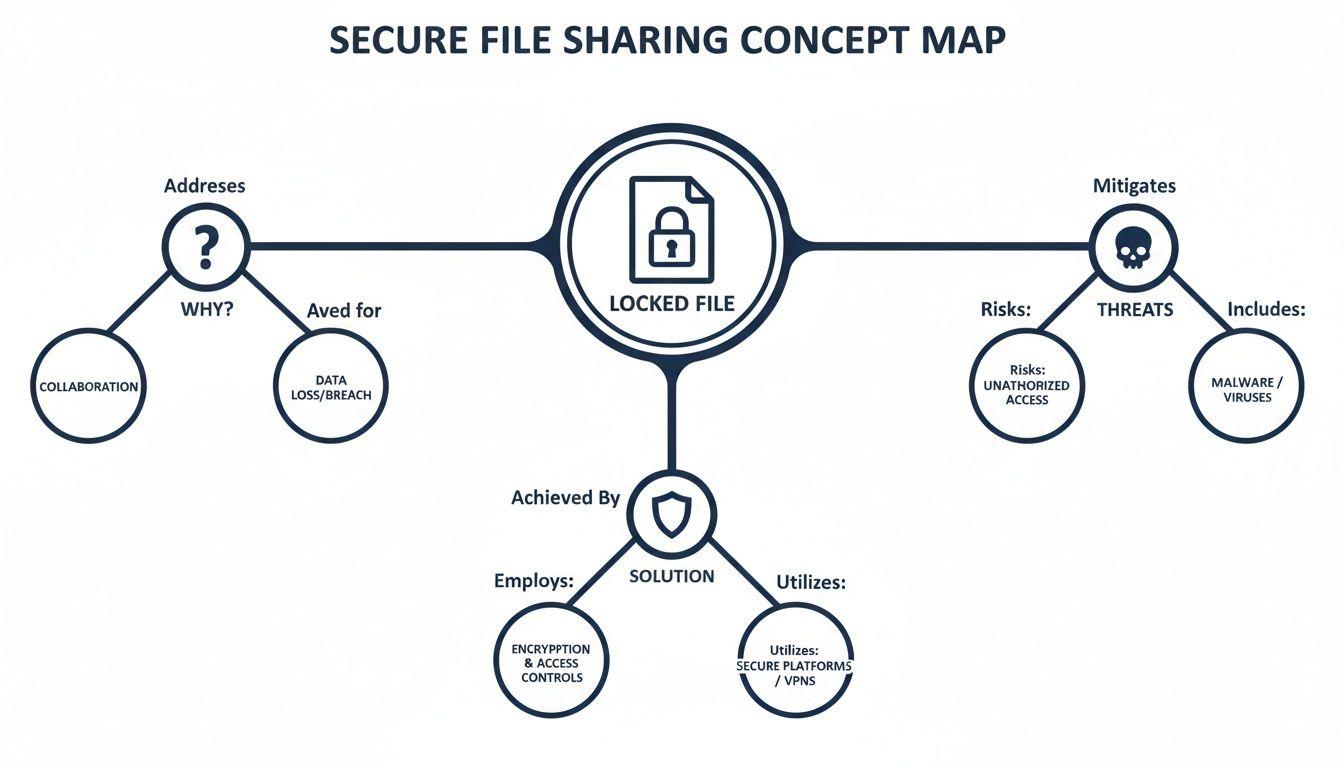
As you can see, the foundation for fighting off these threats always comes back to two things: strong encryption and a platform built for security from the ground up.
Protecting Data on the Move
The first line of defense is Encryption in Transit. This is your digital armored car. When your file travels from your computer to a server, this type of encryption wraps it in a protective, scrambled shell.
Technologies like Transport Layer Security (TLS) create a private, encrypted tunnel over the public internet. So, when you upload a sensitive document, TLS ensures that anyone trying to eavesdrop on the network—say, on that sketchy coffee shop Wi-Fi—sees nothing but gibberish.
Securing Data at Its Destination
Once your file safely arrives on the server, its journey isn't over. It needs protection while it's just sitting there, which is where Encryption at Rest comes in. This is the high-tech, impenetrable vault where your file is stored.
The file remains in its scrambled, encrypted state on the server's hard drive. That means even if a hacker managed to physically steal the server or find a backdoor into the system, the data itself would be completely useless without the unique decryption key.
"True security isn't about a single, unbreakable wall. It's about a series of smart, overlapping defenses that work in concert to protect information at every possible point of weakness."
The Ultimate Privacy Guarantee
For conversations and files that absolutely cannot be compromised, there's End-to-End Encryption (E2EE). This is the gold standard for privacy.
With E2EE, your file is encrypted on your device before it ever leaves, and it can only be decrypted by the person you sent it to, on their device. The most important part? Not even the service provider has the key to unlock your data. This model, often called zero-knowledge, means they can't access your files, even if they were forced to by a court order. It's the ultimate guarantee that your data remains yours and yours alone.
Practical Tools for Everyday Security
Beyond these foundational encryption methods, great secure sharing platforms give you more granular control with a few essential features. Think of these as extra security guards and smart locks for your digital assets.
- Password Protection: Putting a password on a shared file adds a crucial checkpoint. It means that even if the link gets forwarded to the wrong person, they can't get in without that second piece of information. For tips on creating strong ones, check out our guide on the differences between a passphrase vs a password.
- Expiring Links: A simple but brilliant feature. You can set a sharing link to automatically self-destruct after a certain time or a specific number of downloads. This is perfect for preventing old, forgotten links from becoming permanent backdoors to your files.
- Two-Factor Authentication (2FA): This forces users to prove their identity in two ways—usually their password plus a temporary code from their phone. It’s one of the single most effective ways to shut down attacks that rely on stolen passwords.
Choosing the Right Secure Transfer Protocol
When you dive into secure file sharing, you'll bump into a whole alphabet soup of acronyms—SFTP, FTPS, PGP, and others. These are the protocols, the rulebooks that different apps follow to send your data safely. Think of them as specialized couriers. You wouldn’t hire a freight truck to deliver a single, sensitive letter, and you wouldn't use a bike messenger to haul a ton of bricks.
Choosing the right protocol is all about matching the tool to the job. You don't need to be a network engineer to get the hang of it. The real goal is to recognize which protocol is built for your specific need, whether you're setting up a massive, automated data transfer between two corporate systems or just emailing a confidential report to a colleague.
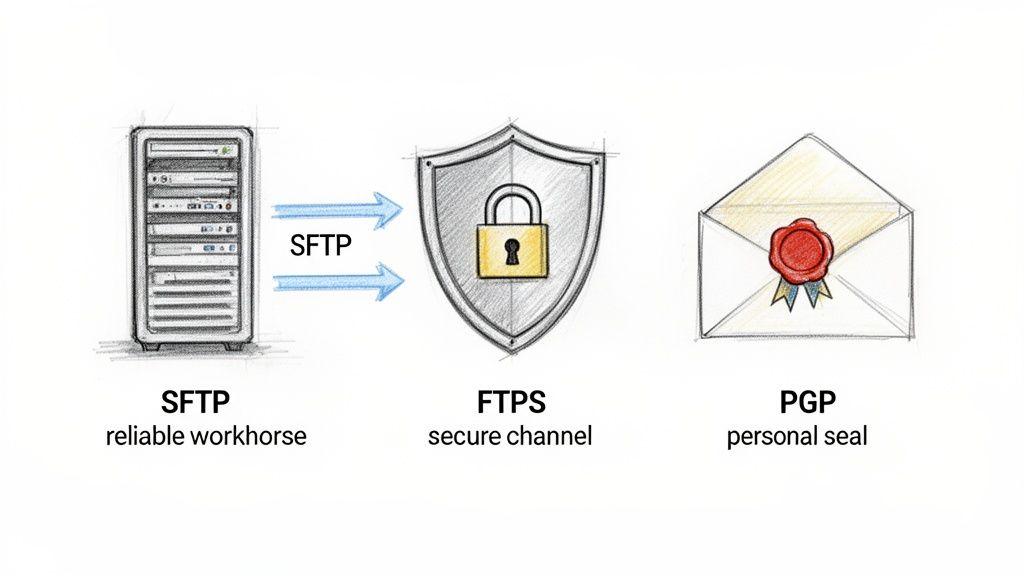
Let's unpack the most common ones and see where each one truly shines.
SFTP: The Automated Workhorse
For any kind of system-to-system business transfer, Secure File Transfer Protocol (SFTP) is the undisputed champ. It’s built on the incredibly solid foundation of the Secure Shell (SSH) protocol—the same technology system admins rely on to securely manage servers from halfway across the world.
Picture a company that needs to send its payroll data to the bank automatically every night. SFTP is the perfect courier. It uses a single, encrypted connection for everything—both authenticating the connection and transferring the data—making it incredibly reliable and much easier to manage through firewalls.
SFTP isn't just a secure pipe; it's a predictable, automated pipeline. It's designed for efficiency and reliability in environments where human intervention is minimal and consistency is everything.
Thanks to this robust design, SFTP is the go-to choice for:
- Automated Data Syncs: Regularly syncing inventory, sales figures, or customer lists between different business platforms.
- Scheduled Backups: Securely pushing large backup files to an offsite server on a strict schedule.
- Enterprise Workflows: Plugging into larger business processes that demand dependable, server-to-server file exchanges.
PGP: The Personal Digital Wax Seal
While SFTP is the king of large-scale automation, Pretty Good Privacy (PGP) is all about locking down individual files, often before they're even sent anywhere. If SFTP is the armored truck, think of PGP as a digital, tamper-proof wax seal on an envelope. It uses a clever system of public and private keys to encrypt the file itself.
This means you can encrypt a document on your desktop and then send it using any method you like—standard email, a cloud drive, or even a USB stick. The file remains a scrambled mess until your recipient uses their unique private key to "break the seal." This makes PGP (and its open-source cousin, OpenPGP) perfect for protecting the contents of a file, no matter how it travels.
Comparing Secure Transfer Protocols
Choosing the right protocol can feel complex, but a side-by-side comparison makes it much clearer. The table below breaks down the most common options, highlighting their best uses and what makes them tick.
| Protocol | Best For | Key Security Feature | Typical User |
| SFTP | Automated, system-to-system transfers between servers. | Uses a single, encrypted SSH connection for both commands and data. | IT administrators, developers, and businesses with automated workflows. |
| FTPS | Securing legacy FTP workflows without a full system overhaul. | Adds a layer of TLS encryption over the traditional FTP protocol. | Organizations with existing FTP infrastructure needing to add security. |
| PGP/S/MIME | Encrypting individual files and email attachments for person-to-person sharing. | Encrypts the file itself, making it secure regardless of the transfer method. | Individuals, journalists, lawyers, and anyone sending a single, highly sensitive document. |
Ultimately, it comes down to matching the technology to the task. For most everyday users, teams, and small businesses, a modern secure file sharing service like 1chat handles all this complexity in the background. These platforms typically use a powerful mix of protocols—like TLS for transit and strong encryption at rest—giving you top-tier security without you ever having to touch a server configuration file. Knowing what's happening under the hood just helps you make a smarter choice.
Finding the Best Secure Sharing Solution
Alright, now that we’ve covered the technical side of security layers and protocols, let's put that knowledge to work. Choosing the right secure file sharing tool isn't about finding the one "best" option—it's about finding the best option for you. A large company's needs are worlds apart from a family sharing vacation photos or a student sending in a term paper.
The market for these tools is booming. While big corporations made up 54.5% of the secure file transfer market in 2023, the whole sector is valued at $2.35 billion in 2024 and is still climbing. This explosive growth is creating fantastic opportunities for tools built specifically for smaller teams, families, and students, blending enterprise-level security with a design anyone can use.
And it’s a good thing, too. Research shows that only 41% of people properly manage file sharing on their personal devices. That’s a huge gap that leaves everything from homework to sensitive business proposals vulnerable. You can dig into more of these trends in a report on 2025 file transfer statistics.
Solutions for Businesses and Teams
For businesses and professional teams, the stakes are much higher. Here, secure sharing isn't just a nice-to-have; it's fundamental to compliance, protecting intellectual property, and keeping the lights on. This is where you need a truly robust, feature-packed platform.
Here's what you should be looking for:
- Managed File Transfer (MFT): These are the heavy hitters. MFT platforms are built for enterprise-scale needs, offering powerful automation, centralized dashboards, and detailed audit trails to prove you’re compliant with regulations like HIPAA or GDPR.
- Granular Access Controls: You absolutely need the ability to control exactly who can view, edit, download, or share a file. It’s non-negotiable for preventing data leaks.
- Audit Trails and Reporting: This is your black box recorder. It gives you an unchangeable log of every single action taken on a file—who touched it, when they did it, and from where.
- Integration with Other Tools: The best secure sharing platform should slide right into your existing workflow, connecting with the other apps your team already uses.
Of course, great collaboration depends on more than just great tools; it’s built on clear communication. For more on that, you might find our guide on how to improve team communication helpful.
The right business solution turns secure file sharing from a defensive chore into a strategic advantage. It builds client trust, keeps regulators happy, and lets your team work together with confidence.
Tools for Individuals and Families
When you’re sharing things for personal reasons—family photos, tax documents for your accountant, or a group project for school—the priorities change. Security is still key, but simplicity and ease of use are just as critical. The best personal tools make top-tier security feel completely effortless.
Here’s what to prioritize:
- End-to-End Encryption by Default: This is the gold standard for personal privacy. Look for apps that offer zero-knowledge encryption, meaning not even the company that runs the service can peek at your files.
- Simple, Intuitive Interface: You shouldn't need a PhD in cybersecurity to share a photo securely. The process should feel as easy as sending an email, with all the heavy-duty security running quietly in the background.
- Cross-Platform Availability: The tool has to work everywhere you do, moving seamlessly between your laptop, tablet, and smartphone.
This is where privacy-first tools like 1chat really stand out. They give you a secure bubble not just for sharing files, but for working with them, too. For instance, you could review a sensitive PDF or draft a private contract right inside the platform, knowing the entire process is shielded from prying eyes. This makes tools like 1chat a core part of a truly private digital life, putting powerful security within everyone's reach.
Your Actionable Secure File Sharing Checklist
It’s one thing to understand the theory, but taking real control of your data security is all about action. This isn’t a technical manual; it’s a straightforward checklist designed to help you put a secure file sharing strategy in place right now.
Think of it as your roadmap to a safer digital life, broken down into simple, manageable steps that anyone can follow.
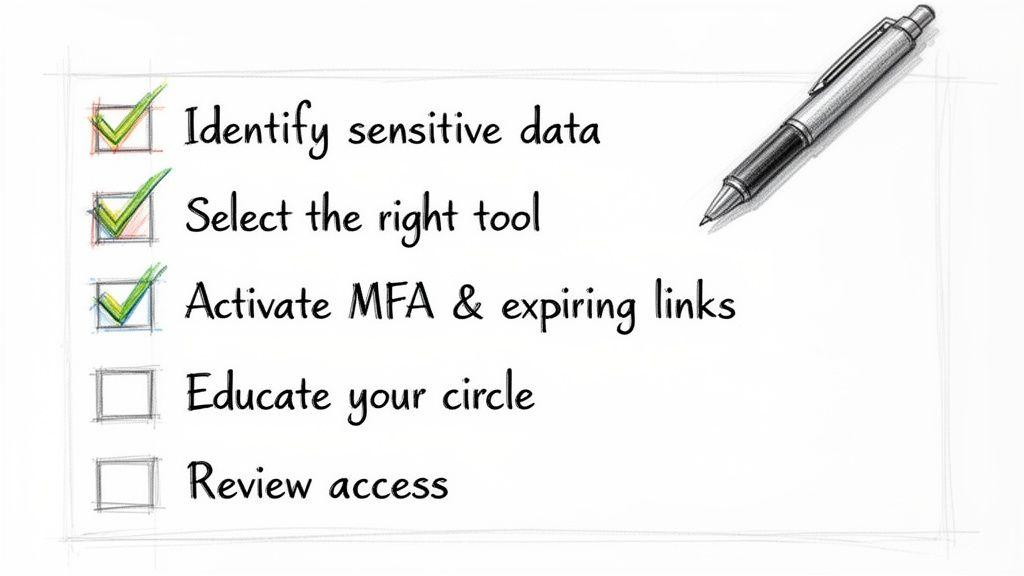
1. Identify Your Most Sensitive Data
First things first: you can’t protect your files if you don’t know which ones are most important. Let's be honest, not all data is created equal. A shopping list doesn't need the same Fort Knox treatment as your financial records or a client's confidential project files.
Take a few minutes to think about what you have. Create a quick list—mental or on paper—of the files that would cause a major headache if they ever got into the wrong hands. This simple act of sorting is the bedrock of any good security plan.
Your list might include things like:
- Business Data: Client contracts, intellectual property, financial statements, and employee records.
- Personal Information: Tax documents, medical records, copies of your ID, and personal legal papers.
- Private Media: Family photos and videos that are meant for your eyes only.
Once you know what your "crown jewels" are, you can make sure they get the highest level of protection.
2. Select the Right Sharing Tool
With your sensitive files identified, the next job is to choose the right vehicle to move them. As we've covered, for anything important, a tool built for security from the ground up is non-negotiable. Your standard email or basic cloud drive often just doesn't have the muscle for true peace of mind.
Look back at the solutions we explored and pick one that fits what you do. For a team, that probably means a platform with audit trails and fine-grained access controls. For families or individuals, user-friendly apps that offer end-to-end encryption by default are the way to go.
Your choice of tool is the single most impactful decision you'll make. A truly secure platform does the heavy lifting for you, running powerful encryption and security protocols quietly in the background.
3. Activate Key Security Settings
Just having a secure tool isn't quite enough—you have to use it correctly. The good news is that most secure sharing platforms offer a bunch of settings that seriously boost your protection. Spend five minutes exploring the "security" or "sharing options" menu and flip these switches.
Here’s your essential settings checklist:
- Multi-Factor Authentication (MFA): This is your single best defense against a stolen password. Always turn it on.
- Link Expiration: Never create a sharing link that lives forever. Set links to automatically expire after a few days or even a specific number of downloads.
- Password Protection: Slap a unique password on every sensitive file you share. Just be sure to send that password to your recipient through a separate, secure channel (like an encrypted message).
- Download Limits: If you only want the recipient to download a file once, set a limit. This stops it from being passed around.
4. Educate Your Circle
Security is a team sport. The strongest lock in the world is useless if someone leaves the key under the doormat. You need to gently but clearly communicate your security habits to the people you share files with, whether they're colleagues, clients, or family members.
A quick, simple message can make a massive difference. For instance: "Hi, I've shared the project proposal via our secure platform. Please download it to a safe location and avoid sharing the link. For security, it will expire in 48 hours." This reinforces good behavior and extends your security bubble beyond just your own device.
5. Periodically Review Access
Finally, make it a habit to do a little digital house-cleaning. Over time, you'll grant access to lots of people for different reasons. A fantastic security practice is to set a calendar reminder every quarter to review who has access to your shared files and folders.
When you do your review, just revoke permissions for anyone who no longer needs them—think former employees, clients from a finished project, or old collaborators. This simple cleanup shrinks your digital footprint and ensures old connections can't become future security risks.
Building a Foundation of Digital Trust
At the end of the day, secure file sharing isn’t just about technology. It's about building trust. Think about it: whether you're sending a sensitive client contract, working on a team project, or just sharing family photos, protecting that information is a sign of respect. It shows you care.
Every time you send a file securely, you’re strengthening that bond of trust with the person on the other end. This is the new handshake in our digital world—an unspoken agreement that you’re handling their information with the seriousness it deserves.
Thankfully, you no longer need an enterprise-sized budget to get enterprise-grade security. The best tools are now simple, intuitive, and available to everyone.
By putting the practical steps from this guide into action, you can take back control over your digital life. Choosing tools that are secure by default isn’t just a nice-to-have anymore; it's essential.
The New Standard of Communication
This move toward everyday privacy means we have to be more intentional about the tools we pick. The platforms we use for sharing say a lot about our commitment to security, shaping how clients, colleagues, and even family see us.
When you send a file the right way, you’re sending a powerful message along with it:
- For Businesses: "We take our partnership—and your data—seriously."
- For Teams: "Our shared work is protected, so we can collaborate freely and without worry."
- For Families: "These moments are just for us, and I’m making sure they stay that way."
Making secure file sharing a reflex isn’t just a tech upgrade. It's about committing to a safer, more trustworthy way to connect. It’s the final piece of the puzzle, making sure your digital relationships are just as solid as your real-world ones.
Common Questions About Secure File Sharing
Even after you've got the basics down, you'll still run into real-world questions when trying to share files safely. Let's tackle some of the most common ones that pop up.
Are Password-Protected Zip Files Actually Secure?
Honestly, not really. While slapping a password on a Zip file feels like you're adding a lock, it's often more like a flimsy latch. The encryption on older Zip formats is notoriously weak and can be cracked with readily available tools. It's better than nothing, but it’s not a serious defense.
Modern secure sharing platforms are in a completely different league. They use robust, military-grade encryption like AES-256 to protect your files in transit and at rest. More importantly, they give you tools a Zip file can't even dream of—think audit trails, link expirations, download limits, and proper access controls. For a throwaway, non-sensitive file, a Zip is fine. For anything important, use a tool built for the job.
What's the Real Difference Between Secure Cloud Storage and Secure File Sharing?
It's easy to see why people get these two mixed up, as there's a lot of overlap. The simplest way to think about it is by their main job.
Secure cloud storage is like your digital safe deposit box. It’s built for long-term safekeeping, organization, and keeping files synced across all your devices. Secure file sharing, on the other hand, is the armored truck. Its entire purpose is to get a specific file from you to someone else, securely.
Many great cloud storage services have solid sharing features built-in. But dedicated file transfer services often give you more fine-tuned control over the act of sharing itself.
Secure Storage is about keeping your files safe. Secure Sharing is about sending them safely. For most people, a good secure cloud service that does both well is the perfect solution.
How Can I Make Sure the Person I'm Sending to Handles the File Safely?
This is the tricky part, because it involves another person's habits. Technology can't force someone to be responsible, but it can certainly nudge them in the right direction. The best approach is a mix of smart tech and clear communication.
Here's how to handle it:
- Use Technical Guardrails: Choose a service that requires the recipient to prove who they are before they can access the file. This could be a login or some other form of authentication.
- Set a Self-Destruct Timer: Never send a link that lives forever. Set it to expire in a short window, like 24 or 48 hours. This closes the door automatically so you don't have a forgotten, active link floating around the internet.
- Just Tell Them: Don't be shy. You can't assume the other person understands the sensitivity of the file. Send a separate, quick message to set expectations.
For instance, a simple note like, "Hey, the contract I just sent over is confidential. Please download it directly to your work computer and don't forward the link. It's set to expire in 24 hours for security," works wonders. It clarifies the stakes and encourages the other person to be a good partner in security.