Eighty-six percent of students already use AI in their studies, and 54% use it at least weekly, according to a global student survey reported by Campus Technology. AI studying isn't an experiment happening at the edges of education anymore. It's already part of everyday student life, while clear guidance on using it well still lags behind.
The difference between useful and harmful AI study support comes down to the role you give the tool. Use it as an answer machine and you may finish a task without building the skill behind it. Use it as a study coach, and it can help you plan, explain, question, challenge, and expose gaps while you remain responsible for the thinking.
Why AI Has Become a Normal Study Tool
AI now handles several routine study tasks in one place. It can rephrase a difficult paragraph, turn notes into questions, offer another explanation, or divide an intimidating assignment into manageable steps. That convenience saves time, but learning improves only when the student still has to retrieve, explain, and apply the material.
The same survey found that 24% of students use AI daily (Campus Technology). That pattern makes the practical question clear: does the workflow strengthen independent understanding, or does it replace the work that builds it?
Practical rule: Ask AI to make you retrieve, explain, compare, or apply information before asking it to produce anything polished.
Over-reliance creates one predictable problem. A student copies a solution, accepts a confident explanation, and mistakes recognition for mastery. Avoiding AI entirely creates a different cost, since students may spend scarce time on mechanical tasks that can be delegated safely, such as organizing a reading list or generating practice questions.
A useful workflow treats AI as a sparring partner. It should make your reasoning work harder by presenting a question, challenging an answer, or offering a new case. You remain responsible for reading the assigned material, attempting problems, editing generated notes, checking claims, and writing submissions in your own voice. Students in specialized fields can also explore focused resources such as AI types for med students when coursework requires domain-specific tools.
Use this sequence:
- Explain: Request a plain-language explanation tied to your course material.
- Question: Ask for prompts that make you retrieve the answer.
- Diagnose: Have the model identify likely misconceptions after you respond.
- Transfer: Apply the idea to a new example or unfamiliar problem.
- Verify: Compare important claims with your notes, textbook, or a trusted source.
Students and parents comparing platforms can review 1chat's research resources alongside each tool's settings and study features. The platform matters less than the behavior it creates. If it repeatedly hands you finished work, change the prompts and require an attempt before requesting feedback. That guardrail turns AI from a shortcut into structured practice.
Choosing the Right AI Tool for Your Study Style
Start with the task, not the brand. A built-in assistant such as Microsoft Copilot, Google Gemini, or Apple Intelligence may fit naturally into the devices and documents a student already uses. A multi-model hub can be useful when you want to compare responses, switch models for different tasks, or keep study work in one account.
Families and students should assess four practical criteria: cost, privacy, model access, and academic-integrity support. A low-cost tool can become expensive in time if it produces vague explanations or inaccurate citations that require extensive cleanup. Privacy also deserves more attention than a colorful interface. Check how chat history is stored, whether account controls are available, and what information you should never upload.
| Criterion | Built-in assistant, such as Copilot, Gemini, or Apple Intelligence | Privacy-first multi-model hub, such as 1chat |
| Cost | Often connected to an existing ecosystem, with features depending on the account | May consolidate access under one account, so compare the plan and included models |
| Privacy | Review the provider's account, history, and data settings | Review the hub's retention, account, and privacy controls directly |
| Model access | Usually centered on the provider's own assistant experience | Designed to let users work across more than one model |
| Comparison | Comparing outputs may require separate tools or accounts | Switching models can make side-by-side checking easier |
| Academic integrity | Features vary, so look for source handling and school-use guidance | Check whether the service supports source-aware workflows and clear user controls |
Run a small trial
Pick two tools and give them the same prompt based on material you're allowed to use. Ask each one to explain a difficult concept, create review questions, and identify supporting passages from the supplied text. Then judge clarity, accuracy, usefulness, and citation quality, rather than choosing the answer that sounds most confident.
A student-focused directory such as Mytholyra's study AI guide can help you discover options, but directories shouldn't replace your own trial. The right tool is the one that fits your workflow without encouraging you to surrender authorship or personal information.
Turning Your Syllabus into an AI Study Plan
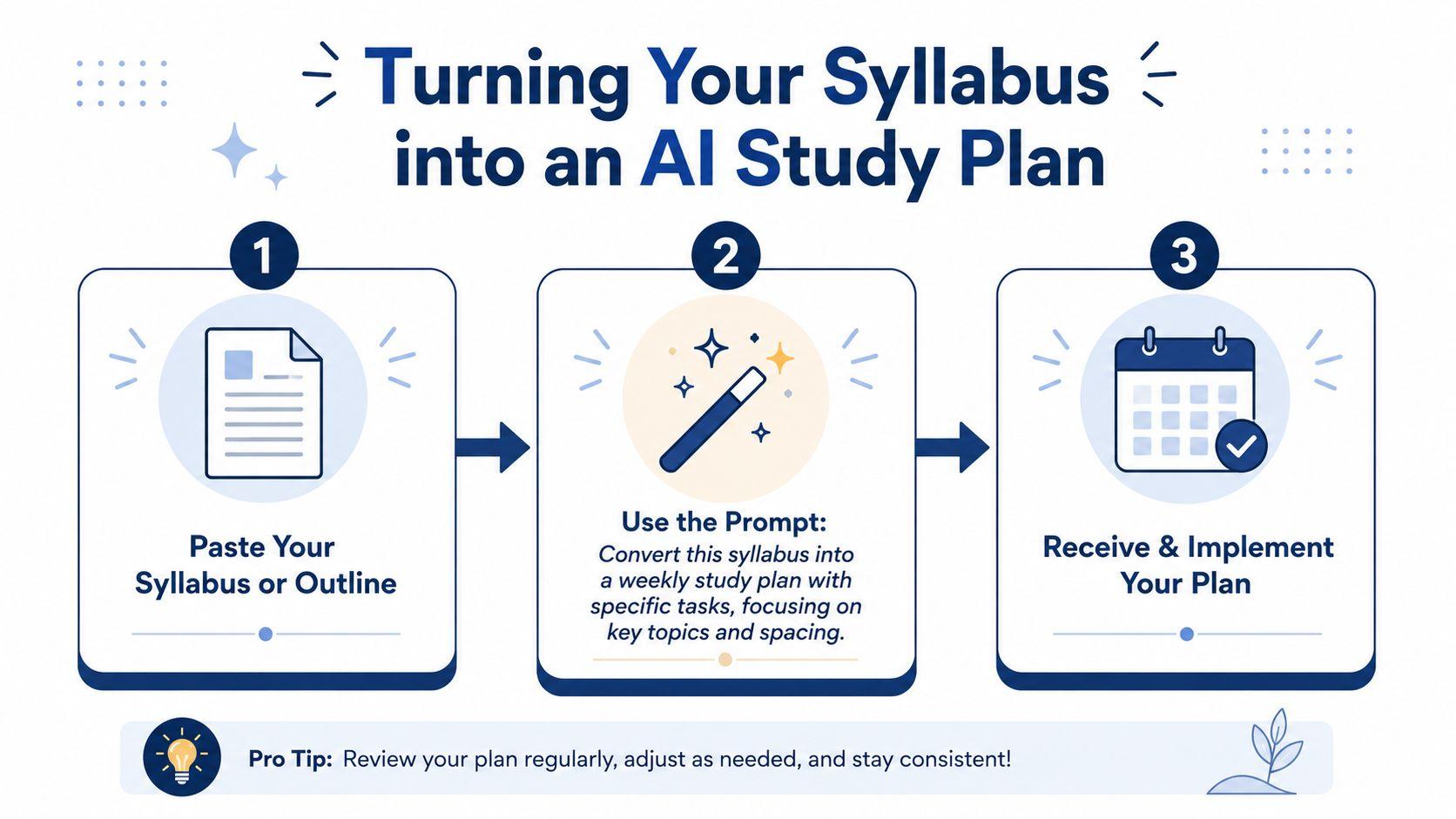
A syllabus contains more than deadlines. It often reveals readings, grading categories, unit sequence, and the instructor's priorities. AI can turn that material into a workable plan, but you should treat the first output as a draft, not a schedule carved in stone.
Paste the syllabus or unit outline and use a prompt like this:
“Read the syllabus below. Extract every graded item, its due date, the required materials, and the apparent preparation tasks. Estimate the effort qualitatively for each item, then create a week-by-week study plan that finishes preparation one day before each deadline. Separate reading, retrieval practice, drafting, revision, and final checking. Flag any missing or ambiguous dates instead of guessing.”
Don't ask only for a calendar. Add a second prompt:
“For each week, identify the three highest-leverage study activities. Prioritize tasks that improve understanding, retrieval, and application. Keep the plan realistic for a student with classes and extracurricular commitments. Explain what can be shortened if the week becomes overloaded.”
A fictional history example
Suppose a high-school history unit covers industrialization, labor movements, and progressive reform. The student supplies the unit outline and upcoming assessment details, then asks the model to schedule reading, vocabulary retrieval, source analysis, and an essay outline.
The output might place background reading early, source comparison after the student has basic context, and timed essay planning before the assessment. The student should then adjust the plan around sports practice, family responsibilities, and known difficulty with interpreting primary sources.
Use the final plan as a weekly contract with yourself. At the start of each session, ask the model to identify the learning objective. At the end, mark what you completed, what felt unclear, and what should enter the next review queue. Planning becomes useful only when it reflects actual behavior.
Note-Taking, Summaries, and Flashcards That Stick
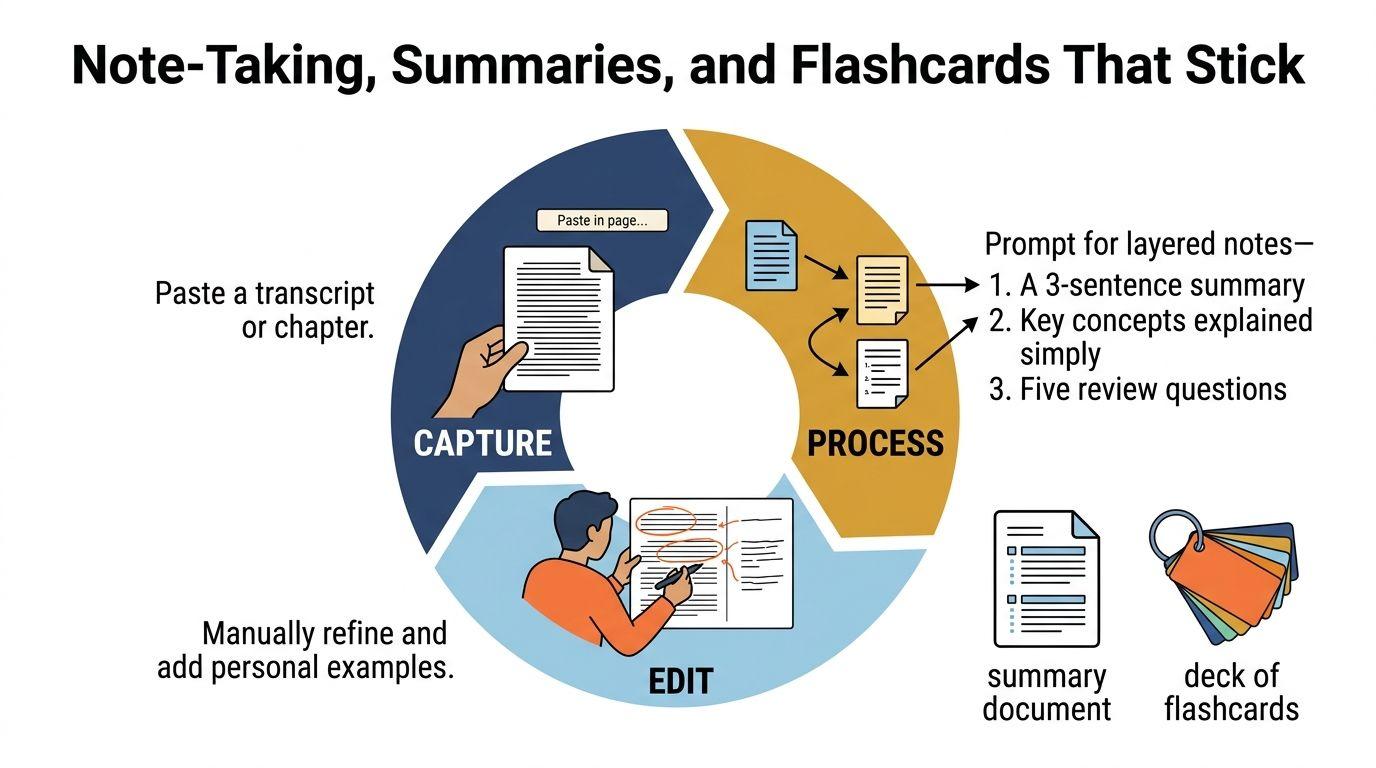
Treat study notes as a personal knowledge database. AI can help sort raw material into usable records, but the database becomes valuable only when each entry supports recall, connection, or application. A practical workflow is capture, process, edit. Without editing, polished notes can preserve irrelevant detail, missing context, or errors.
Start with a lecture transcript, textbook excerpt, PDF, or handwritten notes. Identify the source and request several layers instead of one compressed summary:
“Using only this material, produce a one-sentence summary, a concise bullet outline, key terms with plain-language explanations, and review questions that test relationships rather than isolated facts. Mark anything unclear or unsupported by the source.”
For handwritten notes, use a cautious transcription prompt:
“Transcribe these notes cautiously. Mark words you can't read, preserve course-specific terms, organize the content into a Cornell-style outline, and don't fill gaps with guesses.”
Then turn the edited material into retrieval cards:
“Convert the edited notes into question-and-answer flashcards. Include definitions, cause-and-effect questions, comparisons, and application scenarios. Keep each answer short enough to recall, and label any card that depends on information missing from the notes.”
Build flashcards from decisions, not transcripts
Read the generated summary against the original, remove filler, add your teacher's vocabulary, and rewrite key explanations in your own language. Cards should make you retrieve an answer, not recognize a sentence you have already seen. Change obvious prompts into application questions, and split cards containing two ideas.
You can use 1chat's blog resources to explore broader AI workflows while keeping the deck tied to your course materials. The model can prepare candidates, but you choose which cards deserve review.
Finally, create a short testing queue from the edited notes:
“Test me on these notes one question at a time. Don't reveal the answer before I respond. After each response, identify what I understood, what I missed, and what I should review.”
An explain-back response often reveals gaps that rereading leaves hidden. Keep missed cards in the next review queue, and retire cards you can answer accurately without hesitation.
Practicing and Quizzing Yourself with an AI Tutor
When a student opens a math problem and hesitates, the useful AI response is not a completed solution. It is a prompt that makes the student name the known quantities, choose a principle, and attempt the first step. That structure turns uncertainty into retrieval practice while keeping the reasoning with the learner.
Research supports this narrower use. A 2024 Stanford randomized study found that college students using an AI tutor learned more than twice as much in less time than students in an active-learning class, with higher reported engagement and motivation (Stanford SCALE). The finding applies to guided, pedagogically designed practice, not automatically to every chatbot.
Separate causal research with 334 students found that AI-tutor access increased performance on incentivized assessments by 0.23 standard deviations, while unrestricted access produced a 0.34 standard deviation gain compared with the control group (IZA discussion paper). Set the model to question your reasoning, then attempt each problem before requesting an explanation.
Use this instruction:
“Act as a Socratic tutor. Don't give me the answer directly. Ask one guiding question at a time, wait for my response, identify the reasoning step that needs attention, and give a concise explanation only after I attempt the problem.”
Prompts for different subjects
Math and science
“I'll attempt this problem first. Ask me to identify the known quantities, the target, and the relevant principle. Check each step without jumping to the final answer. If I make an error, ask a question that helps me locate it.”
Vocabulary
“Quiz me on these terms one at a time. Use definition, example, contrast, and application questions. Don't show the term before I answer unless the question requires it.”
Case analysis
“Give me a short case based only on these course concepts. Ask me to identify the issue, evidence, competing interpretation, and conclusion. Challenge unsupported reasoning.”
Language practice
“Hold a conversation at my current level. Ask one question at a time, correct only errors that affect meaning or the target grammar, and ask me to reformulate the sentence.”
Mix question types instead of relying on multiple-choice items. Request short answers, explanations, comparisons, and new applications, then ask for a list of weak topics. The 2026 LearnLM classroom report found that students supported by LearnLM were 5.5 percentage points more likely to solve novel problems on subsequent topics, reaching 66.2% versus 60.7% with human-tutor-only support (Stanford SCALE). Transfer matters because exams rarely repeat practice wording exactly.
The best quiz is slightly uncomfortable. Instant answers test recognition. Delayed answers test recall.
Record each mistake in a review queue with the topic, error type, corrected principle, and a new example. Before an exam, have the tutor revisit that queue and create fresh problems targeting the same skill without copying the original wording. Examples of students using AI for exam preparation can suggest routines, but the learner still has to retrieve, explain, and correct the material.
Checking AI Output for Accuracy and Citations
A student once copied an AI-generated research citation into an essay. The journal existed, but the article title and DOI did not. The paragraph sounded academic until the instructor checked the reference. Fluency is not evidence, and a citation-shaped sentence does not prove that a source exists.
Treat every unfamiliar claim as a draft requiring review. A statistic needs a source, date, population, and definition. A publication needs a real author, title, journal, and DOI that appear in a credible catalog or publisher record. Check historical context too: a person, institution, technology, or event may be placed where it could not belong. Real scholars and organizations can also be given ideas they never published.
A repeatable fact-check
Open a second tab and search the exact claim in quotation marks. Find the primary source when possible, confirm that it exists, and compare the source with the wording AI produced. Check whether the source supports the full claim or only a narrower point. If you cannot verify it, remove the statement or label it as uncertain.
Use AI to organize the audit:
“List every factual claim in your response. For each claim, provide a source that directly supports it, explain what the source supports, and label any claim you can't verify. Don't invent citations.”
This prompt creates a checking list, not a final verdict. Models can produce references that look convincing, so open every important source yourself. For textbooks, scientific topics, and current events, compare the answer with class materials or a trusted primary source before adding it to your notes.
Academic-integrity rules differ by teacher, course, school, and institution. Some allow brainstorming or language editing, while others prohibit AI assistance for particular assignments. Read the policy first, ask the instructor about unclear wording, and disclose assistance in the format the course requires.
Keep original notes, drafts, prompts, revisions, and source links. The record shows how your reasoning developed and clarifies what AI contributed. Never submit an AI-written paragraph merely because it passed a detector or resembles your voice. The learning gain comes from checking, correcting, and explaining the material yourself.
Privacy, Integrity, and Your First AI Study Routine
Safe AI studying starts before the first prompt. Remove full names, student IDs, school portal details, unpublished research, test questions, health information, payment data, and other identifying material. Replace real people and institutions with fictional labels when the context isn't necessary for the learning task.
Families should review account settings together. Check whether chats are saved, how deletion works, whether conversations may be used for training, and whether child or teen controls are available. A privacy-focused service can be part of that review, and 1chat's privacy policy provides a reference point for examining how a provider describes its handling of information.
A routine you can run tomorrow
- Name the target: Ask the model to turn the next topic into a clear learning objective.
- Retrieve before receiving: Attempt an explanation or problem yourself, then ask AI for feedback rather than a finished response.
- Close the material: Recall the principle from memory and apply it to a new example.
- Verify and record: Check claims against class notes, textbooks, or trusted primary sources, then save corrections and questions for the next session.
A simple starter session can combine 15 minutes of retrieval practice, 10 minutes of feedback, and 5 minutes of verification. That routine is useful because it protects the central sequence: attempt, receive feedback, correct, and try again. The exact timing can change around age, subject, and workload, but the order matters.
Before submitting work, follow the instructor's AI policy, disclose required assistance, and keep drafts that demonstrate your own reasoning. For younger students, parents can review prompts and outputs without taking over the assignment. For college students, instructors and departmental policies remain the authority.
AI should coach the process, not impersonate the learner. Start your next study session by bringing one small topic, one honest attempt, and one verification habit. Use the prompts above, edit every generated resource, and build a review queue you can return to before the next assessment.
Choose one subject today, paste in a permitted excerpt or your own notes, and run the Socratic tutor prompt. Complete one independent attempt before accepting feedback, verify every important claim, and save the corrected version for your next review session.