You're in a family group chat or small-team meeting when someone says, “We have antivirus, strong passwords, and a firewall, so we're covered.” Then a school photo appears in a public post, a draft contract lands in the wrong shared folder, or an AI assistant stores a sensitive conversation longer than anyone expected. The systems may be secure from intrusion, yet the information may still be handled in ways people didn't intend.
That confusion sits at the center of privacy vs security. Security tools defend devices, accounts, networks, and stored information. Privacy practices govern what information gets collected, who can use it, where it goes, and how long it remains available. The two overlap, but they aren't interchangeable.
This guide separates the concepts, compares their goals and failure modes, and applies them to families, students, and small teams. It also shows how weak privacy habits can create security blind spots, then turns those lessons into practical checklists, including a neutral way to evaluate a privacy-first AI tool.
Why Privacy and Security Get Confused
A parent may install parental controls, enable location sharing, and require multifactor authentication. A team manager may add endpoint protection, monitor company devices, and restrict access to shared files. Everyone sees visible safeguards and concludes that the information itself is safe.
But those safeguards answer only part of the question. Security asks whether unauthorized people can break in, alter data, steal it, or disrupt access. Privacy asks whether the right people are collecting, viewing, using, and retaining it in the first place.
A strong password can stop an attacker from entering an account. It can't decide whether a child's school photo should be public, whether a customer's email should be copied into a marketing database, or whether a draft contract should be used to improve an AI model. Antivirus software can detect malicious code, but it doesn't set a sensible retention period for employee records.
Practical rule: A protected system can still handle personal information poorly.
The distinction matters because modern services often combine storage, analytics, advertising, collaboration, and AI features. A product may describe its infrastructure as secure while giving users limited control over sharing, deletion, or secondary use. That doesn't automatically make the product unsafe, but it means security claims shouldn't be treated as privacy guarantees.
People also confuse the terms because a single incident can involve both. A stolen account may expose private messages, making it a security failure and a privacy violation. In another case, a company may collect more information than it needs without suffering a breach. That can be a privacy problem even when its defenses work as designed.
The useful approach is simple: define each concern separately, identify where they reinforce each other, and ask what control is missing before choosing a tool or policy.
What Privacy and Security Actually Mean
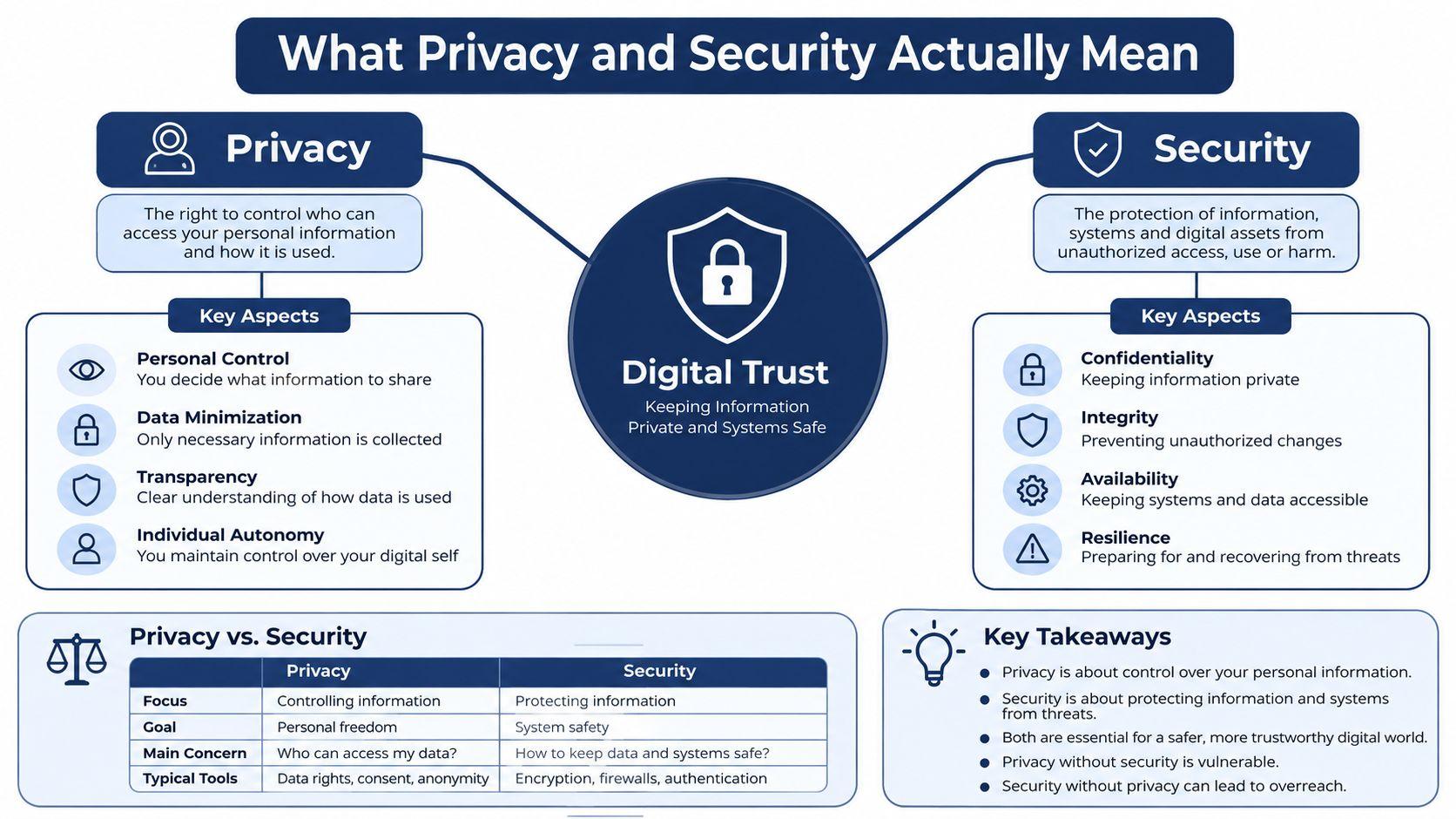
Think of a digital account as a house. Security is the lock, alarm, fence, and emergency repair plan. It helps keep intruders out, prevents damage, and supports continued access when something goes wrong. Password managers, multifactor authentication, encryption, software updates, firewalls, and backups all belong mainly to this protective layer.
Privacy is what happens inside the house. Curtains control what outsiders can see. Visitor rules determine who may enter. A filing cabinet controls who can inspect records, and a shredder removes papers that no longer need to exist. In digital life, privacy includes consent, data minimization, access boundaries, retention periods, deletion, and decisions about whether information can be shared or reused.
The overlap matters
Suppose an attacker steals a password and reads a private conversation. The broken lock represents a security failure, while the exposed conversation represents a privacy harm. Security controls could have prevented the intrusion, and privacy controls could have reduced the amount of information available to expose.
Now consider a school directory. A family may opt out of having a phone number published. That choice protects privacy, but it doesn't necessarily change the school's technical defenses. The directory could remain encrypted and carefully access-controlled while still containing more information than a family wants publicly available.
The same distinction applies to business systems. Encrypting a customer database helps protect stored records. A retention policy helps decide whether the company should keep every record indefinitely. The first is primarily security. The second is primarily privacy, though both affect the consequences of an incident.
For a more concrete example of how a service describes privacy controls, review 1chat's privacy policy and look for details about protection measures, data handling, and user choices rather than relying on a general “secure” label.
A reusable definition is:
Security protects information and systems from unauthorized access, damage, or disruption. Privacy controls how personal information is collected, used, shared, and retained.
Where Privacy and Security Overlap and Differ
The fastest way to make the distinction practical is to compare the questions each discipline asks. Security teams usually begin with the system and its weaknesses. Privacy discussions begin with the person, the information, and the purpose for processing it.
| Dimension | Security | Privacy |
| Goal | Protect systems and data from unauthorized access, alteration, loss, or interruption | Control who can see, use, share, and retain personal information |
| Threat model | Hackers, malware, stolen credentials, ransomware, and outages | Oversharing, surveillance, profiling, unwanted reuse, and excessive collection |
| Typical tools | Firewalls, multifactor authentication, patching, encryption, backups, and endpoint detection | Consent flows, data minimization, retention rules, deletion controls, and access logs |
| Failure mode | Account takeover, data theft, service disruption, or corrupted files | Exposed photos, doxxing, unwanted AI training, intrusive targeting, or indefinite retention |
Different goals, shared consequences
Security asks, “Can an unauthorized person get into this system?” Privacy asks, “Should this system have this information, and what may it do with it?” A company can answer the first question well while failing the second.
For example, an application may securely store a complete contact list, detailed location history, and message content. If the service never needed all that information, strong encryption doesn't remove the privacy concern. Conversely, a service might collect very little information but protect it poorly, leaving the small amount it holds exposed.
Different threats, connected decisions
Security threats tend to be easier to visualize because they involve an attacker, malicious software, or a technical failure. Privacy threats can be quieter. They may involve an employee accessing records without a business need, an app requesting unnecessary permissions, or a platform retaining conversations after users believe they have disappeared.
The overlap appears in design choices. Data minimization reduces the amount an attacker can steal. Access limits reduce both unauthorized viewing and unnecessary internal exposure. Deletion reduces the period during which a record can be misused. These are privacy decisions with clear security benefits.
A mature policy therefore avoids treating the two as competing checkboxes. Before enabling monitoring, location sharing, or an AI integration, ask two questions: what danger does this control reduce, and what new information does it collect? The best design addresses the threat without creating a larger and less visible data trail.
Privacy and Security in Everyday Life
A family enables location sharing for a teenager traveling home after practice. The feature improves safety because a parent can see whether the child reached an expected place. The same setting can feel invasive if it stays active all day, is visible to too many relatives, or remains enabled after the original reason disappears.
The gained benefit is situational awareness. The cost is continuous visibility. The next question shouldn't be “Is location sharing good or bad?” It should be, “Who needs this location, during which situations, and when will we turn it off?”
A student's shared computer
A student uses single sign-on on a shared lab computer. That makes access convenient, but the account can leave browser history, cached files, downloaded documents, or session tokens behind if the student doesn't sign out properly. A stolen laptop creates a different problem. Without device encryption and a strong lock, notes and credentials may be exposed even if the student uses a private browser.
Convenience helped the student work quickly. The privacy cost came from the trail left on a shared device, while the security risk came from weak protection on the personal laptop. The next question is, “What information remains on this device after I finish, and what happens if the device disappears?”
Students handling damaged drives or inaccessible files may also need a specialist that understands both recovery and confidentiality. A resource such as secure data recovery in New York City can help frame that decision around preserving access without casually exposing sensitive material.
A small business monitoring employees
A manager installs monitoring software to detect unusual downloads and prevent customer data from leaving the company. The security goal is legitimate, but broad surveillance can expose personal messages, create distrust, and collect more information than the business needs.
A better design limits monitoring to business systems, explains what is recorded, restricts who can view alerts, and sets a deletion rule. The lesson is direct: a security control should have a defined purpose, a narrow scope, and an accountable owner.
How Weak Privacy Habits Become Security Risks
Privacy mistakes expand the information available to attackers. A public social profile can reveal names, relationships, workplaces, school activities, and likely answers to account-recovery questions. An unredacted document can expose signatures, customer details, internal filenames, or identifiers that make a fraudulent message more believable.
The behavioral gap is visible in recent consumer data. Privacy Horizon reports that 35% of consumers don't back up data regularly, 4% don't know what a backup is, 43% use mobile security apps, and nearly 30% say security tools are too complex to manage. Those figures point to a practical problem: protections fail when people can't understand or maintain them.
A privacy mistake can become an account takeover
Consider a family posting a holiday photo. A boarding pass is visible in the image, including a booking reference. A scammer copies that detail, combines it with the traveler's public name and destination, and sends a convincing password-reset message. The family member clicks the link, enters credentials, and loses control of the account.
The attack didn't begin with a technical exploit. It began with unnecessary exposure. Security tools may still block some steps, but encryption and antivirus can't make already-public information private again.
Weak privacy habits also create security blind spots inside teams. Employees may paste customer records into unapproved tools, share documents through personal accounts, or grant broad folder access because the official workflow feels difficult. Each shortcut creates more places to monitor and more opportunities for accidental disclosure.
A clear cookie policy can also reveal how a service handles tracking technologies and related choices. For that reason, review 1chat's cookie policy before assuming that a familiar interface tells you everything about data collection.
The response is not to hide every detail or ban every convenient feature. It's to reduce exposure before adding more defensive technology. Remove unnecessary metadata, limit audiences, separate accounts, question unexpected requests, and make secure behavior easy enough that people will follow it.
Best Practices for Families Students and Small Teams
Different groups face different pressures, but each can build a short routine around least privilege, deliberate sharing, and recovery. The aim isn't perfect control. It's to make the safest choice the normal choice.
For families
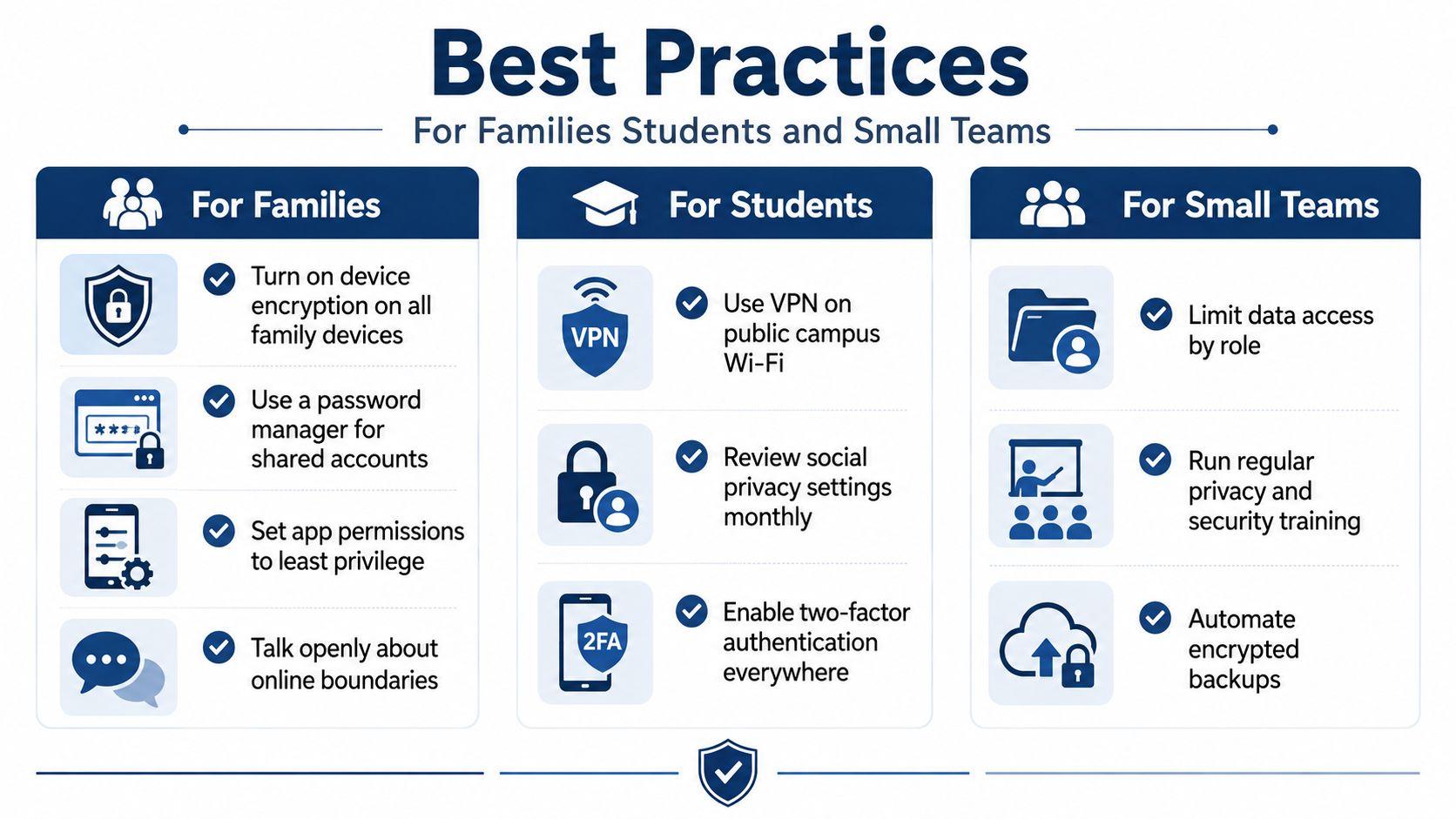
- Encrypt devices: Turn on device encryption for phones, tablets, and computers so a lost device doesn't immediately reveal its contents.
- Use a password manager: Store unique credentials and manage shared household accounts without sending passwords through casual chat.
- Limit app permissions: Give an app only the camera, microphone, contacts, or location access it needs.
- Discuss online boundaries: Agree on what family members may post, who may see it, and whether photos contain school, travel, or identifying details.
- Review together: Set a recurring household privacy review and revisit settings when children change schools, devices, or activities.
The conversation matters as much as the settings. Children should understand why a parent asks for location access, and parents should explain when that access is unnecessary.
For students
Use a laptop PIN and biometric authentication where available, then keep school and personal accounts separate. Sensitive chats can use disappearing-message timers, while submitted documents should be checked for embedded metadata such as author names, revision history, and location details.
Students should also learn to scan a privacy policy quickly. Look for what the service collects, whether inputs can be used for model training, which third parties receive information, how long logs remain, and how deletion works. If those answers are unclear, treat the tool as unsuitable for sensitive work.
For small teams
Require single sign-on with phishing-resistant authentication where the tools support it. Assign access by role, document a retention rule, encrypt work devices, and automate encrypted backups. Then rehearse a lost-laptop response and a phishing response so employees know whom to contact before they start deleting evidence or guessing at fixes.
These habits reinforce one another. Fewer exposed details make phishing harder, narrower access reduces internal misuse, and reliable backups make recovery less desperate. The same discipline should guide AI tools.
Choosing a Privacy-First AI Tool
A privacy-first AI tool should make its data practices understandable before you upload a family document, student assignment, or customer file. Start with five criteria:
- Processing protection: Check whether processing happens on-device or through encrypted channels, and identify what the provider can access.
- Training defaults: Look for a clear statement that user inputs aren't used to train models by default, along with any opt-out process.
- Retention control: Find the retention window for chats, uploads, logs, and backups. “Deleted” should have a defined meaning.
- Deletion controls: Confirm whether users can delete conversations, files, and accounts without contacting support for every request.
- Verifiable claims: Prefer a detailed privacy policy, specific security explanations, and independent review over broad marketing language.
A quick policy-reading method
Scan for headings or terms such as training, service providers, logging, cookies, retention, deletion, and security measures. Then ask three plain questions: Does the provider share inputs with third parties? What records does it keep after a conversation ends? Can the account owner remove those records?
For teams comparing products, a resource about secure private AI chat for business can provide useful context for evaluating confidential workplace conversations. The checklist still matters more than the product label.
1chat is one example readers can assess against these criteria. Its published materials describe technical, administrative, and organizational protections, privacy controls that include personal-data deletion, Temporary Chats that are automatically deleted within 30 days, and a statement that it doesn't train on user data. Review those claims in the provider's own policies, then compare them with the practices of any other assistant under consideration. 1chat offers access to multiple large language models, PDF analysis, AI image generation, and question-answering features, so the relevant question is how each feature handles submitted information.
Before switching, test your current assistant with a simple decision prompt: What happens to my input, who can access it, how long is it retained, and can I delete it? If the answers aren't clear, don't upload sensitive material until they are.
Putting Privacy and Security Together
Use a three-part routine for every new app, device, collaboration system, or AI assistant.
Classify the data
Label information as public, private, or sensitive before sharing it. A public event announcement needs less protection than a child's medical document or a customer export.
Choose the protection
Match the control to the label. Use encryption and strong authentication for sensitive material, narrow access for private information, and deletion when a record no longer serves a clear purpose.
Confirm the practice
Review permissions, account access, retention settings, and backup status on a recurring basis. Repeat the review after a move, a new school term, a staff change, or a major business process change. For AI systems, consult technical resources such as this AI context layer architecture guide when you need to understand how context moves through connected tools.
Privacy determines what gets collected and seen. Security protects what gets stored and transmitted. Provider rules also matter, so read 1chat's usage policies before relying on an AI service for family, school, or business work.
Core message: Privacy limits unnecessary exposure, while security protects what remains. You need both.
Take one practical step today. Choose a family device, student account, or small-team AI workflow, classify the information it handles, review its permissions and retention settings, and remove one unnecessary exposure. If you're evaluating an AI assistant, compare its policy against the five criteria above before uploading another sensitive document.