
You paste a client email into a chatbot and ask for a cleaner reply. Or your teenager drops a personal essay draft into an AI tool to get feedback. Or you upload a school worksheet, a travel plan, or a contract and move on with your day.
Then the small uncomfortable question shows up. Where did that information just go?
That question sits at the heart of private AI chat. The initial understanding of “private” often focuses on only one thing: other users can't see the conversation. But that's only part of the story. The bigger issue is whether the company running the chatbot can use your prompts to train its models, keep the conversation for a very long time, or let people review it behind the scenes.
A good private AI chat should feel less like borrowing a public computer and more like writing in a locked notebook you control. That difference matters for work, school, and family life because AI tools are no longer rare experiments. They're becoming part of ordinary routines.
Why We Need to Talk About Private AI Chat
The confusion starts with the word private.
Many people assume a chatbot is private if chats aren't posted publicly or shared with strangers. But a private AI chat has to answer harder questions. Can the provider use your text to improve its model? How long does it keep your prompts? Can uploaded files be reviewed later? If the company changes its defaults, will your old conversations still sit there?
That's why privacy in AI needs a more careful definition. It's not just about hiding your conversation from the crowd. It's about reducing access by the company itself and limiting what happens after you click send.
Private from whom
Recent reporting from Stanford notes that six leading U.S. AI companies feed user inputs back into models, and some retain that data indefinitely, while retention details can be hard to pin down in privacy policies (Stanford coverage of chatbot privacy concerns). That changes the meaning of “private” in a big way.
If you're a business owner, that could mean strategy notes, customer messages, or draft proposals enter a system you don't fully control. If you're a parent, it could mean a child shares personal stories, school struggles, or medical questions with a tool that remembers more than you expected. If you're a student, it could mean an essay about family problems becomes part of a long-lived data trail.
Practical rule: A chat isn't private just because it's not public. Ask whether it's isolated from training, review, and long-term retention.
This is one reason companies are taking a closer look at workplace AI policies. If you're comparing tools in regulated environments, this guide on assessing Copilot's GDPR implications is useful because it frames AI privacy as a data-governance question, not just a convenience feature.
Why this matters in everyday life
Private AI chat used to sound like a niche concern for lawyers, security teams, or healthcare staff. It doesn't anymore. AI now touches homework help, travel planning, email drafting, budgeting, brainstorming, and document review.
That means privacy mistakes no longer happen only inside large organizations. They happen at kitchen tables, in classrooms, and in small businesses where one person wears five hats and needs help fast. The speed of AI is useful. The defaults are what need scrutiny.
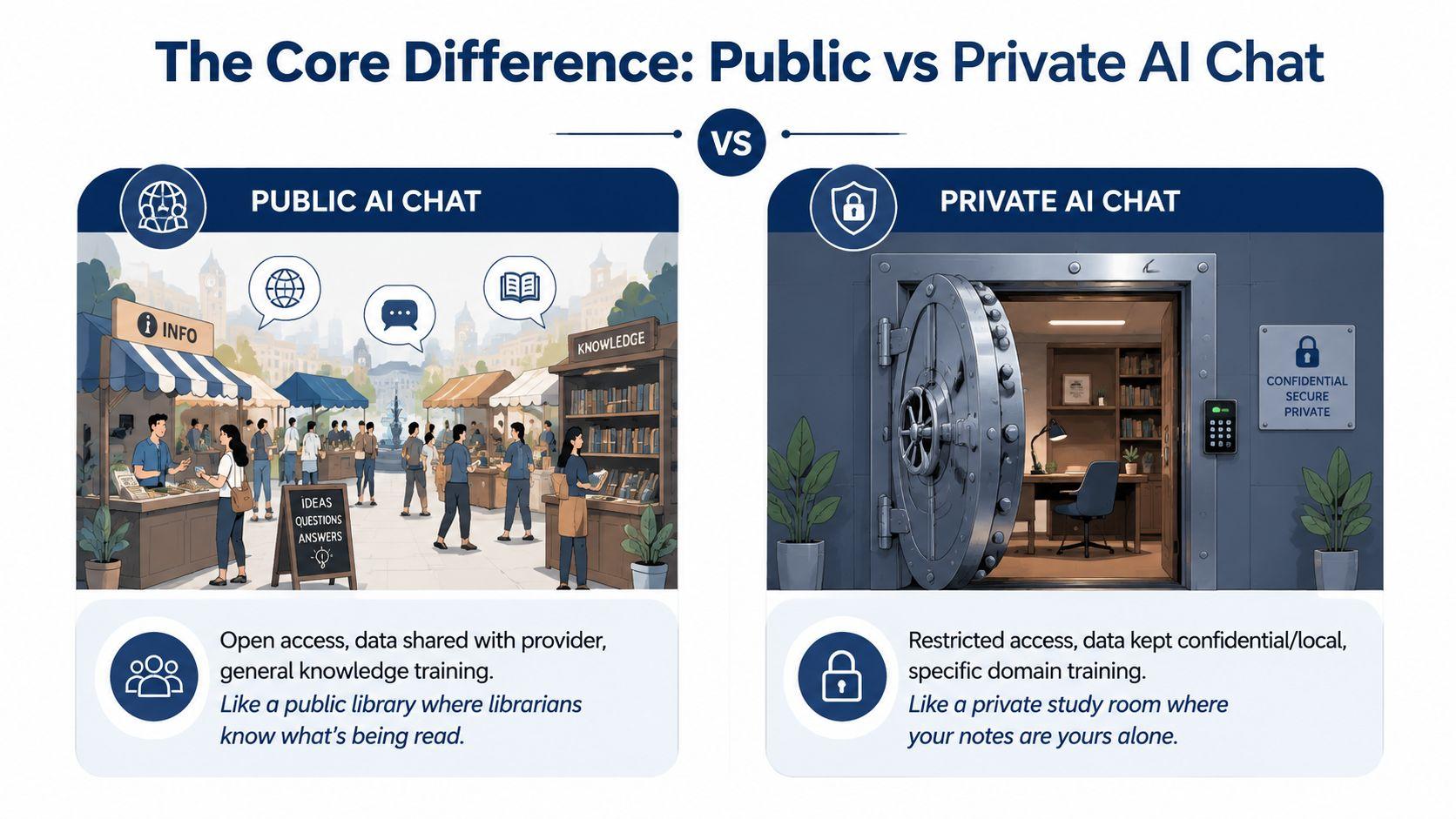
The Core Difference Public vs Private AI Chat
The easiest way to understand this is with a simple analogy.
A public AI chat is like using a computer in a public library. It's helpful, easy to access, and built for lots of people. But your activity may be logged, reviewed, or retained according to rules you didn't write.
A private AI chat is closer to using your own locked laptop at home, or a secure study room with the door closed. You still get help, but the system is designed to keep your notes from becoming part of a general pool.
What changes behind the scenes
The biggest difference isn't the chat box. It's the default data-handling model.
Surfshark reported in 2025 that ChatGPT may collect 17 out of 35 data types in the Apple App Store privacy label, up from 10 the prior year, a 70% increase, including categories such as coarse location, health and fitness, search history, audio data, advertising data, and customer support (Surfshark's AI chatbot privacy comparison). That doesn't mean every tool works the same way, but it does show how data exposure can expand as mainstream AI products grow.
By contrast, private AI tools try to narrow the path your data can travel. Some do that by keeping processing local on your device. Others do it through tighter contracts, restricted storage, separate environments, or settings that prevent training reuse.
If you want a concrete look at the local route, this overview of private offline AI for Mac helps show what it means when AI runs without a normal cloud account workflow.
Public AI Chat vs. Private AI Chat
| Feature | Public AI Chat (e.g., Standard ChatGPT) | Private AI Chat (e.g., 1chat, Local Models) |
| Typical default | Built for mass use and broad provider control | Built to reduce provider access or isolate data |
| Training use | May use prompts or uploads for model improvement unless settings say otherwise | Designed to avoid training on your content or keep data local |
| Retention clarity | Can be hard to understand from consumer-facing policies | Usually easier to evaluate if privacy is a core feature |
| User control | Often depends on manually changing settings | Often centers on stronger privacy defaults |
| Best fit | Low-sensitivity everyday tasks | Sensitive work, school, family, or business use |
A private AI chat isn't simply “more hidden.” It changes who can reuse your words after the conversation ends.
How Different Privacy Models Work
Not all private AI chat tools protect data the same way. Private is really a spectrum.
At the high level, most options fall into two buckets. One keeps everything on your own device. The other uses cloud infrastructure but tries to limit what the provider can do with your data.
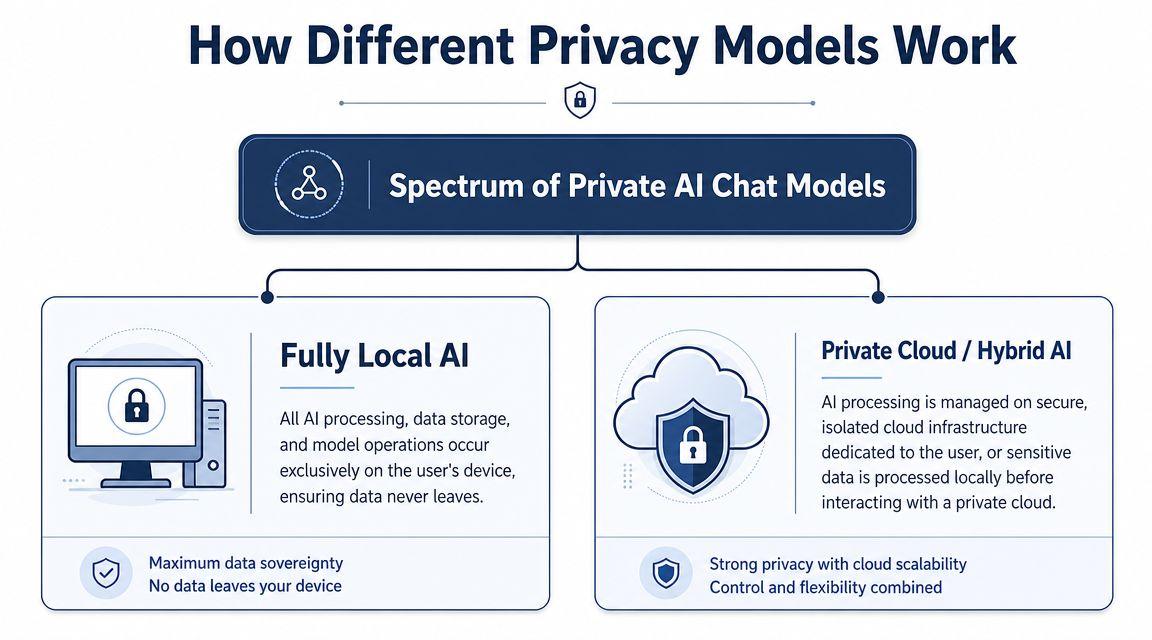
Fully local AI
A local setup is the closest thing to keeping a diary in your desk drawer.
The model runs on your computer. Your files stay on your machine. Your prompts don't need to travel to a third-party endpoint. Privacy Guides recommends local chat stacks built around an on-device model and a local client, with requirements such as not transmitting personal data, being multi-platform, and supporting GPU acceleration when available (Privacy Guides on AI chat).
That's the strongest privacy position for many people because the simplest way to reduce exposure is to avoid sending data out in the first place.
Local AI works well for:
- Sensitive notes and drafts where keeping content on-device matters more than having the newest cloud model
- Offline use when internet access is limited or you don't want cloud dependence
- Personal control if you're comfortable installing software and managing files yourself
The tradeoff is practical. Local setups may require stronger hardware, more setup time, and a bit more patience.
Private cloud and hybrid models
A private cloud model is more like a secure safe deposit box. Your data still leaves your device, but the provider is supposed to put tighter boundaries around access, retention, and reuse.
This is where careful reading matters. Stanford HAI reported that six leading U.S. AI companies feed user inputs into their models by default, with some systems keeping data indefinitely and allowing human review unless users actively opt out (Stanford HAI on chatbot data use). So if a cloud-based tool claims privacy, you need to ask whether it changes those defaults in a meaningful way.
A good checklist for cloud privacy includes:
- Training limits. Does the provider clearly say your chats aren't used to train models?
- Retention rules. Can you tell how long logs and uploads are stored?
- Deletion controls. Can you remove chat history and files?
- Access boundaries. Is human review limited?
- Policy clarity. Can a non-lawyer understand the privacy terms?
For an example of the kind of policy page worth reading before you trust a service, look at 1chat's privacy policy.
When a company says “private,” the useful follow-up is “private from training, private from retention, or private only from other users?”
Real-World Scenarios Where Privacy Matters
Privacy questions feel abstract until you attach them to ordinary tasks.
Style Factory reported that ChatGPT had more than 400 million weekly users by April 2025, and broader market coverage found the global chatbot market had surpassed $9 billion, which shows these tools are now woven into work, school, and personal routines (ChatGPT and chatbot market statistics). That scale means privacy mistakes happen during normal, everyday use.
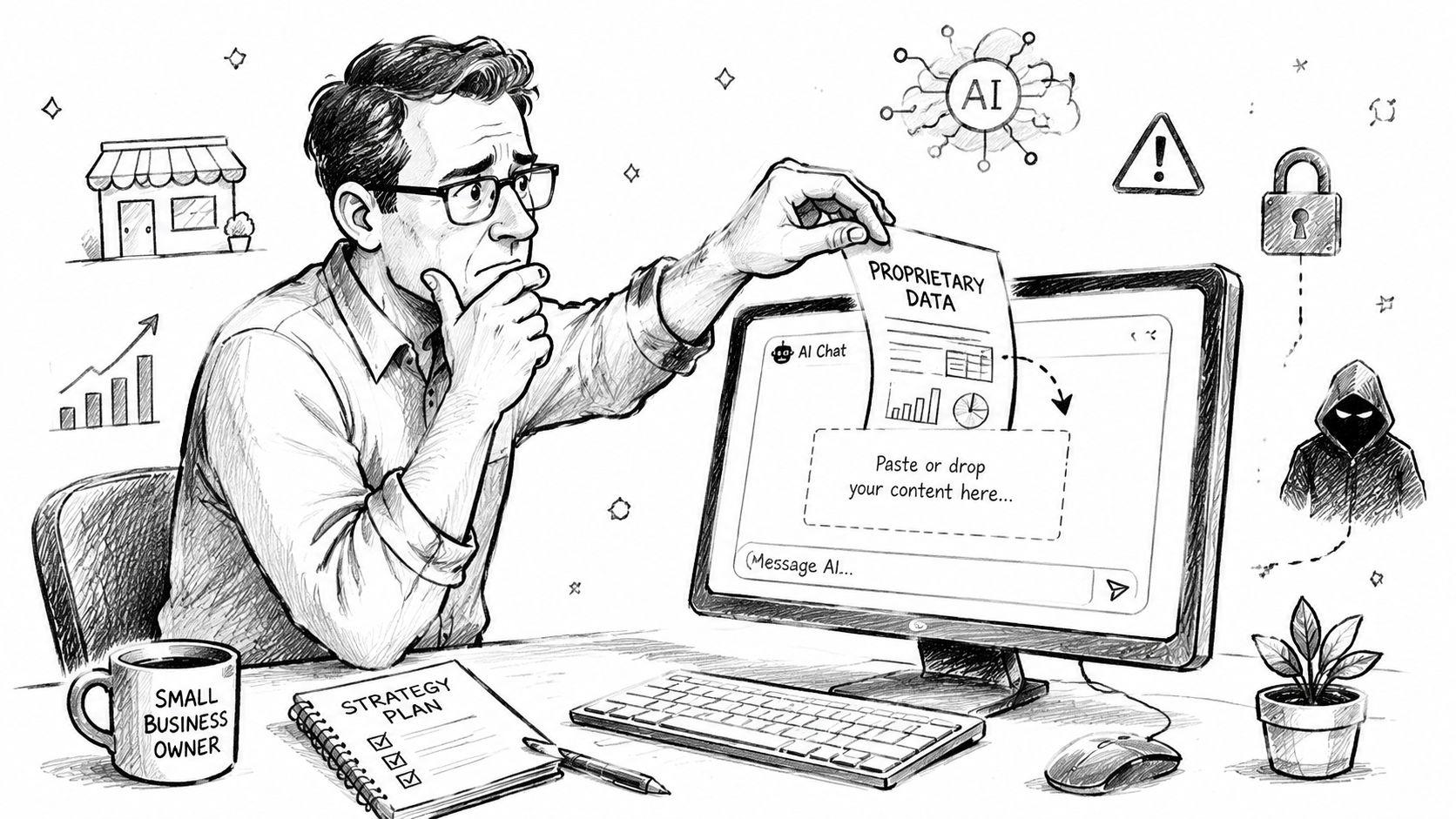
A small business manager
A manager at a ten-person company copies a client list, a proposal draft, and rough pricing notes into a chatbot to “make this sound more polished.” The output is helpful. The problem is the input.
That prompt may contain customer names, commercial plans, and internal thinking that wasn't meant to leave the company's working documents. A private AI chat reduces that risk by isolating the conversation from broad training use and by giving clearer boundaries around storage and review.
A student writing something personal
A high school or college student asks AI for help revising an essay about grief, divorce, anxiety, or another family issue. The student isn't trying to disclose anything important. They just want writing help.
But sensitive context is still sensitive context. A more private tool lowers the chance that a confidential draft becomes part of a long-lived record in a consumer service. The same principle matters in specialized fields too. In healthcare-adjacent workflows, even voice tools need careful review, which is why a guide to medical speech recognition for healthcare is useful reading when sensitive spoken data enters AI systems.
A family planning a trip
A family uses AI to organize travel dates, hotel options, child needs, budget ranges, and days when the house will be empty. None of those details sounds dramatic on its own.
Together, though, they form a picture of household routines and personal circumstances. A private AI chat can help with the same planning task while reducing how much of that picture is stored or reused.
The risk usually isn't one single secret. It's the full pattern your prompts create when combined.
How to Choose the Right Private AI Chat
Picking a private AI chat is less about marketing language and more about specific controls. You don't need to be technical. You just need a short list of questions and the patience to check the answers.
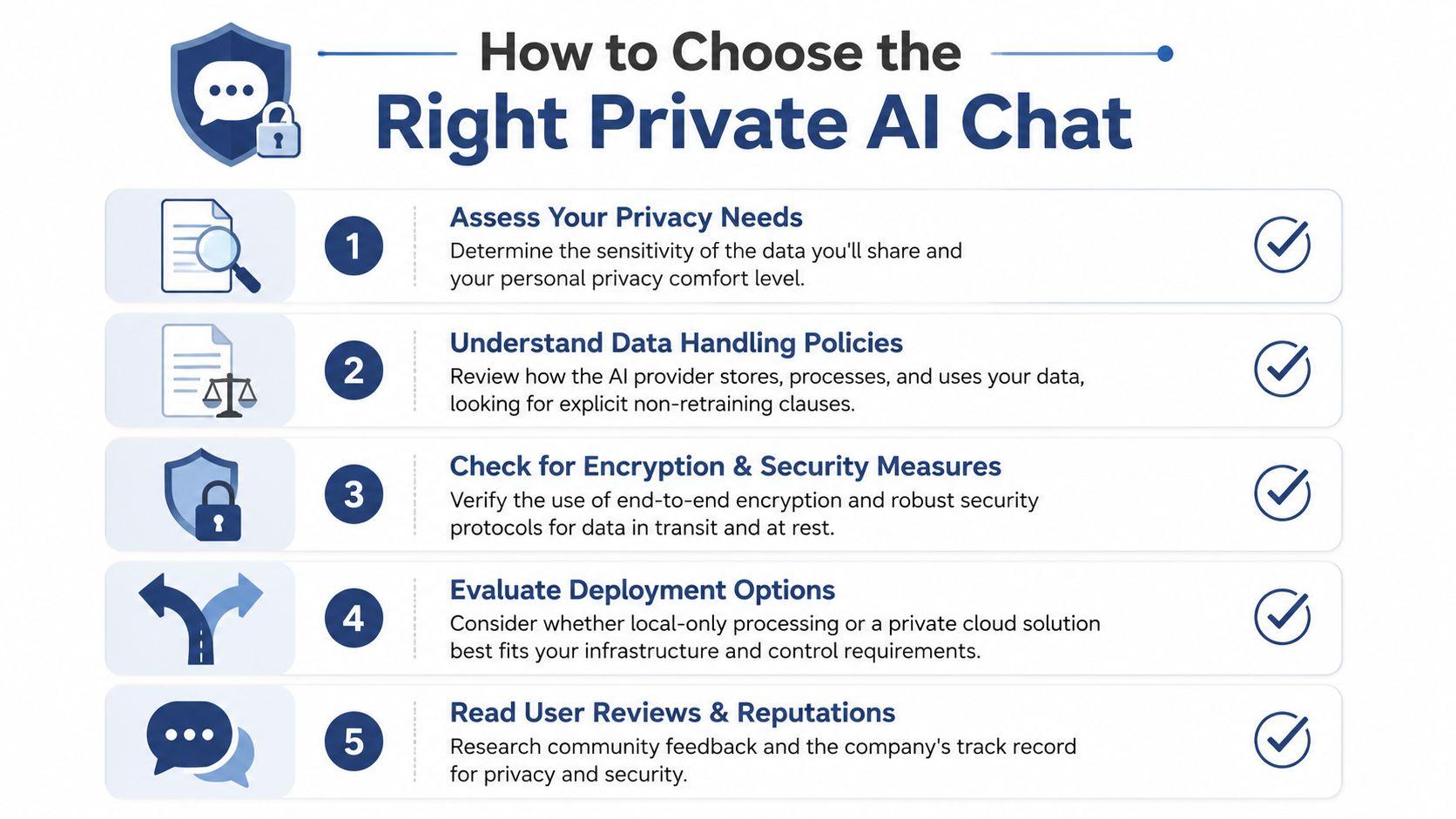
Start with your risk level
A parent helping with homework has different needs than a designer reviewing client files. A college student doing research has different risks than a team handling internal planning documents.
Ask yourself:
- What will I paste in? School drafts, internal documents, customer messages, medical questions, or light brainstorming?
- Who is using it? Just you, your family, or a work team?
- What would bother me if retained? Names, files, budgets, contracts, personal stories?
If the answer includes anything sensitive, treat privacy as a core feature, not a bonus.
Read the privacy promise in plain English
The strongest sign of a trustworthy tool is a direct statement about data use. Don't settle for vague wording like “we value privacy” or “we may use data to improve services.”
Look for language that answers:
- Training. Are your prompts used to train models or not?
- Retention. How long are chats and uploads kept?
- Deletion. Can you erase your history?
- Review. Can humans access the content?
- Deployment. Is it local, cloud-based, or mixed?
One category worth considering is local-first software, especially if maximum control matters. As noted earlier, dedicated privacy guides favor on-device chat stacks when users want to keep personal data from being transmitted at all.
Match the tool to the job
Not every task needs the same privacy model.
Use a local tool when you're working with highly sensitive drafts, personal notes, or files you don't want leaving your device. Use a private cloud tool when you need convenience, modern features, and easier access across devices, but still want stricter boundaries than a standard consumer chatbot.
For non-technical users who want a privacy-focused cloud option with access to multiple models in one place, 1chat is one example to review. Its feature and plan details are available on the 1chat pricing page. That doesn't remove the need to read policies carefully, but it gives families, students, and small teams a practical starting point.
Check usability before you commit
A secure tool that nobody uses correctly won't help much.
Look for:
- Simple history controls so deleting chats doesn't feel hidden
- Clear file handling if you upload PDFs or documents
- Separate workspaces if you mix family, school, and business tasks
- Cross-device support if you move between laptop and phone
Good privacy tools lower the chance of mistakes. They don't depend on you remembering a maze of hidden settings.
Best Practices for Using Any AI Chat Securely
Even the most private AI chat can't protect information you share carelessly. Good privacy is part tool, part habit.
The easiest rule is also the one often skipped. Don't paste more than the task requires. If you want help rewriting an email, remove names, addresses, account details, and anything that doesn't affect the answer.
Small habits that make a big difference
- Redact first: Replace real names with roles like “client,” “teacher,” or “vendor” when possible.
- Separate contexts: Use different accounts or workspaces for work, school, and family tasks so information doesn't mix.
- Review uploads: Before sending a PDF or document, check for hidden pages, signatures, contact details, or tracked comments.
- Delete regularly: If a tool keeps history, clear conversations you no longer need.
- Pause on sensitive topics: If a prompt involves health, legal, financial, or student information, slow down and decide whether AI is appropriate for that task.
A lot of privacy mistakes come from convenience. You're in a rush, the chatbot is open, and copying the whole file feels easier than trimming it. That's understandable. It's also how low-risk tasks turn into high-risk disclosures.
Policy settings still matter
Cookies, saved sessions, and account settings don't carry the same weight as prompt content, but they're part of the overall privacy picture. If you want to understand how one service handles that layer, review 1chat's cookie policy alongside its main privacy terms.
The broader mindset is simple. Treat AI chats the way you'd treat a shared workspace. Bring in only what's needed, clean up after yourself, and don't assume silence means secrecy.
The Future of Truly Private AI
The encouraging news is that privacy and usefulness no longer need to be treated as opposites.
Google's 2025 Urania framework describes a way to analyze chatbot usage with differential privacy, which means organizations can extract useful insights without exposing individual conversations (Google Research on a differentially private framework for chatbot insights). That matters because companies still need to improve products, detect issues, and understand usage patterns. They just don't need full access to each person's raw prompts to do it.
Where the industry is heading
Several trends point in the right direction:
- Stronger defaults: Privacy settings are likely to move closer to default protection instead of buried opt-outs.
- Task-based deployment: Teams will use one setup for routine work and another for sensitive material.
- Better policy clarity: Users increasingly expect plain-language answers about training, retention, and deletion.
- More local and hybrid options: People want a choice between convenience and maximum control, not one model for everything.
Private AI chat in 2026 isn't about hiding from technology. It's about choosing tools that respect boundaries. The right question isn't “Can AI help me?” It's “Can AI help me without turning my words into someone else's training data or keeping them longer than necessary?”
That's the standard worth asking for. And it's becoming a practical one.