You paste a customer list into an AI assistant to clean up duplicate entries. A few minutes later, the spreadsheet looks perfect, the task is done, and nobody on the team thinks about the names, email addresses, purchase details, or internal notes that just left your workspace.
The same thing happens at home. Someone uploads a child's medical form to translate it, asks an AI assistant to summarize a contract, or shares a school document to make the language easier to understand. The convenience is immediate. The privacy consequences are usually invisible, including retention in service logs, access by vendors or administrators, and unclear use of prompts for model improvement.
I've watched these mistakes happen in small businesses and family settings because people aren't careless. They're trying to finish ordinary tasks quickly. Choosing a secure AI platform is less about paranoia than practical configuration, sensible account habits, and knowing which vendor promises protect your data in real use.
When a Quick Chat Turns Into a Privacy Problem
A five-person design studio receives a draft agreement from a new client. The owner wants a plain-English summary before sending it to the team, so she opens a familiar chatbot, copies the contract into the prompt box, and clicks submit. The assistant produces a useful summary almost instantly.
The draft contains the client's legal name, pricing terms, business address, project deadlines, and a clause describing an unreleased product. The studio hasn't checked whether the chatbot retains conversations, uses customer inputs for training, allows support personnel to access logs, or separates one workspace from another. The owner has completed the task, but she hasn't controlled what happens to the document afterward.
At home, the pattern is just as ordinary. A parent photographs a child's medical form under bright kitchen light, uploads it for translation, and sends the result to a school administrator. The image may include a date of birth, medication details, physician information, and insurance references. “Delete chat history” might remove the conversation from the visible interface without explaining whether backups, safety logs, or vendor systems still retain copies.
Practical rule: If you wouldn't email a document to an unknown address, don't paste it into an AI service until you understand its data handling.
The risk isn't limited to malicious model behavior. Independent research cited in the AI security statistics report indicates that 1 in every 80 GenAI prompts poses a high risk of sensitive data leakage, while 1 in 13 prompts contains potentially sensitive information. Those figures describe a routine behavior problem: people put private material into systems before checking the controls.
A better response starts with a simple question. Can the platform keep sensitive prompts isolated, restrict who can access them, show administrators what happened, and delete the information according to a clear policy? If the answer is vague, the tool isn't ready for confidential work.
What a Secure AI Platform Actually Means
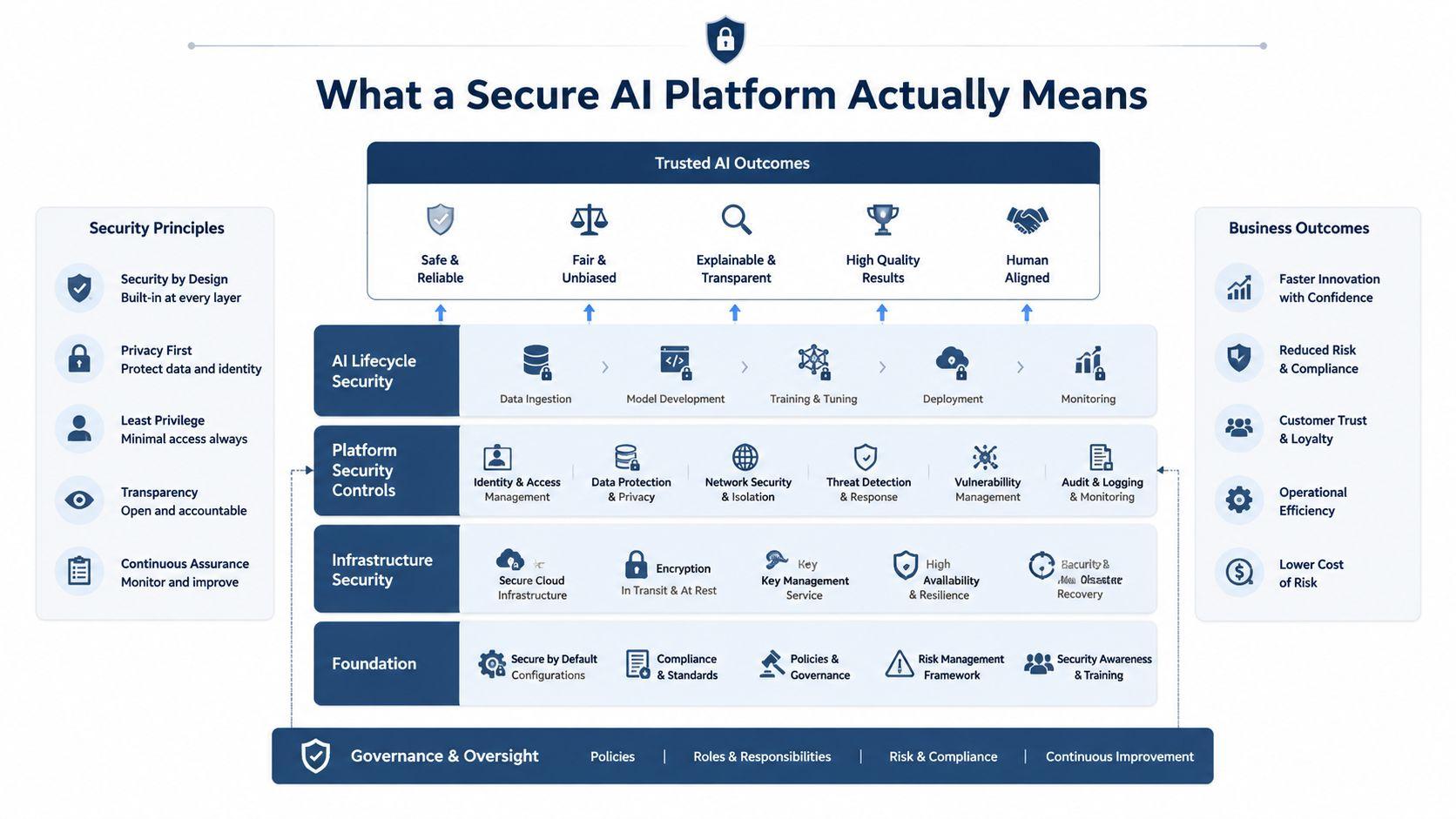
Think of an AI platform as a building. The model is one room, but the building also needs a foundation, locked entrances, controlled plumbing for data, and a security desk that records activity. A polished chatbot interface only shows the lobby. It doesn't prove that the other layers are protected.
A practical secure AI platform has five connected layers:
- Models, which generate answers, images, summaries, or classifications.
- Infrastructure, including servers, networks, storage, cloud accounts, and deployment environments.
- Data pipelines, which receive prompts, files, images, tool calls, and outputs.
- Access controls, which determine who can use which models, files, workspaces, and actions.
- Governance, including policies, audit logs, retention rules, monitoring, and incident response.
The weakest layer can undermine the others. Strong encryption won't fix an account shared by an entire team. A private model won't protect a PDF if browser extensions copy its contents. A strict retention policy isn't enough when nobody knows which AI tools employees or family members are using.
Security and privacy solve different problems
Security protects systems and data from unauthorized access, compromise, and abuse. Privacy governs how the provider collects, retains, shares, and uses information, including information you intentionally submit. A service can encrypt data while it travels and still retain prompts longer than you expect. It can also offer private conversations while using weak account recovery or poor access controls.
The need for layered defenses is becoming more urgent. The average cost of a data breach reached $4.88 million in 2024, while organizations using extensive AI and automation in security operations reduced breach costs by about $2.2 million on average, as reported in the AI security research report. That doesn't mean automation makes a small team safe by itself. It means security controls affect operational consequences.
For a broader view of how AI can support defensive operations, the discussion of groundbreaking AI for cybersecurity is useful context. For practical product research, review a provider's privacy and AI service information, not only its feature page.
Working definition: A secure AI platform protects the infrastructure, controls the data path, limits user and agent authority, and creates enough evidence to explain what happened to every sensitive interaction.
Core Security and Privacy Features That Matter
Security features matter only when they change what happens during an ordinary task. A parent uploading a school document needs retention controls. A small team reviewing a proposal needs workspace separation. An administrator needs to know who opened which file and whether the output was exported.
Start with the data path
Encryption in transit protects information while it moves between your device and the service, commonly through TLS and HTTPS. It helps prevent someone on the network from reading a prompt as it travels. End-to-end encryption offers a different promise. It limits who can decrypt content so that the service itself has less ability to inspect it, although the exact design matters and providers use the term differently.
Encryption at rest protects stored prompts, files, backups, and logs. Ask what data it covers, who controls the keys, and whether administrators can set retention periods. A provider that says “encrypted” without explaining storage, backups, or deletion leaves an important gap.
Data handling deserves equal attention:
- Zero-retention modes can prevent the service from keeping prompts after processing, subject to documented exceptions.
- Training controls should clearly state whether your inputs are used to improve models and whether opting out applies to existing data.
- Regional storage can help teams meet location and contractual requirements.
- Prompt isolation should keep one user, family member, customer, or workspace from seeing another's conversations.
Control the people and inspect the activity
A shared login is not a team security strategy. Use separate accounts, role-based permissions, workspace boundaries, MFA, and SSO where available. A family account should let adults manage access without exposing every child's private conversation. A small company should be able to give a contractor access to one project without granting access to the entire archive.
Audit logs turn an argument into an investigation. Look for timestamps, user identity, model selection, file activity, tool calls, policy decisions, and export history. The privacy policy and terms should help you understand what the provider records and how it handles personal information.
Model safety still matters. Prompt-injection protection, jailbreak resistance, input filtering, output redaction, and human review can reduce harmful or unauthorized results. The OWASP Top 10 for LLM Applications 2025 ranked prompt injection as the number one issue, which reinforces a practical point: the platform must defend the prompt flow, not merely lock down its database.
| Feature | What It Does | Why It Matters for SMBs and Families |
| Encryption in transit | Protects data moving between devices and the service | Reduces exposure on networks used at home, school, or work |
| Encryption at rest | Protects stored prompts, files, backups, and logs | Limits damage if storage is accessed without authorization |
| Retention controls | Defines how long prompts and files remain available | Helps prevent old medical, financial, or client documents from lingering |
| Training opt-out | Prevents submitted data from being used for model improvement, according to the policy | Keeps confidential material outside broader product-development workflows |
| Access controls | Assigns accounts, roles, MFA, and workspace permissions | Stops one shared credential from exposing every conversation |
| Audit logs | Records identities, actions, timestamps, and policy decisions | Gives a small team evidence when something goes wrong |
| Safety controls | Filters inputs and outputs and detects suspicious requests | Helps contain prompt injection, jailbreaks, and accidental disclosure |
Deployment Options and How to Choose One
Deployment is a control decision, not a prestige decision. A private server isn't automatically safer if nobody patches it, monitors access, or protects its backups. A managed cloud service may be the responsible choice for a small team that lacks security staff, provided the vendor gives you clear controls and a usable contract.
A five-person design studio might choose a public cloud platform because it needs quick setup, predictable administration, and access from multiple devices. The trade-off is that the studio depends on the provider's infrastructure, retention settings, identity controls, and incident response.
A private cloud gives the studio more control over networking, storage, and access policies while retaining managed infrastructure. It costs more and still requires someone to configure identities, logs, backups, and updates. This model fits teams with stronger technical support or a compliance reason to isolate workloads.
On-premises deployment keeps systems in an environment the organization manages directly. A small healthcare clinic may prefer it for highly sensitive records, but the clinic then owns patching, physical security, disaster recovery, model updates, and monitoring. Local control creates responsibility, not automatic protection.
Hybrid deployment separates workloads. A studio could keep confidential client files in a controlled environment while using a managed service for public copywriting or image ideation. The boundary must be clear, and staff need rules that tell them which content belongs in each system.
| Deployment Model | Best For | Control Level | Cost | Complexity |
| Public cloud | Families and small teams needing fast setup | Lower direct infrastructure control | Usually simpler to budget | Lower operational burden |
| Private cloud | Teams needing stronger isolation with managed infrastructure | High policy and network control | Higher than public cloud | Requires skilled administration |
| On-premises | Organizations with sensitive workloads and capable IT support | Highest direct control | Hardware and maintenance responsibility | Highest day-to-day burden |
| Hybrid | Teams separating sensitive and routine workflows | Flexible, workload-specific control | Variable | Requires clear boundaries and monitoring |
The threat surface is expanding beyond the model itself. AI-specific security incidents reached 233 in 2024, a 56.4% increase from 2023, and AI-related CVEs rose to 2,130 in 2025, up 34.6% year over year and representing 4.42% of all CVEs, according to Trend Micro's AI security report.
Choose the simplest deployment that keeps sensitive data away from systems you don't control. If you can't maintain an on-premises environment, don't buy one for appearances. Select a managed option with verifiable controls instead.
An Evaluation Checklist for Small Teams and Families
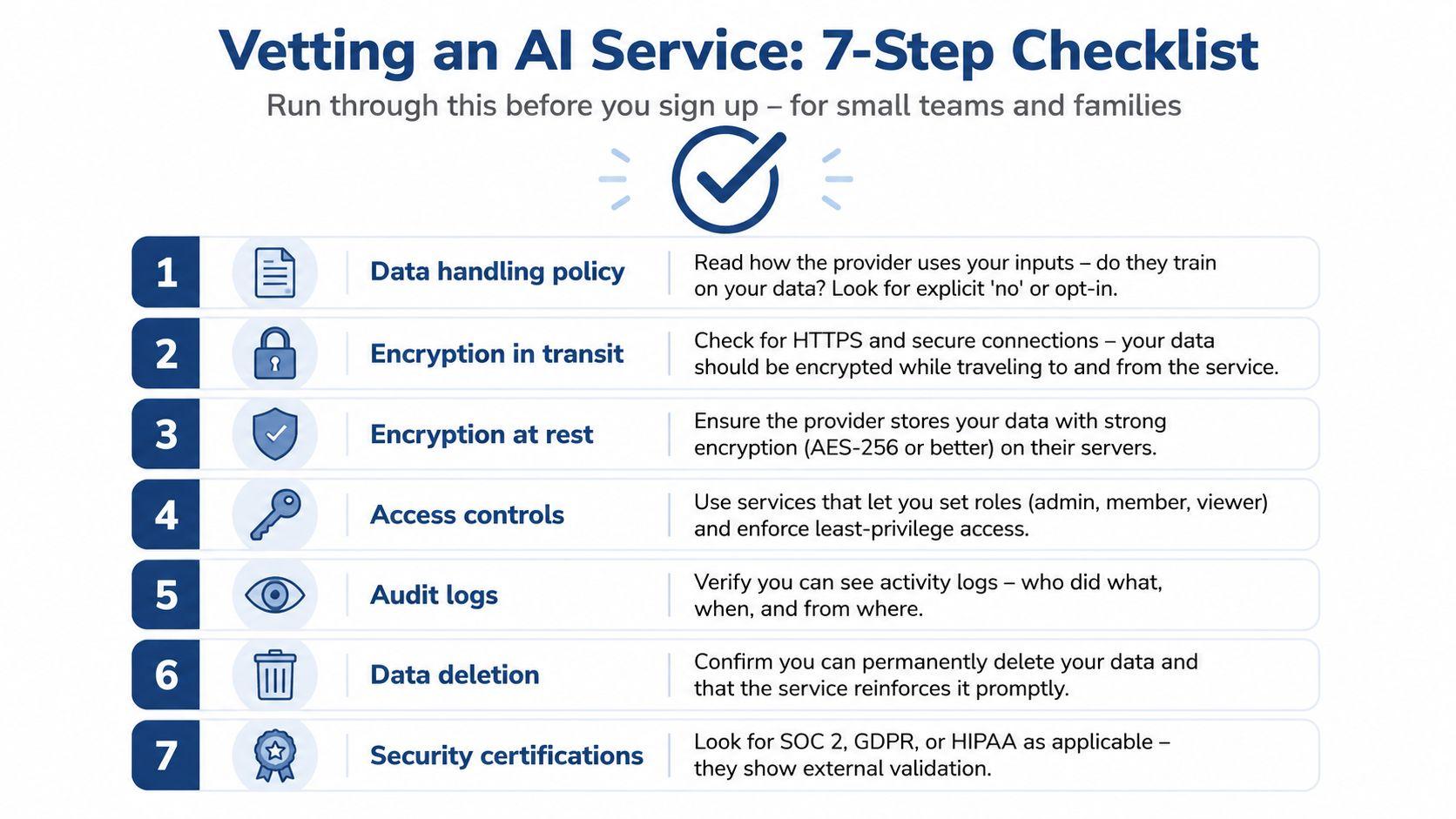
You don't need a security department to vet an AI service. You need a repeatable set of questions and a willingness to reject vague answers.
Ask these questions before signup
- Where does my data go? Read the privacy policy and data-processing terms. Identify whether prompts, files, outputs, telemetry, and support tickets are stored or shared.
- Is the connection protected? Confirm encrypted connections for web, mobile, API, and integrations. Don't assume every extension or third-party connector follows the same standard.
- How is stored data protected? Ask about encryption at rest, backups, administrator access, and key management.
- Does the provider train on inputs? Look for an explicit statement. “We may use information to improve services” deserves a direct clarification.
- Can I control access? Check for individual accounts, MFA, roles, workspace separation, and account recovery. Never use one shared password for a family or team.
- What can I audit? Confirm that logs show who accessed data, what they did, and when. Exportable reports matter when you need to investigate or change vendors.
- Can I leave cleanly? Ask whether you can export conversations and files, request deletion, and receive confirmation that deletion covers active systems and backups.
Verify instead of trusting labels
Certifications can help, but they aren't a substitute for understanding the actual service. Ask which product and region a certification covers, whether subprocessors are disclosed, and how the provider handles incidents. Review breach notifications and security advisories, then ask support how quickly the company would notify customers after a confirmed exposure.
Red flags include vague data-sharing language, no retention schedule, no deletion process, missing security contact details, unclear ownership of uploaded files, and a sales representative who can't explain whether support staff can view prompts. Pricing isn't a security control. Before comparing available pricing options, compare the data policy and administrative controls.
Write down the answers. A simple document shared with your team or family prevents one person from relying on a promise that nobody else has seen. If the provider won't answer a basic privacy question, don't place sensitive material in its system.
Common Threat Scenarios and Misconceptions
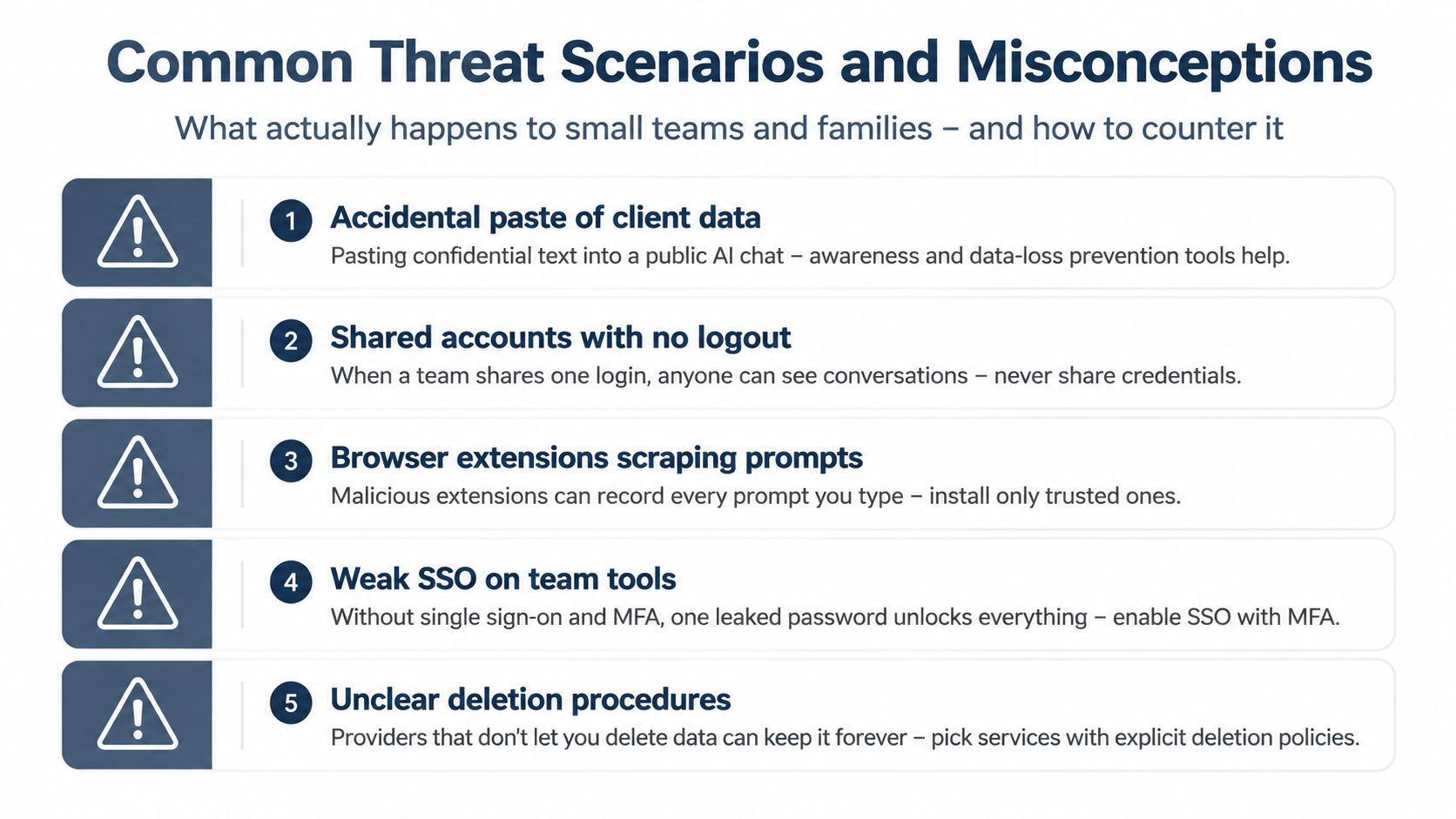
The most damaging mistake for a small team is often a normal action performed in the wrong place. Someone pastes a customer complaint into a public chat because they want a faster reply. Someone else installs a browser extension that promises better prompts, without checking whether it can read every page and prompt. A family shares one account, so a child can open an adult's financial or work conversations.
Weak identity practices multiply the problem. A stolen password can expose an entire team workspace when there's no MFA, separate account, or role restriction. A contractor who only needs to summarize one document may receive access to months of conversations because the platform has no meaningful workspace separation.
The assumptions that need to go
“Paid means safe.” Paid plans may offer additional controls, but payment doesn't prove zero retention, private training, strong access governance, or reliable deletion.
“Disabling history deletes the data.” It may hide conversations from the interface. Only the provider's documented retention and deletion process explains what happens in storage, backups, and logs.
“On-device AI removes all risk.” Local processing can reduce exposure to external services, but the device still needs updates, account protection, disk security, and careful handling of generated files.
“The model is the only threat.” Configuration mistakes, exposed databases, hardcoded API keys, and missing access controls repeatedly cause AI application breaches, according to the AI security breach review.
Agents raise the stakes because they can read files, call tools, and take actions instead of only returning text. For a focused discussion of the security risks of AI agents, pay attention to permissions, tool access, isolation, and monitoring rather than the agent's conversational quality.
Create a short usage rule: never paste secrets, personal identifiers, private health information, or unreleased client material into an unapproved tool. Review browser extensions, use separate accounts, enable MFA, and revisit the policy when the platform adds new models or integrations. Security is a daily habit, not a setting you configure once.
Why 1chat Fits the Privacy-First Use Case
For families, solo founders, and small teams, the right platform is the one that aligns daily convenience with clear privacy boundaries. 1chat is positioned as a privacy-first AI assistant for chat, PDF analysis, and AI image workflows, with product materials describing private conversations and no training on user data. Its iOS app description also presents an offline, locally running assistant that doesn't require an internet connection or permissions for that mode.
That approach maps naturally to the checklist. Local-first handling can reduce unnecessary transmission, while encryption, scoped accounts, workspace controls, and visible logs address the operational gaps that cause ordinary leaks. The important question remains implementation. Users should still read the current policy, verify which features run locally, and confirm how cloud-connected models handle prompts.
| Checklist Criterion | 1chat Implementation |
| Data handling | Privacy-focused product positioning and a stated no-training approach |
| Local processing | Offline, locally running capability described for its iOS app |
| Sensitive workflows | Support for chat, PDF analysis, and image generation in one environment |
| Access governance | Review the available account and workspace controls before assigning users |
| Transparency | Check current privacy terms and service documentation for retention and logging details |
| Deployment fit | Consider local use for personal workflows and managed access for approved team work |
The trade-off is straightforward. A local-first experience may limit model choice, cloud features, or availability when a device lacks the required capability. Those constraints are preferable to trading confidential client or family information for a marginal convenience gain.
Use 1chat exactly where the earlier criteria matter most, then verify the configuration before uploading sensitive material. It's a practical option for people who won't treat confidentiality as an afterthought.
Putting It All Together
A secure AI platform isn't a chatbot with a padlock icon. It combines protected infrastructure, controlled data flows, individual access, model safeguards, and governance that lets you inspect and correct mistakes.
For a small team or family, the decision can stay manageable:
- List the layers: Identify the model, infrastructure, data handling, access controls, and governance behind each service.
- Check the essentials: Verify encryption, retention, training settings, workspace separation, MFA, audit logs, and deletion.
- Match deployment to reality: Use managed cloud, private cloud, local, or hybrid infrastructure according to data sensitivity and your ability to maintain it.
- Set daily rules: Ban sensitive copy-and-paste behavior in unapproved tools and review extensions, shared devices, and connected integrations.
- Limit agent authority: Give agents only the files, tools, and actions they need, with monitoring enabled.
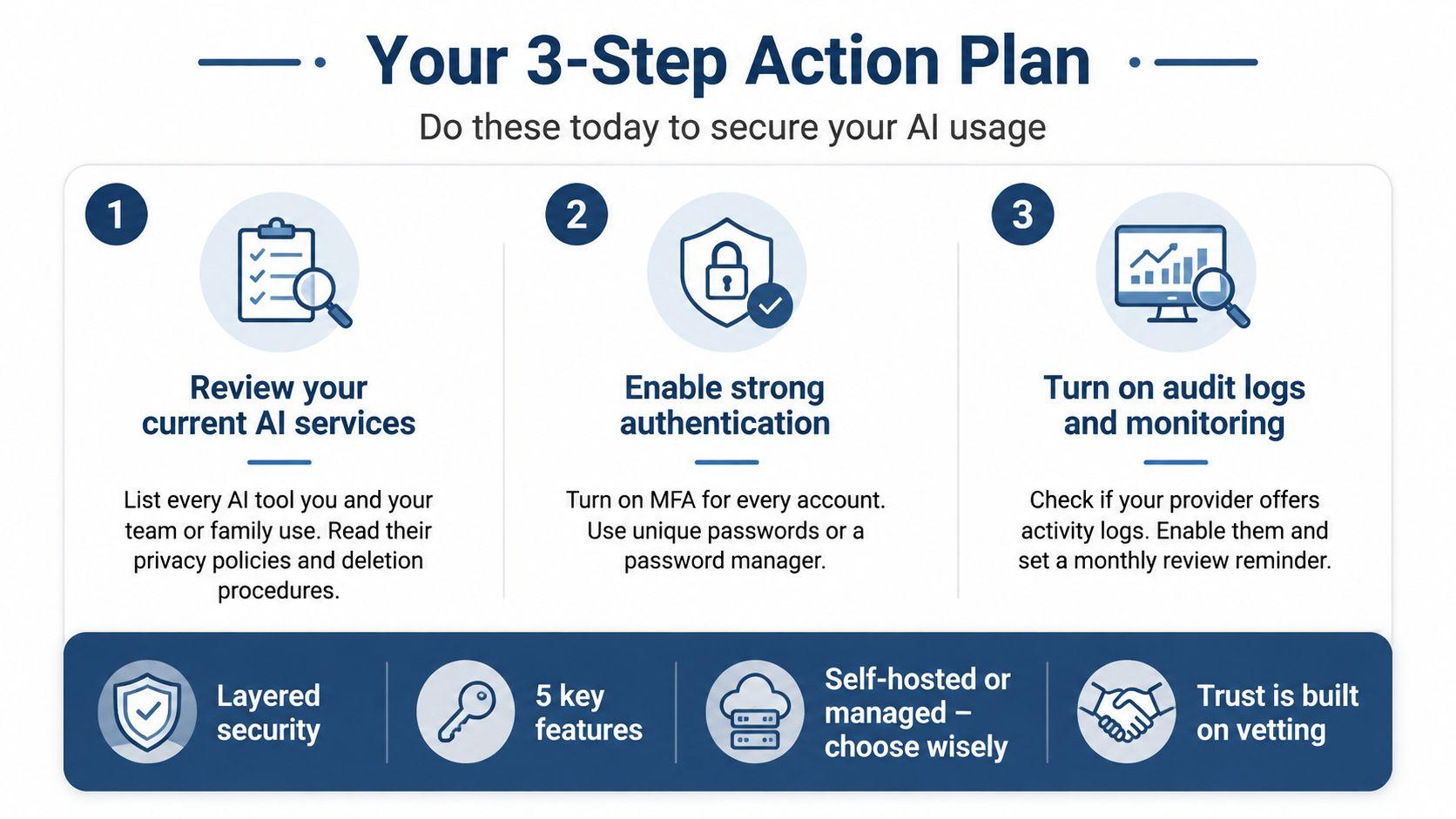
Start today by listing every AI service your household or team uses, reading its privacy and deletion terms, and turning on MFA. Then move one sensitive workflow, such as contract review or document translation, to a platform whose retention and access controls you can verify. Finally, write a short usage policy and share it with every person who can access the account.
That's an achievable upgrade. You don't need an enterprise overhaul to stop routine leakage. You need better defaults, separate identities, fewer unapproved tools, and a secure AI platform chosen with evidence instead of marketing language.
Run the checklist against your current AI tools today. If a provider can't clearly explain retention, training, deletion, access, and logging, stop uploading sensitive material and evaluate a privacy-first alternative for your next workflow.