You send a bank statement to your accountant. Your partner shares a photo of your child in the family group chat. Your team swaps a rough product idea before a client meeting. In each case, the message feels ordinary until you pause for half a second and think: who else could see this?
That hesitation is reasonable. Messaging has become the default way families, students, and small businesses handle personal details, work files, and time-sensitive decisions. At the same time, the tools people use most often were usually chosen for convenience first, not privacy first.
A secure communication platform matters because modern communication isn't just chatting anymore. It's how people approve payments, discuss health details, share school documents, coordinate travel, and store snippets of private life in searchable threads.
Why Your Everyday Chats Need a Security Upgrade
A common pattern looks harmless. A parent sends a medical form to a spouse. A freelancer messages a client contract from a phone in a coffee shop. A student shares draft research notes with a project group. Nobody in that moment thinks they're handling "sensitive communications." They think they're just trying to get through the day.
That gap is the core problem. People treat chat apps like casual conversation, while attackers and data collectors treat them like rich containers of personal and business information.
The urgency isn't niche. The Secure Communication Solution Market was valued at 12.55 billion USD in 2024 and is projected to reach 25 billion USD by 2035, growing at a CAGR of approximately 6.4%, driven by the urgent need to protect sensitive data from cyber adversaries, according to secure communication market research. That kind of growth tells you secure communication has moved from specialist concern to daily infrastructure.
Why this hits ordinary users now
Families don't need military-grade jargon. They need a safer way to share calendars, forms, travel details, and photos. Small businesses need a space for contracts, internal decisions, and customer documents that doesn't leak more than necessary. Students need collaboration without turning every draft, question, or study habit into a trackable trail.
Practical rule: If you'd hesitate to post it publicly, don't assume an ordinary chat app is the right place to send it privately.
Many readers start researching secure messaging only after something feels off. Maybe an account gets hijacked. Maybe a staff member leaves and still has old files. Maybe a family member forwards something that was meant to stay inside a small circle. That's usually when people realize they never had a communication policy at all. They just had habits.
If you want a broader look at how privacy, AI tools, and communication risks intersect, 1chat maintains a useful privacy and communication research library.
Understanding the Digital Locks on Your Conversations
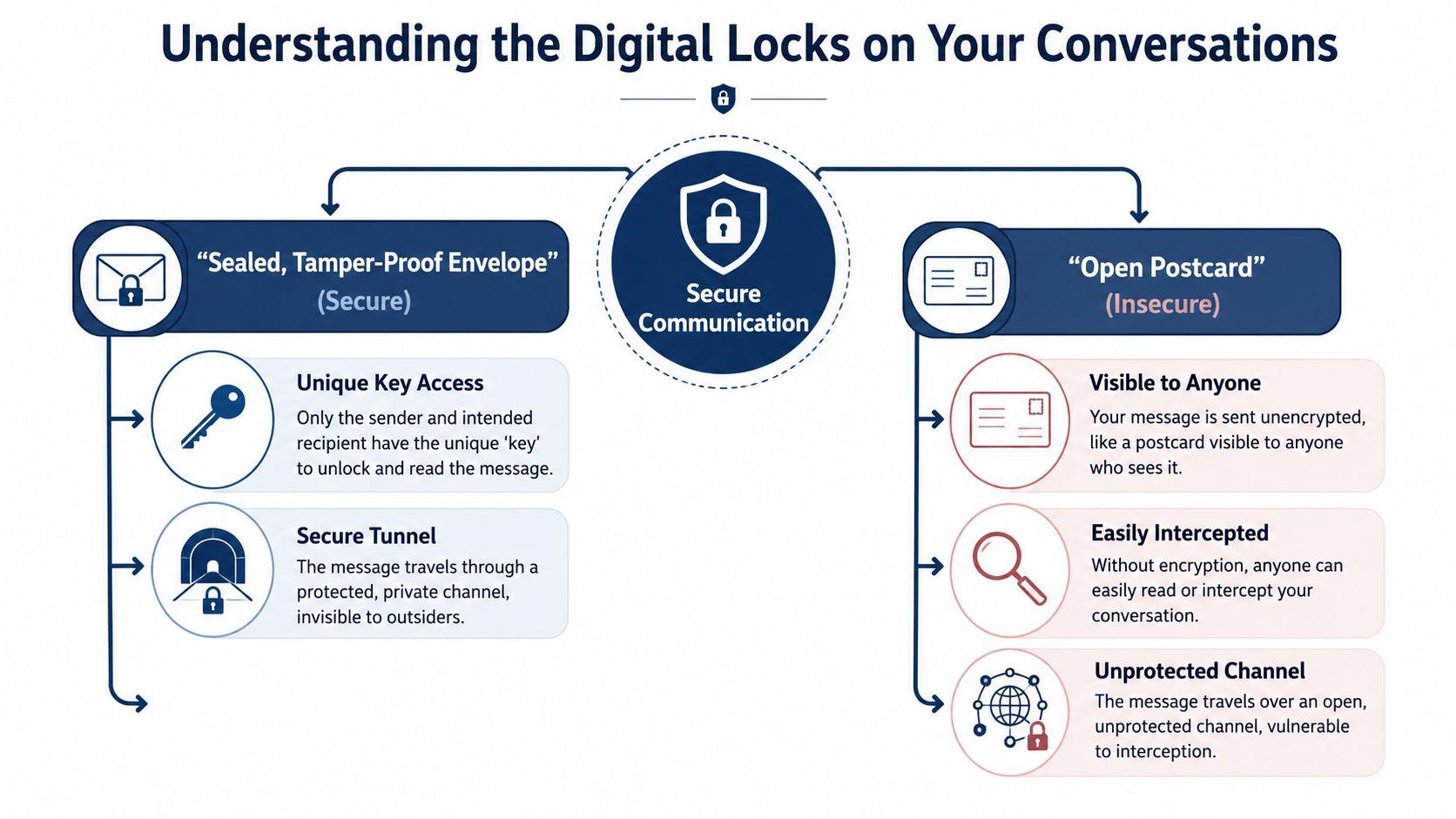
The simplest way to understand a secure communication platform is to compare two kinds of mail: a postcard and a sealed letter.
A postcard is easy. Anyone handling it can read the message. A sealed letter hides the contents from casual view. Digital communication works the same way, except the "mail handlers" may include service providers, network operators, attackers, and anyone who gains access to a device or account.
What encryption actually does
Encryption in transit protects data while it's moving between devices. Think of it as a locked courier bag during delivery.
Encryption at rest protects data while it's stored on a device or server. Think of it as locking the filing cabinet after the letter arrives.
The strongest version for messaging is End-to-End Encryption, often shortened to E2EE. That means only the sender and intended recipient have the keys needed to read the message content. If the system is built properly, the platform itself can't casually read what you wrote.
A useful analogy is this:
- No encryption: You wrote on a postcard.
- Basic transport encryption: Your postcard traveled in a covered truck, but the message was still readable at several stops.
- End-to-end encryption: You placed your note in a tamper-proof envelope that only the recipient can open.
Why group chats are harder
Private one-to-one messaging is only part of real life. Families use group chats. Businesses use channels. Students build project threads with shared files and comments. Security gets harder when more people, devices, and changes in membership are involved.
That's why modern standards matter. A secure communication platform should use End-to-End Encryption with protocols like Message Layer Security (MLS) so only authorized recipients hold decryption keys. MLS also helps address the scaling limits of older approaches by making secure group chats practical for larger, active teams, as described in this overview of MLS and secure communication tools.
The part most people miss
Even if nobody can read your message content, they may still learn a lot from the outside of the envelope.
That's metadata. It can include who contacted whom, when messages were sent, how often two people communicate, what device was used, and sometimes location or network clues. The message body might stay hidden while the surrounding pattern tells a revealing story.
A secure conversation isn't only about hiding the words. It's also about reducing what others can infer from the timing, frequency, and shape of the conversation.
For families handling shared files, privacy questions often extend beyond chat to storage. A good companion concept is zero-knowledge storage, where the provider isn't meant to see your file contents. This explainer on encrypted family document solutions is useful if you also store records, scans, or private household paperwork online.
Three Ways Platforms Handle Your Private Data
When people compare messaging apps, they often focus on features they can see: group chat, file sharing, voice calls, search, maybe AI tools. The deeper question is simpler: who can access your messages, and who can observe the context around them?
That answer usually depends on the platform's architecture.
The quick comparison
| Architecture Type | Message Content Access | Metadata Access | Best For |
| Client-server | The provider may be able to access content, depending on design | The provider usually has broad visibility into communication patterns | Convenience and mainstream reach |
| End-to-end encrypted | Intended participants can read content | Metadata may still be visible unless the platform works to hide it | Private messaging for sensitive conversations |
| Federated | Access depends on how each server is configured and managed | Metadata exposure varies across participating servers | Cross-group or cross-organization communication with more control |
Client-server platforms
This is the model many mainstream services use. Your messages pass through and often live on the provider's servers in a form the service can process. That can support search, moderation, syncing, and integrations. It can also create a larger trust burden.
For ordinary users, the upside is obvious. Everyone is already there. Setup is easy. Recovery is easy. The problem is that convenience often comes from central visibility and control.
End-to-end encrypted platforms
This model narrows content access. If implemented well, only the people in the conversation can read the message itself. That's a major upgrade.
But content secrecy isn't the same as total privacy. As BlackBerry's analysis notes, secure platforms must also "conceal or encrypt metadata" to prevent traffic analysis and "patterns of life" reconstruction, a point many consumer guides leave out. That comes from their discussion of metadata protection in secure communications.
Federated platforms
Federation is closer to how email works. Different servers can communicate while remaining separately operated. A business can control its own server, and still communicate outward. Matrix-based systems are one example of the broader idea.
This can improve control and reduce dependence on one provider. It can also add complexity. If one server is carefully configured and another isn't, your experience of privacy may depend on someone else's setup quality.
The architecture tells you what the vendor can know, not just what the marketing page promises.
For readers who want to compare how a privacy-first service explains local processing and data handling, HyperWhisper's on-device privacy statement is worth reading. It's a good example of the kind of plain-language disclosure users should look for.
If you're evaluating any communication or AI product, don't skip the platform's own privacy policy and legal terms. That's where vague security promises meet specific data practices.
Your Vendor Evaluation Checklist for Secure Communication
Individuals often ask the wrong opening question. They ask, "Is this app encrypted?" A better question is, "What would have to go right for me to trust this with family matters, client work, or school files?"
That's where a checklist helps.
What belongs on the must-have list
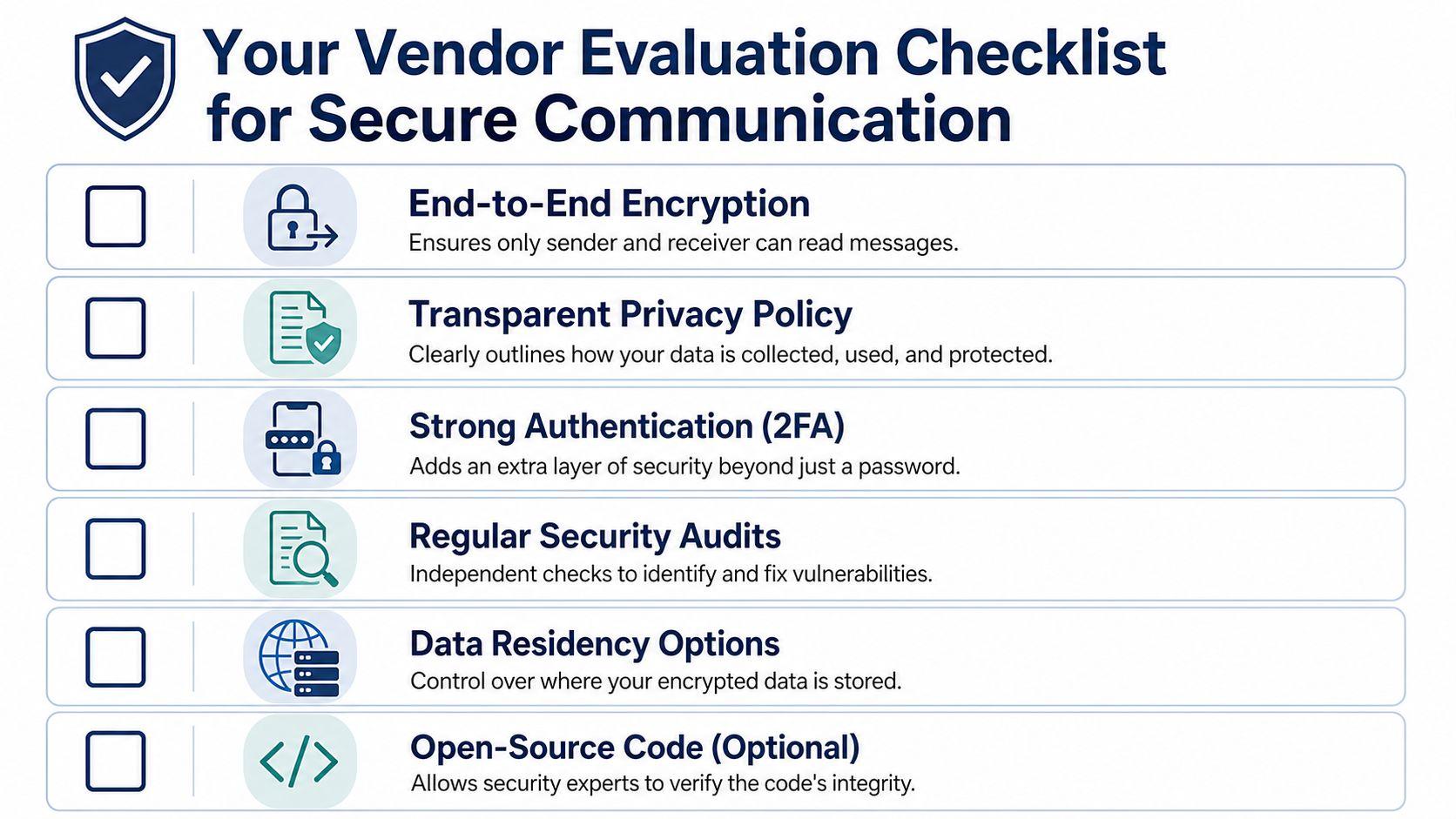
- End-to-end encryption by default: Don't settle for a platform that hides its strongest protections behind optional settings or limited modes.
- Clear identity controls: You should know who can join a chat, how access is revoked, and what happens when someone changes devices.
- Minimal data collection: If the service gathers more than it needs, your risk expands even when message content is encrypted.
- Readable privacy policy: If you can't tell what happens to your messages, files, and logs, that's a warning sign.
- Independent scrutiny: Open-source code or credible outside security review gives users more than marketing reassurance.
- Secure file handling: A lot of sensitive information moves as PDFs, photos, spreadsheets, and scans, not just text.
- Account protection: Strong authentication matters because a private app isn't private if the wrong person gets into your account.
What serious buyers should now expect
A secure communication platform isn't only defending against today's obvious threats. It's also preparing for the next wave of attacks and the fact that devices, users, and networks can't be trusted automatically.
According to RealTyme's description of enterprise requirements, Zero Trust architecture and quantum-resistant algorithms are becoming benchmark expectations, and compliance frameworks such as ISO 27001 have become important signals of auditability and long-term security posture. Their overview of quantum-secure communication platform requirements explains why.
In plain language:
- Zero Trust means the system keeps verifying users, devices, and access instead of assuming everything inside the boundary is safe.
- Quantum-resistant cryptography means the vendor is thinking ahead about future decryption risks, not only today's.
- Compliance signals suggest the company has been forced to document and standardize how it protects data.
Questions to ask before you commit
Ask these in demos, trials, or product reviews:
- Who can read my message content besides the intended recipients?
- What metadata does the platform keep?
- How does the service handle group membership changes?
- Can I control where data is stored or how it's deployed?
- What happens if a device is lost, shared, or stolen?
- How easy is it for non-technical family members or staff to use safely?
The last question matters more than vendors like to admit. A perfect tool that nobody uses correctly isn't secure in practice.
Choosing the Right Platform for Your Team Family or Studies
The most secure app in theory may be the wrong app in real life.
That's the utility gap. People say they want privacy, then stay on the platform that already includes their family, customers, classmates, or contractors. That's not hypocrisy. It's how communication works. Research discussed in this utility gap analysis argues that security experts often underweight utility, meaning the ability to reach the people you need to reach, and that weak adoption often follows.
For a small business
A business needs more than secret messages. It needs predictable teamwork.
If you run a small company, ask whether the platform supports staff turnover, role changes, shared documents, and client communication without confusion. A secure communication platform for business should reduce accidental exposure, not create a maze that employees bypass with personal apps.
Look for:
- Access control that matches roles: Sales, operations, and finance shouldn't all need the same visibility.
- Safe file sharing: Contracts, invoices, proposals, and internal notes need protection too.
- Usability under pressure: If the secure option is clumsy, staff will drift back to whatever is fastest.
For a family
Families need a different balance. They care about private conversations, but they also care about whether grandparents, teenagers, and busy parents can all use the same tool without constant support.
A good choice often has:
- Simple setup: If joining feels like a technical exam, adoption falls apart.
- Clear privacy settings: Parents shouldn't need to decode security jargon to make good choices.
- Practical reach: A private family space is useful only if everyone who matters can participate.
For most households, the best secure choice isn't the most extreme one. It's the one relatives will consistently use for the conversations that matter.
For students and study groups
Students often move between personal chats, project channels, shared documents, and AI tools. That means privacy failures can affect grades, research, reputation, and future opportunities.
A useful student-friendly platform should support:
- Group collaboration without oversharing
- Private drafting and feedback
- Reasonable boundaries between school, social life, and device syncing
The mistake is chasing "perfect" security while ignoring everyday behavior. If your classmates won't install the app, or if your own workflow keeps pushing you back to less private tools, your security plan is already leaking.
The right answer is usually the platform that protects the important conversations well, handles files safely, and still fits the way your group communicates.
How 1chat Balances Privacy with AI-Powered Productivity
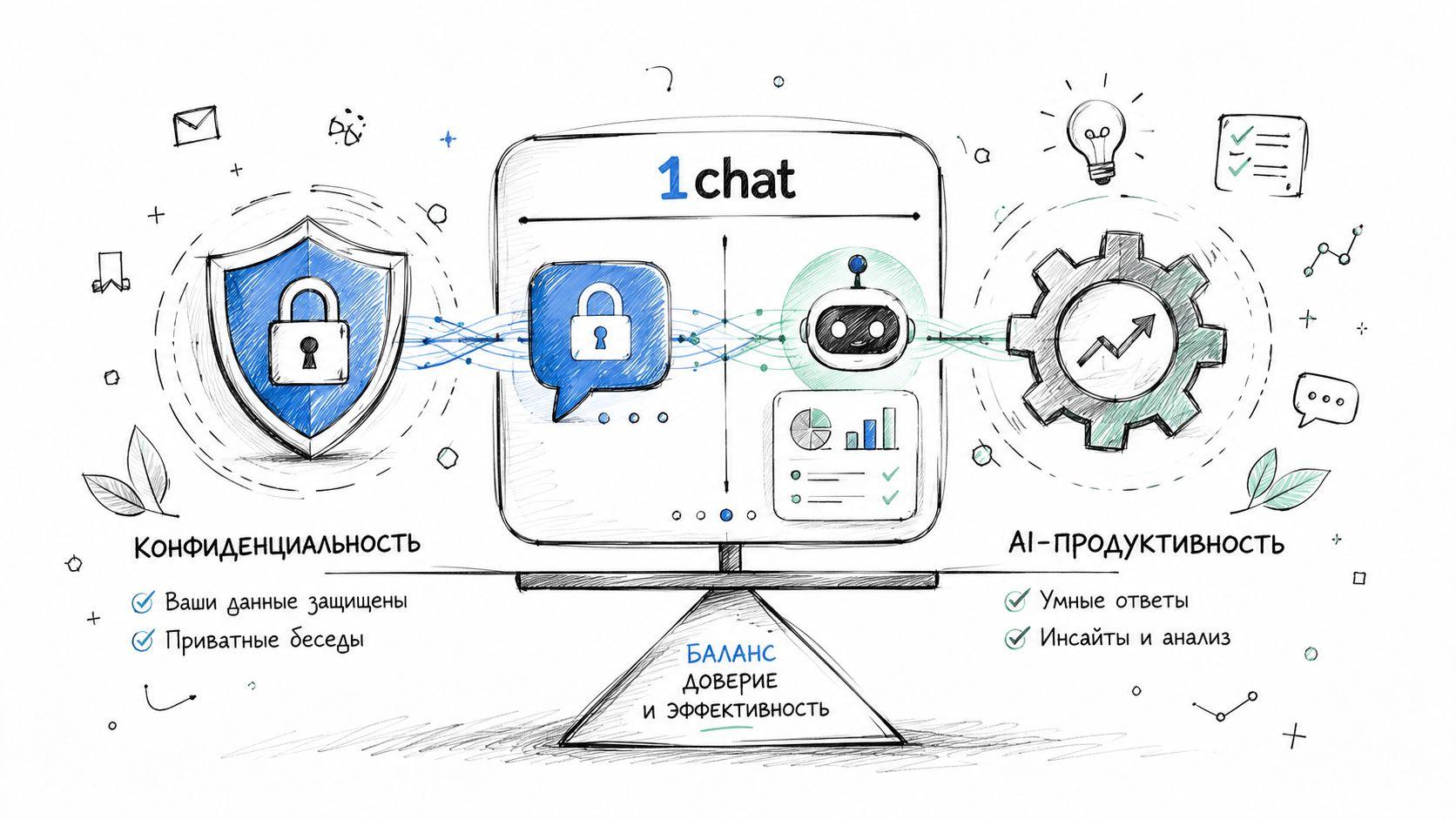
Privacy and convenience often get framed as enemies. In practice, users need both. They want a place to ask questions, review files, brainstorm, and write without feeling like every input should be treated as disposable public data.
A more practical model
That need is where 1chat fits best. Instead of asking users to choose between a useful AI workspace and a privacy-first mindset, it aims to support both for families, students, and small teams.
A student might use it to review a PDF source, refine an essay draft, and ask follow-up questions in one place. A parent might use it to organize trip plans, summarize documents, or help a child think through homework in a family-friendly environment. A small business team might use it to brainstorm copy, compare ideas across models, and analyze documents without scattering work across several disconnected tools.
Why that matters
The utility gap doesn't only exist in messaging. It exists in AI too. People drift toward the tool that helps them finish the task, even if they aren't fully comfortable with the privacy trade-offs.
A platform becomes more useful when it combines communication-style interaction with practical tools people already need:
- Access to multiple leading LLMs in one place
- PDF analysis for school and work documents
- AI image generation
- A setup designed for families and small teams, not just solo power users
Good privacy design supports the task people came to complete. It doesn't force them to leave for a more convenient tool halfway through.
That's the strongest case for a platform like 1chat. It treats privacy as part of a usable workspace, not as a feature that only matters in edge cases. For readers who need a family-friendly and small-business-oriented alternative to mainstream AI chat tools, that's a more realistic answer than telling everyone to adopt an isolated, single-purpose app and hope their contacts follow.
Frequently Asked Questions About Secure Communication
A few questions come up every time people move from casual messaging to a more secure communication platform.
Is a VPN the same as a secure communication platform
No. A VPN protects the network path between your device and the VPN service. It doesn't automatically make your chat app private. Your messages may still be visible to the app provider, and metadata may still exist. A secure communication platform focuses on protecting the messages, identities, files, and access model inside the service itself.
Are free secure apps safe
Sometimes, but "free" isn't the issue by itself. Key questions are how the provider handles data, what business model supports the service, and whether the privacy claims are specific and believable. Read the policy, check the defaults, and look for signs that the company minimizes access rather than merely promising trust.
Is popular social media messaging good enough
For casual notes, many people accept that trade-off. For sensitive family details, school records, private documents, financial conversations, or early business ideas, "good enough" often isn't good enough.
That matters because messaging is massive. The number of people using messaging apps reached nearly four billion in 2024, creating a huge exposure surface if security is neglected, according to secure mobile communications market analysis.
What's the simplest way to choose
Start with your real use case:
- Private family coordination
- Student collaboration and file review
- Small business communication and document handling
Then ask which platform protects content, limits metadata exposure, and still works with the people involved. If you'd like a plain-language starting point for product questions and usage details, 1chat's frequently asked questions are a practical next stop.
If you want one place to chat with leading AI models, analyze PDFs, generate images, and work in a privacy-first environment built for families, students, and small teams, explore 1chat.