43% of participating businesses reported that AI had a moderate effect, including reducing manual tasks or improving accuracy, according to the OECD's 2025 D4SME survey. The survey isn't representative of all small and midsize businesses, but it offers a useful reset: practical progress can mean less copying, better drafts, and fewer administrative chores, not a business running itself.
Small business AI automation should start with a modest question: can you make a repeated job cheaper without making mistakes harder to catch? Answer that before choosing tools or giving software access to customer records.
What AI Automation Means for a Small Team
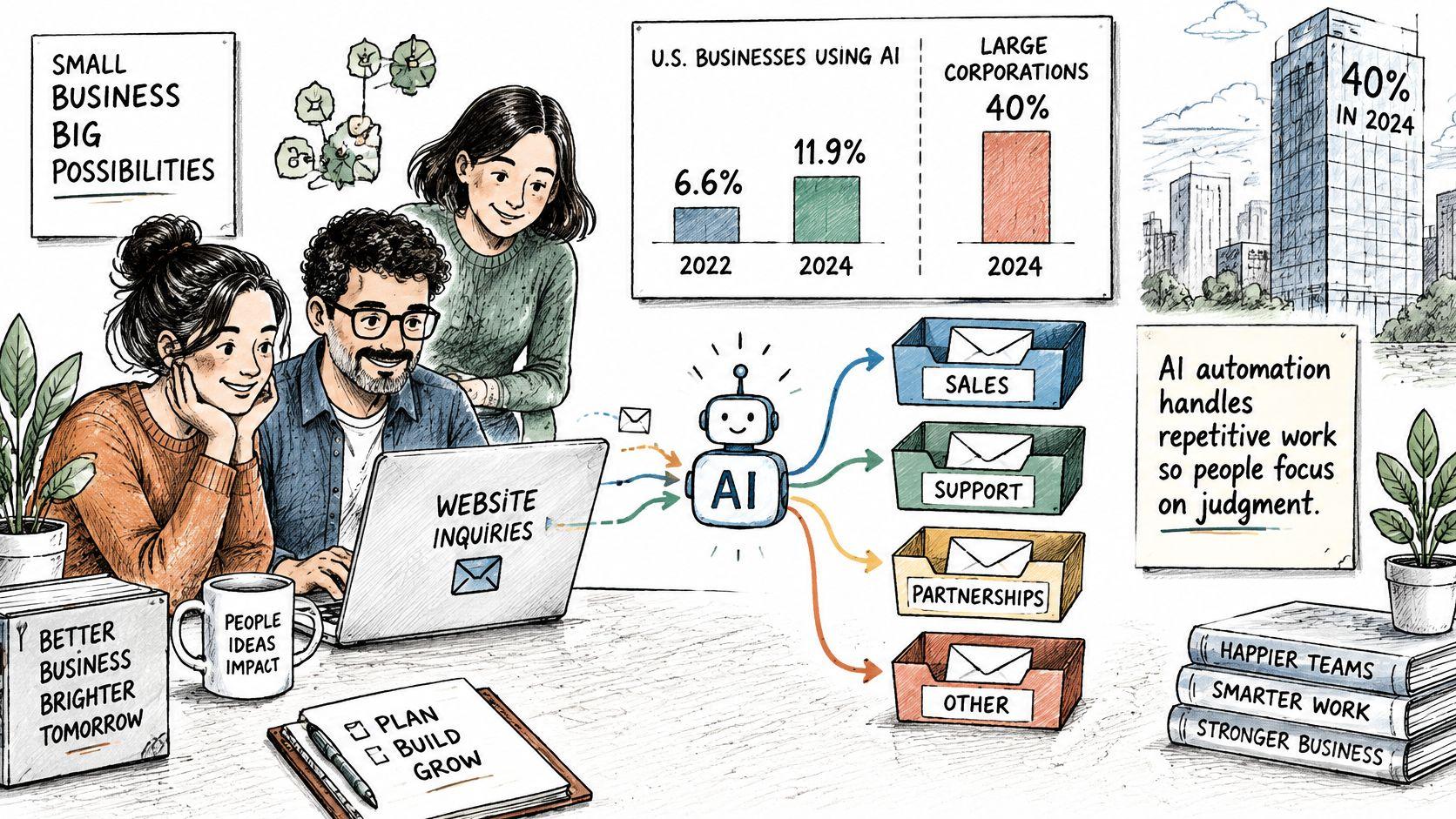
The adoption gap is substantial. OECD figures show that small-business AI use rose from 6.6% in 2022 to 11.9% in 2024, while large-firm adoption reached 40% in 2024. A small team shouldn't copy the scope of a large company's implementation.
AI automation is a repeated process that starts when something happens, uses a model to interpret or create information, and passes the result to another step. Unlike chatting with an AI assistant, it doesn't require someone to type each request manually.
The basic building blocks
Think of a template as a fixed form you fill in yourself. AI automation is a form that reads the incoming letter, fills itself in, and waits for your signature.
- Trigger: A website form arrives, an email lands, or a calendar event ends.
- AI step: The model reads, sorts, summarizes, or drafts using defined instructions.
- Action: Software saves the result, creates a task, or queues a draft for approval.
Say a repair shop receives a question about service coverage. The workflow identifies the requested service, prepares an answer from the shop's approved information, and places it in a review queue.
Start with the job, not the software
For a local operator translating that pattern into daily work, Heyline's practical AI setup for local shops offers a useful companion resource.
The obstacles aren't just technical. Someone must understand the process, decide what information is safe to use, and establish whether checking the result costs less than doing the work manually.
Write down one repetitive job, its trigger, its input, its required output, and the person who checks it. If you can't describe those clearly, clarify the process before automating it.
Workflows to Automate First and Which to Avoid
Small business AI workflows ranked by risk
| Workflow | What the AI does | Risk | Human check |
| Meeting summaries | Turns call notes into action items | Low | Spot-check weekly |
| Research summaries | Condenses public sources into a short brief | Low | Verify each claim before use |
| Social post drafts | Writes post variations from an approved brief | Low | Brand owner approves |
| Customer reply drafts | Writes a first draft from a saved answer library | Low to medium | A person sends every reply at first |
| Document data extraction | Pulls invoice numbers, dates and totals into a sheet | Medium | Compare initial pilot documents against originals before importing |
| Inquiry sorting | Tags and routes website messages by topic | Medium | Review misrouted items weekly |
| Pricing, refund or credit decisions | Approves or denies money-related requests | High | Keep manual |
| Hiring or firing recommendations | Ranks candidates or flags staff | High | Keep manual |
These ratings assume approved inputs and limited permissions. A meeting summary containing sensitive personnel information isn't a low-risk project just because summarization is straightforward.
Drafting and deciding are different jobs. Preparing a response about an existing refund policy can be suitable for review. Deciding whether a customer deserves an exception involves money, precedent, and context that a draft-generation workflow shouldn't control.
Choose by frequency and consequence
Use this selection method before buying anything:
- List repeated tasks with their weekly volume and current handling effort. Include copying information between systems, not just writing.
- Score each task by the consequences of a wrong output and the hours you could realistically recover after checking it.
- Choose a low-risk, high-volume task with a stable input and a clearly recognizable correct result.
For a plumbing or maintenance business, Recepta.ai's automation guide for home service businesses can help translate that task inventory into an operational process.
Avoid combining several departments' work in the initial project. A summary that reliably assigns action items is easier to evaluate than a system that summarizes meetings, changes schedules, promises delivery dates, and sends follow-ups.
A modest workflow that employees trust is worth more than an impressive demonstration they stop using.
Keep the first output easy to reject. A draft can be deleted; an incorrect credit decision may require an apology, a financial correction, and a review of how it happened. That difference should determine the order in which you automate.
What Data Must Never Enter an AI Tool
Data types and whether they belong in AI tools
| Data type | Allowed in AI tools | Conditions |
| Public marketing copy | Yes | Brand check before publishing |
| Internal non-sensitive notes | Yes | Use a business account with administrator control |
| Anonymized support transcripts | Yes | Remove names, emails and account numbers; sample human review |
| Identifiable customer personal data | Only with approval | Remove identifiers first; check contract and privacy terms |
| Financial records | Limited | Aggregate figures only, approved by the owner |
| Health or sensitive HR data | No | Keep out of general-purpose tools |
| Trade secrets and unreleased plans | No by default | Consider only an explicitly approved environment with administrator-controlled access and suitable contractual protections |
Treat this as a conservative operating policy, not a statement that every tool or jurisdiction has identical rules. Administrator control alone doesn't make restricted information safe to upload.
The concern is material: OECD research on non-adopting SMEs found that 54.1% cited copyright, legal, or regulatory concerns, while 52.5% worried about what happens to information entered into generative-AI systems.
Use a permission ladder
Move from public material to internal non-sensitive material, then anonymized customer information. Identifiable personal data requires explicit approval; restricted material requires a separate security and legal assessment.
Anonymization means more than deleting a name. Remove order references, addresses, signatures, and narrative details that could identify the customer. Never paste passwords, access tokens, recovery codes, or private keys into prompts.
Apply these operating rules:
- Human review: High-stakes decisions in sensitive areas require qualified oversight. Our services cannot be used to automate those decisions without human review.
- Company-controlled access: Use business accounts rather than employees' personal logins. Accounts created with an organization's email address may be added to its business account, whose administrator can then control the account.
- Retention records: Document what was shared, why it was needed, where copies exist, and when prompts, attachments, outputs, and logs should be deleted.
Read the privacy policy alongside your workflow's requirements. Privacy and intellectual-property obligations differ across jurisdictions, so check applicable requirements before the first upload.
Prepare for an accidental disclosure
- Stop the workflow and prevent further transfers.
- Revoke the connection or access involved.
- Record what information was shared, where it went, and who could access it.
- Assess notification duties and notify affected customers or authorities as local law requires.
Preserve enough evidence to investigate without spreading the exposed information into more tickets, screenshots, or chat messages.
How the Pieces Connect in a Working Setup
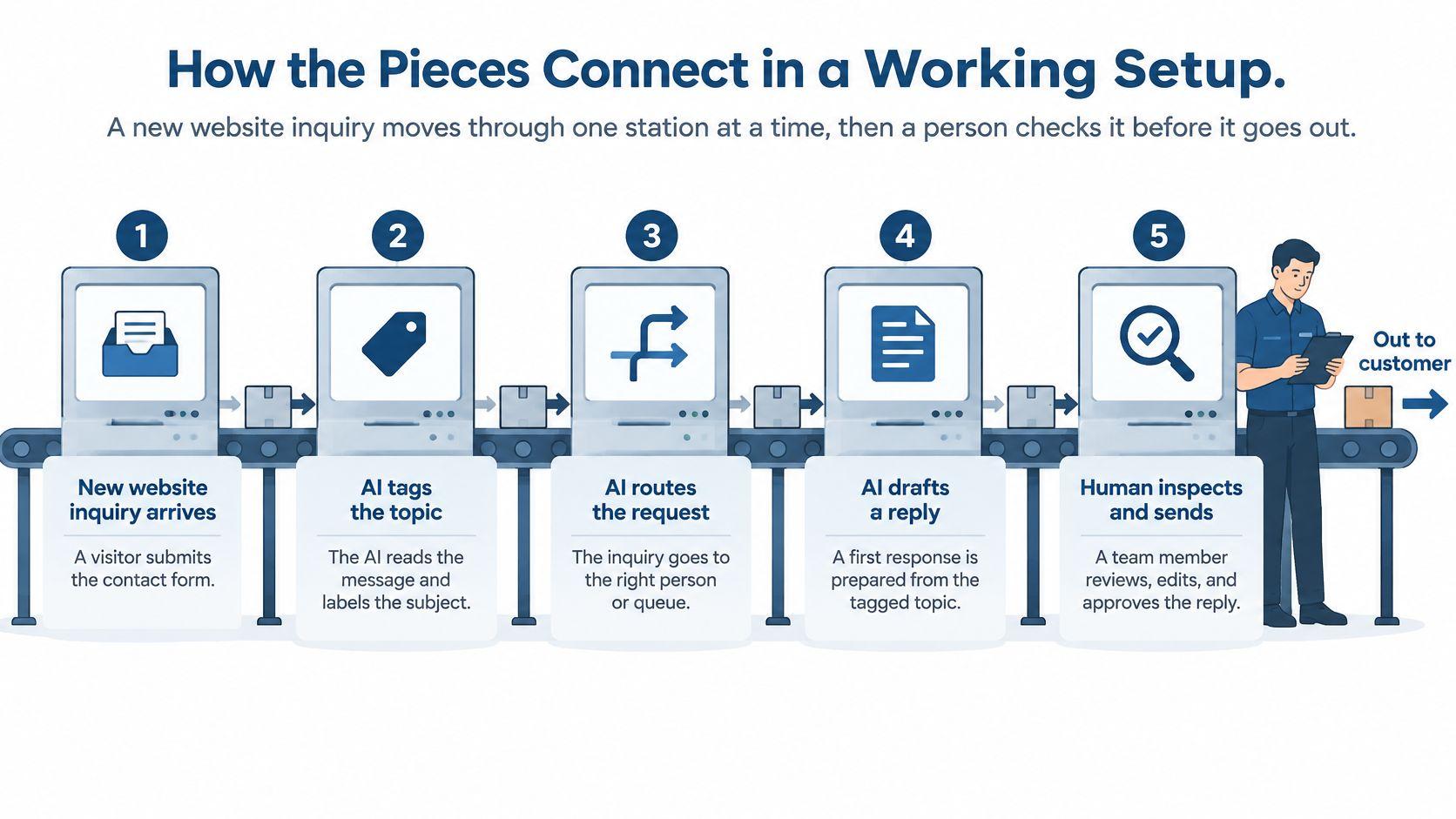
Build the workflow like an assembly line. Each station performs a defined job, and a person inspects the result before it leaves the business.
A website inquiry arrives, the AI tags the topic, and the system routes it to the appropriate queue. The model drafts an answer from approved material; a staff member edits and approves it before sending. The system then updates the customer record, and the owner reviews the operational log monthly.
Assemble the connections
- Connect the trigger source. Limit the connection to the relevant mailbox, form, or calendar.
- Define the AI step with approved examples, permitted categories, and an explicit instruction not to invent missing information.
- Set the human checkpoint. Specify who can approve and what happens when they're unavailable.
- Connect the approved output to its destination, such as a customer record or draft folder.
- Log each run's input reference, output, status, and approver, subject to your retention policy. Don't duplicate sensitive raw inputs unnecessarily.
Give every connection only the permissions it needs. A drafting workflow shouldn't receive permission to delete customer records or issue refunds.
For appointment-related work, Ansa's guide to prevent double-bookings with scheduling tools provides useful scheduling context. Let the scheduling system enforce availability rather than allowing generated text to promise an unchecked appointment.
Handle uncertainty explicitly
An unclassifiable message belongs in a person's queue. A failed connection should create a visible alert, not an apparently successful empty record.
Keep the AI workspace, such as 1chat, conceptually separate from the connector layer. Verify that your chosen connector supports every required action rather than assuming a chat interface can execute the workflow.
More complexity isn't automatically better. An OECD review describes a small-business prototype where completion improved from 68% to 92% as complexity increased, while execution time rose from 4.2 to 10.9 seconds.
Assign a trained employee to own the workflow. Benchmark completion rate, latency, error rate, and escalation frequency, not speed alone.
Realistic Gains, Limits and Proof of Savings
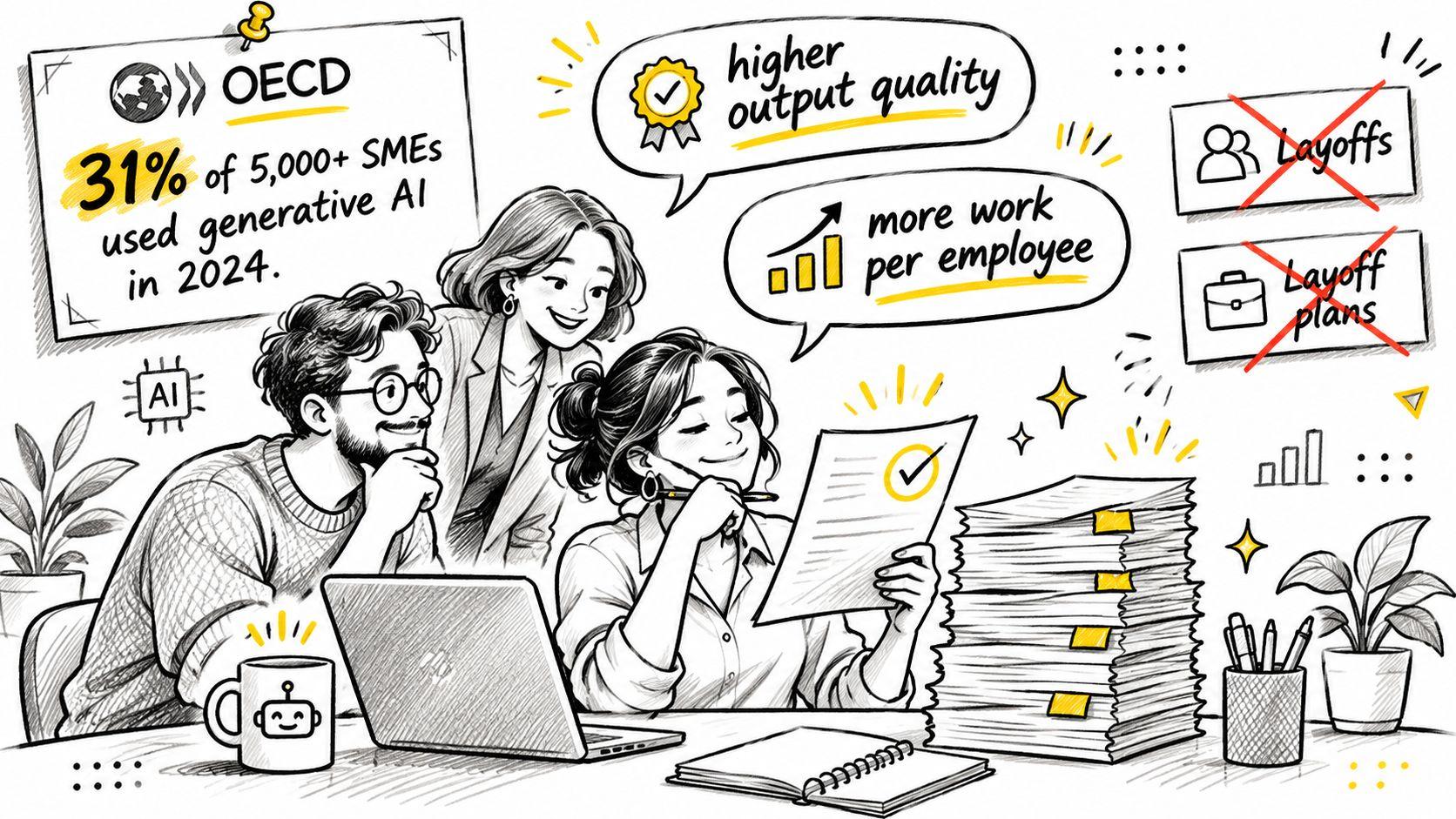
The strongest starting expectation is better employee output, not immediate staff reductions. In a representative survey of SMEs across Austria, Canada, Germany, Ireland, Japan, Korea, and the United Kingdom, 65% of generative-AI adopters reported improved employee performance, compared with 26% reporting increased revenue, according to the OECD's Generative AI and the SME Workforce.
Start by testing faster first drafts, more consistent replies, and quicker retrieval of approved answers. Document extraction can reduce retyping, but it introduces its own failure modes, including reading the wrong total or placing a correct value in the wrong column.
Count the checking, not just the drafting
The recurring limits are practical:
- Confident mistakes: Fluent wording can conceal unsupported facts.
- Brand drift: A grammatically correct response can still sound abrupt or make an inappropriate promise.
- Customer-specific judgment: An established relationship or unresolved complaint may change the right answer.
- Review overhead: Checking, correcting, and reopening work can consume the apparent savings.
Say a draft arrives almost instantly, but an employee must reopen the original request, locate the policy, verify every claim, and rewrite the response. Faster generation hasn't necessarily reduced total handling effort.
That uncertainty matters. 74% of surveyed small businesses said clearer ROI evidence would make adoption more likely, according to a PayPal survey announcement. Your own pilot should produce that evidence for your workflow.
Metrics for judging an AI automation pilot
| Metric | How to measure | Stop signal |
| Task time | Average minutes per task, before and after | Saved time is smaller than the review time added |
| Error rate | Errors found per hundred outputs in review | Higher than the manual error rate |
| Human review minutes | Logged minutes spent checking AI output | Exceeds the time saved |
| Completion rate | Share of tasks finished without rework | Consistently below the manual rate |
| Latency | Seconds from trigger to finished output | Slower than the manual turnaround |
| Escalation frequency | Share of items routed to a person | Rising without a clear cause |
| Cost per task | Labor plus tool cost divided by tasks completed | Higher than the manual cost per task |
| Payback period | Setup cost divided by monthly net savings | Longer than the period you set in advance |
Use the stop signals to investigate or pause, not to conceal difficult results. A faster workflow with more serious errors hasn't passed.
Build a defensible cost comparison
- Record the manual baseline. I recommend observing two ordinary working weeks before the live pilot. Capture handling time, volume, errors, rework, and loaded labor cost, including employer costs where applicable.
- Run a limited pilot on the selected workflow. Keep its scope fixed so you're not comparing routine manual tasks against easier AI-assisted tasks.
- Log review effort and failure costs. Include manager interventions, duplicate entries, customer corrections, connector maintenance, and training.
- Calculate payback as setup cost divided by monthly net savings. If net savings are zero or negative, there's no positive payback to calculate.
- Write stop and go criteria before launch. Set an acceptable quality threshold, a cost ceiling, and a maximum payback period appropriate to your cash flow.
Use this calculation:
Monthly net savings = manual operating cost avoided minus AI-assisted labor, tool, connector, maintenance, and failure costs.
Keep one-time setup expenses separate from recurring operating costs. Otherwise, you may count the same expense twice or make the pilot look cheaper by omitting configuration work.
Review current pricing when building the cost sheet, and include any separately billed workflow services. Don't assume the chat subscription covers integrations or ongoing support.
Separate capacity from cash savings
Recovered employee time is capacity, not automatically money returned to the bank. Record what the team does with it: reducing overtime, clearing a backlog, handling more inquiries, or improving service.
Expect the learning period to be slower while employees settle into review and exception handling. Judge steady-state performance only after those routines stabilize, but keep the training cost in the overall investment calculation.
Keep tasks with rare but expensive errors manual when you can't detect failures reliably. A favorable average cost doesn't justify an uncontrolled downside.
Start a 30-Day Pilot This Month
Choose one low-risk, high-volume workflow and run a bounded pilot. An internal action-item summary or a draft based on approved answers is a more useful starting point than autonomous customer decisions.
Treat preparation and evaluation as real work. If you haven't established a manual baseline, complete that before starting the live pilot clock.
Put the trial on the calendar
- Confirm the data boundary. Write down permitted inputs, prohibited material, and who approves exceptions. Get the business owner's approval before connecting live systems.
- Record the baseline over two ordinary working weeks. If you already have reliable operational records, check that they include review and correction effort.
- Configure the workflow with a named approver and a visible fallback queue. Test malformed inputs, missing information, and connection failures before live use.
- Review the metrics weekly. Examine rejected outputs as well as successful ones. Don't improve the headline result by excluding difficult cases.
- At day 30, decide whether to continue, adjust, or stop using the criteria agreed before launch. If there hasn't been enough representative work, extend evaluation rather than claiming success.
A stopped pilot can still be useful. Record whether the problem was poor source material, unreliable extraction, excessive checking, or a process that needed human judgment throughout.
Test the workspace against the job
A shared AI workspace may help employees keep approved instructions and source documents organized. Compare it neutrally with your existing office assistant, a standalone chat tool, or a workflow builder; choose based on review effort, access control, output quality, and total operating cost.
Don't mistake a useful workspace for a completed automation. The trigger, connector, approval queue, and monitoring still need to work together.
Start this month by naming the workflow owner, booking the baseline period, and writing the stop criteria. If you're evaluating a shared workspace, our ChatGPT alternative, 1chat, lets signed-in users organize conversations into projects, save chats, analyze documents, and customize their experience. Test it with approved material against your pilot criteria before committing, and expand only when the finished workflow costs less than the manual work it replaces.