You're staring at a draft that looks almost done, except the equations don't line up, the symbols keep breaking, and the last thing you want is to spend another hour fighting a word processor. If that sounds familiar, text to LaTeX is probably the workflow you need, not because it's trendy, but because it gives you a cleaner path from rough content to a document that compiles, prints, and reads like it belongs in an academic or technical setting.
Why Convert Text to LaTeX Anyway
A lot of people reach for LaTeX only after a document has already become painful to manage. The draft started in a word processor, then the equations got dense, the formatting drifted, and every small edit seemed to create a new visual bug. text to LaTeX starts making sense at that point because LaTeX was built to keep content separate from formatting and handle long, structured documents with equations more reliably than a general-purpose editor.
Why LaTeX Remains Relevant
LaTeX became standard in scientific and mathematical publishing because it is used heavily for articles, especially in scientific and mathematical fields, and it is widely used in academia for producing a professional page layout and a PDF ready for printing EBSCO's overview of the LaTeX document preparation system. That matters because the goal is not just to convert text. The goal is to turn unstable prose into a format that stays readable, portable, and consistent.
Practical rule: If the document needs structure, equations, references, or repeated formatting discipline, LaTeX usually saves time later even if it costs a little time upfront.
LaTeX also has a clear technical lineage. It was originally released in 1984 by Leslie Lamport on top of TeX, which Donald E. Knuth developed in the 1970s from its original 1984 release and TeX roots. That history explains why it feels different from a normal editor. It does not ask you to place every visual element by hand. It asks you to describe structure clearly, then it handles the presentation.
For students, researchers, and technical writers, that is the advantage. You can focus on what the document says while LaTeX handles the look, which is why text to LaTeX conversion stays useful when a draft has outgrown a word processor.
The Manual Workflow for Simple Conversions
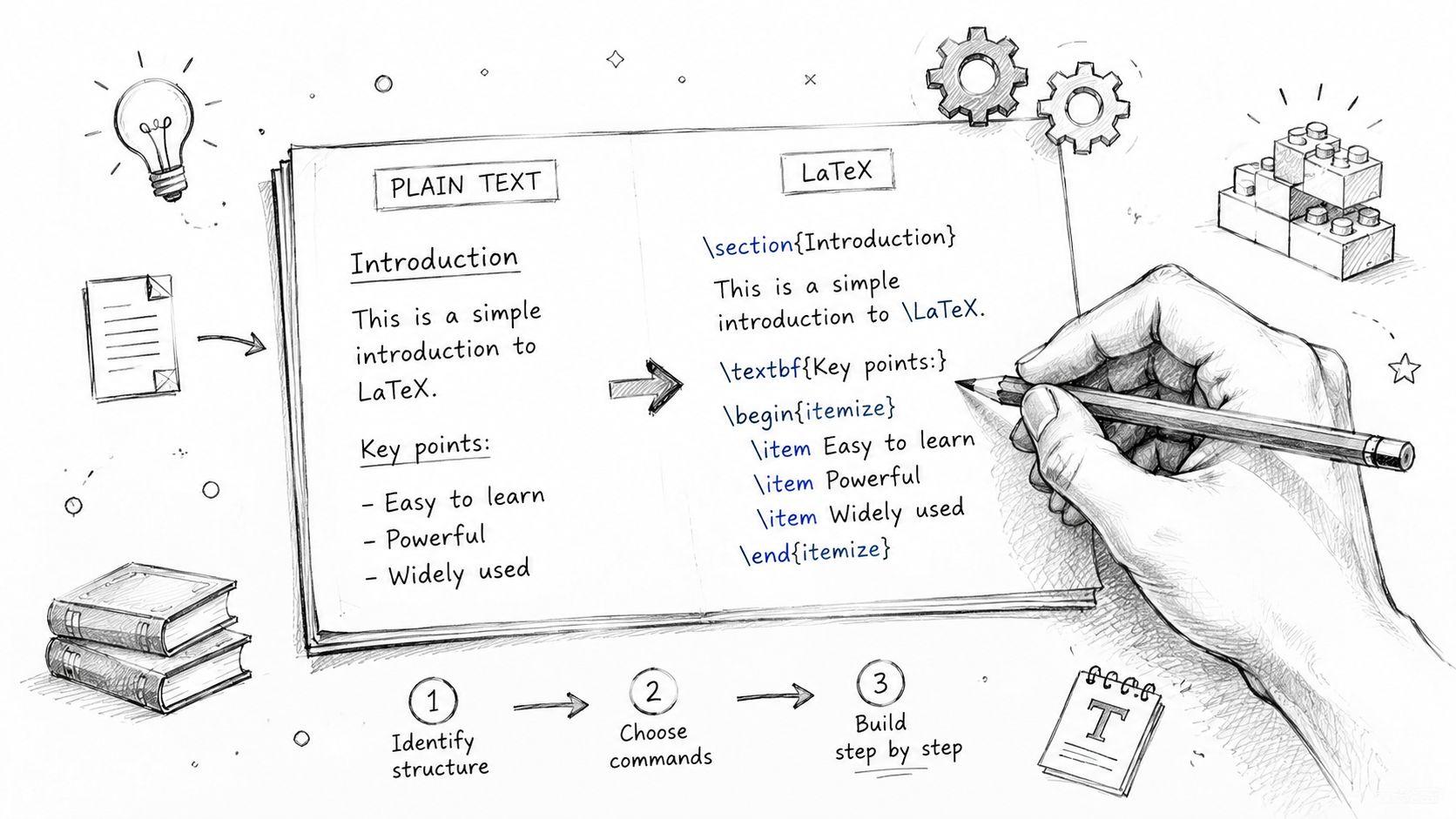
Manual conversion is slow, but it teaches the logic faster than any automatic tool. If your text is short, or if you need to make targeted fixes after an automated pass, knowing the basics lets you move without guessing. The trick is to think in terms of structure first, then formatting, then math.
Start with document structure
A basic LaTeX file usually begins with a document class, then the content is wrapped in a document environment. Headings become section commands, paragraphs stay as plain text, and line breaks matter less than in a word processor because LaTeX uses structure, not screen position, to decide layout. That's why text to LaTeX is easiest when you break the source into sections before you start typing commands.
For emphasis, use the built-in commands rather than manual styling. Bold is \textbf{...} and italics is \textit{...}. Special characters need escaping because LaTeX treats them as commands, not literal text. The most common ones are %, &, and $, so write \%, \&, and \$ when you want the character itself.
Percent signs are comments in LaTeX, so an unescaped % can silently cut off the rest of a line.Handle equations separately
Inline math stays inside dollar signs, so a simple expression like E=mc^2 becomes $E=mc^2$. A numbered equation block should live in an equation environment, which gives you cleaner formatting and easier reference. That's the main manual habit worth learning, because math is where sloppy conversion shows up fastest.
The point isn't memorizing every command. It's understanding that LaTeX reads meaning first. If you feed it structure, it gives you consistent output.
A good small-draft pattern
- Write the text cleanly first. Keep section order, sentence order, and equation names clear.
- Convert the structure next. Add section commands, then math environments, then formatting.
- Escape special characters last. Scan for symbols that LaTeX treats as syntax.
- Compile early. Small errors are easier to spot before the document grows.
That sequence sounds basic, but it's the fastest way to avoid cascading errors when you're learning. If you only need to convert a page or two, manual control is often enough. For more ambitious workflows, it's still the best fallback when a tool gets something wrong.
Choosing Your Text to LaTeX Conversion Method
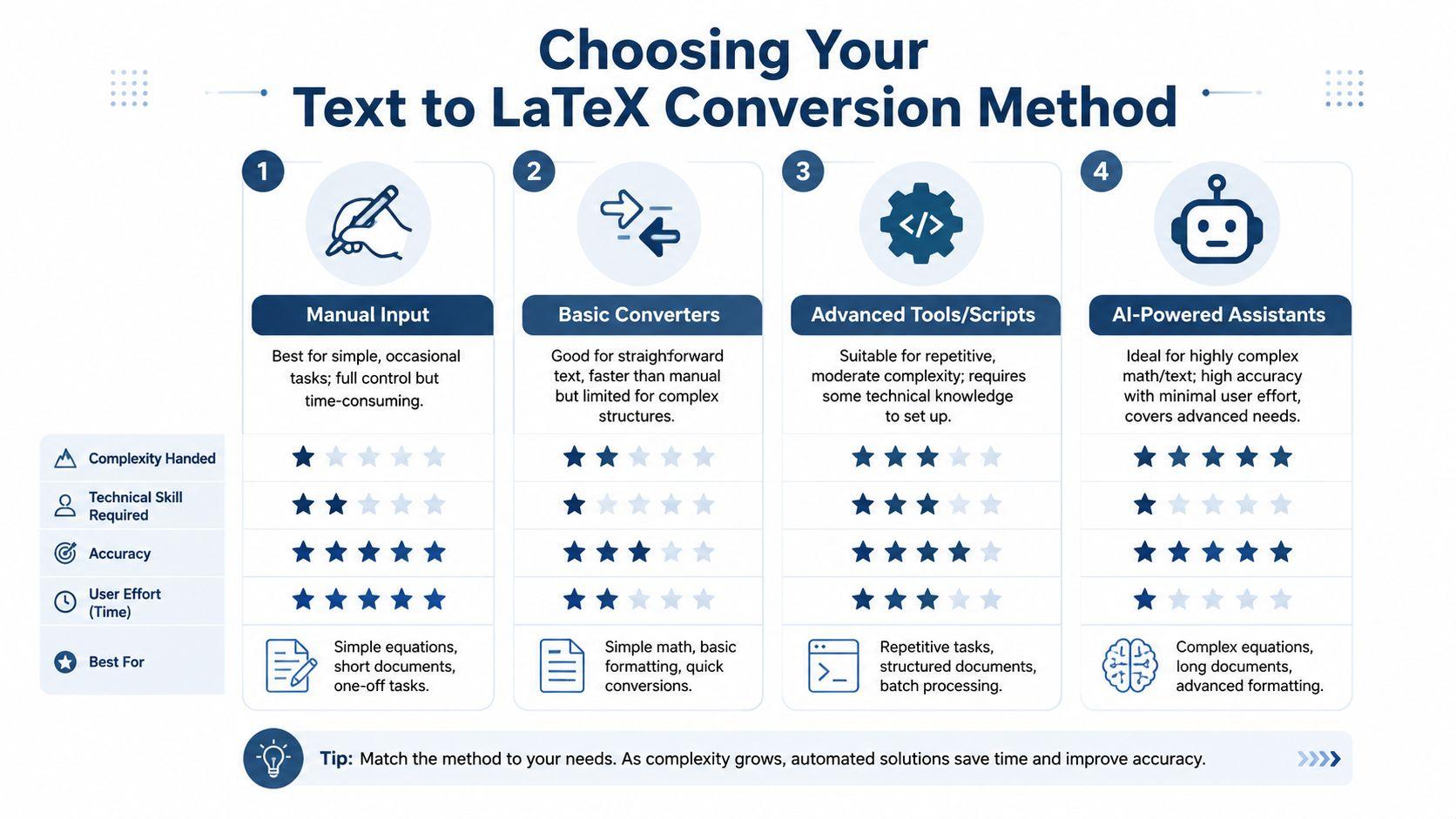
A bad conversion method can waste more time than writing the LaTeX by hand. The best choice depends on three things, how clean the source text is, how much control you need over the final output, and how much repair work you are willing to do after the first pass. In practice, students and small teams usually move through a convert, verify, and correct cycle, so the fastest path is the one that gets you closest to usable output with the least cleanup.
Manual input fits short, sensitive, or highly specific material. You control every command, every environment, and every spacing decision, which matters when the document has to be exact. The trade-off is time, and that trade-off becomes obvious once the source grows beyond a small excerpt.
Basic converters are a better fit when the source is already clean and the structure is simple. They are useful for turning plain text into headings, lists, or other basic layout elements, but they can struggle with mixed prose, inline math, tables, and unusual symbols. Speed helps, but only if the output is close enough to compile without a long repair pass.
AI tools sit between those two approaches. They can interpret messy text, help repair rough formatting, and explain the generated LaTeX in plain language, which is useful if you need to finish the work without becoming a LaTeX specialist first. That said, AI output still needs a careful check, especially for notation-heavy material, because a convincing draft is not the same as a correct one.
Good workflow choice: use the method that gets you closest to compilable output, then spend your time correcting the remaining issues instead of retyping everything.
The primary consideration is control versus convenience. Manual work gives the most control, converters give speed, and AI gives flexibility when the input does not follow a neat pattern. LaTeX remains useful because it produces clean, print-ready documents, even when the path to a clean draft takes a few corrections.
For teams comparing tools, the practical question is whether the feature set matches the job. A quick look at pricing details for conversion-oriented tools can help you avoid paying for capabilities you will not use often.
If the same formatting pattern keeps showing up across many files, the benefits of batch processing can matter more than the first conversion pass. Repetitive work is where a repeatable workflow starts to pay off.
Automating Conversion with Dedicated Tools and Editors
Automation makes the most sense once you are converting more than a one-off snippet. Full-featured editors and specialized converters solve different problems, and using both is often the smartest workflow. The practical goal is to pick the tool that gets you closest to clean LaTeX, then spend your time fixing details instead of rebuilding everything by hand.
Editors help when the document is a project
A LaTeX-aware editor gives you a live environment for writing, compiling, and fixing. That matters when the document has sections, references, and math that need to stay in sync. Visual or rich-text modes can lower the barrier for new users because they let you work more naturally while the LaTeX code updates behind the scenes.
That is why editors are usually the better choice for ongoing work, drafts with multiple revisions, and team-based writing. They are not just converters, they are project spaces. If you keep returning to the same paper, the file structure, preview pane, and compilation feedback save time every round because they make it easier to spot what changed and what broke.
Single-task tools help when the job is narrow
Specialized online converters are better when you need one thing done quickly, like a table, a simple note set, or a pasted block of text. They are convenient because there is no long setup process. Their weakness is that they often assume the input is neat, which means messy prose, inline math, and unusual symbols can come out in rough shape.
That is the trade-off. Editors are heavier but more dependable for sustained work. Converters are lighter but easier to outgrow. If you are handling repeated documents, the benefits of batch processing are worth knowing because they push you toward repeatable steps instead of one-off fixes.
If a tool cannot preserve structure, it cannot really save you time, it only shifts the cleanup to the end.
For broader LaTeX workflow context, the practical discussions at the 1chat blog are useful if you want to see how people apply AI-assisted writing tools to technical tasks. The point is not the brand, it is the discipline. Good automation still needs a human pass.
Convenience can hide quality issues. If a converter gives you code that compiles but reads awkwardly, that is not a win. It just means the cleanup moved downstream.
Leveraging AI for Complex Text and Math Conversion
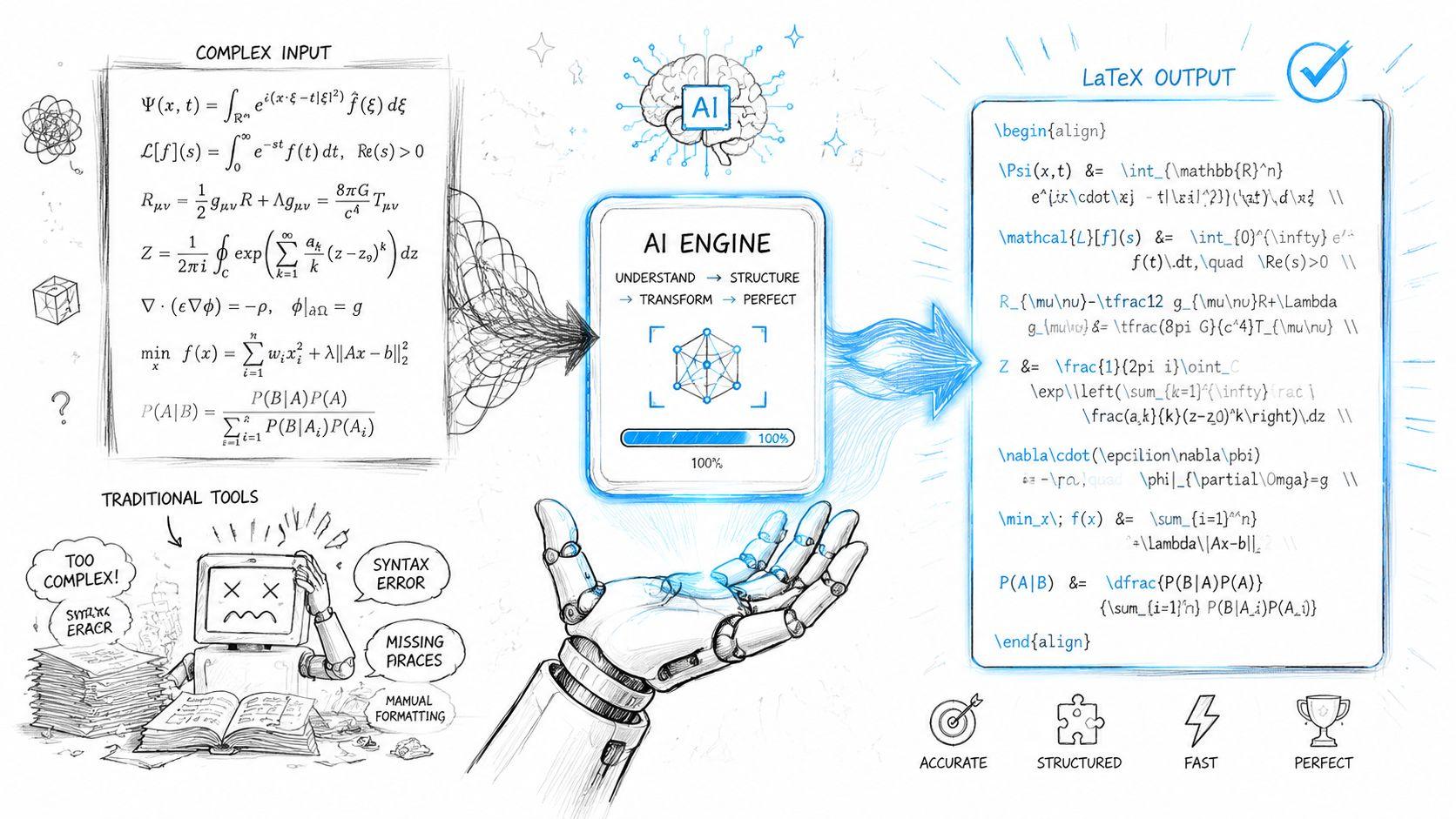
AI is the most flexible option when the source isn't clean enough for a simple converter. It can read rough notes, reorganize awkward prose, and translate natural-language math into formatted code. That makes it especially useful for text to LaTeX work that mixes explanation with formulas.
Where AI actually helps
AI shines when the input is ambiguous. A handwritten page, a photographed notebook, or a paragraph that describes a formula in plain English can all be turned into usable LaTeX with far less manual retyping than a traditional workflow. That's a serious advantage for students and small teams handling sensitive academic material, especially when they want a lightweight private workflow rather than a full manual rewrite a gap identified in the public text2latex discussion.
The best use case isn't “generate a final file and trust it.” It's “get a strong first draft, then verify it aggressively.” That's where AI saves time, because the first pass is often the slowest part of the task.
Prompting matters more than people think
Good output depends on asking for the right transformation. If you want clean technical LaTeX, tell the model what kind of content it should preserve, what it should normalize, and what it must not simplify. A helpful reference for that mindset is prompt engineering for technical content, because the prompt is really a constraint system, not just a request.
Useful pattern: Ask for LaTeX output plus a brief explanation of any symbols, environments, or assumptions the model had to make.
That extra explanation helps you spot mistakes faster. It also turns the tool into a learning aid, which is valuable when you're still building fluency with environments, math mode, and package-dependent syntax.
Why the quality has improved
The underlying research direction matters here. MathBridge says the field has been limited by a severe shortage of paired text-to-LaTeX data, and it introduces about 23 million LaTeX formulas paired with spoken English as a baseline dataset in its reported research corpus. That scale matters because it shows why conversion quality improves when models have better paired examples to learn from.
For practical users, the takeaway is simple. AI is strongest when the source is messy, when the content mixes prose and math, and when you need speed without fully giving up control. It's weaker when you skip verification. If you're using a privacy-first workflow for sensitive notes, research drafts, or homework, 1chat's research-oriented interface fits the general direction users are asking for, but the core principle stays the same, verify every important line.
Best Practices and Troubleshooting Common Errors
The last mile is where many text to LaTeX jobs fail. A file can look fine in the editor and still hide symbol mistakes, environment issues, or formatting drift that only show up in the PDF. The safest habit is to treat compilation as the start of review, not the finish line.
Verify the rendered PDF against the source
For equation-heavy documents, a compile-only check is not enough. A practical workflow is to classify every equation by source, run the conversion, and then verify each equation against a PDF reference from the original document as recommended by The LaTeX Lab. That catches subtle symbol and formatting errors that do not always break compilation, but still change the meaning of the result.
Fix the usual failure points first
Most errors cluster around the same issues. Missing math packages, unescaped special characters, and copied Unicode symbols are the common traps. If a document uses complex math, load the right package support before you start debugging the expression itself.
A clean troubleshooting order helps a lot:
- Start simple. Test the smallest possible snippet before converting the entire document.
- Use a LaTeX-aware editor. Syntax highlighting and inline warnings save time.
- Check the input carefully. Unusual punctuation and hidden formatting often survive conversion.
- Read the error message directly. LaTeX usually points to the line where the problem surfaced, not always the line where it began.
- Look up package rules. A missing environment or command often needs a specific package.
- Keep backups. Save versions before major edits so you can roll back quickly.
Build the habit of correcting after conversion
The best users do not treat the first pass as final. They convert, compile, compare, and correct. That matters most for mixed prose and math, where a converter may get the sentence structure right but still misplace a delimiter or a symbol. The goal is to let the machine handle the first draft, then use human review to finish the job.
If you only remember one thing, remember this, a successful LaTeX workflow is not conversion alone. It is conversion plus verification plus correction. That cycle turns a rough draft into a document you can send, submit, or print with confidence.
If you are working on a paper, thesis chapter, or set of class notes right now, pick one page, convert it, compile it, and compare the PDF line by line before scaling up. AI-powered tools can provide a strong first pass, but keep your own verification checklist open beside it.