In a world drowning in digital files, finding the right document at the right time feels like a superpower. From scattered team projects and crucial business contracts to family records and student research, disorganization is the silent killer of productivity and security. This guide cuts through the noise. We've compiled 10 actionable, non-negotiable best practices for document management designed for the real-world needs of small businesses, dynamic teams, families, and students. Forget generic advice; this is your strategic blueprint to transform digital chaos into a streamlined, secure, and intelligent system.
This isn't just about creating tidy folders. It's about building a reliable framework that saves time, prevents costly errors, and protects sensitive information. Each practice detailed below is a building block toward a comprehensive document management strategy, one that ensures consistency, control, and clarity across all your files. You will learn how to establish a central repository, implement consistent naming conventions, manage access permissions, and automate tedious workflows.
We will explore practical methods for version control, security protocols, and defining clear retention policies to keep your digital space clean and compliant. This article provides the specific steps and tools you need, including leveraging privacy-first AI like 1chat, to not only manage but also master your documents. By implementing these techniques, you can reclaim countless hours, reduce stress, and build a system that supports your goals, whether you're running a business, coordinating a family, or acing your next academic project. Let's build your blueprint for document sanity.
1. Centralized Document Repository with Cloud Storage Integration
The foundational step in achieving effective document management is to eliminate scattered files across individual hard drives, email attachments, and disparate platforms. Establishing a single, centralized document repository using a cloud storage service acts as the "single source of truth" for your entire organization, team, or even family. This practice ensures that every member has access to the most current versions of files from any device, anywhere with an internet connection.
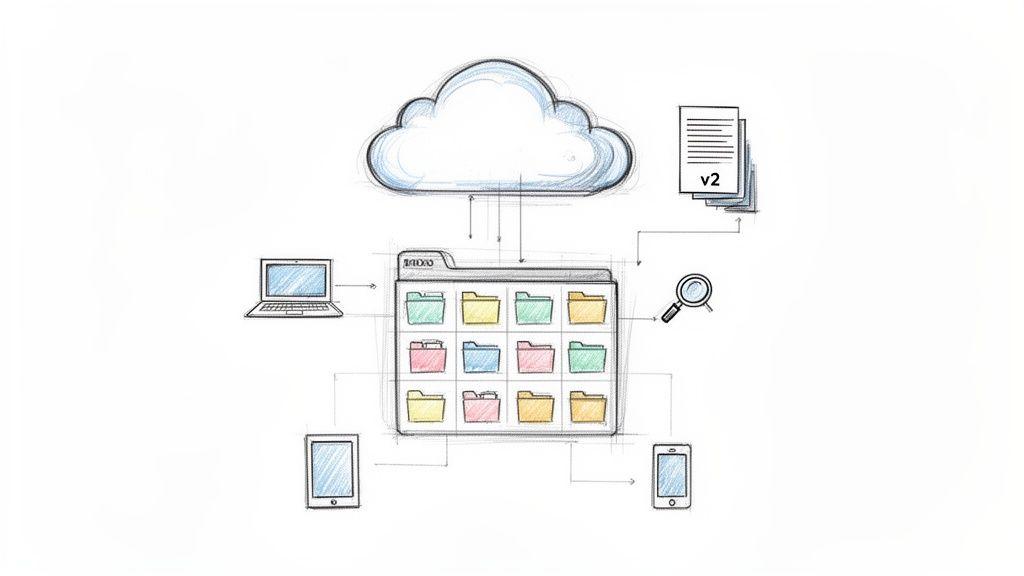
This approach is more than just shared storage; it’s a strategic asset. For small businesses, platforms like Google Drive or Microsoft OneDrive become the backbone for project collaboration. For families, a shared drive can organize crucial documents like medical records, school forms, and financial statements. The core benefit is universal access and streamlined collaboration, which is essential for any modern workflow.
Why It's a Top Practice
A centralized repository directly combats data silos and version control chaos, two of the biggest productivity drains. When documents are centralized, you prevent team members from working on outdated information, which saves significant time and reduces errors. Furthermore, it creates a secure, searchable, and organized environment that supports more advanced workflows, including integration with AI tools for document analysis. For teams using tools like 1chat, a central repository means documents can be easily and securely uploaded for AI-powered summarization, data extraction, or content creation, making it a critical component of modern best practices for document management.
Actionable Implementation Steps
- Choose Your Platform: Select a service that fits your ecosystem. Google Workspace is ideal for teams heavily reliant on Docs and Sheets, while Microsoft 365 with OneDrive and SharePoint is a natural fit for businesses using Office applications. Dropbox Business offers robust syncing and third-party integrations.
- Establish a Clear Folder Structure: Don't just dump files. Create a logical hierarchy from the start. A common business structure is
Department > Project > Document Type (e.g., Contracts, Marketing, Reports). For family use, tryFinances > 2024 > Taxes. - Integrate with AI Workflows: Connect your repository to your AI tools. When your team needs to analyze a research paper or financial report, they can pull it directly from the shared drive and upload it to a privacy-focused AI like 1chat for analysis without compromising the original file's location or security.
- Set Permissions Diligently: Use role-based access controls. Not everyone needs editing rights to every file. Assign "View Only," "Commenter," or "Editor" permissions based on an individual’s role to protect sensitive information.
2. Comprehensive Document Classification and Tagging System
Beyond a well-organized folder structure, a robust classification and tagging system adds a powerful layer of searchability to your document repository. This practice involves applying metadata (tags, labels, keywords) to each file, describing its content, status, and context. This transforms your storage from a simple digital filing cabinet into an intelligent, searchable database where files can be found based on what they are, not just where they are.
This metadata-driven approach is invaluable for any group managing a high volume of documents. For a marketing team, assets can be tagged by campaign (Q4-Holiday-Promo), format (Video, Blog-Post), and status (Draft, Approved). A law firm can classify documents by case number, client name, and document type (Pleading, Contract, Discovery). This precise categorization makes locating critical information instantaneous, regardless of its folder location.
Why It's a Top Practice
A strong classification system directly addresses the inefficiency of manual searching and reliance on memory. It ensures that any team member can find a specific document quickly using logical keywords, even if they didn't create it. This practice is fundamental to maintaining order as your document volume grows. For teams leveraging AI, this becomes a force multiplier. Properly tagged documents uploaded to a platform like 1chat provide the AI with crucial context, enabling more accurate data extraction, smarter summaries, and highly relevant content generation. This is a core component of modern best practices for document management.
Actionable Implementation Steps
- Develop a Tagging Guide: Create a simple, shared document that outlines your official classification schema and a "dictionary" of approved tags. This guide ensures everyone applies metadata consistently.
- Use a Consistent Naming Convention: Complement your tags with a standardized file naming convention. A good formula is
YYYY-MM-DD_ProjectName_DocumentType_vX.pdf(e.g.,2024-10-28_WebsiteRedesign_FinalContract_v3.pdf). - Leverage Auto-Tagging Tools: Many modern document management systems (DMS) and cloud platforms offer features that can automatically suggest or apply tags based on file content, reducing manual effort.
- Integrate with AI Analysis: When preparing documents for AI analysis, use tags to group relevant files. For example, upload all files tagged
Q3-Financialsto 1chat to generate a comprehensive quarterly performance summary without having to locate each file individually. - Conduct Regular Audits: Periodically review your repository to ensure files are tagged correctly and update your classification system as your needs evolve.
3. Document Access Control and Permission Management
Beyond organizing files, controlling who can access them is a fundamental pillar of secure and effective document management. Establishing clear access control policies ensures that sensitive information is only seen and modified by authorized individuals. This practice involves defining specific permissions (e.g., view, comment, edit, share) based on a person’s role and responsibilities, which is critical for protecting data integrity and confidentiality.
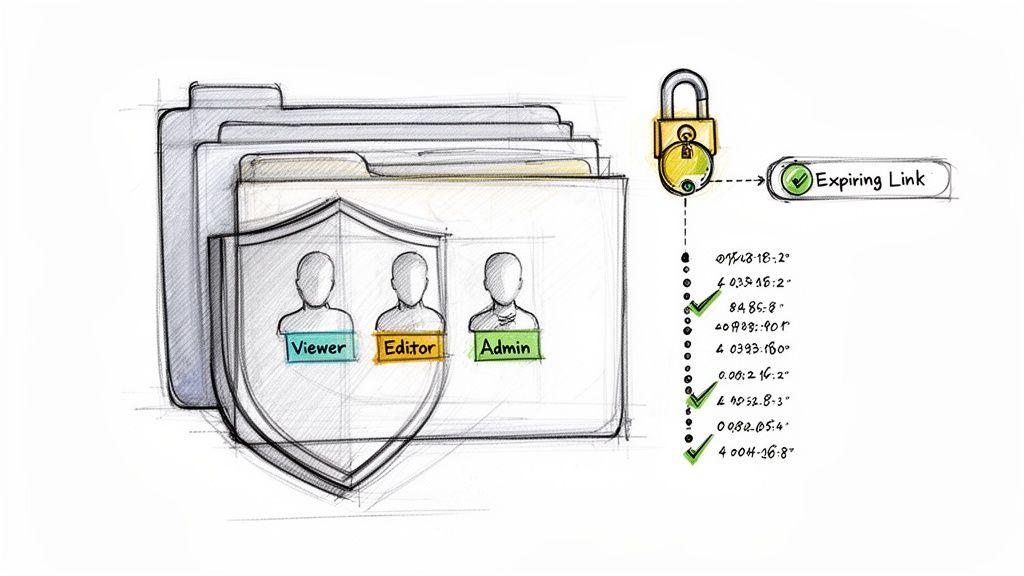
This principle applies universally. For a financial services firm, it means restricting access to client investment portfolios to only the assigned advisors. In a family setting, parents can use permissions to share household budget spreadsheets with each other while keeping them private from their children's accounts. The goal is to create a secure environment where information flows to the right people without risking accidental exposure or unauthorized changes.
Why It's a Top Practice
Robust access control directly prevents data breaches and ensures regulatory compliance (like with GDPR or HIPAA). By implementing the "principle of least privilege," you grant individuals the minimum level of access required to perform their duties, drastically reducing the risk of human error or malicious intent. This security-first mindset is a core component of modern best practices for document management. Furthermore, when using AI tools for document analysis, controlled access ensures that only authorized, non-sensitive files are uploaded, maintaining privacy and security throughout the workflow.
Actionable Implementation Steps
- Implement the Principle of Least Privilege: Start by assigning "View Only" access as the default. Only grant "Editor" or "Admin" permissions when absolutely necessary for a person's role.
- Use Role-Based Groups: Instead of assigning permissions to individuals, create groups like
Marketing Team,Finance Dept, orFamily Adults. This simplifies management, as you only need to add or remove users from a group to update their access across all relevant files. - Enforce Strong Authentication: Require multi-factor authentication (MFA) for all users accessing the document repository. This adds a critical layer of security against compromised passwords.
- Conduct Regular Audits: Schedule quarterly or biannual reviews of user permissions. Remove access for former employees or for individuals whose roles have changed, ensuring no outdated permissions remain.
4. Automated Document Naming and File Structure Standards
Beyond a central repository, the next layer of order comes from enforcing strict, standardized naming conventions and folder hierarchies. This practice moves beyond simple organization; it creates a predictable, logical system where anyone can locate a specific file quickly without needing to know its exact name. It transforms a potentially chaotic digital archive into a searchable, sortable database.
A consistent naming scheme ensures that files are automatically sorted chronologically and by category. For a marketing team, a file named 2024-10-28_FallCampaign_SocialMediaAd_v3.docx is instantly identifiable. For a student, SmithJ_HIST101_MidtermEssay_2024-10-15.pdf leaves no room for confusion. This systematic approach is the backbone of efficient retrieval and long-term archival.
Why It's a Top Practice
Standardized naming is one of the most impactful yet simple best practices for document management. It dramatically reduces the time wasted searching for misplaced files and eliminates the confusion caused by cryptic or inconsistent names like "Final_Report_new_final.docx". This clarity is crucial for team collaboration and essential for new member onboarding, as they can quickly understand the system. Furthermore, a logical file structure makes processes like AI-assisted document analysis more efficient, as tools can navigate and process well-organized data sets more effectively.
Actionable Implementation Steps
- Create a Naming Convention Document: Formalize your standards in a shared style guide. For example, a legal department might use:
CaseName_DocumentType_DateCreated. A research team could useResearchTopic_DataType_Author_DateCollected. - Use Date Formats for Sorting: Always start file names with the date in
YYYY-MM-DDformat. This ensures that files automatically sort in chronological order within any folder, regardless of the operating system. - Avoid Ambiguity and Special Characters: Use underscores (
_) instead of spaces and avoid special characters (!@#$%^&*) that can cause issues with some systems. Be descriptive but concise; for author identification, use initials likeJSfor John Smith. - Enforce Standards Through Policy: Documenting standards is the first step; enforcing them is key. Make it part of your team's official workflow or your family's organizational rules. Regularly audit folders to ensure compliance and correct deviations.
5. Regular Document Audit and Retention Policies
Beyond initial organization, maintaining an efficient system requires a proactive approach to its lifecycle. Implementing regular document audits and clear retention policies prevents your repository from becoming a digital junkyard filled with outdated, trivial, or redundant files. This practice involves systematically reviewing documents and applying a predetermined schedule for how long they should be kept, archived, or securely deleted.
This process is critical for both efficiency and compliance. For a small business, a retention policy dictates that project files are purged two years after completion, freeing up valuable storage and reducing clutter. For families, it could mean a simple annual cleanup of expired warranties and old utility bills. The goal is to keep your document system lean, relevant, and manageable over the long term.
Why It's a Top Practice
Without a formal audit and retention plan, digital storage becomes bloated, slowing down search functionality and increasing security risks. This practice directly addresses digital hoarding by creating a defensible process for disposal, which is essential for meeting legal and regulatory requirements. For example, healthcare providers must adhere to HIPAA’s six-year retention rule for patient records, while law firms must often keep contracts for seven years or more. A clear policy ensures compliance, minimizes liability, and is a cornerstone of responsible best practices for document management.
Actionable Implementation Steps
- Create a Retention Schedule: Document how long different types of files must be kept. Categorize by type, such as
Financial Records: 7 years,Project Files: Project End + 2 years, orEmployee Records: Employment + 7 years. - Set Calendar Reminders: Schedule semi-annual or annual audit days for your team or family to review and purge files according to the retention policy. Consistency is key to preventing backlog.
- Use Automation to Flag Documents: Leverage features in your document management system to automatically flag files that have reached their retention date. This simplifies the audit process by creating a pre-sorted list for review.
- Archive Before Deleting: For documents that are no longer active but cannot be deleted, move them to a separate, clearly labeled "Archive" folder. This keeps your primary workspace clean while preserving a long-term record.
- Involve Stakeholders: For business use, consult with department heads and legal or compliance teams when creating your policies to ensure all requirements are met.
6. Version Control and Change Management Documentation
Without a system for tracking changes, collaborative work can quickly devolve into chaos. Version control is the practice of managing and tracking revisions to a document, ensuring that everyone knows which version is the most current and can access a historical record of changes. This prevents team members from accidentally overwriting crucial work or continuing to develop an outdated draft.
This practice is indispensable for any collaborative environment. For a marketing team, it means the designer, copywriter, and manager are all working from the same approved creative brief. For students collaborating on a research paper, version history in Google Docs prevents lost contributions and simplifies the editing process. The goal is to create a transparent and auditable trail of a document's evolution from its initial draft to its final state.
Why It's a Top Practice
Effective version control eliminates the "final_v2_final_FINAL.docx" problem, a common source of confusion and costly errors. It provides a safety net, allowing you to revert to a previous version if a mistake is made or if a new direction proves ineffective. This historical context is also vital for accountability and understanding the rationale behind certain decisions. When using AI tools like 1chat for document analysis, referencing the version history first ensures you are feeding the most relevant and approved information into the platform, leading to more accurate summaries and insights. This makes it one of the most critical best practices for document management for teams focused on accuracy.
Actionable Implementation Steps
- Leverage Built-in Tools: Prioritize platforms with native version control. Google Docs automatically saves a detailed revision history, while Microsoft 365 uses "Track Changes" and version history in SharePoint/OneDrive. For technical documentation, GitHub is the industry standard.
- Establish a Naming Convention for Milestones: While automatic versioning is great, manually label major milestones. Use clear markers like
Project-Proposal-v1.0for the initial draft andProject-Proposal-v2.0-Approvedfor the final version to denote significant stages. - Document Major Changes: For critical documents like contracts or policy manuals, include a "Change Log" or brief note with each major revision. Explain what was changed and why. This provides context that a simple timestamp cannot.
- Archive, Don't Delete: Instead of deleting old versions, move them to a dedicated "Archive" folder. This preserves the historical record for compliance or future reference without cluttering your active workspace.
7. Document Security and Encryption Protocols
Beyond organizing files and controlling access, you must implement technical safeguards to protect the content itself from unauthorized interception or access. Document security and encryption protocols are the digital equivalent of a locked safe, ensuring that even if a document is accessed, its contents remain unreadable without the proper key. This involves encrypting data both "at rest" (when stored on a server) and "in transit" (when being sent over a network).
This practice is non-negotiable for anyone handling sensitive information, from legal firms protecting client privilege to healthcare providers ensuring HIPAA compliance. It is the technical backbone that makes modern, secure collaboration possible. For example, financial services rely on robust AES-256 encryption to protect customer data, while privacy-first AI platforms like 1chat build their entire service on the principle that user data is encrypted and private by default.
Why It's a Top Practice
In an era of constant cyber threats, relying solely on passwords and permissions is insufficient. Encryption provides a critical layer of defense that protects data integrity and confidentiality. If a server is breached, unencrypted files are an open book. Encrypted files, however, are useless to the intruder. This makes encryption a fundamental component of modern best practices for document management, especially when integrating documents with third-party tools. Using a platform like 1chat, which prioritizes end-to-end encryption, ensures that your proprietary business plans or sensitive research remain confidential during AI-powered analysis.
Actionable Implementation Steps
- Choose Platforms with Strong Encryption: When selecting a document management system or cloud storage, verify that it uses industry-standard encryption like AES-256. Confirm that encryption is applied to data both at rest and in transit.
- Enable Multi-Factor Authentication (MFA): Combine strong encryption with MFA. This adds a crucial security layer, requiring a second form of verification (like a code from your phone) to access documents, even if a password is compromised.
- Use Secure Sharing Features: When sharing documents, use built-in secure sharing links that can be password-protected or set to expire. For a deeper dive into protecting your files during collaboration, learn more about the principles of encrypted document sharing.
- Regularly Review Security Protocols: Technology evolves, and so do threats. Periodically review and update your security settings, encryption protocols, and user access lists to ensure they remain effective against new vulnerabilities.
8. Document Workflow Automation and Integration
Effective document management transcends simple storage; it involves creating intelligent, automated systems that reduce manual effort and accelerate processes. Document workflow automation connects your repository to other business systems, enabling documents to move seamlessly through predefined stages like review, approval, and analysis. This practice transforms static files into active participants in your daily operations, from invoice processing to contract management.
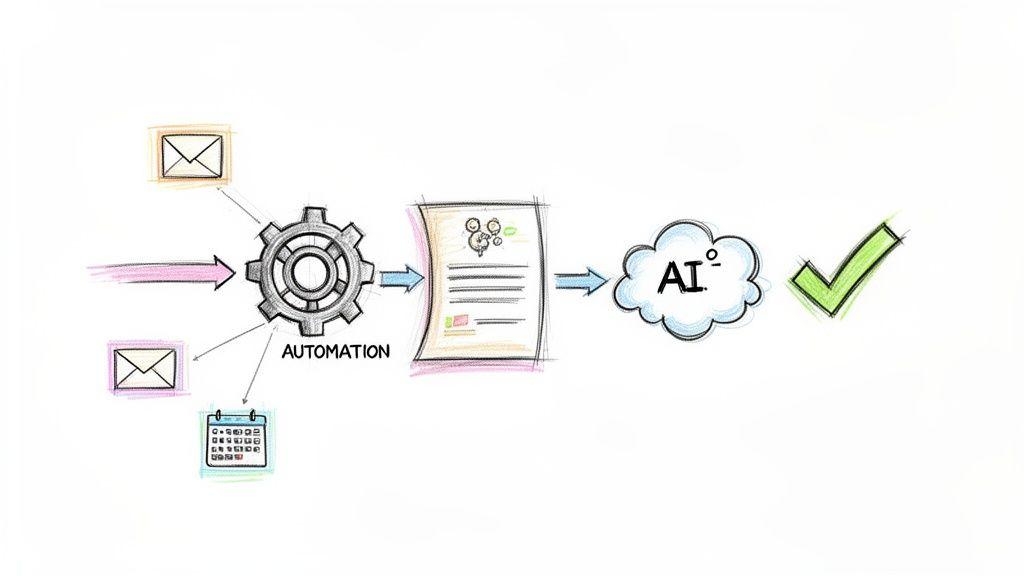
This approach is powerful for any user. A small business can automatically route a new client contract from sales to legal for review, then to finance for invoicing. A student can set up a workflow where a completed essay draft is automatically sent to an AI tool for feedback before final submission. The goal is to eliminate bottlenecks and ensure documents are acted upon promptly and correctly.
Why It's a Top Practice
Manual document handling is a major source of delays, human error, and lost productivity. Automation directly addresses these issues by creating consistent, repeatable processes that run without constant intervention. Integrating AI tools like 1chat into these workflows further enhances efficiency. For example, a marketing team can automate the process of sending product descriptions to 1chat to generate compelling ad copy, or a support team can have incoming issue reports automatically summarized. This level of integration is a core component of modern best practices for document management. For more ideas, you can learn more about how to improve workflow efficiency with these strategies.
Actionable Implementation Steps
- Map Your Current Workflows: Before automating, visually map out a high-volume, repetitive process, such as onboarding paperwork or expense report approvals. Identify each step, decision point, and stakeholder involved.
- Select an Automation Tool: Use tools like Zapier, Make, or native features within platforms like Microsoft Power Automate or Google Apps Script to connect your document repository with other applications.
- Start with a Simple Process: Begin with a low-risk, high-impact workflow. A good starting point is automatically filing emailed invoices into a specific "To Be Paid" folder in your cloud storage.
- Integrate AI for Analysis: Set up a workflow where new research papers or reports added to a specific project folder are automatically sent to 1chat via its API for summarization. The summary can then be posted in a team chat channel, keeping everyone informed.
- Implement Human Checkpoints: For critical tasks like contract approvals or large payments, build a manual approval step into your automated workflow. This ensures you maintain control while still benefiting from automation.
9. Document Metadata Management and Search Optimization
Beyond just file names and folder structures, effective document management involves embedding descriptive data, or metadata, directly into your files. This practice transforms a simple document into a smart, searchable asset. Metadata includes details like author, creation date, keywords, document status (e.g., Draft, Final, Archived), and a brief description. This "data about data" makes finding the exact file you need incredibly fast, even within a repository containing thousands of documents.
Think of it as the digital equivalent of a library card catalog entry for every single file. A legal team can tag contracts with client names and case numbers, a marketing agency can tag assets with campaign names and usage rights, and a student can tag research papers with subjects and key theories. This rich context is what powers intelligent search and retrieval, turning a frustrating hunt into a simple query.
Why It's a Top Practice
A robust metadata strategy eliminates the guesswork from document retrieval. Instead of relying solely on memory or inconsistent file names, anyone can find what they need by searching for relevant keywords, project codes, or authors. This is a cornerstone of best practices for document management, as it dramatically reduces time wasted searching for information. For users of AI tools like 1chat, documents with rich metadata are far more valuable; the AI can leverage this context for more accurate summarization, categorization, and analysis, understanding the document's purpose before even processing its contents.
Actionable Implementation Steps
- Create Metadata Templates: Define a standard set of metadata fields for each common document type (e.g., invoices, reports, contracts). This ensures consistency across the organization. Fields could include
Client Name,Project ID,Status, andKeywords. - Use a Controlled Vocabulary: Establish a standardized list of terms for key fields. For example, use "Approved" instead of "Done" or "Complete" to ensure search consistency.
- Leverage Auto-Tagging: Use document management systems that can automatically extract and apply metadata, such as the creation date, author, and even keywords from the document's content.
- Optimize for Search: When adding keywords, think about the terms your colleagues or family members would naturally use to search for the document. Include synonyms and broader categories.
- Enhance AI Analysis: Before uploading a set of reports to 1chat for comparative analysis, ensure each file's metadata accurately reflects its content (e.g., "Q1 Financials," "Q2 Sales Report"). This provides the AI with critical context for a more insightful output.
10. Team Training and Documentation Governance
Even the most sophisticated document management system will fail if your team doesn't know how to use it correctly. Implementing clear governance policies and providing comprehensive training are crucial for ensuring everyone understands and adheres to your established protocols. This practice transforms a set of rules into a shared organizational habit, making your entire system sustainable and effective.
This is about creating a culture of organization, not just a set of instructions. For a law firm, this means documented procedures for handling sensitive case files. For a small business, it's a shared playbook that outlines how to name client proposals and where to save project assets. The goal is to eliminate ambiguity and ensure every team member contributes to, rather than detracts from, an organized digital environment.
Why It's a Top Practice
Training and governance bridge the gap between having a system and successfully using it. Without them, even the best practices for document management fall apart as individuals revert to old, inefficient habits. This leads to inconsistent file naming, documents saved in the wrong folders, and security protocols being ignored. Proper training ensures compliance, improves security, and maximizes the return on your investment in document management tools and systems. It also empowers your team to use advanced features confidently, such as securely uploading PDFs into an AI tool like 1chat for analysis without creating data privacy risks.
Actionable Implementation Steps
- Develop a Clear Governance Document: Create a simple, accessible document outlining your core policies. This should cover naming conventions, folder structures, version control rules, and security protocols.
- Create Engaging Training Materials: Go beyond a simple email. Develop a mix of training resources like short video tutorials, interactive workshops, and a one-page quick-reference guide. For more in-depth guidance, you can learn how to create effective training materials that resonate with different learning styles.
- Designate a Document Lead: Appoint a person or a small committee to be the go-to resource for any questions. This person can also be responsible for onboarding new hires and conducting periodic refresher sessions.
- Conduct Regular Check-ins: Schedule brief, quarterly reviews to monitor compliance and address any emerging issues. Use these sessions to gather feedback and celebrate teams or individuals who are excelling at maintaining organizational standards.
10 Best Practices: Document Management Comparison
| Practice | 🔄 Implementation complexity | ⚡ Resource requirements | 📊 Expected outcomes | 💡 Ideal use cases | ⭐ Key advantages |
| Centralized Document Repository with Cloud Storage Integration | Medium — initial migration and setup | Cloud storage costs, admin time, internet | Single source of truth; synced access | Remote/hybrid teams; 1chat users needing uploads | Eliminates version confusion; scalable storage |
| Comprehensive Document Classification and Tagging System | Medium–High — taxonomy design & rollout | Time for taxonomy, tagging tools, training | Faster discovery; better AI context | Organizations with diverse document types | Dramatically improves searchability and AI processing |
| Document Access Control and Permission Management | Medium — policy design + RBAC setup | Identity management, auditing tools, training | Improved privacy/compliance; audit trails | Healthcare, finance, families with sensitive data | Strong data protection; regulatory compliance |
| Automated Document Naming and File Structure Standards | Low–Medium — policy creation and enforcement | Style guide, templates, occasional audits | Consistent organization; easier bulk uploads | Teams with frequent file sharing/versioning | Reduces naming errors; speeds search & processing |
| Regular Document Audit and Retention Policies | Medium — periodic reviews and automation | Time for audits, retention tooling, legal input | Reduced storage costs; compliance maintained | Regulated industries; long-lived records | Lowers risk, keeps system lean and compliant |
| Version Control and Change Management Documentation | Medium — tool adoption and workflows | Versioning tools, storage for histories | Clear provenance; rollback capability | Collaborative writing, technical docs, students | Prevents conflicts; provides accountability |
| Document Security and Encryption Protocols | High — cryptography + key management | Encryption tools, KMS, MFA, specialized skills | Strong breach protection; regulatory alignment | Any handling sensitive or regulated data | Protects data at rest/in transit; builds trust |
| Document Workflow Automation and Integration | High — mapping + automation implementation | Automation platform, dev/config effort, APIs | Faster processing; fewer manual tasks | High-volume repetitive processes; invoices | Speeds throughput; reduces human error |
| Document Metadata Management and Search Optimization | Medium–High — schema design and indexing | Metadata tools, OCR, search engine (Elasticsearch) | Precise search; richer AI context | Large archives, research, legal repositories | Enables advanced filtering and discovery |
| Team Training and Documentation Governance | Medium — ongoing training and governance | Time for training, champions, documentation | Consistent practices; higher adoption rates | Organizations deploying any DM initiative | Ensures long-term consistency and compliance |
From Theory to Action: Activating Your Document Management Strategy
We have journeyed through ten foundational pillars of effective document management, from establishing a centralized repository to fostering a culture of documentation governance. The path from digital chaos to structured clarity can seem daunting, but it's crucial to remember that implementing these best practices for document management is not an all-or-nothing endeavor. It is a process of incremental improvement, where each small adjustment builds upon the last, creating a powerful, compounding effect over time.
The core principle unifying all these strategies is a shift from a reactive to a proactive mindset. Instead of searching frantically for a misplaced contract, a family medical record, or last semester's research notes, you are building a system that anticipates your needs. This system is designed to serve you, whether you are a business owner safeguarding sensitive client data, a parent organizing a family's digital life, a student streamlining academic workflows, or a team leader fostering seamless collaboration.
Recapping Your Path to Document Mastery
Let's distill the journey into its most critical takeaways. The power of a well-executed document management strategy lies in the synergy between its parts:
- Structure and Accessibility: A centralized repository (Practice #1) combined with logical classification and tagging (Practice #2) creates a single source of truth. This foundation makes information findable and reliable.
- Control and Security: Robust access controls (Practice #3) and strong encryption protocols (Practice #7) form your digital fortress. They ensure that the right people see the right information at the right time, protecting privacy and intellectual property.
- Consistency and Efficiency: Standardized naming conventions (Practice #4) and automated workflows (Practice #8) are the engines of productivity. They eliminate guesswork, reduce manual effort, and ensure a consistent, predictable user experience.
- Governance and Evolution: Regular audits and clear retention policies (Practice #5), coupled with version control (Practice #6) and team training (Practice #10), transform your system from a static archive into a living, evolving asset that adapts to your changing needs.
By weaving these elements together, you don't just organize files; you build a resilient, intelligent information ecosystem.
Your Immediate Action Plan: Where to Start Today
Feeling motivated but unsure where to begin? The key is to start small and build momentum. Do not try to overhaul everything at once. Pick one area that causes the most friction and tackle it first.
- The 15-Minute Triage: Choose one critical folder, whether it’s "Client Invoices," "Family Legal Docs," or "Fall Semester 2024." Spend just 15 minutes applying the naming convention we discussed. Example:
2024-10-28_ClientName_Invoice-1052.pdf. This small victory will demonstrate the immediate value of consistency. - Activate One Automation: Identify one repetitive task. Is it saving email attachments to a specific cloud folder? Use a simple tool like Zapier or your email provider's built-in rules to automate it. This frees up mental bandwidth and proves the power of hands-off efficiency.
- Secure One Document Workflow: For your next sensitive task, like reviewing a proposal or drafting a personal legal document, integrate a privacy-first AI tool like 1chat. Instead of copying and pasting sensitive data into a less secure platform, use its capabilities to analyze, summarize, or proofread your documents within a secure environment, reinforcing good security habits.
Key Insight: The goal is not perfection on day one. The goal is progress. One improved folder, one automated task, one securely handled document. These are the building blocks of a truly effective system.
Mastering these best practices for document management is ultimately an investment in your most valuable asset: your time. It’s about creating an environment where you can focus on high-value work, creative thinking, and meaningful connections, rather than on the administrative drag of digital disorganization. You now have the blueprint. Start building your more organized, efficient, and secure future today.