At its simplest, generating an AI image is about giving a text instruction—a "prompt"—to a tool and watching it create a picture for you. You type in what you want, and the AI builds it, turning your words into anything from a photorealistic landscape to a whimsical cartoon character in mere seconds.
Understanding the Magic of AI Image Generation
Before you jump in, it really helps to know what's going on under the hood. Peeking behind the curtain will make your own creations that much better.
When you ask an AI to make an image, you're tapping into a program that has been trained on a truly massive collection of pictures and their text descriptions. It's not just grabbing a photo from the internet; it’s learning the fundamental connections between words like "dog" and the millions of ways a dog can look.
Imagine an artist who has spent a lifetime studying every photograph, painting, and sketch ever made. When you describe a scene, this artist doesn't copy an existing work. Instead, they draw on that immense visual knowledge to create something entirely new that fits your description. The AI is doing the same thing, but with pixels.
The Technologies Powering Your Creativity
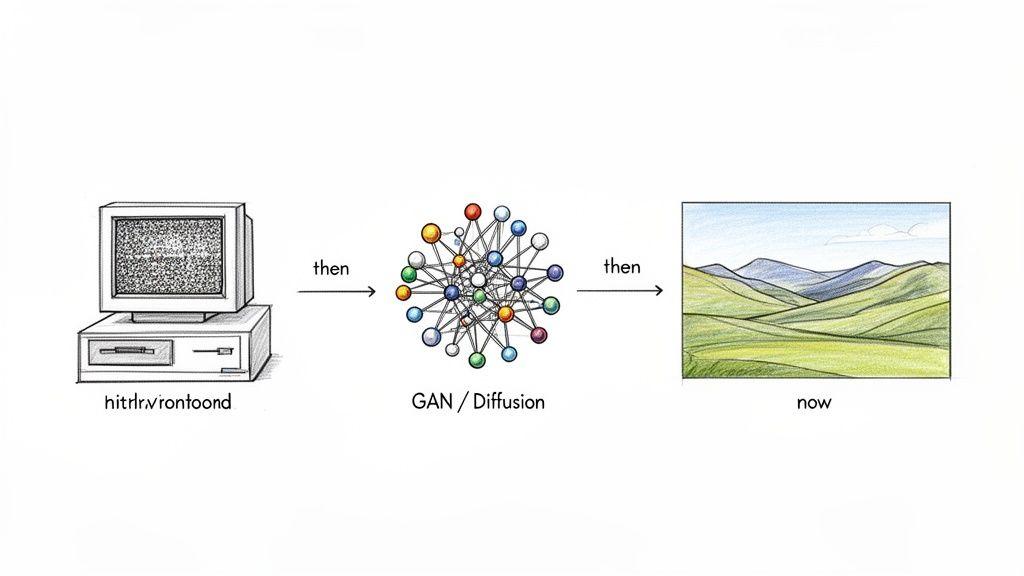
A couple of core technologies have made all of this possible. The first breakthrough came with Generative Adversarial Networks (GANs). A GAN involves two AIs locked in a creative duel:
- A "Generator" that creates images from scratch.
- A "Discriminator" that judges whether the image looks real or AI-generated.
This constant competition pushes the Generator to get better and better, producing images that are good enough to fool its counterpart.
More recently, diffusion models have taken center stage. Think of the process in reverse. The model first learns by taking a clean image and systematically adding digital "noise" until it's just a field of static. Then, it learns how to perfectly reverse that process. When you give it a prompt, it starts with a fresh canvas of noise and carefully "denoises" it, step-by-step, until your described image emerges. This method is behind many of the most detailed and high-quality images you see today.
At its heart, learning how to generate images with AI is about learning a new language. You're not just typing commands; you're having a creative conversation with a machine that has a near-infinite visual library.
From Academic Concept to Mainstream Tool
The road from a purely academic idea to a tool on your laptop has been surprisingly fast. While early experiments date back to the 1970s, the field truly ignited in 2014 with the invention of GANs. This progress led to a major moment in 2018 when an AI-generated portrait sold at a Christie's auction for a staggering $432,500.
By 2022, tools like DALL-E and Midjourney exploded into the public consciousness. The growth was phenomenal—Midjourney alone had gathered over 15 million users by mid-2023.
The table below highlights some of the key milestones that brought us to where we are today.
Key Milestones in AI Image Generation
| Year | Milestone | Significance |
| 2014 | Introduction of GANs | Created a competitive framework for AI to learn image creation, dramatically improving realism. |
| 2018 | First AI Artwork Auction | Portrait of Edmond de Belamy sold at Christie's, proving AI art had cultural and commercial value. |
| 2021 | Release of DALL-E | Showcased an AI's ability to generate creative and complex images from natural language prompts. |
| 2022 | Public Access to Midjourney & Stable Diffusion | Made high-quality image generation widely accessible, sparking a wave of public adoption and creativity. |
These advancements show just how quickly this technology has developed. If you're interested in the full story, you can explore a brief history of AI image generation to see the complete timeline.
Knowing this isn't just for fun. It helps you understand that different tools are built on different technologies, each with its own quirks, styles, and strengths. This insight gives you the power to pick the right tool for the job and write prompts that get you the results you actually want.
Finding Your Creative Partner: Which AI Image Tool Is Right for You?
Now that you understand the magic behind how AI turns words into pictures, it’s time for the fun part: choosing your tool. The market is packed with incredible options, and the "best" one really just depends on what you're trying to do.
A small business that needs quick marketing visuals has totally different needs than a family creating a custom storybook for their kids. Let's look at the main players to help you find the perfect fit.
The Big Three Contenders
A few major platforms really define the world of AI image generation today. Each has its own personality and a community that has grown around it.
Midjourney
If you're looking for something with serious artistic flair, Midjourney is probably where you want to start. It’s a long-time favorite for artists and designers because it excels at creating beautiful, highly stylized images. It has a knack for painterly, fantasy, and concept art styles that just feel a step above.
The catch? It runs almost entirely through the Discord chat app. This can feel a little strange at first, but it’s also home to a fantastic and helpful community.
DALL-E 3
Developed by OpenAI, DALL-E 3 is the model you'll find powering tools like ChatGPT Plus and Microsoft's Copilot. Its superpower is understanding exactly what you ask for. It’s remarkably good at following complex prompts and is one of the few models that can actually generate legible text within an image.
Because it's built into conversational tools, it’s incredibly easy to use, making it a perfect starting point for anyone new to AI image generation.
Stable Diffusion
For those who love to tinker and want complete control, there's Stable Diffusion. This is the open-source powerhouse of the group. It’s not just a tool; it's a foundation you can build on.
You can run it on your own computer (if you have a decent graphics card), train it with your own art or photos, and tweak every little setting. It's the go-to for developers and anyone who wants to push the absolute limits of customization, but it definitely comes with a steeper learning curve.
When you're picking a tool, try to think beyond just the final image quality. The user experience, the cost, and the community around it are just as important. The best tool is the one you’ll actually enjoy using day-to-day.
Comparing Tools Based on Your Needs
Making the right choice often comes down to a simple trade-off: do you want something easy, or do you want something powerful? Here’s a quick breakdown of how these tools stack up.
| Feature | Midjourney | DALL-E 3 (via ChatGPT) | Stable Diffusion (Self-Hosted) | 1Chat Image Generator |
| Ease of Use | Moderate (Discord-based) | High (Conversational) | Low (Technical setup) | High (Integrated in chat) |
| Best For | Artistic & stylized images | Prompt accuracy & realism | Full customization & control | Safe, easy family & team use |
| Cost | Subscription-based | Included in paid subs | Free (hardware costs) | Included in subscription |
| Commercial Use | Permissive with paid plans | Generally allowed | Fully allowed (your models) | Varies by plan |
As you can see, there's no single winner here. A marketing team might lean on DALL-E 3 to whip up on-brand images in seconds. A hobbyist photographer might fall in love with Stable Diffusion's granular controls.
For a deeper dive into even more options, check out our guide on the best AI image generators for a complete comparison.
What About Integrated and Privacy-First Options?
Beyond the big names, there’s a new wave of tools that bring image generation right into the platforms you already use. This is where an integrated tool like 1Chat can be a game-changer for certain people.
For a small business, efficiency is everything. Imagine writing your next social media post and generating the perfect graphic for it without ever leaving your chat window. It’s a massive time-saver. A local bakery could write up a quick promotion and instantly generate an image of a "freshly baked croissant on a rustic wooden table, morning light" to go with it.
For families, the top concerns are often safety and privacy. Using a family-friendly platform like 1Chat means you have a protected space to get creative. You can help your kids generate illustrations for a school project or create a fun image for a birthday invitation, all without worrying about them stumbling upon inappropriate content or having their data misused. It’s a worry-free way to start experimenting.
Mastering the Art of Prompt Engineering
Think of an AI image generator as an incredibly talented but very literal artist. If you just ask for "a dog," you'll get a dog—but it probably won't be the one you're picturing. To truly get the AI to create what's in your head, you need to learn how to talk to it. That's the whole idea behind prompt engineering.
It's less about code and more about being a great creative director. You need to give clear, specific instructions for everything: the subject, the setting, the mood, and even the "camera" you're using. The more detail you provide, the closer the AI will get to your vision.
The Anatomy of a Powerful Prompt
A great prompt is really just a collection of descriptive ingredients. You won't need all of them every time, but knowing how to combine them gives you incredible control. A good framework to start with is:
[Subject] + [Action/Pose] + [Style] + [Composition] + [Lighting/Mood] + [Detail/Parameters]
So, what does that look like in practice? Let's take our simple "a cat" prompt and build it out.
A fluffy calico cat (subject) curled up sleeping on a stack of old books (action/pose) in the style of a heartwarming children's book illustration (style), close-up shot (composition), with soft, warm afternoon light filtering through a window (lighting/mood), vibrant colors, whimsical feel (details).
That's a world of difference, right? We've gone from a random cat to a specific scene with a story and a feeling. The details are what bring it to life.
Building Your Prompt Piece by Piece
Getting the hang of this is all about playing with these building blocks. You'll quickly see how each one can dramatically change your final image.
Subject and Style
This is the heart of your image. What's the main focus, and what should it look like?
- Get descriptive: Instead of "a man," try "an elderly, weathered fisherman with a thick white beard and a kind smile."
- Define the style: You can reference famous artists ("in the style of Vincent van Gogh"), art movements ("Impressionism," "Art Deco"), or even the medium itself ("watercolor painting," "3D render," "pixel art").
Composition and Lighting
Now you're the photographer. How is the scene framed, and what does the light look like? This is where you can get really cinematic.
- Set the shot: Use terms like "wide shot," "portrait," "macro shot," or even "drone footage" to tell the AI where to put the camera.
- Control the mood: Words like "cinematic lighting," "golden hour," "dramatic backlighting," or "neon glow" will completely transform the atmosphere of your image.
Before you even get to prompting, though, picking the right tool for the job is half the battle. This simple flowchart can help guide your decision.
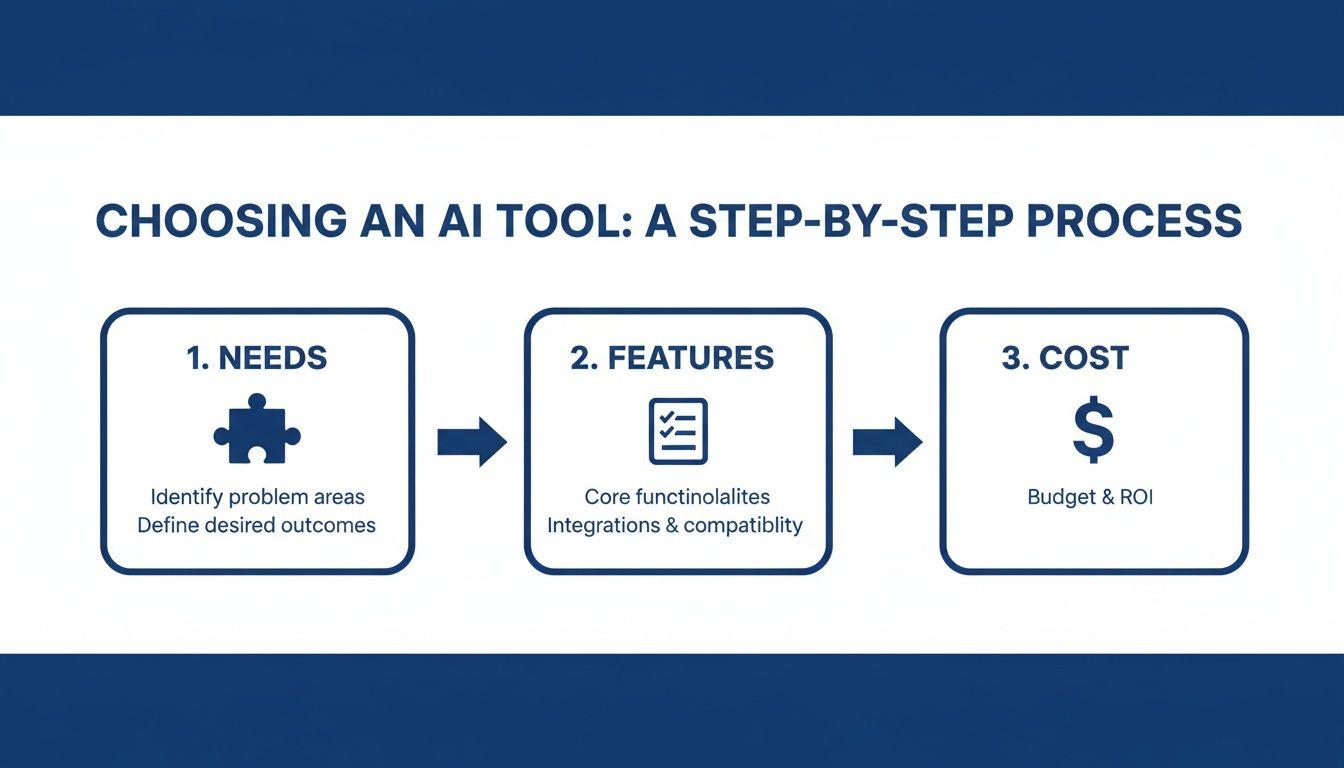
As you can see, starting with your own needs and then exploring a tool's features and costs will set you up for success. Different platforms handle prompts differently, so this first step directly influences how you'll approach the next ones.
Advanced Prompting Techniques
Once you've got the basics down, you can start adding some more advanced tricks to your arsenal. One of the most useful is the negative prompt. This tells the AI what you don't want to see. For instance, if you're trying to generate a photorealistic image of a hand but keep getting extra fingers, adding a negative prompt like --no extra fingers, malformed hands can work wonders.
It’s also crucial to remember that this technology is always getting better at understanding what we want. In April 2025, the release of Midjourney v7 brought a significant leap in how well the model followed prompts, showing 30-50% better coherence scores in benchmarks. Likewise, OpenAI's GPT Image 1, launched in March 2025, not only got better at rendering text in images but could also generate pictures from sketches, not just text. These updates mean your prompts can—and should—become more precise over time.
Pro Tip: When you generate an image you absolutely love, save that prompt! I keep a running document of my best prompts. It becomes a personal recipe book that I can pull from, mix, and match to create entirely new visuals.
Ultimately, getting good at prompting is less about memorizing formulas and more about developing an intuition for how to describe your ideas. It's a skill that pays off immediately, turning you from someone just playing with AI into a true creator. If you want to go even deeper, check out our complete guide on what is prompt engineering.
A Practical Walkthrough with the 1Chat Image Generator
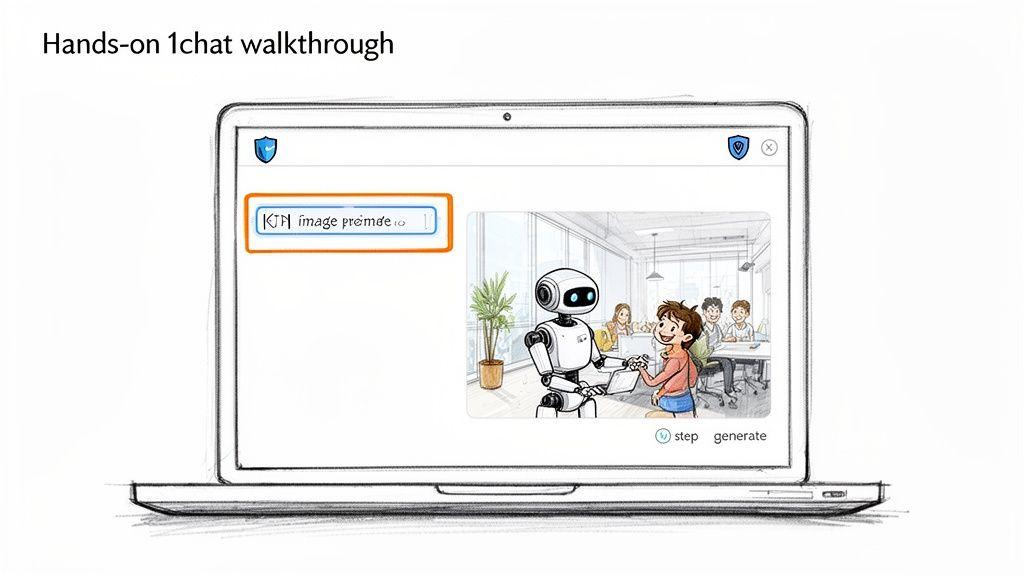
Alright, enough theory. The best way to understand AI image generation is to actually do it. Let’s walk through how you can start creating images right now using the tools built into 1Chat, which is a great privacy-focused platform for both work and family life.
One of the best things about the 1Chat tool is that it's integrated directly into the chat. You don't have to juggle different apps or browser tabs. Your entire creative process happens in one place, which makes a huge difference in workflow.
This all-in-one approach is becoming the standard. We saw this trend emerge in 2024-2025 as other tools were folded into chatbot platforms. For a small business, having your text AI, PDF reader, and image generator in a single hub is a massive time-saver. You can learn more about the broader context of AI's impact on visual art and how it's changing creative work.
Crafting Your First Prompts
Let's dive in with a real-world business scenario. Your team needs a unique image for a blog post about modern collaboration. A vague idea is one thing, but specific details are what produce great results.
- Initial Idea: "A robot helping a team."
- Improved Prompt: "A friendly, sleek white robot helping a diverse small team organize tasks on a digital whiteboard. The office is bright, modern, and filled with natural light, high-detail, 4K."
See the difference? The second prompt tells the AI exactly what to create: the robot's personality ("friendly"), the team's description ("diverse"), the specific action ("organize tasks"), and the overall atmosphere ("bright, modern"). The result will be infinitely more useful.
Now for a family-friendly example. Imagine you're making up a bedtime story and want an illustration to go with it.
- Initial Idea: "A family of lions."
- Improved Prompt: "A cartoon-style family of lions—a father, mother, and two cubs—reading a large, colorful book together in a cozy, fire-lit den. Whimsical and heartwarming style."
By adding "cartoon-style," "cozy," and "whimsical," you give the AI the creative direction it needs to generate a picture that perfectly matches the tone of your story.
The single most important thing to remember is that iteration is your best friend. Your first image is almost never your last. Think of it as a conversation with the AI—look at what it gave you, decide what needs to change, and then refine your prompt.
Refining and Iterating on Your Results
So what do you do when the first image isn't quite right? Maybe the robot looks more menacing than friendly, or the lions' den is too dim. This is where the real fun begins. You simply adjust your prompt and try again.
- Refinement 1: "A friendly, humanoid robot with a smiling LED face..." This simple change adds a ton of character.
- Refinement 2: "...in a cozy, fire-lit den with soft, glowing lanterns." This instantly brightens the scene and adds to the mood.
Each little tweak brings you closer to the vision in your head. The 1Chat platform makes this refinement process feel effortless, encouraging you to experiment without any friction. It’s a safe, controlled environment that’s perfect for anyone—from a marketer trying to hit a deadline to a parent creating a fun activity with their kids—to jump into the world of AI art.
Refining and Using Your AI-Generated Images
That first 'aha!' moment when the AI spits out a great image is fantastic. But don't stop there. The journey from a neat-looking concept to a polished, ready-to-use asset is where the real skill comes in.
Most good AI image tools have built-in features that are essential for this next stage. They don't just give you one shot and call it a day; they give you tools to iterate and improve. Two of the most important ones you'll use constantly are variations and upscaling.
Ever get an image that’s almost perfect? Maybe the lighting is a bit off, or a character’s hand looks strange. Instead of starting from scratch with a new prompt, just hit the variations button. This tells the AI to use your favorite image as a direct inspiration, generating a few new options that keep the same overall vibe but change the little details. It's the fastest way to fine-tune your idea.
Enhancing Detail and Preparing for Use
Once you've landed on a version you love, it’s time to get it ready for the real world. That little preview image isn't going to cut it for a blog post or a social media graphic. This is where upscaling becomes your best friend.
An upscaler doesn’t just stretch your image; it intelligently rebuilds it at a higher resolution, adding crispness and detail. This step is what turns a small, pixelated preview into a sharp, professional-quality graphic that looks great on any screen—or even in small prints.
With your high-resolution image in hand, a few final touches can make all the difference. You don't need to be a Photoshop wizard. Simple, web-based tools like Canva or Adobe Express are perfect for quick post-processing tasks.
- Add text overlays to create a stunning social media announcement.
- Tweak the colors or apply a filter to match your brand's aesthetic.
- Crop and resize the image for specific formats like an Instagram Story or a website banner.
Think of the initial AI generation as raw clay. Using variations to refine the shape, upscaling to fire the piece, and adding final glazes with a simple editor is how you create something truly finished and unique.
Practical Applications for Business and Family
So, what can you actually do with these images? This is where the fun begins, because the applications are incredibly broad, spanning both professional work and personal projects.
For a small business owner, this technology can be a massive help. Forget sifting through stock photo libraries for a "good enough" image. Now, you can create the exact visual you need, saving both time and money.
Below is a quick look at how different people are putting AI images to work.
Practical Use Cases for AI-Generated Images
| User Group | Example Use Case | Benefit |
| Small Businesses | Custom blog headers and social media graphics. | Creates a unique brand identity and increases engagement without a large design budget. |
| Families | Personalized storybook illustrations for kids. | Fosters creativity and provides a fun, collaborative activity. |
| Marketers | Product mockups on different backgrounds. | Quickly visualizes products in various settings for ad campaigns or e-commerce listings. |
| Students | Unique visuals for presentations and reports. | Makes academic work more engaging and helps illustrate complex concepts. |
As you can see, the possibilities go far beyond just making cool art. These tools solve real-world problems.
Finally, always think about your final destination. For anything on the web, exporting your image as a JPEG or PNG is the way to go. If you're printing something, like a custom birthday card or a small poster, you'll want the highest resolution available. A high-quality PNG or even a TIFF file will ensure your creation looks just as sharp on paper as it did on screen.
A Quick Word on the Legal and Ethical Stuff
Okay, so you’re ready to start creating some amazing images. It’s a ton of fun, but before you go all-in, we need to talk about the tricky stuff. Using these tools means wading into some new and often murky waters when it comes to ownership, ethics, and basic responsibility.
The first question everyone asks is about copyright: if I make an image with AI, do I own it? The short answer is... it's complicated. Right now, the legal thinking in places like the United States is that if a piece is made entirely by AI without significant human input, it can't be copyrighted. This means you can use what you create, but you might not have exclusive legal ownership in the way a photographer owns their photos.
The Big Debate: Training Data and Artist Rights
Here’s the elephant in the room: how do these AI models get so smart? They learn by analyzing billions of images, and many of those images were scraped from the internet without the original artist's permission.
This has, understandably, sparked a massive debate. Many artists and photographers feel their work was used to train a system that could one day devalue their profession, all without their consent or any compensation. On the other side, AI developers often argue that this is "fair use," comparing it to how human artists learn by studying and being inspired by the work of others.
As someone using these tools, it's worth being aware of this conflict. My advice? Try to choose platforms that are open about how their models are trained or that are actively working on ways to compensate artists. It’s a small step toward being a more responsible creator.
Your Responsibility: Keeping It Real (and Honest)
Beyond the legal questions, there’s a simple matter of personal responsibility. AI can create incredibly realistic images of people who don't exist and events that never happened. This is an amazing creative tool, but it also opens the door for misinformation and harmful "deepfakes."
It really just comes down to a few common-sense ground rules:
- Be clear about your creations. If you’re sharing something that looks real, consider adding a quick note or hashtag like #AIart or #MadeWithAI. Transparency is key.
- Don't spread fake news. This should be obvious, but it’s the most important rule. Never use these tools to create deceptive images that could mislead people or damage someone's reputation.
- Respect people's privacy. Avoid creating realistic images of private individuals without getting their permission first. It’s a basic sign of digital respect.
The point here isn’t to scare you off. It’s to make sure you’re not just a skilled creator, but a thoughtful and ethical one, too. By keeping these ideas in mind, you can explore all the incredible possibilities of AI while making the digital space a better, more honest place.
Answering Your Top AI Image Generation Questions
As you start experimenting with AI image generators, a few common questions and creative roadblocks are bound to pop up. Let's tackle some of the big ones so you can keep moving forward.
One of the first things entrepreneurs ask is, "Can I use an AI-generated image for my business logo?" My advice is almost always no. The legal ground for AI art copyright is still shaky, and you rarely get exclusive ownership. A great logo needs to be 100% yours and legally defensible, which just isn't a guarantee with most AI tools today.
Another common point of confusion is what really separates the big-name models from one another. Here’s how I think about them based on my own experience:
- DALL-E 3 is the literalist. It’s incredibly good at following complex, detailed instructions precisely. If you need a very specific scene and want the AI to stick to the script, DALL-E 3 is your best bet.
- Stable Diffusion is for the tinkerers and control freaks (like me!). It's open-source, giving you an unmatched level of control. You can train your own models, fine-tune settings, and really get under the hood.
- Midjourney is the artist of the group. It produces images with a very distinct, often beautiful and painterly style. For anything that needs a touch of fantasy or a fine-art aesthetic, Midjourney is fantastic.
Achieving Consistent Characters
Getting the same character to show up consistently across different images is one of the biggest frustrations in AI art. It's a classic problem—your main character looks perfect in one shot and like a distant cousin in the next. While it's still a challenge, things are getting better.
The most reliable technique is to craft an incredibly detailed character prompt and then reuse that exact text every single time. Get super specific. Things like, "a man with a small, crescent-shaped scar above his left eyebrow, wearing a worn leather jacket with a silver zipper," help lock the character in. Some tools are also introducing "character reference" features, which let you upload a source image to guide the AI.
The secret to consistency is specificity. The more unique details you feed the AI, the less it has to guess. This locks down the character's appearance from one image to the next.
Is AI Image Generation Safe for Kids?
This is a huge question for parents, and rightly so. Many of the most powerful AI tools are wide open, with little to no content filtering.
Fortunately, there are family-friendly alternatives. A privacy-focused tool like 1Chat, for example, gives you a controlled space where you don't have to worry about what your child might accidentally generate or see.
When you do introduce kids to these tools, it's a perfect opportunity to teach them about digital literacy. Set some ground rules together. Talk about why they should never put personal information into a prompt and encourage them to think critically about the images they create and see online. It turns a fun new toy into a valuable life lesson.