You’ve probably had this happen. You visit a shop online, glance at a pair of shoes, leave without buying, and then the same shoes seem to follow you into Instagram, YouTube, or your inbox. It can feel a little creepy, a little convenient, and a little confusing all at once.
That trail often starts with pixel tracking.
If you run a small business, work on a school project site, send newsletters, or just care about your family’s privacy, it helps to know what is pixel tracking and why it matters. Pixels sit in the background of much of the web. They help businesses measure ads, emails, and website activity. They also raise real privacy questions because individuals rarely see them, and often don’t realize they’re there.
The Invisible Engine of the Web What Is a Tracking Pixel
A tracking pixel started as a simple 1×1 invisible image placed inside a webpage, ad, or email. It’s too small to notice, and often transparent. When your device loads that page or message, the pixel sends a signal back to a server.
That sounds abstract, so picture a tiny digital scout. Its whole job is to report back that something happened. A page was opened. An email loaded. A checkout confirmation screen appeared. That report helps a business connect actions to campaigns.
A simple way to picture it
A cookie is often talked about more, but a pixel is different. A pixel doesn’t mainly “remember” you on your device. It acts more like a silent check-in point. When your browser reaches it, it says, “someone viewed this page from this device, at this time.”
That single check-in can include more than one might expect. According to Prescient AI’s guide to tracking pixels, a pixel can capture device specifications, screen resolution, operating system, IP address for geolocation, and referrer information. The same source notes that email platforms like Mailchimp and HubSpot automatically insert email tracking pixels, and that Google Analytics 4 uses pixel-style measurement as part of its core reporting.
Why businesses use them
For a small business, that can be useful. If you run a bakery, tutoring service, or local repair shop, you want to know basic things:
- Which ad brought visitors in: Did your Facebook ad lead to visits?
- Which page worked: Did people read your pricing page or leave immediately?
- Which email got attention: Did recipients load the newsletter at all?
- Which action mattered: Did someone book, buy, or submit a form?
Without a measurement tool, marketing becomes guesswork.
Pixels became a basic part of digital marketing because they’re easy to place and can report activity across websites, ads, and emails.
Why regular people should care
Pixels aren’t only a “marketing thing.” They affect your privacy because they work invisibly. A family browsing for school supplies, a student opening a campus newsletter, or a parent reading an email promotion may trigger tracking without seeing anything on screen.
That doesn’t automatically make pixels bad. Many are used for ordinary analytics. But it does mean the technology deserves plain-English explanation, especially for people outside large enterprise teams.
If you remember one idea from this section, make it this: what is pixel tracking at its core? It’s a behind-the-scenes way for websites, ads, and emails to log that an action happened and send that information back to a system for analysis.
How Pixel Tracking Actually Works Under the Hood
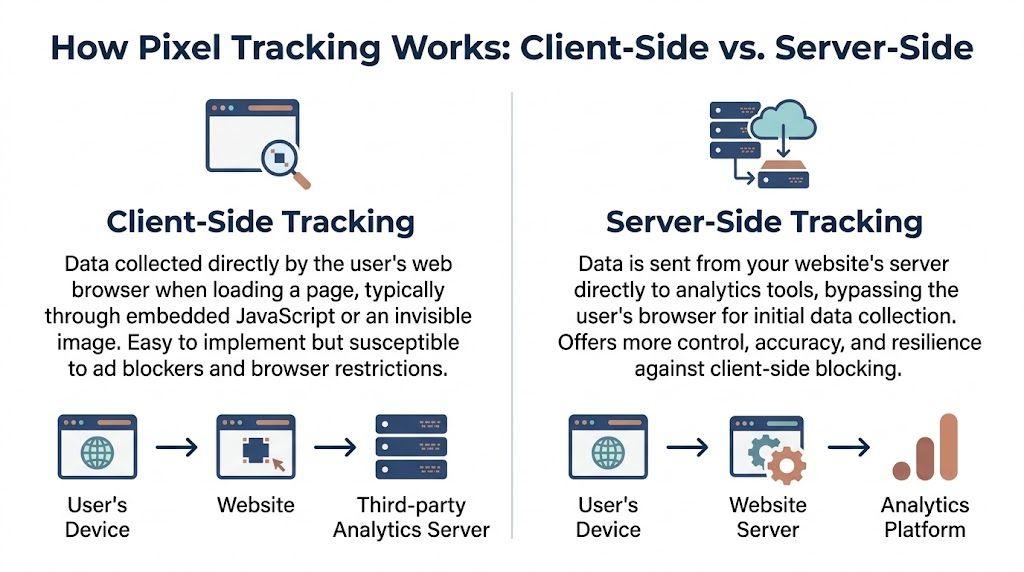
The easiest way to understand pixel tracking is to follow the path the data takes. There are two common setups: client-side tracking and server-side tracking.
Client-side tracking
In a client-side setup, your browser does most of the work.
You visit a page. That page contains a bit of code or an invisible image tied to a tool like Meta Pixel, Google Analytics 4, or another analytics platform. Your browser loads the page, sees the tracking code, and sends a request out to the third-party service.
Imagine mailing a postcard yourself. Your browser writes the note and sends it directly.
That note can include details like the page viewed, the time, and technical information about the device. This setup is common because it’s easy to install. A site owner can add it through a website builder, Google Tag Manager, a Shopify setting, or a WordPress plugin.
Why client-side tracking is less reliable now
The problem is that modern browsers and privacy tools often interrupt that postcard before it leaves.
According to Improvado’s explanation of tracking pixels, client-side pixels suffer from 25-50% signal loss due to ad blockers. The same source says that in 2026, EU markets report client-side pixels at 60-70% effectiveness versus 92% for server-side implementations, and that a hybrid setup can lead to an 18% conversion lift from deduplicated, more accurate data.
For a small business owner, that means your dashboard may not be showing the full picture. You might think one ad failed when some of its results weren’t captured.
Server-side tracking
Server-side tracking changes the route.
Instead of the browser sending the information straight to Meta, Google Analytics 4, or another platform, the browser sends information to your own server first. Then your server decides what to pass along.
That’s more like handing the postcard to your front desk instead of mailing it yourself. The front desk reads it, removes anything unnecessary, and then forwards only what’s appropriate.
This gives the website owner more control over:
- What gets sent
- When it gets sent
- How much detail is shared
- How data is cleaned up before forwarding
Why that matters for privacy and accuracy
Server-side tracking is often presented as a technical upgrade, but for families and small teams it’s really about control. If your own system handles the event first, you can design a more careful process.
It can also be more resilient because the communication doesn’t depend as heavily on the browser’s willingness to run third-party scripts. That’s one reason many companies are exploring server-side methods as cookies become less central.
Practical rule: Client-side tracking is easier to launch. Server-side tracking gives you more control over privacy and usually better data quality.
A quick side-by-side view
| Method | Data path | Main strength | Main weakness |
| Client-side | Browser to third-party platform | Easy to install | More vulnerable to blockers and browser restrictions |
| Server-side | Browser to your server, then to platform | More control and stronger data reliability | More setup work |
Why many teams choose both
A lot of teams don’t pick one or the other. They use a hybrid setup.
That usually means client-side tracking for lightweight engagement signals, plus server-side tracking for important events like purchases, signups, or bookings. The goal is to reduce missed data and avoid counting the same action twice.
For non-technical readers, the key takeaway is simple. Pixel tracking is not one single thing. The phrase covers different methods, and the method matters because it shapes both measurement accuracy and privacy risk.
Pixels Versus Cookies What’s the Real Difference
People often treat pixels and cookies like they’re the same thing. They’re related, but they’re not identical.
A good shortcut is this. A cookie is like a name tag your browser wears. It stores information locally so a site can recognize you later. A tracking pixel is like a turnstile counter at a stadium. It doesn’t mainly store information on your device. It reports that you passed through.
Where the confusion comes from
Both tools can be used in marketing. Both can support analytics. Both can help advertisers understand behavior. And both often appear in the same conversation about privacy.
But they play different roles.
A cookie is usually about storing something in the browser. That might be a login state, language preference, or an identifier used for later recognition. A pixel is about sending an event or signal when something happens.
Pixel vs. Cookie at a Glance
| Attribute | Tracking Pixel | Cookie |
| Primary job | Reports that an action happened | Stores information in the browser |
| Where it operates | In the page, ad, or email | On the user’s device |
| What it feels like | A check-in signal | A memory tag |
| Common use | Analytics, ad measurement, email tracking | Login state, preferences, session memory |
| Visibility to users | Usually invisible | More familiar through browser and consent notices |
How they work together
A business might use both at once. The cookie helps recognize a browser over time. The pixel sends event data when a person visits a product page or completes a signup.
That combination is powerful, which is why it became so common.
It’s also why the privacy conversation got bigger. When a stored browser identity and event signals work together, websites can build a richer picture of behavior than most users expect.
The easiest way to remember it
If you forget all the technical wording, keep this mental model:
- Cookie: “Remember me.”
- Pixel: “Tell the system what just happened.”
That distinction matters in the post-cookie world. Even if third-party cookies become less useful, pixels and related event tracking methods don’t disappear. They just shift toward new forms, especially server-side measurement.
For small businesses, that means you shouldn’t assume “cookie banner handled” automatically means your tracking setup is fully understood or properly managed. Pixels have their own role, and they deserve their own review.
Common Pixel Tracking Uses for Small Businesses and Teams
For most small organizations, pixels aren’t interesting because they’re technical. They’re interesting because they answer practical questions. Did that ad work? Did anyone open the email? Which page convinced people to contact us?

A local shop trying to stop wasted ad spend
A small online gift store runs ads on social media before the holidays. The owner doesn’t need enterprise-grade dashboards. She just needs to know whether visitors who clicked the ad reached product pages and bought anything.
A pixel helps connect those dots. If someone clicks an ad, browses a candle set, adds it to the cart, and checks out, the store can see that the ad likely contributed to that sale. That makes future budget decisions less random.
This is also where retargeting comes in. If someone viewed a product but left, the business may choose to show that person a reminder ad later.
A service business learning what content brings leads
A bookkeeping firm publishes blog posts to attract local clients. One article about tax prep gets lots of traffic. Another article about payroll questions brings fewer visitors, but more of them submit a consultation form.
Pixel-based analytics can help the team see that difference. Raw traffic doesn’t always equal useful traffic. One page may attract curiosity. Another may attract people ready to hire.
That kind of insight works best when paired with audience research. If you’re figuring out what your customers care about, this guide to market research for small business is a useful companion.
An email sender measuring engagement carefully
A school club, nonprofit, or local business might use Mailchimp, HubSpot, or SendGrid for newsletters. These platforms commonly use tracking pixels in emails to estimate opens.
That helps answer basic questions:
- Was the message loaded at all
- Which subject lines got more attention
- Which campaigns led readers back to the website
The catch is that email tracking isn’t perfect, especially now. Some inboxes preload images and others block them, which can blur what an “open” really means. For small teams, that means email open numbers should be treated as clues, not absolute truth.
A small team using analytics to improve a website
A tutoring center may have five pages that really matter: home, pricing, subjects, testimonials, and contact. Pixel-style measurement inside tools like Google Analytics 4 helps the team see where visitors land, what they read, and where they leave.
That can lead to simple improvements:
- Moving the contact form higher
- Making pricing easier to understand
- Rewriting a page title that confuses parents
- Sending more traffic to the page that leads to inquiries
The best use of pixel tracking for small businesses isn’t “track everything.” It’s “track the few actions that actually help you make better decisions.”
Where small teams get into trouble
The biggest mistake isn’t technical. It’s strategic. Teams often install multiple pixels, collect lots of events, and then never use the data to make choices.
A cleaner approach is better:
- Pick a small number of goals.
- Track only the actions tied to those goals.
- Review the data with healthy skepticism.
- Remove tools that don’t help.
That keeps your setup simpler, more respectful of users, and easier to manage over time.
The Privacy Problem Navigating Legal and Ethical Risks
Pixel tracking creates a strange imbalance. Businesses can learn a lot from it, while users often see almost nothing. That gap is the heart of the privacy problem.
For a family, this can feel unsettling. A parent might search for tutoring help, a kid might browse school supplies, or a student might open an email from a retailer. Tracking can happen in the background without a visible sign that data moved anywhere.

Why the legal risk is real
This isn’t only about user discomfort. It’s also a compliance issue.
The FTC discussion of hidden impacts of pixel tracking notes that ad blockers eliminate 30% or more of tracking requests and affect 30-40% of desktop traffic. The same source explains that Safari’s Intelligent Tracking Prevention limits attribution windows to 24 hours, and that GDPR enforcement has led to million-euro fines for non-compliant pixel implementations.
That creates two problems at once. First, the data gets worse. Second, the legal risk goes up.
Incomplete data is not neutral
If your tracking misses a chunk of visitors, your reports may overrepresent the people who allow tracking and underrepresent everyone else. That can push businesses toward lopsided decisions.
A small business owner might cut a campaign too early because the dashboard missed some of the conversions. Or a team might optimize for a narrow audience because those users were easier to measure.
This is one reason privacy and performance are linked. Bad tracking doesn’t just create ethical concerns. It can also create bad business choices.
What consent should mean in practice
For non-essential marketing pixels, the safest mindset is simple. Get consent before they fire.
That means the pixel shouldn’t run first and ask permission later. It also means users should understand, in plain language, what’s being collected and why.
A privacy-first setup usually includes:
- A clear consent banner: Not hidden, not vague, not stuffed with legal jargon
- Category choices: Let people choose between essential functions and marketing tracking
- A way to change their mind: Preferences shouldn’t be one-way
- A current tracker audit: Old plugins often add pixels nobody remembers installing
If your family is trying to reduce everyday exposure to hidden tracking, this practical guide to protecting privacy online is a strong next step.
Businesses often treat compliance like a box to check. Customers experience it as a trust test.
Ethics matter even when the law is unclear
A lot of pixel decisions sit in a gray area where legal advice, platform defaults, and real-world expectations don’t line up neatly. That’s why ethics matter.
If your audience includes parents, teens, students, or local community members, respectful data handling is part of your brand. People notice when they’re surprised by aggressive retargeting or when an email campaign feels overly watchful.
A privacy-first checklist for small organizations
| Question | Better answer |
| Do we know which pixels are on our site? | Keep an inventory and review it regularly |
| Do they fire before consent? | Block non-essential ones until permission is given |
| Are we tracking more than we need? | Limit events to useful business purposes |
| Can users understand our notice? | Use plain language, not only legal wording |
The strongest long-term move isn’t squeezing every last signal out of a visitor. It’s building a system that people would still consider fair if they could see it working.
The Future is Coming Cookieless Tracking and Safer Alternatives
A lot of people hear “cookieless future” and assume tracking is disappearing. It isn’t. It’s changing shape.
Third-party cookies have become less dependable, and many of the old assumptions behind digital advertising no longer hold. That shift creates friction for marketers, but it also creates a chance to build cleaner systems with less hidden surveillance.
Why this shift is happening
Browsers, regulators, and users have all pushed in the same direction. People want more control over what gets collected about them. Platforms have responded by limiting older tracking methods, especially those that rely on passive monitoring across sites.
That doesn’t mean businesses stop measuring. It means they need methods that rely less on silent cross-site tracking and more on direct relationships, first-party data, and careful event handling.
Safer alternatives worth understanding
Some of the most promising alternatives are already in use.
Server-side tagging
Server-side tagging gives organizations more control because events pass through their own systems before they reach analytics or ad platforms. That makes it easier to reduce unnecessary data sharing and adapt to stricter privacy expectations.
It’s not automatically private. A careless server-side setup can still over-collect. But it gives responsible teams better tools to limit what they send.
Privacy-first analytics
Some website owners are choosing analytics platforms that focus on aggregated trends instead of user-level profiles. These tools usually answer simpler questions. Which pages are popular? Which channels bring visits? Where do people drop off?
That can be enough for many schools, clubs, family projects, and local businesses.
Contextual advertising
Contextual advertising targets the content being viewed rather than the person being followed around the web. A gardening ad on a plant care article is a basic example.
This approach feels less invasive because it depends more on present context than on building a detailed behavioral trail.
A smarter way to measure in the post-cookie world
For small businesses, the future may be simpler than the past. Instead of collecting everything because a platform allows it, teams can focus on a short list of meaningful signals:
- Core conversions: purchases, bookings, inquiries
- Useful content actions: downloads, key page visits, form starts
- Broad trends: channel performance over time
- First-party trust signals: subscriptions, repeat visits, direct engagement
Families and students can also benefit from this shift. A web that relies less on invisible identity stitching is easier to understand and easier to browse safely. If you want to reduce what personal data is floating around online, this guide to removing personal information from the internet is a practical resource.
The post-cookie world doesn’t mean “no measurement.” It means better measurement choices matter more.
What to do now
If you run a small site or team, you don’t need to rebuild your entire stack overnight. Start by asking:
- Which tracking tools are still worth keeping?
- Which events help us make decisions?
- Can we replace some user-level tracking with aggregated reporting?
- Are we choosing convenience over trust?
Those questions lead to a healthier setup than chasing every new workaround.
Frequently Asked Questions About Pixel Tracking
A lot of the confusion around pixels comes from edge cases. People don’t just want the definition. They want to know what this means for daily use, compliance, and control.
Can people block tracking pixels completely
Not completely in every case.
Some client-side pixels are blocked by privacy tools, ad blockers, browser settings, or image blocking in email. But some tracking methods are harder to prevent, especially when data moves through a website’s own server rather than directly from the browser to a third party.
That’s one reason this area gets so much scrutiny. Users often assume standard cookie controls cover everything, but pixels and related event systems can be more complicated than that.
Are tracking pixels illegal
No, not by default.
What matters is how they’re used. If a business deploys marketing pixels without proper consent, ignores disclosure duties, or captures more personal data than it should, that’s where legal trouble starts.
According to Mailchimp’s pixel tracking resource, pixels can capture IP addresses and create device fingerprints, and misuse under GDPR can risk fines of up to 4% of global revenue. The same source says 70% of small business sites audited in 2025 by OneTrust lacked proper consent banners for pixels, and that server-side tagging adoption is rising 150% year-over-year as of Q1 2026.
Do I need to be a developer to use one
Usually not.
Many tools add pixel tracking through built-in settings, plugins, or tag managers. A Shopify store owner, a Mailchimp sender, or a WordPress user can often install basic tracking without writing code.
The catch is that easy installation doesn’t mean easy governance. You may be able to add a pixel in minutes and still misconfigure consent, duplicate events, or forget that the tool is there months later.
Do tracking pixels slow down a site
They can, especially if you stack many scripts and tags from multiple vendors. The exact effect depends on the site and setup, but the broader point is straightforward. Every extra script or tracking call adds complexity.
That’s another reason a lean setup is healthier than a bloated one. Small businesses often get better results by keeping only the tools they actively use.
Are email open rates still trustworthy
They’re useful, but they’re not a perfect read on human attention.
Email tracking depends on whether images load, whether the email client preloads content, and whether privacy settings interfere. Treat opens as a directional signal, then pair them with stronger actions like clicks, replies, or conversions.
What’s the safest mindset for a small business
Use the minimum tracking needed to answer real business questions.
That usually means:
- Track fewer events: Focus on key actions
- Get consent first: Especially for marketing uses
- Review your stack regularly: Old plugins and integrations linger
- Favor clarity over cleverness: If users would feel tricked, don’t do it
Small businesses don’t need the most tracking. They need the clearest understanding of what they’re collecting and why.
Should families and students be worried
They should be aware, not helpless.
Pixels are part of the modern web, but people can still reduce exposure by using privacy-focused browsers, blocking unnecessary trackers, limiting marketing email subscriptions, and being selective about which apps and websites they trust.
Awareness changes the experience. Once you understand what is pixel tracking, the web feels less mysterious. You can spot when measurement serves a practical purpose and when it crosses into unnecessary surveillance.
If you want tools that fit a more privacy-aware digital life, 1chat offers a family-friendly, privacy-first AI experience for small businesses, teams, and students who want a practical alternative for research, writing, and everyday work.