Automating data entry is all about using software to get data from point A to point B without a human having to type it all out. Think of tools like Robotic Process Automation (RPA) that act like a digital assistant, mimicking clicks and keystrokes. Or you can use API integrations to get your different software systems talking directly to each other. For paper-based stuff, Optical Character Recognition (OCR) is the go-to for lifting text from scanned documents.
Why Manual Data Entry Is Quietly Sinking Your Business
Before we get into the nuts and bolts of how to set up automation, we need to be crystal clear on why it’s no longer optional. Manual data entry isn't just a tedious chore; it's a silent killer of productivity, morale, and ultimately, your bottom line.
Picture this: your top salesperson starts their day by manually copy-pasting lead details from a spreadsheet into your CRM. Down the hall, someone in finance is squinting at a PDF invoice, keying each line item into the accounting system. This isn’t a rare occurrence. For many small teams, it's a daily, soul-crushing ritual.
The Hidden Price Tag on Repetitive Work
The true expense of manual data entry goes way beyond an employee's hourly wage. The real killer is the opportunity cost. What could your team be doing instead?
That salesperson could be on the phone, building relationships and actually closing deals. The finance pro could be digging into financial trends, not just transcribing them.
Manual data entry doesn’t just waste time; it wastes talent. It forces your most valuable assets—your people—to focus on low-impact, repetitive work instead of the creative, strategic initiatives that drive business growth.
This kind of monotonous work is also a fast track to low morale. Nothing crushes a motivated employee's spirit faster than spending half their day on a task a simple script could handle in seconds. This leads to disengagement and burnout. If this sounds familiar, our guide on how to reduce employee burnout is a must-read.
Let's Talk Numbers
This isn't just a feeling; the data tells a stark story. Let's say your sales reps spend a conservative 3.4 hours a week on CRM data entry. With a team of just five people, you're losing nearly 900 hours every single year to administrative grunt work. Good automation can often cut that down by 70% or more.
And then there's the accuracy problem. Human error is inevitable, and it’s costly. Bad data costs businesses an estimated $12.9 billion a year globally. One tiny typo—a misplaced decimal, a wrong digit in a zip code—can snowball into shipping disasters, angry customers, and skewed financial reports. You can find more stats on CRM data entry automation that really drive this point home.
At the end of the day, automating data entry isn't about replacing your team. It’s about unleashing them. By handing the mind-numbing tasks over to technology, you free up your people to solve real problems, innovate, and grow the business. The question isn't whether you can afford to automate; it's whether you can afford to keep wasting your team's potential.
Finding the Right Automation Approach for Your Team
Picking the right way to automate data entry is a bit like choosing a vehicle for a road trip. You wouldn’t take a sports car on a bumpy, unpaved road, and you wouldn't ride a bike across the country. The best choice depends entirely on your destination (the task), your budget, and who’s driving (your team's technical skills).
Automation isn't a one-size-fits-all solution. It's more like a toolbox, with different tools designed for specific jobs. Let's look at the four main methods to help you find the perfect fit.
Robotic Process Automation (RPA)
Think of Robotic Process Automation (RPA) as a digital assistant. These software "bots" are trained to mimic exactly what a person does on a computer—clicking buttons, typing into fields, and moving files. They work right on the user interface, which makes them perfect for older, legacy systems that lack modern APIs.
For instance, a small insurance agency might use an RPA bot to log into an ancient claims portal, copy client details from an email, paste them into the portal's form, and then save the confirmation PDF. It’s ideal for rule-based, repetitive tasks involving software that just won't "talk" to anything else.
API Integrations And Low-Code Platforms
If RPA is like a digital person, think of API integrations as a direct, private hotline between two apps. An Application Programming Interface (API) provides a set of rules that lets software communicate directly, sharing data instantly without anyone needing to lift a finger.
This is by far the cleanest and most reliable way to automate data entry. A great example is an e-commerce store connecting Shopify to QuickBooks. When a new sale comes through, the order details and customer info are automatically sent over to create a new invoice. No manual entry, no mistakes.
Custom Scripts
If you have a developer on your team (or access to a freelancer), a custom script can be a highly precise, tailored solution. Using languages like Python or JavaScript, you can build a small, dedicated program to handle a very specific data entry task exactly the way you want.
Imagine a marketing team that needs to pull daily performance stats from several social media platforms into a single Google Sheet. A simple Python script could be set to run every morning, automatically grabbing the latest data from each platform's API and organizing it into the spreadsheet before the team even starts their day.
Optical Character Recognition (OCR)
But what about all the paper? That's where Optical Character Recognition (OCR) shines. This technology scans images of documents—like invoices, receipts, or contracts—and converts the printed or handwritten text into structured, digital data.
A local accounting firm could use an OCR tool to process a shoebox full of a client's receipts. Instead of an employee manually typing the vendor name, date, and amount from each one, the OCR software "reads" the documents and pulls that information into a spreadsheet, ready for import.
Deciding between these can be tricky, so let's break them down side-by-side.
Comparing Data Entry Automation Methods
This table compares the four main approaches to help you decide which is the best fit for your team's needs, budget, and technical expertise.
| Method | Best For | Cost | Technical Skill | Pros | Cons |
| RPA | Automating tasks on legacy systems without APIs. | High | Low to Medium | Works with any application; no coding needed for most tools. | Brittle (can break with UI changes); expensive licensing. |
| Forms + APIs | Connecting modern web applications (e.g., CRM to email). | Low to Medium | Low (with no-code tools) | Reliable and stable; real-time data transfer. | Requires both systems to have an open API. |
| Custom Scripts | Highly specific, unique tasks or complex data transformations. | Medium | High | Completely customizable; cost-effective if you have in-house talent. | Requires a developer; needs ongoing maintenance. |
| OCR | Digitizing data from physical documents or PDFs. | Low to High | Low | Reduces manual entry from paper; increasingly accurate. | Not 100% accurate (especially with handwriting); requires manual review. |
Ultimately, the goal is to find the most practical path forward. A complex RPA bot might be overkill when a simple Zapier workflow connecting two apps gets the job done faster and cheaper.
The decision tree below highlights the pain points that come from sticking with manual data entry.
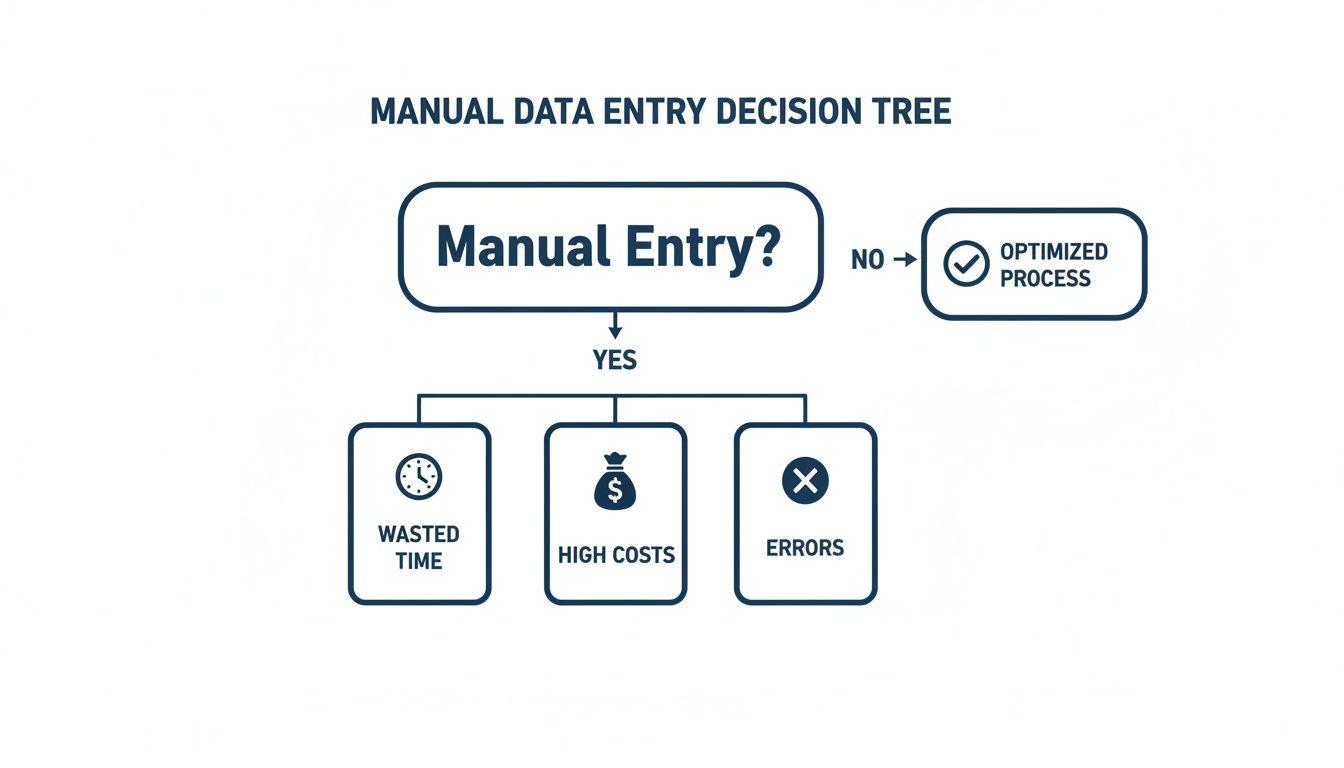
As you can see, manual processes are a recipe for wasted time, inflated costs, and a high risk of errors. That’s why finding the right automation strategy is so important.
Choosing the right tool isn't about finding the most powerful option; it’s about finding the most practical one. A simple Zapier workflow connecting two apps is often more effective than a complex RPA bot if it solves the problem efficiently.
For a broader look at this topic, you can explore our guide on how to automate repetitive tasks, which covers other business processes. The best method is always the one that fits your specific workflow, software stack, and team's skills, turning a tedious chore into a seamless, invisible process.
Your Blueprint for Getting Automation Done
Okay, let's move from theory to action. This is where you actually start building something and see the real value of automation light up. Think of this as your hands-on guide for launching your very first data entry automation project. The goal here isn't to automate everything overnight. It's about starting small, proving it works, and building momentum.
The best place to start is by zeroing in on the most obvious pain points in your team's day-to-day work. You're looking for those tasks that are mind-numbingly repetitive, strictly rule-based, and don't really require any strategic thinking.
Find Your First Automation Target
What are the daily or weekly tasks that make your team groan? Those are your prime candidates. A great starting point is any process that involves shuffling data between two or more systems where no complex decision-making is needed.
A few common examples I see all the time:
- Updating Contact Lists: Manually copying new lead info from a website form or an email into your CRM.
- Processing Invoices: Pulling details like an invoice number, amount, and due date from a PDF and punching it into your accounting software.
- Onboarding New Clients: Taking information from a signed contract and creating new entries in your project management and billing systems.
The key is to pick one specific, manageable task. If you try to automate an entire department's workflow right out of the gate, you're setting yourself up for a world of frustration. A focused, successful pilot project builds confidence and makes it way easier to get buy-in for bigger, more ambitious projects down the road.
Map Out Your Current Workflow
You can't automate a process until you understand it inside and out. Seriously, grab a whiteboard or open a simple diagramming tool and map every single step of the task you’ve chosen. Get granular.
Let's say you want to automate the process of handling new sales leads that show up as email attachments. Your map might look something like this:
- Monitor Inbox: Someone on the team has to check a specific email address (like
[email protected]) every hour. - Find New Leads: They open unread emails, looking for subject lines like "New Inquiry."
- Download the File: They download the attached PDF or spreadsheet with the lead's information.
- Extract the Data: They open the file and manually copy the lead's name, email, phone number, and company.
- Enter into CRM: They log into the CRM, find the "New Lead" page, and paste the information into the right fields.
- Update Tracker: Finally, they update a separate tracking spreadsheet to show the lead has been processed.
This level of detail is absolutely crucial because it shows you every touchpoint and every action your automation tool will need to perform. The diagram below gives you a simplified look at this kind of flow.
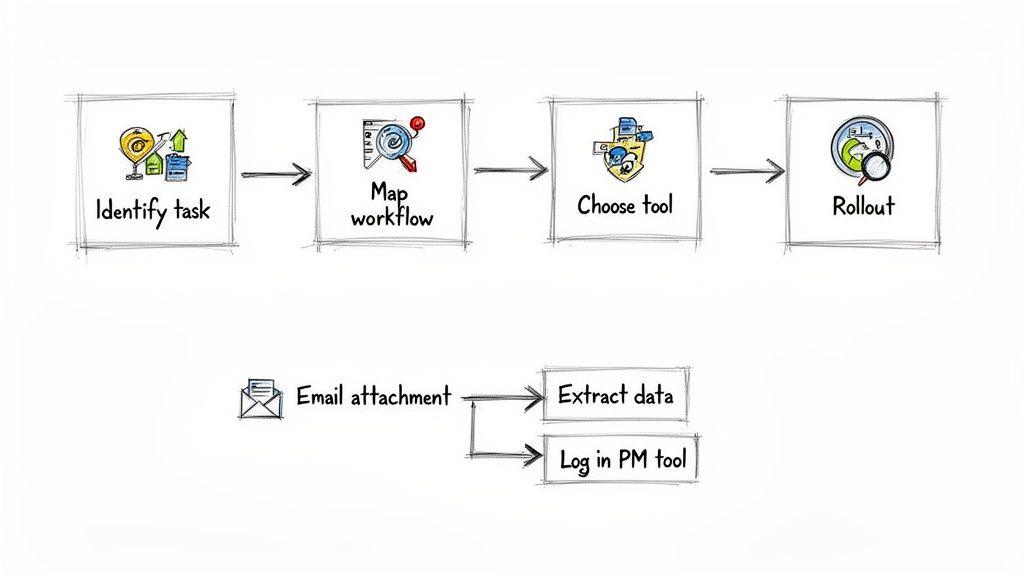
Mapping your workflow like this is the best way to spot hidden inefficiencies and figure out which tools are actually right for the job.
Build and Test Your Automation
Once you have your workflow mapped, you can start building the automation itself. If you're using a no-code tool like Zapier or Make, you'll set up a "trigger" and a series of "actions."
- The Trigger: A new email lands in the
[email protected]inbox with an attachment. - Action 1: An AI-powered parser reads the email attachment and extracts the data. This is where specialized document processing tools are incredibly valuable. For a deeper look at this, check out our guide on how to extract information from PDF files automatically.
- Action 2: The tool takes that extracted data and creates a new lead in your CRM.
- Action 3: The tool then adds a new row to your Google Sheet tracker with the lead's details and a "Processed" status.
Before you flip the switch and let this run on its own, you absolutely have to test it rigorously. This is non-negotiable. Send several test emails with different kinds of files and data formats to see how the system reacts. Does it trip up on extra spaces? What happens if a field is missing? This is your chance to find the breaking points before they mess with your real data.
Pro-Tip from the Trenches: Always start with a pilot test. For the first week, run your new automation in parallel with your old manual process. This lets you compare the results side-by-side, catch any subtle errors, and make sure the automated output is 100% accurate before you put your full trust in it.
This is where you'll see the strategic power of automation come to life. Data entry jobs are disappearing fast—over 7.5 million jobs are projected to be lost to automation. For a small business, that isn't a threat; it's a huge opportunity to move talented people into more creative, high-impact work.
In fact, within operations—the top area for automation at 37%—an overwhelming 93% of IT leaders say it's directly linked to business growth. If you want to dig into the numbers, you can find additional business process automation statistics on 2am.tech.
How to Build an Automation System That Lasts
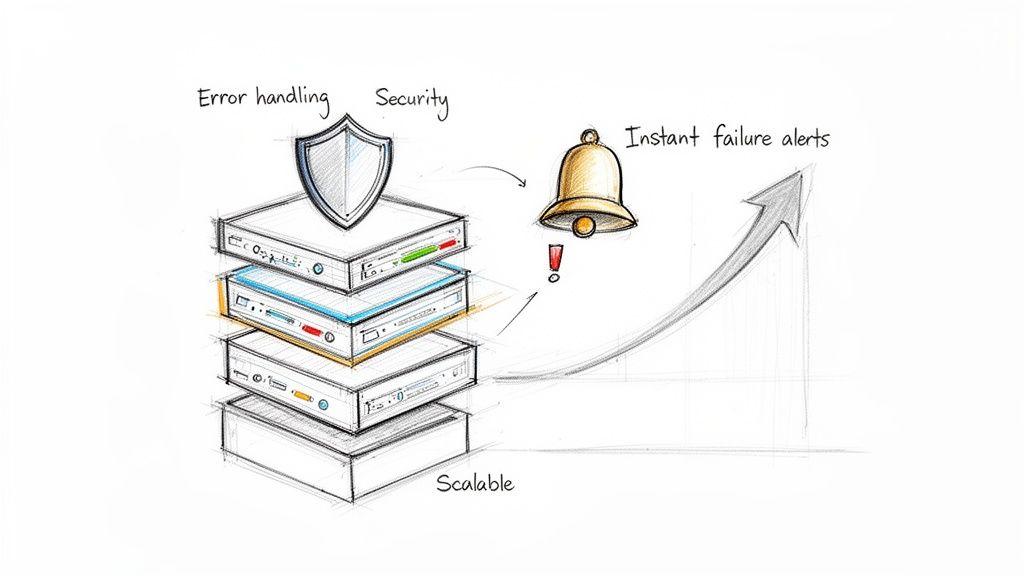
Getting your first data entry automation up and running feels like a massive win. And it is! But the real test isn't whether it works today; it's whether it will still be working six months from now. The initial setup is just the starting line. The true value comes from building something reliable, secure, and ready to grow with you.
Without that solid foundation, your brilliant time-saver can quickly turn into a fragile liability that breaks at the worst possible moment. Building a lasting system means thinking beyond a single, linear workflow. You have to create a process that can handle the unexpected without needing a human to constantly babysit it. This means planning for errors, locking down sensitive data, and making sure your system won’t buckle when your business starts to take off.
Proactive Error Handling and Alerts
Let's be real: no automation is perfect. Sooner or later, something will break. An API will get an update, a website layout will change, or someone will upload a file with a weird data format you didn't anticipate. The difference between a minor hiccup and a major data disaster is how fast you find out about it.
Don't wait to discover a problem weeks later when you're staring at a spreadsheet full of garbage. You need to build in proactive error handling from the get-go. Most modern automation platforms like Zapier or Make have this built-in.
- Set Up Instant Notifications: The moment a workflow fails, it should fire off an alert to your team via email or a dedicated Slack channel. This lets someone jump on the issue immediately, before it snowballs.
- Create Fallback Logic: What should the automation do when it hits a snag? Instead of just crashing, design it to handle common errors gracefully. For instance, if a file can't be processed, it could automatically move it to a "manual review" folder.
- Log Everything: Good logs are a lifesaver. When something goes wrong, detailed logs are your best friend for quickly figuring out what happened and why.
A silent failure is the most dangerous kind of automation error. An immediate notification about a broken workflow isn't a sign that your automation is bad—it's a sign of a well-designed system. It gives you the power to fix things before they truly impact the business.
When you start anticipating failure, you turn a potential crisis into a simple, manageable task. It’s how your automations become a trusted part of your operations instead of an unpredictable black box.
Prioritizing Data Security and Privacy
When you're automating data entry, you're almost always dealing with sensitive information—customer details, financial records, you name it. Protecting this data isn’t just a nice-to-have; it's a fundamental legal and ethical responsibility. We've all heard the horror stories, and bad data quality can be incredibly costly, with some estimates putting the annual global loss around $3.1 trillion.
The best place to start is with the principle of least-privilege access. This just means your automation tool should only have permission to access the specific data and systems it absolutely needs to do its job. Don't just hand over the admin keys to your entire tech stack.
Here are a few other critical security measures:
- Use Secure Connections: Make sure any data being passed between your apps is using an encrypted connection, like HTTPS. This is non-negotiable.
- Manage Credentials Safely: Never, ever hard-code passwords or API keys directly into your workflows. Use a dedicated secret manager or the built-in vault features that many automation platforms provide.
- Audit Regularly: Every few months, take a look at who and what has access to your systems. If you see old connections or users that are no longer needed, remove them. This minimizes your security footprint.
These steps are absolutely crucial for maintaining trust with your customers and staying compliant with regulations like GDPR or HIPAA.
Designing for Scalability
Your automation needs to be built for the business you want to have, not just the one you have today. A workflow designed to process ten invoices a day should be able to handle a hundred without you having to rebuild it from scratch.
A classic mistake I see is tying an automation to a single person's email inbox or a file on their local desktop. This immediately creates a bottleneck and a single point of failure. What happens when that person goes on vacation?
Instead, build your processes around shared, cloud-based resources. Use a team inbox (like [email protected]), a shared Google Drive or Dropbox folder, or a central database. This ensures the automation can run independently and can be managed by anyone on the team if needed.
Also, think in terms of modularity. If you have a massive, complex automation, try breaking it into smaller, independent parts. This makes it much easier to troubleshoot, update, and scale individual components as your needs change. A little foresight here will save you countless hours of painful rework down the line.
Measuring Your Automation Success and ROI
You’ve flipped the switch on your new automation system. Great! But the job isn't done. Now comes the real question: is it actually working? To justify the time and money you've spent—and to get buy-in for future projects—you need to prove its value with cold, hard data. It’s easy to say you’ve "saved time," but to understand your true return on investment (ROI), you need to get specific.
Tracking success isn't just about patting yourself on the back. It’s about fine-tuning your system. When you watch the right key performance indicators (KPIs), you can quickly see what’s working, spot opportunities for improvement, and show leadership the tangible impact it's having on the business.
Key Metrics to Track for Data Entry Automation
To get the full story, you need to look at both the numbers (quantitative) and the human impact (qualitative). Each one reveals a different, equally important, part of your success.
Let's start with the concrete figures you should absolutely be tracking:
- Error Rate Reduction: This is a huge one. Before you automate, take a sample of your manually entered data and calculate your baseline error rate. After the system is live, run the same audit. The difference shows the direct improvement in your data quality.
- Processing Speed Increase: How long did it take someone to process 100 invoices by hand versus with your new tool? Measure this "cycle time" per document. A massive drop is a clear win for efficiency.
- Manual Hours Reclaimed: This is where you put a number on "time saved." Figure out how many hours your team was spending on this task each week. Those hours translate directly into cost savings and freed-up capacity.
These metrics do more than just fill a report; they tell a powerful financial story. It's common for manual data entry to have error rates between 1-5%, which can lead to surprisingly large losses from bad data. Good automation can slash those errors by up to 90% and boost productivity by over 25%. For small businesses using AI-powered tools like 1chat, the results can be even more dramatic, with some teams reporting a 93% spike in IT productivity. If you want to dive deeper, you can explore more data on automation ROI and see just how quickly these benefits compound.
Looking Beyond the Numbers
While hard data is king, don't ignore the qualitative wins. These "soft" benefits often have a huge ripple effect on your company culture and long-term success.
The best automation projects don't just fix a process; they make people's jobs better. When you eliminate the soul-crushing, repetitive tasks, you give your team the mental space to focus on the creative, high-value work that actually moves the needle.
Think about tracking these improvements, too:
- Team Morale and Job Satisfaction: Are people happier now that they aren't bogged down by mindless data entry? A quick survey or a few informal check-ins can give you a great read on this.
- Focus on High-Value Work: Is your team now spending more time building customer relationships, solving complex problems, or working on strategic projects? Take note of how their day-to-day work has shifted.
These factors are just as critical as the numbers. A happier, more strategic team is always going to be a more productive and innovative one.
A Simple Formula to Calculate Your Automation ROI
Ready to tie it all together? You don't need a finance degree to get a solid snapshot of your ROI. Here's a straightforward formula to get you started.
First, calculate your total savings:
(Hours Saved Per Month x Employee's Hourly Rate) + (Cost of Errors Avoided) = Monthly Savings
Next, calculate your total investment:
One-Time Setup Costs + Monthly Software Subscription = Total Investment
Finally, calculate your ROI:
( (Total Savings - Total Investment) / Total Investment ) x 100 = ROI %
Let's say you save 40 hours a month for an employee earning $25/hour. That's $1,000 in labor savings right there. Factor in the money you're no longer losing to errors, subtract your software costs, and you'll quickly see how fast automation pays for itself. This simple math provides the clear, compelling proof you need to show everyone that automating data entry was one of the smartest moves your team has made.
Got Questions About Data Entry Automation? We've Got Answers.
Diving into automation can feel a bit overwhelming at first. It's totally normal to have questions, maybe even a few doubts. We hear the same handful of questions from small and midsize teams all the time, so we’ve put them all in one place to give you some clear, honest answers.
Let's cut through the noise and tackle the big concerns, from budget worries to what this really means for your team.
How Much Is This Actually Going to Cost?
This is usually the first thing people ask, and the honest answer is: it really depends. But the good news? You don't need a huge budget to get started. In fact, starting small is the smartest way to go.
- Low-Cost Tools: Platforms like Zapier or Make have free or very affordable plans, often starting around $20-$50 a month. These are perfect for connecting a couple of cloud apps, like automatically saving email attachments to a specific folder in Google Drive.
- Specialized Software: If you're doing something more complex, like using OCR to pull data from invoices, you'll look at tools priced by the document. This could run anywhere from $100 to $500+ per month, all depending on how much you're processing.
- Custom Solutions: You could also hire a developer to write a specific script. This is a one-time cost that might range from a few hundred to several thousand dollars. The upfront hit is bigger, but you won't have any monthly subscription fees eating into your budget.
The key is to pick one high-impact, repetitive task and start there. The time and money you save by eliminating manual entry and fixing fewer errors often pays for the software within the first couple of months.
Does This Mean I Have to Fire My Team?
This is a huge fear, but for small businesses, the reality is almost always the opposite. Automation isn't about replacing people; it's about making them more valuable.
Let's be real: nobody enjoys the soul-crushing work of copying and pasting information between screens all day. That kind of work leads to burnout and mistakes. When you automate those robotic tasks, you free your team up to do things that actually require a human brain and a personal touch.
Things like:
- Building real relationships with customers
- Solving tricky problems that require creative thinking
- Coming up with new ideas for growing the business
Automation does the boring stuff so your people can be more human. The end result is almost always better morale and higher job satisfaction, not a smaller team.
What If Our Business Data Is Super Sensitive?
Security is everything. It's not something you can compromise on, especially when you're dealing with customer details or financial records. Any reputable automation platform knows this and has built its entire business around keeping your data safe.
Here's something most people don't realize: automating data entry often improves security. Manual processes are full of opportunities for human error—think of accidentally sending a sensitive file to the wrong email address. A well-built automation follows the exact same secure path, every single time, without fail.
When you're looking at different tools, keep an eye out for these security must-haves:
- Data Encryption: The platform must encrypt your data both while it’s moving between systems (in transit) and while it's being stored (at rest). This is non-negotiable.
- Access Controls: You need the ability to grant very specific permissions. The tool should only be able to access the exact data it needs to do its job, and nothing more. It’s a security concept called the "principle of least privilege."
- Compliance Certifications: Look for proof that the vendor takes security seriously, like certifications for SOC 2 or compliance with GDPR. These show they've been audited by third parties and meet high security and privacy standards.
How Technical Do I Really Need to Be?
You definitely don't need to be a coder. Modern automation platforms were built for the rest of us. If you can write a formula in a spreadsheet, you have all the technical skill you need to build your first automation.
These tools use visual, drag-and-drop builders. You simply set up a "trigger" (like "when a new form is submitted") and then an "action" ("create a new contact in our CRM"). It's all designed to be intuitive, letting you map out powerful workflows without ever seeing a line of code. For a small team just getting their feet wet, an accessible platform like 1chat can be a fantastic way to start exploring what AI-powered efficiency can do for you.