If your inbox feels less like a communication tool and more like a never-ending to-do list someone else controls, you're not imagining it. That constant stream of new messages creates a low-grade hum of anxiety, pulling your focus and killing your productivity.
The zero inbox method is a practical system for getting out from under that digital avalanche. The goal isn't to have an empty inbox forever—that's impossible. Instead, think of your inbox as a temporary processing station, not a permanent home for messages. You’ll clear out the mental clutter and finally get back in the driver's seat.
Conquering Your Overloaded Inbox for Good
This feeling of digital overwhelm is a universal problem, and it's only getting worse. Projections show we're on track for a staggering 392.5 billion emails sent and received daily by 2026. For the average person, that breaks down to around 117 emails every single day, not to mention all the pings from chat apps.
The Zero Inbox method is about a crucial psychological shift: you stop letting your inbox dictate your day. It’s no longer a reactive list of demands from others. It’s a funnel that you control.
The core philosophy is simple but powerful: every email has a specific fate, and none of them involve living in your inbox indefinitely. It’s about making quick, decisive actions to keep the channel clear.
The Four Core Actions
Getting to Inbox Zero isn’t about some complex, time-consuming ritual. It all comes down to processing every single message with ruthless efficiency using just four simple actions. This is your entire toolkit. Once you master this quick triage, a cluttered inbox becomes a thing of the past.
The whole point is to move items out of your inbox so you can focus on the work that actually matters, instead of re-reading the same subject lines a dozen times. Of course, part of this means making sure important mail doesn't get lost in the first place; knowing how to whitelist an email is a great complementary skill to ensure crucial messages always land where you can see them.
Here's a quick look at the only four decisions you'll ever need to make for any email that comes your way.
The Four Core Actions of the Zero Inbox Method
| Action | Description | When to Use It |
| Delete | Your new favorite button. Use it liberally for junk, irrelevant "reply-alls," and finished conversations. | The email is pure spam, you were CC'd for awareness only, or the issue is completely resolved. No action needed. |
| Delegate | Forward it to the right person and then archive or delete the original from your inbox. | The request is better handled by a colleague, a specific team, or even a family member. It's not your task. |
| Defer | Snooze the email or move it to a dedicated "Follow-Up" folder. Crucially, block time on your calendar to handle it. | This needs real work (more than two minutes). It could be a report to review or a complex question to answer. |
| Do | If it takes less than two minutes to handle, just do it right then and there. Reply, confirm, or complete the task. | For quick-hit tasks like confirming a meeting time, answering a simple "yes/no" question, or reviewing a tiny edit. |
Mastering these four actions is the entire game. It turns email from a source of stress into a simple, predictable part of your workflow.
Building Your Triage System with 5 Essential Rules
The secret to Inbox Zero isn't some complex software or hidden trick; it's a solid, disciplined triage process. Most people fail because they treat their inbox like a to-do list, which it was never designed to be. You have to shift your mindset and see it as a processing station. Every email that lands there demands a quick, decisive action—not just a passing glance before it gets buried.
This entire system rests on five core rules. Once you internalize them, they become muscle memory. And this isn't just for corporate warriors; these rules work just as well for families juggling school emails or small teams trying to keep projects on track.
This flowchart lays out the simple decision-making path for every single email you get.
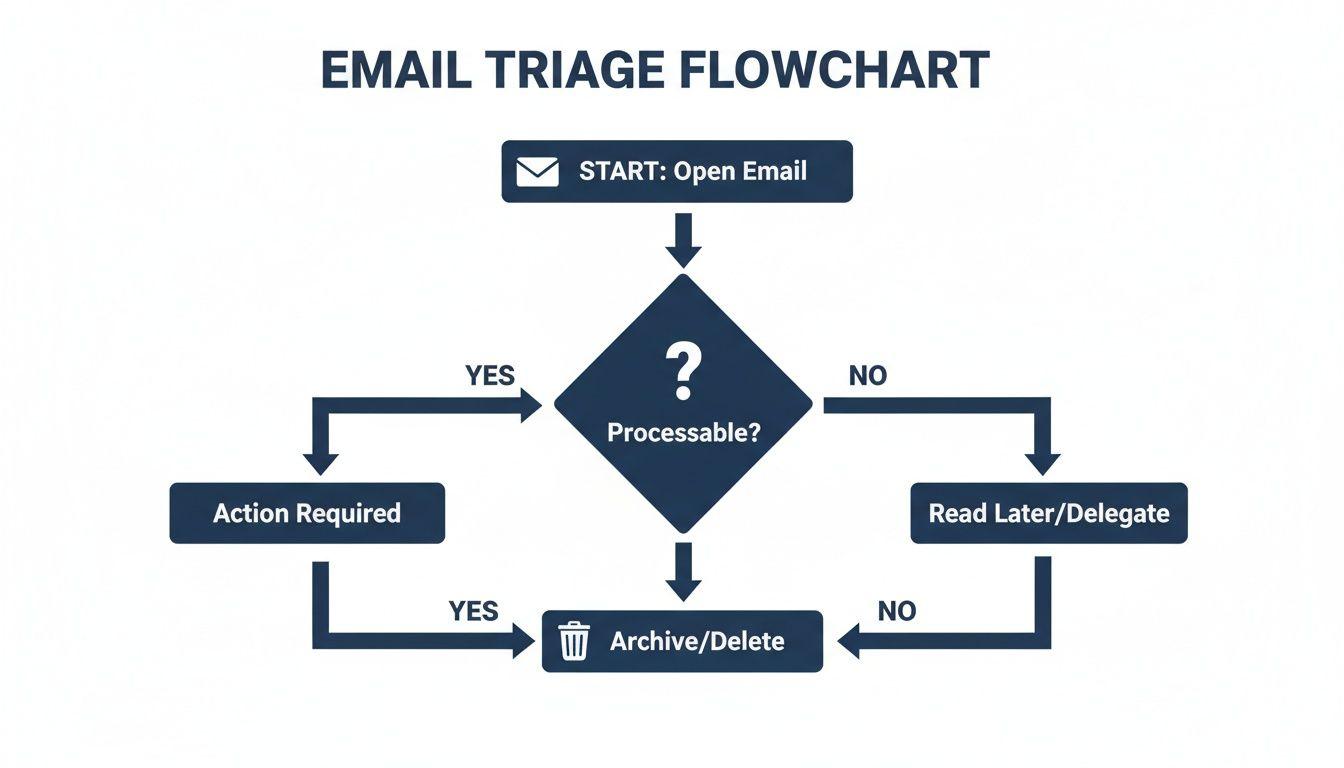
As you can see, every email forces a choice. Nothing is allowed to just sit there and gather digital dust.
Rule 1: Delete Aggressively
Your first and most powerful move is to hit Delete. We all have that "just in case" reflex, but hoarding emails is a major source of digital anxiety. You need to be ruthless.
Is the conversation over? Are you just a CC on a thread for awareness? Is it a promotional email you know you'll never act on? Just delete it. Don't overthink it.
The fear of accidentally deleting something vital is almost always overblown. Most email clients keep deleted messages in a trash folder for about 30 days. You can almost always get it back if you really need to, but you’ll be shocked at how rarely you actually do.
Rule 2: If It Takes Two Minutes, Do It Now
This is a classic productivity hack for a reason—it works perfectly for email. If you can read, process, and reply to an email in less than two minutes, just get it done right then and there. This simple habit stops tiny tasks from snowballing into a massive backlog.
For example, a teammate pings you asking if you're free for a call tomorrow. Don't leave it sitting there. Open your calendar, shoot back a reply with your availability, and immediately archive the thread. The task is done, the email is out of sight, and your mind is clear.
Rule 3: Delegate (Don't Be a Hero)
A lot of what lands in your inbox isn't actually for you. When an email contains a request that someone else on your team or in your family should handle, your only job is to Delegate.
- For a small team: A customer support question comes to you by mistake. Don't try to solve it yourself. Forward it to the support lead with a quick note: "Sarah, can you take this one?" Then, archive your copy.
- For a family: You get an email about the new soccer practice schedule. If your partner is the one who manages the sports calendar, just forward it to them and delete it from your inbox.
Once it's delegated, it's off your plate. This one action is a huge step toward improving your team's overall workflow efficiency by making sure the right person owns the task from the start.
Rule 4: Defer with a System
So, what about the big stuff? The emails that need real work, more than just a quick two-minute reply. These are the messages that usually clog up your inbox for days or weeks. The rule here is to Defer them, but with a real plan.
Don't just leave them in your inbox "for later." Instead, move the email into a single, dedicated folder—I call mine "Action Required." Then, and this is the most important part, immediately switch to your calendar or task manager and schedule a specific block of time to work on it. For instance, you might create a calendar event for "Thursday at 3 PM: Review Q3 Proposal" and paste the email's link or subject line in the description.
This gets the email out of your immediate line of sight but ensures it won't be forgotten. Your inbox stays clean, and your calendar becomes the true source of what needs to get done.
Rule 5: Archive Everything Else
Here’s the final move. Once an email is truly handled—you’ve replied, you’ve delegated it, or you’ve noted the information—you Archive it.
Don't leave it in your inbox. Archiving whisks the email out of your main view, but it's still saved and fully searchable if you ever need to dig it up again. This is the last, satisfying step that gets you to zero and keeps you there.
Let Automation Do the Heavy Lifting
Manually applying triage rules to every email is a noble effort, but let's be honest—it’s not sustainable. Sooner or later, the sheer volume will wear you down. This is where you graduate from simply managing your inbox to building a smart, self-sorting ecosystem with automation.
The idea is to teach your email client to do the grunt work, pre-sorting messages before they ever demand your attention. This frees you up to focus on the emails that actually matter, making the zero inbox method a practical reality instead of a constant chore.
Start with Automated Rules and Filters
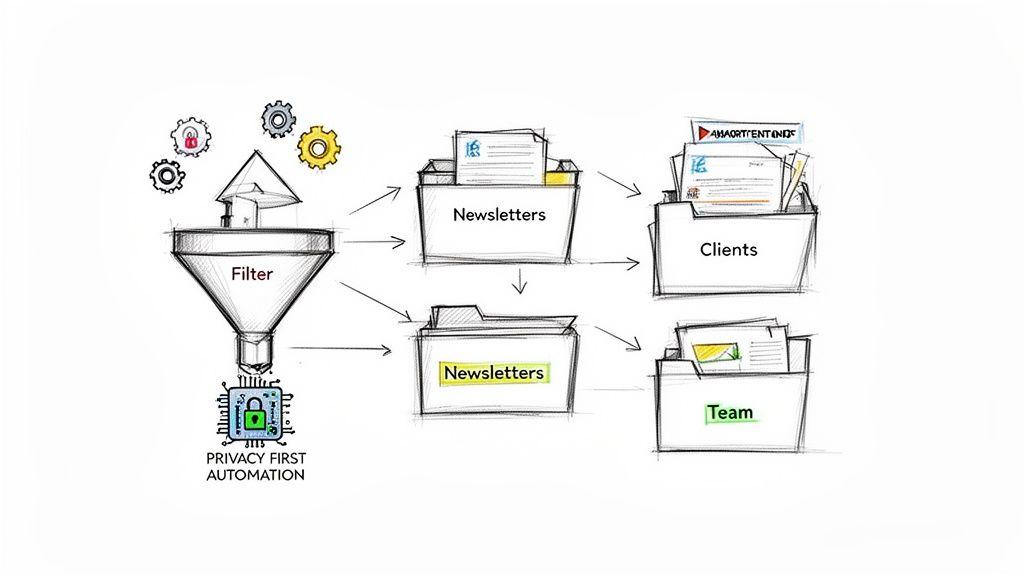
Every modern email client—Gmail, Outlook, Apple Mail—has a powerful "Rules" or "Filters" feature. Think of these as your personal digital assistants, ready to work 24/7. You can create rules based on who sent the email, keywords in the subject line, or even whether you’re on the "To" or "CC" line.
Here are a few of the most impactful filters I recommend setting up right away:
- The "CC" Rule: This one is my favorite. Create a rule that looks for any email where you are only in the "CC" field. Have it automatically mark the message as read and move it into a folder named something like "CC / Low Priority." You can then check this folder once a day or even once a week.
- The Newsletter Sorter: We all have newsletters we want to read… eventually. Set up a filter that sends all emails from those specific senders directly to a "Newsletters" or "Reading" folder, completely bypassing the inbox.
- Client and Project Folders: If you run a small business or work with multiple clients, this is a lifesaver. Create rules for each major client (e.g., any email from
@clientdomain.com) that automatically applies a label or moves it into that client's dedicated folder.
By setting up just these few simple rules, you can often cut down the number of messages hitting your main inbox by 30% or more. It’s not about ignoring email; it’s about putting things in the right place automatically so you can deal with them in focused batches.
Go Further with Privacy-First AI
Automation rules are fantastic for sorting, but modern AI can bring a whole new level of intelligence to your workflow. Many people are rightfully cautious about feeding sensitive company or family data into large AI models. That’s where privacy-first tools like 1chat come in, giving you a secure way to speed things up without compromising your data.
Think about this real-world scenario: a client sends over a dense, 20-page proposal as a PDF. Instead of blocking off 30 minutes to read it, you could use a secure AI to analyze the document on your own device. Within seconds, it can give you a bulleted summary of the key terms, action items, and financial details, letting you draft an informed reply almost immediately.
The impact isn't just theoretical. Teams using these kinds of tools are seeing real results. Pilot data shows users are reading eleven percent fewer emails within just a few weeks of adoption, and some teams are reclaiming up to 45% of their email management time. The return on investment is significant, with organizations projecting a 50-300% ROI over three years from these AI solutions.
Here’s how a privacy-first AI can help you triage even faster:
- Draft Quick Replies: Need to politely turn down a meeting or ask for more details? A simple prompt like, "Write a polite email saying I'm busy this week but can connect next Tuesday or Thursday," gets it done in seconds.
- Summarize Long Threads: We’ve all been forwarded a confusing 30-email chain. An AI can instantly digest the whole conversation, tell you what was decided, and point out who is responsible for the next step.
- Extract Key Information: Instead of manually hunting through an invoice or report, an AI can scan the attachment and pull out the crucial data points you need—like the due date, total amount, or project code.
This combination of rule-based automation and secure AI assistance is what truly makes the zero inbox method sustainable. You're building a system that not only sorts your email but also helps you understand and act on it. You can explore more strategies for using these tools in our guide on how to automate repetitive tasks. Your inbox stops being a source of chaos and becomes a clean, organized command center for your work.
The Art of Batching Your Email Time
If you’ve ever felt like your day is a never-ending series of dings, pings, and notification pop-ups, you know the real cost of a constantly open inbox. Each alert pulls you away from what you're actually trying to accomplish, shattering your focus for what feels like the hundredth time. Getting to Zero Inbox isn't just about cleaning up; it's about fundamentally changing when and how you deal with email.
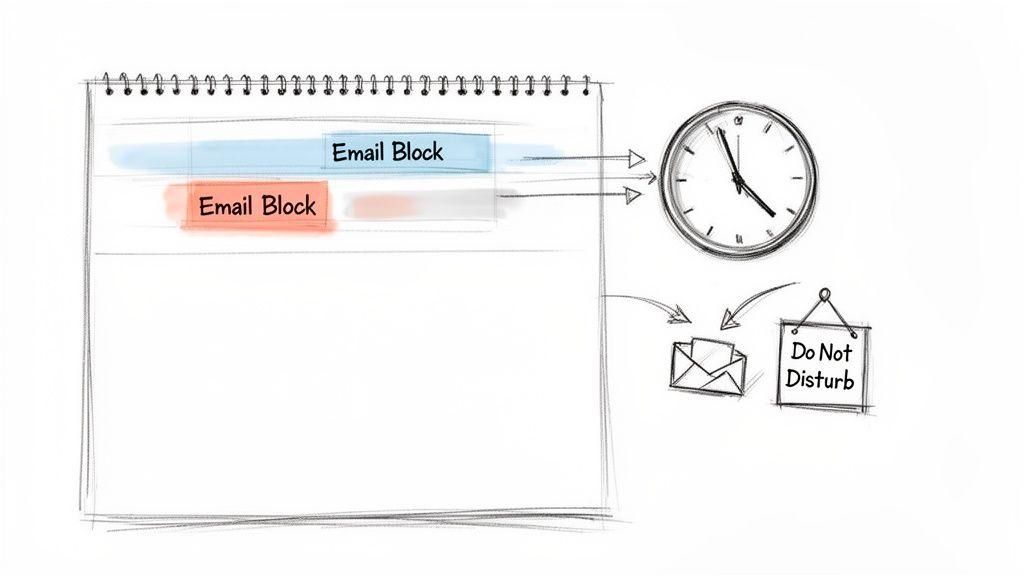
The secret is to stop treating your inbox like an emergency hotline and start treating it like a scheduled task. We call this email batching, and it's simple: you set aside a few specific times each day to process email. Instead of dipping in and out constantly, you clear everything in a couple of focused sessions.
From Constant Interruption to Deep Focus
The results of this shift are pretty dramatic. I’ve seen data showing that people who let their inboxes grow endlessly (the "inbox infinity" crowd) tend to check email reactively 10-20 times per day. These are usually short, frantic bursts of about 8 minutes that don't accomplish much. In contrast, those who practice inbox zero only handle email in 3-4 planned sessions, protecting huge chunks of their day for actual work.
And it works. Over a six-month study, inbox zero users sent only two "sorry I missed this" emails. Their always-on colleagues? They sent a whopping 22. While the inbox zero method does require a disciplined time commitment—around 42 minutes per day—that time is spent with purpose, not scattered across dozens of tiny interruptions. You can explore the data comparing these two approaches to see the full impact.
The goal of batching is to transform email from an unpredictable interruption into a predictable task. You control your email; it does not control you.
How to Schedule Your Email Blocks
So, how often should you schedule these sessions? It really comes down to your job. There’s no magic number, but I’ve found these setups work well for most people.
- High-Volume Roles (Sales, Project Management): When your job lives in your inbox, you need to be responsive. I'd suggest starting with three blocks: one in the morning to set the day's priorities, one after lunch, and a final one to wrap up before you sign off. About 20-30 minutes each should do it.
- Deep-Work Roles (Writing, Coding, Design): Here, the main goal is to protect long, uninterrupted stretches of focus. Try just two blocks a day. Maybe one in the late morning (after you’ve already made a dent in a big task) and another at the end of the day. You’d be surprised how much you can get done in two 30-minute sprints.
- Small Teams or Families: For a shared inbox, once or twice a day is usually plenty. A quick 15-minute triage in the morning and maybe another in the evening keeps everything moving without anyone feeling chained to the account.
Once you have a schedule in mind, put it on your calendar. Treat it like a real meeting. This simple act of booking the time makes it official and helps you build the habit.
Managing Expectations with Others
Switching to batching can be a jolt for colleagues who are used to getting instant replies from you. The key is to be upfront about your new workflow so they don't think you're ignoring them.
An easy way to handle this is with a friendly auto-responder. It doesn't have to be stiff or corporate.
Example Auto-Responder:
"Thanks for your message! I'm currently focused on deep work and only checking emails at set times (usually late morning and end of day) to be more productive.
If your matter is urgent, please text or call me at [Your Number]. Otherwise, I'll get back to you during my next email block. Thanks for your understanding!"
This simple note sets clear expectations and lets people know their message is safe. Over time, your team will get used to the rhythm. It’s a discipline that not only makes Zero Inbox sustainable but also gives you back the one thing we all need more of: focus.
Dealing with Common Inbox Zero Roadblocks
Let's be honest: starting the Inbox Zero journey is one thing, but sticking with it is where the real work begins. It’s totally normal to run into trouble. You're building a new habit, and that always comes with a few speed bumps.
The key isn't to be perfect, but to have a plan for when things inevitably go off the rails.
A great way to stay motivated is to look beyond just the email count. Instead, track how long it takes you to clear your inbox each day. That first day might take an hour, but a week later you might find you’re getting it done in just 45 minutes. Seeing that time drop is a real, tangible win that proves the system is working.
The Mountain of Old Emails
Staring at an inbox with thousands—or even tens of thousands—of messages is probably the biggest reason people quit before they even start. The sheer volume is paralyzing. Don't even think about sorting it all manually.
Instead, the best move is to declare email bankruptcy. It sounds a little dramatic, but the relief is immediate and profound.
Here's how you do it: create a new folder called "Old Inbox - [Today's Date]". Then, select every single email in your inbox and drag them all into that new folder.
That's it. Your inbox is now empty. You have a clean slate to work from.
You haven't deleted anything. You've just moved the past out of sight. Trust me, if something in that massive pile was truly critical, the sender will follow up. This single move allows you to start fresh with today's emails without being dragged down by years of digital weight.
Declaring email bankruptcy isn't about giving up; it's about giving yourself permission to start fresh. The mental relief from clearing out years of digital clutter is the perfect foundation for building a new habit.
That Fear of Missing Something Important (FOMSI)
Once you get into a rhythm of archiving and deleting, a little voice of anxiety can start to creep in. What if I just archived something I'm going to need? What if I miss a critical update? This "Fear of Missing Something Important" is real, especially if you’re used to keeping everything "just in case."
The thing to remember is that Inbox Zero is a system for action, not a system for ignorance. You're still seeing and processing every important email; you're just moving it out of the inbox once you've decided what to do with it.
Your archive is your safety net, and modern email search is incredibly powerful. Once you realize you can find almost any message in seconds just by searching for a name or a keyword, that fear starts to fade. You'll quickly find that you almost never need to dig into that archive anyway.
Falling Back into Old Habits
You've been crushing it for weeks. Your inbox is pristine. Then a huge project lands on your desk, or you come back from a vacation to an absolute flood of messages. Suddenly, the system breaks down, and the emails start piling up again. This is the most common failure point, by far.
The trick is to have a game plan for these high-volume moments.
- During a chaotic week: Don't ditch the system—just simplify it. You might not have the bandwidth for thoughtful, detailed replies, but you can still triage. Spend five minutes rapidly deleting junk, archiving newsletters, and flagging the few emails that truly need a response later.
- After a vacation: Never open your email and try to tackle it all at once. Block out dedicated "Email Catch-Up" time on your calendar and treat it like a meeting. Apply your triage rules without mercy. You’ll be shocked at how many "urgent" emails from a week ago are no longer relevant.
If you're consistently getting overwhelmed, your system might need a tune-up. It could be time to create a new filter for that recurring project report or set up a rule to auto-archive notifications from a tool you just started using. A good system evolves with you.
Here's a quick reference guide for when you get stuck. I've found these are the three problems that come up again and again.
Inbox Zero Troubleshooting Guide
| Common Problem | Why It Happens | Actionable Solution |
| The Backlog Mountain | You have thousands of old emails, and the thought of sorting them is paralyzing. | Declare email bankruptcy. Move all old emails into an archive folder and start fresh with today's messages. |
| Fear of Missing Out | You're anxious about deleting or archiving an email that you might need later. | Trust your search function. Archive everything you've handled instead of deleting, and realize you can find anything you need later. |
| Relapsing Under Pressure | A busy period or vacation causes you to revert to letting emails pile up. | Don't abandon the system—simplify it. Triage quickly even if you can't reply. Schedule dedicated catch-up time after a break. |
At the end of the day, maintaining Inbox Zero is about consistency, not perfection. If you have a bad day and a few dozen emails pile up, don't sweat it. Just deal with them the next morning and get back on track.
Frequently Asked Questions About the Zero Inbox Method
Okay, so you're sold on the idea of Inbox Zero, but the reality of your own inbox is starting to set in. As you begin to shift your habits, a few common "what ifs" and roadblocks are bound to pop up.
Don't worry, that's completely normal. This isn't about blindly following a rigid set of rules; it's about building a system that actually works for you. Here are some of the most common questions I get, along with practical answers to help you stay on track.
But What If I Get Hundreds of Emails a Day?
This is where most people think the system breaks down, but it's actually where it shines brightest—if you get ruthless with automation. When you're dealing with that kind of volume, manually touching every email is a losing battle.
Your first line of defense is a set of aggressive filters. For instance, any email where you're just CC'd? Bam. Have a rule automatically mark it as read and shunt it into a "Low Priority" or "Read Later" folder. That move alone can cut your daily inbox noise dramatically.
The same goes for project-specific emails. Create rules that send anything related to "Project Titan" or from a certain client directly into its own folder, bypassing the inbox entirely. This pre-sorts your world for you. For high-volume roles, checking email more than 2-3 times per day is just asking for distraction. You have to batch your work.
For anyone drowning in email, the goal isn't perfect manual organization. It's about building a powerful, automated triage engine so you only have to deal with the exceptions.
How Do I Even Start with Thousands of Unread Emails?
Staring at a counter showing 5,000 unread messages is paralyzing. I've seen it time and time again—it's the number one reason people give up before they even begin. The thought of wading through that swamp is just too much.
So don't. The solution is as simple as it is radical: declare "email bankruptcy."
Create a new folder and call it something like "Old Inbox - Pre-[Date]." Select every single email in your inbox and drag them all into that new folder. Done. Your inbox is now empty. If something in that digital graveyard was truly important, trust me, the sender will follow up.
This isn't about being lazy; it's a strategic move that gives you the psychological freedom of a clean slate. It lets you start practicing good Inbox Zero habits immediately on new, incoming mail without the crushing weight of the past.
What's the Difference Between Deferring and Just Leaving an Email in My Inbox?
This is a fantastic question because it gets to the very heart of the method. Leaving an email in your inbox is a passive, hope-based strategy. It becomes a vague, nagging task mixed in with all the new stuff, forcing your brain to re-evaluate it every time you scan your inbox. It’s a recipe for mental clutter.
Deferring, on the other hand, is an active and intentional decision. It’s a two-step process:
- Move It: The email is immediately moved out of your inbox and into a specific folder, like "Action Required" or "Follow-Up."
- Schedule It: You instantly create a calendar event or a to-do list item tied to it. For example, "Reply to Jane's proposal on Thursday at 2 PM."
By doing this, you've taken the email out of your immediate line of sight but have guaranteed it will be handled at the right time. Your inbox stays clean, and your calendar becomes the single source of truth for what needs to get done.
Can a Family Really Use This Method?
Absolutely, and it can be a game-changer for household organization. The key is to set up a shared family email account (e.g., "[email protected]") for all the common stuff: school newsletters, sports team updates, household bills, and vacation plans.
The same Inbox Zero principles apply, just in a collaborative way. When a new email comes in, the first person who sees it takes responsibility for the triage:
- Delete: Junk mail and ads are gone in a click.
- Do: A bill that can be paid in two minutes gets paid, and the email is archived. Simple.
- Delegate: This now becomes a quick conversation or a note. "Hey, I moved the permission slip for Sarah's field trip to the 'School' folder. Can you print and sign it tonight?"
- Defer: A reminder about the upcoming school play gets moved to an "Events" folder, and the date is immediately added to the shared family calendar.
The goal is to keep that shared inbox at zero. When you do that, it stops being a chaotic mess and transforms into an organized command center for your family, ensuring nothing important ever falls through the cracks.